Panera Bread
- 28.00K
- 4.9
- Installs
- 10.00M
- Price
- Free

Screenshots






Analysis by Reviewed
I find Panera Bread most useful when I want to plan a café meal before I get there, rather than decide everything at the counter. It is a free Food & Drink app from Panera Bread, and its main appeal is practical: browse the menu, shape an order, and use the phone to make a visit more predictable. That convenience depends on having a working connection at the moments when you need current menu and ordering information, so I see it as a companion for planning and pickup, not a replacement for every way of ordering.
Where a connection matters most
The app’s biggest advantage is that it lets me handle choices before I reach a café. I can look through the options and make decisions without holding up a line, then submit an order when I’m ready. That makes the network-dependent part of the experience important: if the connection is weak while I’m browsing or trying to place the order, the app may be less useful at exactly the time I need it. I’d check that an order has gone through before setting off, rather than assume that tapping the final button is enough.
That same connection is relevant to the app’s rewards and notifications. They make more sense as part of an ongoing account experience than as a one-time menu lookup, but alerts are only helpful if they arrive when I can act on them. I’d keep notifications focused on what I actually want to hear about, and treat any promotion as a prompt to check the app rather than a reason to rush into an order.
Useful in a moving day, less useful in a rush with poor signal
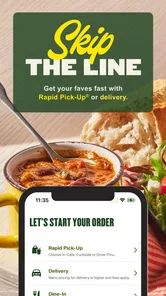
A realistic use case is a lunch break with limited time: I can decide on a salad or soup while walking over, customize the order, and use Rapid Pick-Up to avoid waiting in the ordering line. The practical tip is to leave enough time for the order to be confirmed and ready; the app reduces one kind of waiting, but it cannot make a poor connection or a busy café disappear. If I’m already at the counter, or my phone has unreliable service, speaking to staff may be the simpler option.
On a commute, I’d also avoid trying to build an order while driving. The app is better used before leaving or after stopping somewhere safe. If the network drops mid-process, I would check the order status before trying again, since immediately repeating an uncertain submission could create confusion. For a time-sensitive pickup, a quick confirmation is more useful than assuming the request reached the café.
How it fits alongside other ways to order
Compared with ordering in person, the app gives me more room to consider customizations and repeat a familiar choice, while the counter is better when I want to ask a question or change my mind at the last moment. Compared with a general delivery service, this is the direct Panera Bread route, so it suits someone planning a visit or pickup more naturally than someone who wants to compare several restaurants in one place. The trade-off is that it is specifically useful for Panera; if I’m choosing among nearby cafés, a broader food app or a map search may be more helpful.
Repeat ordering is a small feature with a real everyday payoff: when I already know what I like, I can start from a previous meal instead of rebuilding it from scratch. I’d still review every customization before submitting, especially if I’m ordering for someone else or changing a usual item. Familiar orders save effort, but they can also make it easy to overlook a detail that has changed in my plans.
More From Our News Desk

Weather by Xiaomi Review: Clear at a Glance, Less Clear Up Close

X Under Pressure: Can It Recover When Posting Goes Wrong?

Clash of Clans Is Won Between the Battles

Android Auto Makes the Case for Quieter Car Software

MobiOffice: Transforming Mobile Productivity with Seamless Integration

EA SPORTS FC™ Mobile Soccer: Redefining Mobile Sports Gaming
Exploring the App: A Seamless Experience
Now, let’s dive into the app itself. The moment you open the Panera Bread app, you’re greeted with a clean and user-friendly interface. It’s like walking into a cozy Panera Bread café, only digital. The layout is straightforward and intuitive, making it easy to navigate through various options. Whether you’re a tech guru or someone who struggles with technology, this app is designed to accommodate everyone.
Ordering Made Simple
One of the standout features of the app is its seamless ordering process. With just a few taps, you can customize your meal to your liking. Want extra avocado on your salad? No problem! The customization options are extensive, allowing you to tailor your order exactly how you want it. Plus, the app remembers your previous orders, making reordering your favorites a breeze.
And let’s not forget about the convenience of the Rapid Pick-Up feature. Imagine this: you’re on your way to work, place an order through the app, and by the time you arrive, your meal is ready for pick-up without the hassle of waiting in line. It’s efficiency at its finest!
Membership Perks and Rewards
Who doesn’t love a good deal? The app offers a rewards program where you earn points with every purchase. Rack up enough points, and you’ll be treated to delightful surprises like free bakery items or discounts on your next meal. It’s like having a little bonus every time you dine with Panera Bread.
Additionally, as a member, you gain access to exclusive perks and early access to new menu items. It’s a little something extra that makes you feel valued as a customer.
Staying Updated with Notifications
Another feature worth mentioning is the app’s notification system. You’ll receive updates on new menu items, special promotions, and even reminders for your favorite seasonal offers. It’s a great way to stay in the loop and ensure you never miss out on something delicious.
However, I’d recommend managing your notification settings to avoid being overwhelmed. After all, too many notifications can be a bit much. But with a little tweaking, you can customize the alerts to suit your preferences.
Who will get the most from it
I’d recommend it to people who already visit Panera and value a smoother pickup, particularly anyone with a familiar order or a short lunch break. It is less compelling if you rarely eat there, prefer choosing among many restaurants, or want to ask detailed questions before deciding. In those situations, the counter or a broader restaurant-finding app may fit better than keeping a dedicated chain app on your phone.
The app is free, rated for Everyone, and has a 4.9 average from around 79,000 ratings; more than five million installs suggest it has reached a substantial audience. Its current version is 5.12.0, and it runs on OS version 8.0 or later. Those figures are useful context, but they don’t guarantee the same experience on every device or at every café. I’d treat the app as a convenience, not as a promise that every pickup will be instant.
Keeping the experience dependable
If I’m using it for a meal I need at a particular time, I’d place the order while I have a reliable connection and check that it is confirmed before walking away from the phone. If something seems stuck, I’d pause and inspect the order status rather than tap repeatedly. That simple habit helps avoid accidental duplicates and gives me a clearer next step: wait for the app to catch up, or ask the café directly if I’m already there.
For data-conscious use, I’d open the app when I’m ready to browse or order instead of leaving it as a constant source of alerts. The notification settings are worth reviewing early, since seasonal offers can be useful but are not essential to placing a meal order. I’d also make customizations deliberately before checkout; a careful review at that point is quicker than trying to resolve a mistaken choice during pickup.
In conclusion, the Panera Bread app is a delightful companion for anyone looking to enjoy a hearty meal with minimal fuss. Its user-friendly design, combined with the convenience of fast ordering and the added bonuses of rewards and notifications, make it a must-have for fans of this beloved café chain. So, next time you’re feeling peckish, why not give the app a whirl and treat yourself to a little culinary joy?
My connectivity verdict
For me, the best reason to use it is straightforward: it can move menu decisions and ordering out of a busy café line, especially when I know what I want. The connection is part of that bargain, so I’d plan ahead when timing matters and switch to speaking with staff if the phone or network is getting in the way. If Panera is already part of your routine, the convenience can be worthwhile; if not, the app’s focused scope may make other ways of finding lunch a better fit.
A practical routine for ordering
I find the app works best when I separate choosing from committing. If I have a few minutes at home or during a safe break, I can look over the menu, settle on a meal, and check any changes before placing the order. Later, when I’m closer to the café, I can focus on pickup rather than making every decision in a hurry. That two-step approach is especially useful when ordering for another person: I can confirm their preferences before checkout instead of relying on memory while moving between places.
It is also worth treating a previous order as a starting point, not an automatic answer. A familiar meal can make repeat ordering quick, but I’d check the selected items and customizations each time, particularly if the order is for a different time of day or another person. This small pause is a better safeguard than rushing through the final screen because the meal looks familiar.
When a different approach is smarter
For a group with several questions, allergies, or last-minute changes, I would not assume that the app is the best place to resolve every detail. The ability to customize is convenient, but a direct conversation with café staff can be clearer when a choice needs explanation. Likewise, if I’m comparing lunch options across multiple restaurants, a single-chain app naturally offers less breadth than a general food service or local search. I’d use Panera’s app when I’ve already chosen Panera, not as my main tool for deciding where to eat.
The same distinction matters for delivery versus pickup. This app’s strongest fit in my routine is planning a Panera visit and arranging pickup; someone who wants to browse many restaurants or coordinate delivery across providers may prefer a broader service. Choosing the direct app makes sense when the destination is settled and I want to keep the menu and order in one place. If I am undecided, starting with a wider search saves me from switching between several restaurant apps.
What I would check before relying on it
For an important lunch break, I would verify the selected café and order details before submitting, then look for confirmation before changing plans or walking away. If the screen appears slow, I would give it a moment and check the order status instead of tapping the purchase action again. That is a useful habit whenever a network delay makes it unclear whether a request was received: a little patience can prevent an avoidable second attempt.
I’d also make my first use a low-pressure one. Trying the menu and customization flow when I am not already late gives me time to understand how the app presents choices and where I can review them. Once that feels familiar, using it for a short break is less stressful. The app can reduce time spent deciding at the counter, but it cannot remove the need to allow for preparation, travel, or a café that is busy.
A focused tool for regular Panera visits
In everyday use, I see the app as most valuable to someone whose Panera order is already part of a routine: it puts menu browsing, customization, repeat choices, rewards, and pickup planning in one chain-specific place. Its focused design is also its main limitation. If I visit only occasionally, prefer speaking through every detail, or want a single app to compare local restaurants, I would not expect it to replace those alternatives.
That makes the decision simple for me. If I already know I want Panera and have a stable connection while ordering, the app can make the visit more organized. If I am unsure what I want, have unreliable service, or need a conversation before ordering, I would use a broader search or go to the counter instead. Convenience is the real strength here, but it works best when the choice of café is already made.
Panera Bread Frequently Asked Questions
Can I browse the Panera Bread menu and check nutrition details before ordering?
Yes. The app lets you browse Panera Bread’s menu and check nutritional information for menu items, which can help you compare choices before placing an order. You can also customize items and save favorites for quicker reordering. Reviewing the menu in the app is a convenient way to plan what you want before choosing an available order option.
Can I use the Panera Bread app to find a nearby cafe?
Yes. The app includes a way to find nearby Panera Bread locations, making it useful when you want to check for a cafe before ordering or visiting. You can explore the available locations in the app and then consider the ordering choices shown for the cafe you select. This can help you connect menu browsing with a location that suits your plans.
What is the Panera Bread app, and who is it for?
The Panera Bread app is a Food & Drink app for people who want to explore Panera Bread and manage cafe orders from a phone. It is free to download, and its content rating is Everyone, making it suitable for a broad audience. The app is published by Panera Bread and is available on Android and iOS, so customers can use it to access Panera’s mobile experience.
What devices and operating systems support the Panera Bread app?
The Panera Bread app is available for Android and iOS devices. On Android, it requires version 8.0 or later, so it is worth checking your device’s software before downloading. The app’s current version is 5.12.0. Keeping an app updated can help you use its latest available experience, while compatibility depends on meeting the operating-system requirement.
What is the Panera Bread app and what features does it offer?
The Panera Bread app is a convenient tool for ordering your favorite meals from Panera Bread cafes directly from your smartphone. It offers features such as easy browsing of the menu, customization of orders, and the ability to save favorite orders for quick reordering. Additionally, it provides access to exclusive rewards, offers, and the latest promotions. Users can also find nearby locations and check nutritional information for menu items.
Pros
- User-friendly interface
- Customizable menu options
- Convenient online ordering
- Loyalty rewards program
- Quick delivery services
Cons
- Limited delivery areas
- Inconsistent order accuracy
- Occasional app crashes
- Limited payment options
- High delivery fees











