NFC Tools - Pro Edition

Tools

747.00
4.7
Installs
100.00K
Version
9.0.1
NFC Tools - Pro Edition icon NFC Tools - Pro Edition icon
Advertisements

Screenshots

NFC Tools - Pro Edition screenshot
Advertisements

If you’re anything like me, you’re always on the lookout for ways to make your smartphone even smarter. Enter NFC Tools - Pro Edition. This nifty little app is like the Swiss Army knife of NFC (Near Field Communication) technology. Whether you’re a tech wizard or just someone who loves exploring new app functionalities, this app might just be what you’re looking for.

What’s the Deal with NFC Tools - Pro Edition?

Let’s dive right into the heart of NFC Tools - Pro Edition. This app is all about making the most out of your phone’s NFC capabilities. For those of you who might not know, NFC allows your smartphone to communicate with other devices nearby. It’s the same tech used for contactless payments and those fancy tap-to-pair Bluetooth devices.

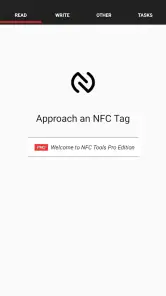
The app itself is super user-friendly. You don’t need to be a tech guru to figure it out. When you fire it up, you’re greeted with a clean interface that guides you through setting up NFC tasks. Whether you want to toggle your Wi-Fi, share contact info, or even launch an app with just a tap, NFC Tools has got your back.

Features That Stand Out

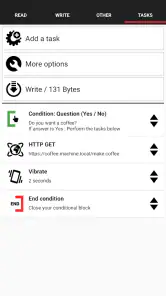
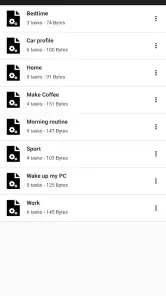
Now, let’s talk features. The app is packed with functionalities that let you read and write NFC tags. You can set up complex scripts that execute multiple tasks at once. For example, imagine tapping your phone to an NFC tag by your bed and having it turn off your Wi-Fi, set your alarm, and dim your screen. How’s that for automation?

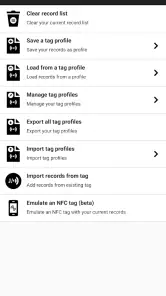
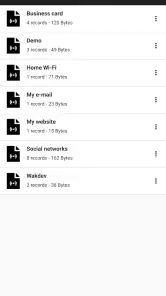
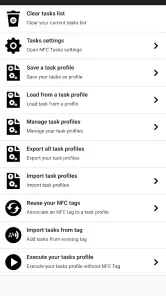
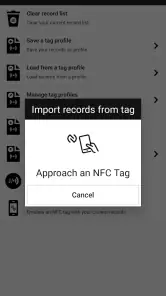
One of my favorite features is the ability to export and import tasks. This means you can share your cool NFC setups with friends or transfer them to another device without starting from scratch. It’s a real time-saver!

Getting the Most Out of It

You might be wondering, "Is it really worth going Pro?" I’d say if you’re serious about diving into the world of NFC, it absolutely is. While the free version of the app is great for basic tasks, the Pro edition unlocks advanced features that can transform how you use your phone.

Plus, the Pro version is constantly updated with new features and improvements, ensuring you’re always at the cutting edge of NFC technology. The developers are pretty active, and you can tell they really care about the app’s community.

So, whether you’re looking to geek out with some techy projects or just streamline your daily routines, NFC Tools - Pro Edition is a fantastic tool to have in your arsenal. It’s all about making life a tad bit easier, and who doesn’t want that?

Pros

  • User-friendly interface
  • Wide range of NFC tasks
  • Supports various NFC tags
  • Customizable task automation
  • Regular updates

Cons

  • Limited free version
  • Requires NFC-enabled device
  • Complex for beginners
  • Potential security risks
  • High battery consumption
Advertisements

Download

Download From Google Play Download From App Store

Available worldwide

You May Like

Frequently Asked Questions

What is NFC Tools - Pro Edition and how does it work?

NFC Tools - Pro Edition is a mobile application designed to read, write, and program tasks on NFC (Near Field Communication) tags and other compatible NFC chips. Users can use it to automate tasks, share data, or interact with NFC-enabled devices. Once you install the app, it allows you to scan NFC tags and perform various actions such as launching a website, setting an alarm, or sharing a contact. The Pro Edition offers additional features like importing and exporting tasks, password protection, and more advanced settings.

Can NFC Tools - Pro Edition be used on all smartphones?

NFC Tools - Pro Edition can be used on smartphones equipped with NFC technology. Most modern Android devices support NFC, but it's important to check if your device has this capability before purchasing the app. For iOS users, NFC functionality is more limited, and some features may not work as seamlessly as on Android devices. Ensure your device supports NFC and meets the app's compatibility requirements.

What kind of tasks can I automate using NFC Tools - Pro Edition?

With NFC Tools - Pro Edition, you can automate a wide range of tasks using NFC tags. These tasks can include connecting to a WiFi network, launching an application, sending a text message, or even changing phone settings like turning on Bluetooth. The app allows you to create customized tasks based on your needs. The Pro Edition provides more advanced capabilities, such as conditional actions and task scheduling, offering greater flexibility for automation enthusiasts.

Is my data secure when using NFC Tools - Pro Edition?

NFC Tools - Pro Edition emphasizes user data security. The app itself does not collect any personal data without your consent. Additionally, the Pro Edition offers features like password protection for sensitive tasks, ensuring that your programmed NFC tags are secure. However, it is essential to protect your physical NFC tags from unauthorized access, as they can be scanned by anyone with an NFC-enabled device.

How user-friendly is NFC Tools - Pro Edition for beginners?

NFC Tools - Pro Edition is designed to be user-friendly, even for those who are new to NFC technology. The app includes a simple and intuitive interface, along with detailed instructions and tips for each feature. Additionally, there is an active user community and support resources available online, making it easier for beginners to get started and troubleshoot any issues they may encounter while using the app.