New Recruit
- 208.00
- 4.3
- Installs
- 100.00K
- Price
- Free

Screenshots
Analysis by Reviewed
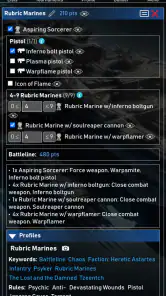
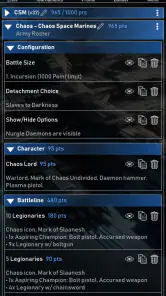
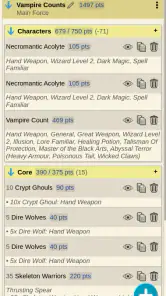
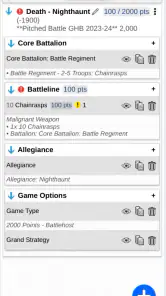
I approached New Recruit as a practical tool rather than another game companion that looks useful only until the first real match. Its purpose is straightforward: help tabletop players build armies and support tournament preparation, especially for games such as Warhammer. After spending time with it, I found that its value depends less on flashy presentation and more on whether you want one place to organize list-building decisions before you arrive at the table.
That makes the app interesting for a particular kind of player. If you regularly adjust rosters, compare possible units, or attend events where a clean army list matters, it can reduce a surprising amount of preparation work. If you only play occasionally and already keep a simple list in notes or a spreadsheet, the reason to change is less obvious. My recommendation therefore comes down to workflow: New Recruit is strongest when army planning is an ongoing part of the hobby, not a task you do once every few months.
What I considered before recommending it
The first question I would ask a friend is not whether the app is free, but whether it fits the way they prepare for a game. A useful army builder should make experimentation easier without turning every change into administrative work. It should also help a tournament player arrive with fewer loose ends: a list that is readable, organized, and ready to use.
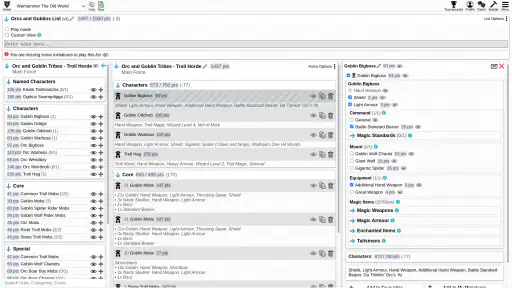
New Recruit is listed as a Tools app, and that description feels appropriate. I did not treat it like a replacement for playing, painting, or learning the rules. Its role is closer to a planning desk for tabletop gaming. You open it when you want to shape an army, review a roster, or prepare for an event, then return to the table with a clearer plan.
The developer is New Recruit, and the app has built a sizeable audience for a specialist tabletop utility. It holds a 4.3 average from around 1.5 thousand ratings, with more than 200 written reviews and over 100 thousand installs. Those figures suggest that it is not an obscure experiment used by only a handful of players, while the rating also feels realistic: useful enough to earn loyalty, but not so perfect that every user finds the same workflow effortless.
It is free to install and rated for Everyone, which makes trying it relatively easy. The current version is 35.70, and it runs on Android 8.0 or later. I would still check the version of Android on an older phone before planning to use it at an event, especially if that device is kept as a backup rather than updated regularly.
The real test is list-building friction
When I judge an army builder, I pay attention to what happens after the first list is created. Making one roster is rarely the difficult part. The more revealing test is whether I can make a second version without losing the first, whether I can compare a conservative build with a more experimental one, and whether the app helps me spot a mistake before the opponent does.
That is where New Recruit makes the most sense. Its usefulness grows when you treat list construction as an iterative process. Instead of committing to the first idea, you can approach an army as a series of questions: what happens if I remove one expensive choice, which role becomes weaker, and does the replacement solve the original problem or merely create another one?
One practical habit I recommend is creating a baseline roster before experimenting. Keep the dependable version intact, then work from a copy or a separate variation when testing changes. This is a small discipline, but it prevents the common tabletop problem of forgetting which version was actually intended for the next game. It also makes post-game adjustments more meaningful because you can compare the revised list with a known starting point.
A second useful habit is to build with the event in mind rather than treating tournament preparation as a final printing step. Before an event, I would review the roster while thinking through deployment, likely opponents, and the units that must perform a specific job. An army builder cannot make those strategic decisions for me, but it can give those decisions a stable structure.
Why the tournament angle matters
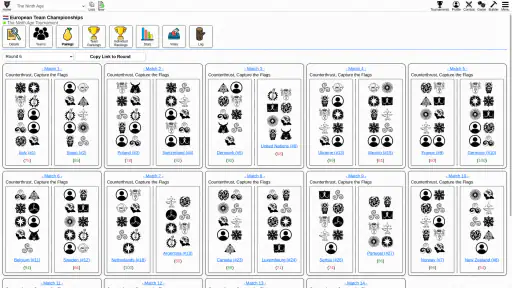
The tournament side is what separates this app from a simple notes page. A note can store a list, but it usually does not encourage the same level of organization. New Recruit is aimed at the space between personal planning and event preparation, which is useful for players who want their roster to be more than a block of copied text.
For a casual game night, that may sound excessive. For a tournament, small uncertainties become irritating quickly. You may need to check which version of a list you meant to bring, explain a choice to an opponent, or make a last-minute adjustment after a practice game. Having a dedicated tool for the roster can make those moments less chaotic.
I especially like the idea of using it before the event rather than relying on it for every decision at the venue. The best workflow is to prepare at home, review the list on the phone, and arrive already familiar with the final version. That reduces the risk of discovering during registration that the list still reflects an earlier idea.
There is also a social benefit. When a list is organized clearly, discussing it with a clubmate becomes easier. Instead of saying that a unit was changed “somewhere in the middle,” you can focus on why the change was made. That turns the app into a conversation tool as well as a personal organizer.
Three workflows that offer more value than a basic roster note
The first is the baseline-and-variants workflow. I would keep one stable army as the reference version and create alternatives around a single question. For example, one variant might test more mobility, while another might test greater staying power. Changing one idea at a time makes the result easier to evaluate than constantly rebuilding everything at once.
The second is the practice-game feedback loop. After a match, I would avoid editing the roster immediately from memory. Instead, write down the problem first: a unit arrived too late, a role was duplicated, or a key option was difficult to use. Then return to New Recruit and change the list with that specific problem in view. This prevents emotional post-game reactions from producing a roster that merely feels different rather than genuinely better.
The third is using the app as a pre-event checklist. A list builder is not the same as a packing list, but the roster can act as the anchor for one. Once the final army is settled, I would check that the physical models, relevant materials, and intended configuration match the digital version. This is particularly helpful when several units have similar equipment or when an army has gone through many revisions.
These workflows are not magic features that play the game for you. They are ways to get more from a focused tool. The app becomes valuable when it supports a repeatable habit instead of being opened only when a deadline is already close.
Where New Recruit wins, and where another approach may be better
Compared with a general notes app, New Recruit offers a more purposeful environment for army planning. Notes are flexible, but that flexibility can become clutter. A long text list may be quick to create, yet harder to revise, compare, or explain. New Recruit is the better choice when the structure of a tabletop roster matters to you and you expect to revisit the same army more than once.
Compared with a spreadsheet, the decision is less one-sided. A spreadsheet is excellent for players who want custom columns, personal calculations, or a completely self-designed system. It can also be easier to adapt to unusual house rules or a collection that does not fit a standard format. I would choose the spreadsheet route if I enjoyed building the tracking system as much as building the army.
New Recruit is more appealing when I want to spend my time making game decisions rather than designing a database. Its dedicated purpose removes some of the blank-page work. The trade-off is that a specialized app may feel less comfortable to someone who wants total control over how information is arranged.
There is a similar comparison with paper. A notebook is reliable, visible, and independent of a phone. It is also pleasant for players who enjoy writing lists by hand. However, paper becomes awkward when a roster changes repeatedly. Erasing, rewriting, and keeping old versions can quickly become less convenient than using a digital tool. I would keep paper as a backup or as a creative planning space, but I would lean toward New Recruit for an army that is still evolving.
The app is not automatically the best answer for every tabletop player. Someone who plays a single familiar force, rarely changes it, and does not attend tournaments may gain little from switching. A player who needs a highly customized data system may also prefer a spreadsheet. The strongest case is the middle ground: a player who wants dedicated army organization but does not want to build that organization from scratch.
What may slow you down
The first limitation is the learning curve that comes with any specialized army tool. Even when the goal is simple, the number of choices in tabletop games can make the first session feel more deliberate than typing a list into a note. I would not judge the app after only a few minutes. The real question is whether the initial setup pays off after several revisions.
The second limitation is dependence on your own discipline. New Recruit can hold the plan, but it cannot tell me whether the plan suits my local group, my preferred play style, or the missions I expect to face. It is possible to produce a beautifully organized roster that is strategically unfocused. The app improves organization; it does not replace practice games or thoughtful review.
The third is the cost of changing habits. If your club already uses a shared document or a particular event process, moving everything into a new tool may create duplicate work at first. You may need to maintain an old format while learning the new one, especially if other players are not using the same system. I would switch gradually: test New Recruit with one active army, keep the existing method available, and commit only after it has handled a full build-and-revise cycle.
Although the app is free, in-app purchases are listed at between $35 and $129.99 per item. That makes it important to understand your own comfort level before spending anything. I would begin with the free experience and decide whether the app has earned a place in my regular workflow. A purchase should solve a specific need, not simply follow the excitement of starting a new army.
Questions I would answer before installing
If you are wondering whether it is only for tournament players, my answer is no, but tournament preparation is where its purpose is easiest to see. A casual player can still benefit from keeping several army ideas organized, especially when building a force over time. The advantage becomes smaller if you use one unchanged roster and do not need to compare alternatives.
If you are asking whether it replaces learning the rules, it does not. I would use it alongside the rulebooks, faction references, and the advice of experienced players. Army construction and rules knowledge overlap, but they are not the same activity. The app can organize a decision without proving that the decision is tactically sound.
If you are concerned about using it on an older device, the stated minimum of Android 8.0 is reassuring for many Android users. Still, I would install it before an important event rather than waiting until the morning of the tournament. That gives me time to confirm that the phone, account, and saved workflow are ready when I need them.
If you are unsure whether the paid items are necessary, I would not treat them as part of the basic reason to try the app. Start by seeing whether the free version handles the army-building routine you actually have. Only then consider whether an in-app purchase offers value for your particular use.
Finally, if you are deciding between this and a spreadsheet, ask yourself which task annoys you more: entering information into a system you designed yourself, or adapting your planning to a dedicated tool. New Recruit is the more natural fit when you want a focused tabletop workspace. A spreadsheet remains better when custom tracking is the main goal.
My recommendation after weighing the trade-offs
I recommend New Recruit to players who regularly build, revise, and discuss armies, with an especially strong recommendation for people preparing for tabletop tournaments. Its free entry point makes experimentation sensible, and its purpose is narrow enough to be useful rather than distracting. The app earns its place when it replaces scattered drafts with a repeatable process.
I would be more cautious for occasional players. If your current notes already do everything you need, changing tools may not produce a noticeable improvement. In that case, the app is worth trying, but not worth forcing into your routine simply because a dedicated tool sounds more professional.
For me, the deciding advantage is not that it promises to make army building effortless. It is that it gives repeated list decisions a home. I can start with a dependable roster, test one idea, learn from a game, and return to the plan without losing the thread. That is a modest benefit, but in a hobby where small changes accumulate, it can save time and make preparation more thoughtful.
New Recruit is therefore best understood as a focused companion for serious planning, not a substitute for rules knowledge or tabletop experience. If that matches the way you play, I think it is worth installing and testing with one real army. The clearest reason to choose it is consistency: it helps turn scattered list ideas into an organized preparation routine.
Pros
- Simple interface makes browsing new opportunities quick and straightforward.
- Useful filters help narrow listings by role
- location
- or experience level.
- Job details are presented clearly
- including requirements and responsibilities.
- Application process is convenient and can be started directly from the app.
- Notifications can help users stay updated on relevant new openings.
Cons
- Some listings may have limited information about salary or benefits.
- Search results can vary in quality depending on the available postings.
- You may need an external browser to complete certain applications.
- Notifications may become excessive without careful preference settings.
- Availability of opportunities can depend heavily on your location.

- Category
- Tools
- Version
- 35.70











