Network Analyzer Pro
- 2.43K
- 4.9
- Installs
- 100.00K
- Price
- $3.99

Screenshots

Analysis by Reviewed
When my Wi-Fi misbehaves, I want more than a vague signal-strength bar: I want clues that help me decide what to check next. Network Analyzer Pro is a practical pocket toolkit for that job, bringing several kinds of network checks together instead of leaving me to guess. It won’t fix a weak router or replace a network specialist, but it can make ordinary troubleshooting feel much less like trial and error.
What I reach for first when a connection falters
The best way to use it is to treat each tool as a small diagnostic step, not as a magic verdict. If a video starts buffering, I can check the Wi-Fi signal where I’m sitting, then compare it with the signal in another room. If the connection improves near the router, that points me toward coverage or placement; if it stays poor, I have a reason to investigate beyond simply moving around.
For a household network, the LAN scanner is useful as an inventory aid. I’d run it when I’m trying to identify the devices currently visible on my network, then compare the results with the phones, computers, TVs, and smart-home gear I expect to be online. An unfamiliar entry is a reason to investigate, not proof that a stranger has joined: devices can be hard to recognize, and the scan is a snapshot rather than a security audit. That distinction makes the feature more useful, not less, because it encourages a sensible next step instead of panic.
Small checks that make the results more useful
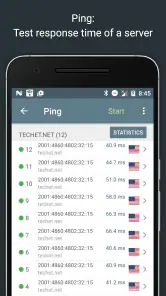
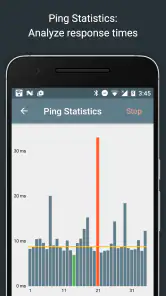
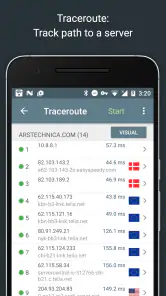
Ping and traceroute are most helpful when I use them to narrow down where a problem might sit. A failed or slow connection to one destination does not automatically mean the Wi-Fi itself is broken. I’d compare more than one destination and, if possible, repeat the check after reconnecting or moving closer to the router. Traceroute can add clues about the route toward a host, but it is not a guarantee that every point along the path will respond or reveal the cause.
This is where the app differs from the usual quick network utilities. A basic speed test gives a convenient performance snapshot, while the tools here are better suited to asking a sequence of diagnostic questions: is the local wireless signal weak, are devices visible on the LAN, and can a destination be reached? I would still use a speed test when I specifically need a simple speed comparison. For a larger office or a complex network, desktop diagnostics and router administration tools offer a more appropriate view than a phone app.
Who will get the most from it
I’d recommend it to curious home users, remote workers, and anyone who is comfortable following a few technical clues. It is also a handy companion for someone helping family troubleshoot a home connection: check the signal near the problem device, look at the local network, then try a reachability test before deciding whether to restart equipment or call the provider. The key benefit is being able to describe the symptom more clearly when asking for help.
It is less suitable if you only want an automatic fix, a beginner-friendly explanation for every result, or a definitive way to identify and block unwanted users. Network checks still need interpretation, and a list of connected devices can include names that are unfamiliar for harmless reasons. If you never investigate network problems and only need occasional speed readings, a simpler free utility may be enough; the paid price makes the most sense when you expect to use several of the diagnostic tools.
More From Our News Desk

Clash of Clans Is Won Between the Battles

Android Auto Makes the Case for Quieter Car Software

MobiOffice: Transforming Mobile Productivity with Seamless Integration

EA SPORTS FC™ Mobile Soccer: Redefining Mobile Sports Gaming

How Microsoft OneDrive Became a Mobile Productivity Giant

How Google Translate Breaks Language Barriers Effortlessly
Getting to Know Network Analyzer Pro
Picture this: you’re streaming your favorite show, and suddenly everything starts buffering. Annoying, right? That’s when I turned to Network Analyzer Pro. The app is designed to provide detailed information about your network, helping you understand and resolve connectivity issues in a snap. It’s easy to use, even for those of us who aren’t exactly tech-savvy.
Features That Stand Out
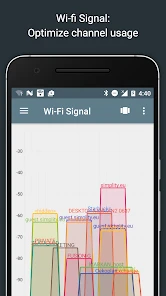
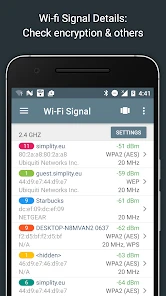
The app is packed with a bunch of nifty features. One of my favorites is the Wi-Fi signal meter. It lets you see how strong your connection is, so you can find the best spot in your house for optimal connectivity. Plus, it’s got this awesome feature called the LAN scanner. With it, you can see all the devices connected to your network, which is super handy if you suspect someone might be mooching off your Wi-Fi.
Another cool tool is the ping and traceroute feature. This allows you to test the reachability of a host on an IP network, which is a fancy way of saying it helps you pinpoint where a connection problem might be happening. And if you’re into networking, you’ll definitely appreciate the detailed ISP data the app provides.
Why You Might Need It
Honestly, if you’re someone who relies heavily on a stable internet connection—whether for work, gaming, or just browsing—this app is a lifesaver. It’s like having a Swiss Army knife for your network. You can quickly diagnose issues without having to wait for tech support, which is a huge time-saver.
There’s also the peace of mind that comes with knowing exactly what’s happening with your network. No more guessing why your speed is slow or if someone’s sneaking onto your network.
In practical terms, I would use the checks to separate a room-specific Wi-Fi problem from an issue that affects every device, then share the clearer diagnosis with whoever manages the router or service. I wouldn’t treat a single scan as a final answer: network conditions change, and results are most useful when compared across locations or repeated after a deliberate change.
A useful tool, with a clear limit
Network Analyzer Pro is a Tools app from Jiri Techet, and its focused approach is what I like most. It has a 4.9 average from around 18,000 ratings, with over 100,000 installs. Version 4.2 is listed for devices running OS 9 or later, and the app is rated for Everyone. At $3.99, it is a paid choice rather than a casual free download; I’d want the LAN, signal, and route checks to be tools I actually use before buying it. It was released on February 5, 2016, and has gathered around 2,400 written reviews.
The main limitation is that diagnosis and repair are different things. The app can help me gather evidence, but it cannot improve a router’s placement, change a provider’s service, or guarantee that an unfamiliar device is unwanted. I also wouldn’t choose it as a substitute for advanced network-management software when I need a broad view of a business network. Its sweet spot is personal troubleshooting, where a few well-chosen checks can save time and make the next decision clearer.
How I’d use it before calling for help
Imagine a video call becomes choppy in the room where I work, while everyone else at home says their connection seems fine. I’d first check the signal near my desk, then repeat that check closer to the router. If the readings differ noticeably, I have a practical lead: the issue may be the path between that room and the access point, so changing rooms or considering router placement is more sensible than immediately blaming the provider.
If the signal seems reasonable in both places, I’d check whether other devices on the LAN are visible and test reachability to more than one destination. That does not identify a definitive cause, but it helps me avoid mixing up local wireless trouble with a problem reaching a particular service. Before contacting support, I’d note what changed and when: for example, whether moving closer helped, whether reconnecting altered the symptom, and whether the checks behaved differently afterward. Those comparisons make a conversation more useful than saying only that “the internet is slow.”
A useful habit is to change one thing at a time. If I move to another room and restart the router at the same moment, I won’t know which action mattered. I’d take a quick reading, make one deliberate change, and test again under roughly the same conditions. This is especially helpful when a problem comes and goes; a single good result after an intermittent slowdown should not be treated as proof that everything is fixed.
Reading a device list without jumping to conclusions
The LAN scan is most valuable when I build a rough mental inventory before something looks unfamiliar. I’d check it when the household’s usual devices are online, then look again after turning on a television or adding a new phone to the network. Seeing how the list changes gives me context for later scans. A device name I don’t recognize may belong to equipment already in the home, so I would verify the router’s own connected-device view or ask household members before changing a password or accusing anyone of using the network.
This is a good example of the app’s trade-off: it can surface information that is otherwise easy to overlook, but it does not make that information self-explanatory. A scan is useful for prompting a follow-up, not for making a security decision on its own. If my main goal were to manage access, I’d use the router’s controls, where any available blocking or password settings belong, rather than expect a phone-side scanner to take action.
Where it fits among everyday network tools
Compared with a dedicated speed-test app, this one is less about producing a single headline result and more about giving me several angles on a connection. Speed tests are easier when I just want to compare performance at two times or report a rough result to my provider. Network Analyzer Pro makes more sense when I’m asking why a particular room or device behaves differently, or when I want to see whether a destination can be reached.
Compared with router apps, it serves a different purpose. A router’s own app is usually the better place to change network settings or manage access, while a network analyzer helps me inspect and test. I see them as complementary rather than interchangeable. Likewise, a technician managing a larger network may need desktop tools and a wider operational view; this is a more convenient choice for quick checks from the place where the trouble is happening.
That distinction also helps answer whether it is worth paying for. I wouldn’t buy it just to run a speed test once in a while, because a simpler utility can cover that narrow need. I would consider the $3.99 price reasonable if I regularly troubleshoot Wi-Fi coverage, check which devices appear on a home network, or use ping and traceroute to investigate reachability. The value depends less on how many tools are present than on whether those specific checks will help me make better decisions.
Who should keep looking
I’d steer away from this app if I expect it to repair the network automatically, explain every technical result in plain language, or conclusively identify an unknown device. It is also not my first choice for managing a business network or changing router settings. In those cases, the relevant router interface, a more guided support service, or desktop network-management software is likely a better fit.
For a person who rarely has connection trouble, the combination of tools may sit unused. Someone who only wants to know whether their internet feels fast enough can open a speed-test utility and be done. But if I’m the person friends and family call when Wi-Fi acts up, having signal checks, device discovery, and reachability tests in one place can make those calls less speculative.
Final Thoughts
At the end of the day, Network Analyzer Pro is a solid investment for anyone who wants to keep their network in check. It’s straightforward, packed with useful features, and can really save you from a lot of headaches. So, if you’re tired of dealing with connectivity issues, give it a try. You might just wonder how you ever lived without it!
My recommendation is more specific: choose it if you want a hands-on diagnostic companion and are willing to interpret clues rather than wait for an automatic answer. Its strongest use is turning a vague complaint into a better question—whether the signal changes from room to room, whether devices appear as expected, or whether a host responds. For occasional speed checks or direct network administration, another tool will suit you better; for practical troubleshooting on a personal network, this one earns its place.
Network Analyzer Pro Frequently Asked Questions
Can Network Analyzer Pro help me identify devices connected to my Wi-Fi?
Yes. Network Analyzer Pro includes network device discovery, which can help you examine devices visible on your network. This can be useful when checking which equipment is connected or investigating an unfamiliar device. The results are diagnostic clues rather than a replacement for your router’s controls, so use them to guide further checks if you are trying to understand or manage your home network.
Can I use Network Analyzer Pro to check whether my Wi-Fi signal is weak?
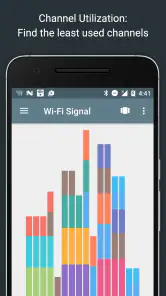
The app includes Wi-Fi signal measurement, so it can help you inspect signal conditions while diagnosing a connection. This may be useful when you are comparing how your network behaves in different places or trying to understand why a connection feels unreliable. Signal readings are one part of the picture; they can help narrow down a problem, but they do not by themselves guarantee a particular improvement.
Does Network Analyzer Pro include tools for testing network response and speed?
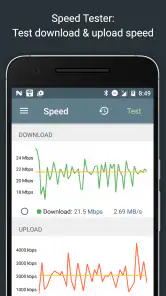
Yes. Its diagnostic toolkit includes ping and traceroute tests, as well as a speed test tool. These can help you investigate responsiveness, trace aspects of a network route, and check connection performance when something seems slow or inconsistent. The tools serve different purposes, so looking at more than one result can provide a clearer picture than relying on a single speed check.
Can Network Analyzer Pro help troubleshoot problems with a home router?
Network Analyzer Pro can provide useful diagnostic insight when you are investigating a home network or router-related issue. Its Wi-Fi scanning, device discovery, ping, traceroute, and other network checks can help you look for clues before changing settings. It is a diagnostic utility rather than a substitute for router administration, so use its findings alongside your router’s own controls when deciding what to adjust.
Is Network Analyzer Pro suitable for IT professionals as well as home users?
The app is aimed at both IT professionals and home users who need practical network diagnostics. Features such as device discovery, ping and traceroute, port scanning, and Wi-Fi signal measurement can be relevant in different settings, from checking a household connection to examining a network more technically. The useful depth will depend on your familiarity with networking and the particular issue you are investigating.
Pros
- Accurate network diagnostics
- User-friendly interface
- Real-time monitoring
- Wide range of features
- Supports IPv6
Cons
- Some features are paid
- Interface could be modernized
- Occasional connectivity issues
- Limited customer support
- Consumes battery quickly
- Category
- Tools
- Version
- 4.2








