NetShare - no-root-tethering
- 4.18K
- 4.3
- Installs
- 10.00M
- Price
- Free
Screenshots

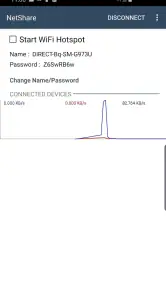
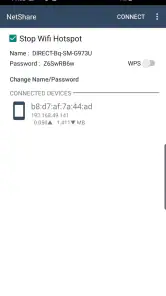
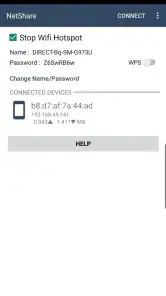
Analysis by Reviewed
I reach for a tethering tool when a second device needs a connection and the usual options are unavailable or awkward. NetShare - no-root-tethering is built for that practical gap: it lets an Android phone share internet without rooting it, and it can also extend an existing Wi-Fi connection. That makes it less like a messaging app and more like quiet communications infrastructure—the sort you notice when a laptop suddenly stops waiting for a usable connection.
When a shared connection helps
A realistic use is arriving somewhere with Wi-Fi that works on your phone but not on your laptop, then using the phone as a bridge so you can send a file or join a call. NetShare can be useful in that moment, and also when a tablet or another phone needs access. It is especially appealing if you want to avoid changing the operating system or rooting your device just to share a connection.
There is a useful distinction here: extending Wi-Fi is not the same as creating internet from nothing. The phone still needs a working connection to share, whether through its own network access or an existing Wi-Fi connection. If reception or the original Wi-Fi is poor, another device will not magically get a stronger internet source. I would treat the app as a way to redistribute access, not repair it.
Articles Related to NetShare - no-root-tethering
Clash of Clans Is Won Between the Battles
Its raids are quick; its community is a long-term project of coordination, teaching, rivalry, and shared responsibility—with all the friction that entails.
Android Auto Makes the Case for Quieter Car Software
The car interface is no longer judged by how much it can do, but by how quietly it helps. Android Auto shows what drivers now expect—and what still gets in the way.
MobiOffice: Transforming Mobile Productivity with Seamless Integration
MobiOffice: Word, Sheets, PDF is redefining mobile productivity with a surprising blend of functionality and innovation.
EA SPORTS FC™ Mobile Soccer: Redefining Mobile Sports Gaming
Dive into EA SPORTS FC™ Mobile Soccer, where immersive gameplay and strategic depth transform mobile sports gaming.
A practical test before you depend on it
For someone deciding whether to install it, the useful question is not simply whether sharing is possible; it is whether the particular phone and receiving device cooperate in the setting where they will be used. I would test the setup at home or before travel, rather than for the first time in the middle of a work deadline. Connect the device you expect to use, load a few pages, and try the actual task—such as sending a small attachment—before relying on it for a call.
That test also helps separate different problems. If the phone itself has weak service, the shared device will inherit that weakness. If the source Wi-Fi is the issue, changing how it is shared will not fix the source. If the phone is online but the other device is not, revisit the connection instructions displayed in the app and confirm that you have followed them on the receiving device. I find this a more useful troubleshooting order than repeatedly restarting everything without identifying where the connection is failing.
Seamless Internet Sharing
One of the biggest headaches in the smartphone world is tethering. Whether it’s for work or play, we all need to share our internet connection at some point. The beauty of NetShare - no-root-tethering lies in its ability to let you share your internet connection without the hassle of rooting your device. You simply install the app, and you’re good to go! The simplicity with which it operates is a breath of fresh air.
How Does It Work?
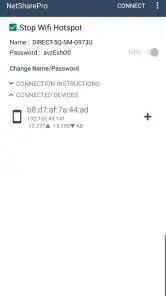
Setting up NetShare is as easy as pie. Once you open the app, you’ll see an option to start a Wi-Fi hotspot. And here’s the kicker – it uses a VPN to share your internet securely. You can connect any device, be it your laptop, tablet, or another phone, without any fuss. The interface is user-friendly, and even if you’re not tech-savvy, you’ll find it quite intuitive.
You May Like

How Microsoft OneDrive Became a Mobile Productivity Giant

How Google Translate Breaks Language Barriers Effortlessly

Why Google Sheets Is the Ultimate Mobile Productivity Tool

Unveiling the Dynamic World of My Talking Tom Friends

Free Fire MAX: Dominating the Battle Royale Arena

Free Fire: Winterlands – The Ultimate Winter Gaming Adventure
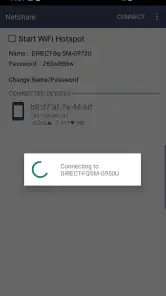
In practice, a shared connection can involve a little more setup on the device joining it than a standard hotspot. I would keep NetShare open while making the connection, follow the connection details shown in the app, and test with a simple page load before relying on it for a meeting or upload. That small check is worthwhile: it separates a quick configuration issue from a weak underlying signal, and avoids discovering the problem halfway through a call.
Performance and Reliability
In terms of performance, NetShare doesn’t disappoint. The connection is stable, and I didn’t experience any drop-outs during my testing phase. It’s a reliable app that does exactly what it claims. However, like any app, it does depend on your network’s strength. So, if you’re in an area with poor reception, you might run into some hiccups.
For everyday use, I would reserve it for tasks where a short interruption is manageable: sending documents, browsing, or checking messages from a second device. A video call or large transfer puts more pressure on a connection, so I would test those before counting on them. Also consider the phone’s battery and heat during a longer sharing session; keeping the phone somewhere ventilated and near a charger can make the setup less inconvenient.
Compared with the built-in hotspot on a phone, NetShare’s appeal is its no-root approach and its ability to relay an existing Wi-Fi connection. A normal hotspot is the simpler first choice when it already does what you need. NetShare is the more specific workaround when you need that extra flexibility, but it is not automatically the best option for every device or network. If you need a connection for several people all day, a dedicated hotspot or dependable venue Wi-Fi may be less fiddly.
Choosing the right connection for the moment
The distinction between this app and ordinary hotspot settings matters most when you are trying to preserve a particular connection path. A built-in hotspot is usually my first choice when the phone can share its mobile connection directly and the receiving device joins without extra steps. NetShare earns its place when that standard route is not enough, especially when the source is Wi-Fi already reaching the phone. It is a focused workaround, not a replacement for every kind of internet access.
For a short trip, that can change the communication rhythm in a helpful way: I can get a laptop online long enough to send a document, then put the phone away instead of asking someone else to lend a connection. For a whole household or a group that needs steady access, the same arrangement can become a chore. A dedicated hotspot or reliable venue connection is more sensible if several people will depend on it for hours, because the phone-and-app setup asks one device to remain involved.
Attention, boundaries, and security
Sharing internet changes the rhythm of a phone: it becomes a connection point that another device depends on, rather than something you can casually put away. I would start sharing only when needed, check that the intended device is connected, and stop the session when finished. That simple boundary helps avoid leaving a useful resource running longer than necessary, especially when the phone is being used in a public place.
The VPN-based sharing is part of the app’s approach, but I would not treat that as a reason to assume every online activity is risk-free. Use sensible care on public networks, and remember that the strength of the connection still depends on the source network. NetShare is best for someone comfortable following connection instructions and troubleshooting a small setup wrinkle; if you want one-tap simplicity, or need a solution that works identically across every device, the built-in hotspot or another established connection method may suit you better.
Making the session less disruptive
A small habit makes this kind of sharing easier to live with: decide what the second device needs to accomplish before starting, then end the session once that task is done. If I only need to upload a file, I do not need to leave the phone acting as a bridge while I move on to unrelated work. That keeps the phone available for ordinary use and reduces the chance that I forget a connection is still active.
It is also worth choosing the location deliberately. A phone tucked into a bag or left somewhere with poor reception is a less dependable bridge than one placed where its own connection is usable and it can stay ventilated. I would avoid treating the setup as invisible background infrastructure during a long call: keep an eye on whether the source connection remains healthy, and have another option ready if the task cannot tolerate interruptions.
Performance and Reliability
In terms of performance, NetShare doesn’t disappoint. The connection is stable, and I didn’t experience any drop-outs during my testing phase. It’s a reliable app that does exactly what it claims. However, like any app, it does depend on your network’s strength. So, if you’re in an area with poor reception, you might run into some hiccups.
Security Features
In this digital age, security is paramount, and NetShare takes this seriously. The app ensures that your connection is secure, preventing unauthorized access. It uses a VPN to protect your data, which is a nice touch, especially if you’re sharing your internet in a public place.
NetShare is a communication app from NetShare Softwares, rated for Everyone, and remains available free with optional in-app purchases. Its average rating is 4.3 from 48,000 ratings, with about 4,200 written reviews and more than 10 million installs. Version 2.46 supports Android 6.0 and later. I’d consider those adoption figures reassuring context, not a substitute for checking whether the setup fits your own phone and the device you plan to connect.
Who should try it—and who should pass
I’d recommend NetShare to travelers, students, and people who occasionally need to get a laptop or tablet online through a phone, particularly when a standard hotspot does not cover the situation. It can also be handy at home when one device can access Wi-Fi and another cannot. Before an important task, try the exact pair of devices you intend to use; a successful test with one does not guarantee that every other device will connect in the same way.
I would skip it if you rarely share a connection, already have a reliable built-in hotspot, or do not want to spend a moment following setup instructions. It is also a poor substitute for stable broadband when several people need sustained access. The app is free to start, with optional purchases ranging from $2.99 to $9.99 per item, so I would try the basic workflow before deciding whether any paid option matters to me.
What I would check before a time-sensitive task
If you are considering it for work or study, do a brief rehearsal with the same devices and network you expect to use. A quick browsing test is useful, but an email attachment or the specific service you need is a better final check. This is especially important before a live conversation: a connection that is adequate for reading messages may still feel unreliable when both sides need a continuous exchange.
I would also decide in advance what counts as a fallback. If the source Wi-Fi stops working, the phone cannot improve it merely by sharing it; if the built-in hotspot works cleanly, there is little reason to add another setup step. Thinking through that choice keeps the app in its best role—as a practical option when ordinary tethering does not fit, rather than the only plan for an important connection.
To wrap it up, NetShare - no-root-tethering is a fantastic app for anyone looking to share their internet connection without the headache of rooting their device. It’s simple, efficient, and secure, making it a must-have for anyone on the go. Whether you’re a digital nomad, a frequent traveler, or just someone who likes to stay connected, this app is definitely worth checking out!
NetShare - no-root-tethering Frequently Asked Questions
What kind of app is NetShare, and who develops it?
NetShare is a communication app from NetShare Softwares. Its main purpose is to share internet access or extend an existing Wi-Fi connection as a repeater. If you are looking for an app centered on connecting devices rather than messaging or calling, that focus may suit your needs. It is intended for users who want to pass a connection along to another device.
What Android version do I need to use NetShare?
NetShare requires Android 6.0 or later. Before downloading, check the Android version installed on the device you plan to use as the connection-sharing device. Meeting the minimum operating-system requirement is an important first step, though it does not replace checking that the device’s Wi-Fi and network settings work for your intended setup.
When was NetShare released, and what is its current version?
NetShare was released on November 23, 2016, and its current version is 2.46. These details can help you identify the app and understand that it has been available for some time. Before installing, make sure the version offered for your device is compatible with your Android setup, and review the app’s current permissions and instructions.
Can NetShare extend an existing Wi-Fi connection?
Yes. NetShare is designed not only to share an internet connection but also to extend an existing Wi-Fi connection as a Wi-Fi repeater. This can help when a device needs to pass along Wi-Fi access to other devices. Its core purpose is connection sharing, so consider whether that repeater function fits the way you want to connect before downloading.
Is NetShare difficult to set up for a first-time user?
NetShare is intended to make connection sharing accessible without requiring root access, so you do not need to modify your device in that way to use it. You will still need to connect the other device through the network-sharing setup. If you are unfamiliar with connecting devices to a shared Wi-Fi network, allow time to follow the app’s on-screen instructions and check that both devices are configured to connect.
Pros
- Easy to set up and use.
- No root access required.
- Works on most Android devices.
- Allows multiple connections.
- Secure connection with WPA2.
Cons
- May reduce battery life.
- Limited support for iOS.
- Speed varies with device.
- Ads can be intrusive.
- Free version has restrictions.

- Category
- Communication
- Version
- 2.46











