MSN Weather - Forecast & Maps
- 1.73K
- 4.2
- Installs
- 1.00M
- Price
- Free
Screenshots

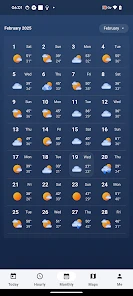
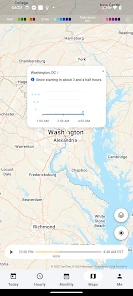
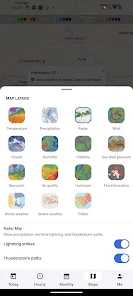
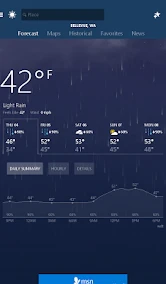
Analysis by Reviewed
I tend to check the forecast at the moments when the weather can change my plans: before leaving home, while arranging an errand, or when deciding whether a walk can wait. MSN Weather - Forecast & Maps is Microsoft Corporation’s free weather app, and its mix of forecasts and maps gives me a useful overview without making me dig through a complicated setup. Its experience does depend on getting current information over a network, so I find it most helpful when I can load it before heading out rather than treating it as a guaranteed source in every setting.
When a connection changes the forecast check
Opening a weather app is often a quick decision, but maps and refreshed conditions are only useful when they load in time. I like being able to look at the forecast and then inspect a map when the sky outside does not match what I expected. That extra step can help me decide whether a shower looks like a brief interruption or a reason to change plans. It is also the point where connectivity matters most: if the map or update is slow, the simplest forecast view may be more practical than repeatedly waiting for every detail.
For a typical weekday, I would check the local outlook before choosing shoes and deciding whether to carry a rain jacket, then look again before a longer trip. Keeping a few favorite places is handy when my day crosses town or I am checking conditions for family elsewhere. I would not treat a forecast for another location as a substitute for local judgement, though; the value is in comparing plans and places, not assuming every neighborhood will experience identical weather.
Useful on the move, with a sensible fallback
The app suits people who want forecasts and weather maps together, especially if they already use Microsoft services or prefer a familiar, broad overview to a specialist weather dashboard. Compared with a basic weather screen, the map view offers more context; compared with apps built around dense radar tools, MSN Weather may feel less focused for someone who wants to inspect storm movement in detail. I would use it for everyday planning, but keep an official local alert channel in mind when conditions become dangerous.
If the app is slow to refresh, I would avoid making a time-sensitive decision from an old screen. Check whether the connection is working, reopen the forecast, and give the information a moment to update before relying on it. For a route or outdoor commitment, checking again when connected is a sensible habit. This is not a criticism unique to MSN Weather: changing forecasts and delayed network access can affect any mobile weather service, and alerts should not replace local emergency guidance.
The Ultimate Weather Companion
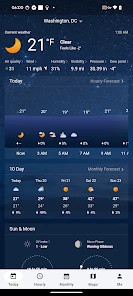
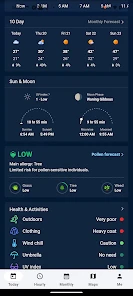
When I first installed MSN Weather - Forecast & Maps, I was blown away by its sleek and user-friendly interface. Navigating through the app is as smooth as a gentle breeze on a sunny day. The app offers detailed hourly, daily, and even 10-day forecasts, so you’re never caught off guard. It’s like having a personal meteorologist in your pocket!
Features that Shine
One of the standout features of this app is its interactive maps. You can zoom in and take a closer look at weather patterns, precipitation forecasts, and even severe weather alerts in your area. It’s like having a bird’s eye view of the weather, which is pretty cool. And let’s not forget about the live tile feature for Windows users that updates right on your home screen.
More From Our News Desk

Clash of Clans Is Won Between the Battles

Android Auto Makes the Case for Quieter Car Software

MobiOffice: Transforming Mobile Productivity with Seamless Integration

EA SPORTS FC™ Mobile Soccer: Redefining Mobile Sports Gaming

How Microsoft OneDrive Became a Mobile Productivity Giant

How Google Translate Breaks Language Barriers Effortlessly
Another aspect I appreciate is the ability to customize your experience. You can set your favorite locations, making it easy to keep tabs on the weather in multiple areas. Whether you’re planning a trip or just keeping an eye on grandma’s neighborhood, this feature is a real lifesaver.
Keeping You Informed
The app doesn’t just stop at forecasts. It provides insightful weather news and articles, helping you understand the ‘why’ behind the weather. So if you’re a weather enthusiast like me, you’ll find this feature particularly engaging. I mean, who doesn’t love a little weather trivia?
Not to mention, the severe weather alerts are top-notch. You’ll receive timely notifications about impending storms or other extreme weather conditions. It’s like having a built-in safety net, ensuring you’re always prepared, no matter what Mother Nature throws your way.
A Few Clouds on the Horizon
Of course, no app is without its quirks. While I’ve generally had a smooth experience, there are occasional hiccups with the app’s loading times. Sometimes it takes a tad longer to update, especially during peak weather events when everyone’s checking the forecast. But honestly, the benefits far outweigh these minor setbacks.
Who it fits, and where I draw the line
I would recommend this to someone who wants one straightforward place to check nearby conditions, compare a few saved locations, and get a broader sense of what the day may bring. It is particularly useful for flexible plans: a walk that can be moved, errands that can be reordered, or a visit where a quick look at both locations helps with packing. It is less suitable if your work depends on highly technical meteorological analysis or if you need a map to function where a dependable connection is unavailable. In those cases, a specialist forecasting tool or another reliable information source may be a better fit.
One practical habit is to use the forecast in stages rather than staring at every screen at once. I would start with the hourly outlook to choose a departure window, then use the map when precipitation is the deciding factor, and keep the longer-range view for rough planning rather than treating it as a promise. Saving a regular destination alongside home can make that comparison quicker. The trade-off is that several locations and map details can invite overchecking; for ordinary plans, a quick look at the relevant hours is often enough.
Making the forecast useful in real routines
A useful way to test whether this app fits your routine is to tie each check to a decision, rather than opening it out of habit. If I have a school pickup, for example, I can compare the conditions around home with the destination and look at the hours that cover the drive and walk from the car. If rain is the only concern, the map can add context; if timing is the concern, the hourly view is the more direct starting point. That division keeps the app practical instead of turning a simple question into a long scroll.
For a weekend outing, I would use the longer forecast to decide whether to make a flexible plan, then check again closer to departure before committing. The longer view is helpful for spotting a potentially unsettled day, but I would not use it to choose a precise hour for an outdoor event several days away. This is a small but important distinction: the app can support planning without making uncertainty disappear. If the outing is easy to move, a broad outlook may be enough; if safety or a fixed reservation is involved, I would verify conditions nearer the time.
People who check weather for relatives or a second home can benefit from saved locations, but I would keep the list focused. A handful of places that regularly affect decisions is quicker to scan than a long collection of occasional destinations. It also reduces the chance that I will glance at the wrong location and carry that forecast into a plan. When I add a place, I try to give it a clear mental role—work, family, or a planned trip—so comparing locations answers a real question rather than simply adding more information.
Maps, detail, and the limits of a broad overview
The map view is most valuable when it resolves a specific doubt: whether precipitation is nearby, whether the area I am heading toward looks different from where I am now, or whether the weather deserves another check before leaving. I would not treat map colors as a substitute for understanding the forecast period they represent. A map can make an evolving situation easier to picture, but it is still a snapshot of information delivered through the app, not a promise about what will happen at a particular doorstep.
This is where I see the clearest difference between MSN Weather and a specialist weather tool. The broad presentation works well when I want conditions, forecasts, and maps in one familiar place. A dedicated radar-focused app may suit someone who routinely follows storm cells, compares technical layers, or needs to examine movement closely. On the other hand, a complicated dashboard can be excessive if the real question is whether to take a jacket. I would choose based on the decision I make most often, not on which app appears to show the most data.
The same principle applies to weather news and articles. I find explanatory material useful when I want context for a pattern, but it is not a replacement for the short-term forecast I need before stepping outside. If I am in a hurry, I would check the practical forecast first and read background material when I have time. That order keeps the app from becoming a distraction when the answer I need is simply whether the next part of my day may be affected.
Connectivity, slow updates, and sensible recovery
Because a current forecast relies on a network connection, I would make a quick check before entering a place where reception may be unreliable. Load the relevant location and the time period that matters while the connection is available, then avoid assuming that a map will refresh later if access becomes weak. I do not treat the app as an offline reference, and I would not plan a remote outing on the assumption that its latest information will remain available without connectivity.
When an update seems stuck, my first step is to distinguish a display that has not refreshed from a forecast that has actually changed. I would check the connection, reopen the view, and wait for the current information before making a decision that depends on timing. If the issue persists, I would use another dependable source rather than repeatedly refreshing the same screen. This is especially sensible during severe weather, when the cost of relying on stale information is higher than the inconvenience of checking an official local source.
For data-conscious use, I would reserve map loading for moments when the visual view can change what I do. A quick forecast check may be sufficient for choosing clothes, while a map is more worthwhile when precipitation or a route is central to the plan. I cannot assume the app offers a particular data-saving mode, so the practical approach is simply to avoid loading visual detail unnecessarily when the connection is slow or limited. The same restraint also makes the app easier to use: less browsing, clearer decisions.
What to expect from the app
MSN Weather has been available since December 11, 2014, and its current version is 30.2.241212005. It is rated for Everyone and supports Android 5.0 or later. The app has a 4.2 average from around 43,000 ratings, with about 1.7 thousand written reviews and over one million installs. Those figures suggest a widely used option, but they do not tell me whether its forecast will be right for a particular street or moment; I still compare what it shows with the conditions around me.
It is free, which makes it easy to try as a daily companion rather than a major commitment. If you are wondering whether it replaces checking the sky, my answer is no: I use the forecast to prepare, then adjust when local conditions differ. If you are asking whether it is useful for more than today, the daily and 10-day views help me think ahead, while I treat farther-out details as planning guidance, not certainty. And if a storm is serious, I would not rely on a single app notification as my only safety measure.
Choosing it for the right reasons
I think this is a good match for someone who wants a general-purpose weather app, appreciates maps as a second way to understand conditions, and checks more than one place during an ordinary week. It can also suit a user who prefers to start with a clean, practical overview instead of learning a specialist interface. The age rating is Everyone, and the Android minimum is version 5.0, so it is aimed at a broad audience of Android users with compatible devices.
I would look elsewhere if the essential requirement is detailed storm analysis, highly specialized forecasting, or dependable access in places with little or no service. A local government weather service is also the better authority for emergency instructions. MSN Weather can help me notice conditions and prepare for a normal day, but a weather app should not be the sole basis for a high-stakes safety decision. That boundary does not make the app less useful; it clarifies the job it does well.
As an everyday tool, its main value is the combination of quick planning and optional context. I can use the hourly outlook to make a near-term choice, save a location that matters, and open a map only when it helps answer a question. The main trade-off is that those extra views depend on information loading properly, and more detail does not automatically mean more certainty. If I keep the app focused on decisions I can reasonably make from a forecast, it earns its place on my phone without pretending to replace observation or official guidance.
In conclusion, MSN Weather - Forecast & Maps is a reliable and comprehensive weather app that provides everything you need to stay informed and prepared. Whether you’re a casual user or a weather buff, this app is sure to become your go-to source for all things weather-related. So why wait? Give it a try and take the guesswork out of your weather predictions!
MSN Weather - Forecast & Maps Frequently Asked Questions
Does MSN Weather help with planning everyday activities?
MSN Weather is built around checking conditions, forecasts, and maps to help you plan your day. You can use it to get a sense of current weather and look ahead before deciding what to wear or whether to adjust outdoor plans. As with any forecast, it is best treated as useful guidance rather than a guarantee of exactly what conditions will be.
How much storage or mobile data does MSN Weather use?
The amount of storage and mobile data an app uses can vary with the device and how it is used. MSN Weather is a weather app for checking conditions, forecasts, and maps, so viewing map content may use data, particularly when you are away from Wi-Fi. If you have a limited data plan, consider checking your device’s data settings and using Wi-Fi when convenient.
What is MSN Weather, and who is it designed for?
MSN Weather is a weather app developed by Microsoft Corporation, designed for people who want a convenient way to check conditions and forecasts when planning their day. Its focus is on weather information, including forecasts and maps. The app is rated for Everyone, making it suitable for a broad audience looking for an everyday weather companion.
Who develops MSN Weather, and what is its standing with users?
MSN Weather is developed by Microsoft Corporation. It has an average rating of 4.2 from around 43,000 ratings, with about 1,700 written reviews, and has been installed over one million times. These figures offer a general sense of its reach and user response, though individual experiences can differ depending on what someone expects from a weather app.
What features does MSN Weather - Forecast & Maps offer?
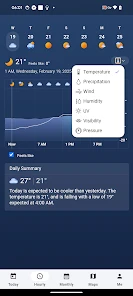
MSN Weather provides users with a comprehensive suite of features to keep them informed about the weather. It includes current conditions, hourly and 10-day forecasts, interactive maps, and severe weather alerts. Users can customize their experience by adding favorite locations and receiving notifications about weather changes. The app also offers detailed weather information such as humidity, wind speed, and UV index.
Pros
- Accurate weather predictions.
- User-friendly interface.
- Detailed maps available.
- Customizable alerts.
- Ad-free experience.
Cons
- Limited offline functionality.
- Occasional slow loading times.
- Requires constant updates.
- Battery drain on prolonged use.
- Limited customization options.
- Category
- Weather
- Version
- 30.2.241212005













