

Moon Calendar Watch
- 25.00
- 3.3
- Installs
- 10.00K
- Price
- $2.49
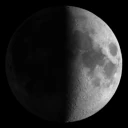
Screenshots
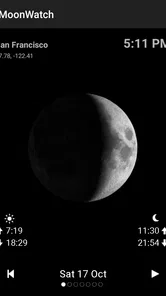
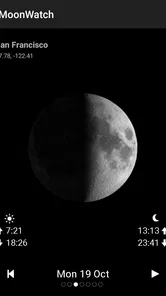
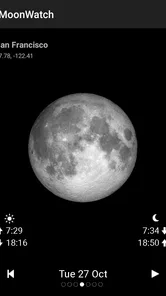
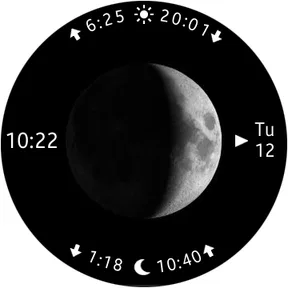
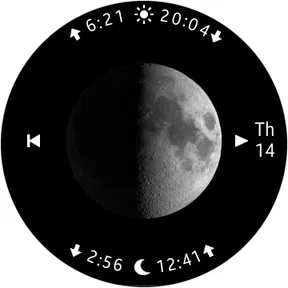
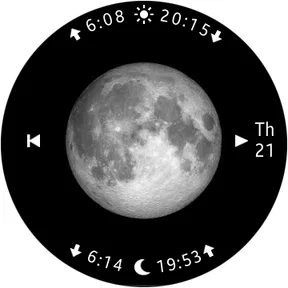
Analysis by Reviewed
I often check the moon when deciding whether an evening walk or a bit of sky-watching is worth planning around. Moon Calendar Watch is aimed at that small, practical question: it puts lunar timing alongside the daily rhythm of sunrise and sunset. I find that focus more useful than an app that turns a quick check into a tour of unrelated astronomy features.
Start with the plan, not the phase
The most useful way to approach a lunar calendar is to begin with what you want to do. A short walk, a late picnic, and a photo session all call for different timing. I would first think about the place and the kind of light I want, then check the moon phase and rise-and-set times as a guide. That keeps the app in its proper role: it helps me plan around the Moon, but it cannot tell me whether a particular spot will have an open view or a clear sky.
This distinction is especially helpful when I am coordinating with someone else. If a friend is meeting me after work, I can use the calendar to narrow down a likely window, then agree on a flexible time instead of treating a listed event as a precise appointment. For a family outing, the phase can also be an easy starting point for a conversation about why the Moon looks different from night to night. The practical outcome is modest but real: I can make a more informed plan without turning a casual evening into a complicated astronomy project.
A quick check before making plans
For a simple outing, I would start by checking the moon phase and the listed moonrise and moonset, then compare those with sunrise and sunset. That gives me a basic sense of when the moon may be above the horizon and how daylight frames the plan. It is a helpful planning aid, not a promise that the moon will be visible: clouds, buildings, trees, and local terrain still decide what I can actually see.
That distinction matters if I am choosing a route or meeting someone outdoors. I can use the calendar to pick a promising evening, then make the final call based on the weather and the view from the location. For photography, it can help me avoid arriving after moonrise or assuming a full moon will be high in the sky at the time I want to shoot. I would still check the precise conditions for a serious shoot rather than treating a calendar as a complete observing plan.
Making the timing useful in practice
A small but useful habit is to check the timing before settling on a destination. If my usual park has a tree-lined edge, a listed moonrise may not translate into a visible Moon until later from the path. I would compare the times with the shape of the place: an open waterfront, a hilltop, or a street canyon each changes what “available” means in practice. This is a reason to think in windows rather than exact appointments.
For a photo outing, I would also separate the planning decision from the camera decision. The calendar can help me choose a night and decide when to head out, while the framing, exposure, and final position still depend on what I see on arrival. If the goal is a particular alignment with a building or landscape, I would scout the location in advance rather than expecting a lunar calendar to solve composition. The trade-off is clear: it can reduce avoidable timing mistakes, but it does not replace preparation at the actual location.
More From Our News Desk

 Gmail
GmailGmail in a Busy Inbox: Who Benefits Most?
From first account to crowded workday, Gmail earns its place through dependable search and flexible sorting—but its best fit depends on how much inbox maintenance you can tolerate.

 Prime Video
Switching to Prime Video: What Changes in Your Viewing Routine
Prime Video can make a compelling second home for streaming, but switching means learning a different catalog, rental layer, and route from browsing to playback.

 Universal TV Remote Control
Universal TV Remote Control Works Best as a Reliable Backup
A phone remote earns its place through quick setup and reliable habits. Here is how to get more from Universal TV Remote Control—and where its limits show.

 Weather - By Xiaomi
Weather by Xiaomi Review: Clear at a Glance, Less Clear Up Close
Xiaomi’s weather app makes everyday forecasts quick to scan, but its calm surface can leave useful details and recovery paths harder to find than they should be.

 X
XX Under Pressure: Can It Recover When Posting Goes Wrong?
A resilience-focused review of X, examining setup, mistaken posts, interruptions, weak connections, and the gaps that matter when recovery needs to be dependable.

 Clash of Clans
Clash of Clans Is Won Between the Battles
Its raids are quick; its community is a long-term project of coordination, teaching, rivalry, and shared responsibility—with all the friction that entails.
Latest News



Getting to Know the Moon Calendar Watch
First things first, let's talk about what the Moon Calendar Watch actually offers. This app is your personal lunar calendar and moon phase tracker. It's like having a mini planetarium in your pocket! Whether you're planning a moonlit hike or just curious about the next full moon, this app has got you covered.
Features That Stand Out
One of the coolest features has to be the real-time moon phase updates. The app provides detailed images and descriptions of the current moon phase, making it easy to understand even for newbies. Plus, it includes a comprehensive lunar calendar that shows all the phases for the entire year. No more guessing when the next crescent will appear!
Another feature I adore is the personalized notifications. You can set alerts for specific moon phases or events, so you never miss a chance to howl at the full moon. It's like having your very own lunar assistant, reminding you of the celestial events that matter most.
Choosing between a focused calendar and other tools
Compared with a general calendar, this kind of lunar reference is more useful when the question is not simply “What date is the full moon?” but “When might the Moon be up in relation to the rest of the day?” A plain calendar can store a reminder, yet it usually leaves the timing and phase context for me to find elsewhere. On the other hand, someone who already uses a comprehensive astronomy app may prefer to keep everything in that one tool, particularly when planning around other objects in the sky.
I would not treat it as a replacement for a weather app either. Sunrise and sunset help establish the day’s broad rhythm, but they do not tell me whether clouds will block the view or whether conditions are comfortable for being outside. A useful handoff is to use this app for lunar timing, then check a forecast and, if needed, a map or route tool for the destination. That extra step is not a flaw so much as a sensible boundary between different jobs.
User Experience and Design
The user interface is sleek and intuitive. Navigating through the app is a breeze, thanks to its clean design and user-friendly layout. The developers clearly put a lot of thought into making the app accessible for everyone, regardless of their level of interest in astronomy.
Additionally, the app includes fascinating tidbits about each moon phase, which adds an educational layer to the experience. It's perfect for both seasoned astronomers and those just starting to explore the night sky.
A realistic evening workflow
Imagine I am considering a walk after dinner and want the Moon to be part of the view. Earlier in the day, I would check the phase and the rise-and-set information, then think about whether my route has an unobstructed horizon. I might choose a more open path if the timing looks promising. Before leaving, I would check the weather separately and keep the plan flexible if the sky turns cloudy.
When I arrive, I would use the listed timing as context rather than repeatedly checking the screen. The point is to spend the evening outdoors, not to let a schedule dictate every minute. If the Moon is not visible from the first spot, I can move to a more open view or simply enjoy the walk without it. That is the most realistic result this app supports: better-informed expectations, not a guarantee of a perfect sighting.
Who will get the most from it
I see the clearest fit for casual sky-watchers, people who like to plan an evening outdoors, and anyone who wants a quick lunar reference without opening a full astronomy toolkit. A family could check the phase together before a night walk, while a gardener or photographer might use the rise and set times as one piece of a broader routine. The useful habit is to check the timing earlier in the day, then decide closer to the outing whether the weather and surroundings make it worthwhile.
It is also a reasonable choice for someone who enjoys noticing the Moon but does not want to learn a complicated interface first. The phase information can make an ordinary calendar date feel more connected to the sky, and the daily rise-and-set details add a practical reason to return. I would recommend it most to people who will actually use that combination. If I only look up the Moon once in a while, a free search or a general calendar reminder may be enough.
Who may be better served elsewhere
If I only needed a general reminder of the next full moon, a basic calendar entry could do the job. If I wanted star charts, object identification, or detailed observing conditions, a dedicated astronomy app would be a better match. This app sits between those options: more focused on the Moon and its daily timing than a plain calendar, but not a substitute for a complete sky guide. That narrow scope is a strength when I want a fast answer, and a limitation when I need more context.
I would also skip it if my main need is navigation, destination discovery, or a complete travel itinerary. Its place in the travel-and-local world is as a small planning aid for choosing when to be outdoors, not as a tool for getting there or finding nearby attractions. Likewise, a serious observer may want more detailed sky information than a lunar calendar is meant to provide. The best fit is someone who values a focused glance and accepts that other apps will handle weather, directions, and broader astronomy.
Practical trade-offs before relying on it
Moonrise and moonset are not the same as a guaranteed viewing window. A hill, a nearby building, or a low horizon can delay the moment the Moon becomes visible from where I stand. I would use the listed times to choose when to look, then allow a little flexibility rather than scheduling a brief outdoor stop around an exact minute. The same caution applies to sunrise and sunset: the figures help frame a day, but they do not describe local visibility or weather.
For a recurring plan, I would treat any alert as a prompt to check conditions, not as the whole plan. A notification can remind me that a phase is approaching, but a clear forecast and a suitable spot matter just as much. The app costs $2.49, so I would decide whether having this focused reference close at hand is worth paying for instead of using a free general calendar or astronomy tool. It is rated for Everyone, which makes it suitable to share with curious younger sky-watchers, while its straightforward subject is also easy to dip into without a technical background.
Questions I would settle before depending on it
Would I use it for a specific event, such as a planned night walk? Yes, as a way to choose a promising time, but I would still check the forecast and make sure the route offers a suitable view. Would I rely on it for a carefully timed photograph? Only for the broad lunar schedule; I would still verify the scene and conditions on location. Those are useful expectations to set before paying for a specialized reference.
Is it enough for a beginner? For someone curious about phases and daily timing, the focused subject is approachable. Is it enough for someone who wants a full sky map or detailed observing support? I would choose a broader astronomy tool instead. And if the main concern is simply whether an evening is clear, a weather app is the more relevant first stop. Thinking through these distinctions helps me avoid expecting one small app to solve several unrelated planning problems.
Why I Love It
As someone who loves all things lunar, the Moon Calendar Watch app has been a game-changer. It not only keeps me informed about the moon's activities but also enriches my understanding of our closest celestial neighbor. The blend of functionality and education makes it a must-have for anyone with even a passing interest in the moon.
In conclusion, if you're looking for an app that combines practicality with a touch of magic, the Moon Calendar Watch is definitely worth checking out. It’s a delightful way to stay connected with the night sky and deepen your appreciation for the wonders of the universe.
In the wider travel-and-local app space, this feels like a specialized companion rather than a route planner or destination guide. AppMosaic’s paid app has an average rating of 3.3 from 85 ratings and 25 written reviews, with 10K+ installs; version 1.3.7 was released on Nov 7, 2015. Those figures suggest an established but modest audience, so I would weigh the focused purpose and price more heavily than expecting a large, constantly expanding travel platform. If sunrise and sunset are the only details I need, a general weather or calendar app may be enough. If I want the Moon’s cycle and rise-and-set timing in one place, this is the more direct choice.
Moon Calendar Watch Frequently Asked Questions
Who develops Moon Calendar Watch, and what does it cost?
Moon Calendar Watch is developed by AppMosaic and costs $2.49. Before downloading, consider whether its focus on lunar timing suits the way you plan to use it, such as checking moon phases or sunrise and sunset. The purchase price is worth weighing against the app’s specific purpose: presenting those time-based details in a dedicated calendar experience.
What information does Moon Calendar Watch show about the sun and moon?
The app is designed to show moon phases as well as sunrise, sunset, moonrise, and moonset. That makes it relevant for people who want a quick reference for daily sky events or are planning activities around daylight and lunar timing. Its central appeal is this practical collection of calendar information rather than a broad travel-planning toolkit.
What features does Moon Calendar Watch offer to its users?
Moon Calendar Watch provides users with a comprehensive lunar calendar, which tracks moon phases, zodiac signs, and lunar cycles. It also offers notifications for significant lunar events, personalized lunar insights, and moonrise and moonset times, making it a valuable tool for anyone interested in astrology or gardening.
Is Moon Calendar Watch compatible with both Android and iOS devices?
Yes, Moon Calendar Watch is compatible with both Android and iOS platforms. Users can download the app from the Google Play Store for Android devices and the Apple App Store for iOS devices. The app is optimized for seamless performance across different device specifications and operating systems.
Does Moon Calendar Watch require an internet connection to function?
Moon Calendar Watch primarily operates offline, allowing users to access lunar information without an internet connection. However, certain features such as updates, notifications, and personalized insights may require an internet connection to ensure accuracy and timely delivery of information.
Pros
- Beautiful interface design
- Easy to navigate
- Accurate lunar data
- Customizable notifications
- Integrates with other calendar apps
Cons
- Limited free features
- Ads can be intrusive
- No widget support
- Occasional sync issues
- Requires Internet connection













