Camera Remote Watch
- 124.00
- 1.6
- Installs
- 10.00K
- Price
- $2.49

Screenshots


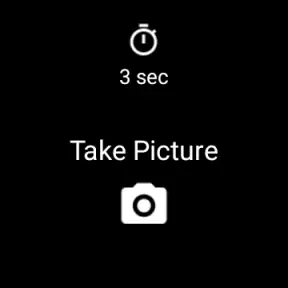
Analysis by Reviewed
I find a watch-operated camera remote most useful when touching the phone would spoil the framing or pull me out of a moment. Camera Remote Watch is built around that simple problem: the phone stays where the picture is being composed, while the watch gives me a way to trigger the shutter. That can make a group photo less awkward, help with a hands-free self-portrait, or reduce the small shake that comes from tapping a phone balanced on a surface. It is a focused idea rather than a replacement for a full camera app, so the value depends on whether remote control fits the way you actually take pictures.
Where the convenience can break down
The basic promise sounds effortless, but the first point of friction is the connection between two devices. This is an app from AppMosaic in the photography category, and its job depends on the phone and smartwatch being able to communicate reliably. If the watch does not appear to control the camera, I would first check that the companion app is installed on both devices, that Bluetooth is enabled, and that the devices are close enough to reconnect. I would also open the phone’s camera side of the app rather than assuming the watch can start everything on its own.
That distinction matters in practice. A remote shutter is only useful once the phone is ready to take a picture. If I am setting up a family photo, I would place the phone, frame the shot, make sure the camera view is ready, and then move into position with the watch. Trying to do the framing, pairing, and group arrangement all at once is an easy way to waste time. The watch is best treated as the final control, not as a substitute for preparing the camera.
Small setup checks that save time
I would test the connection at home before relying on it outdoors or at an event. Put the phone on a stable surface, launch the relevant camera controls, and take a test shot from the watch. That quick rehearsal tells you whether the devices are paired and whether the shutter responds in the way you expect. It also gives you a chance to learn where the watch’s camera-switching, timer, and zoom controls are, without friends waiting for you to sort them out.
If the watch appears connected but a tap does not take a picture, return to the phone and check that the camera session is still active. A screen that has gone to sleep, an app that has been closed, or a connection that has dropped can interrupt the sequence. I would reopen the camera controls, bring the devices near each other, and try again before repeatedly pressing the shutter. Repeated taps can make it harder to tell whether the problem is a delay or a failed connection.
It is also worth checking the composition before walking away from the phone. A watch can make it easier to trigger a shot, but it cannot tell you whether the phone is level, whether everyone is in frame, or whether a branch is covering someone’s face. I use the phone screen to set the shot first, then use the watch only for the moment of capture. This is a simple habit, but it prevents the remote control from creating a false sense that the whole photo is being managed from the wrist.
Recovering a shoot without starting over
When the remote stops responding mid-session, I would avoid dismantling the setup immediately. First, check whether the phone still shows the camera view and whether the watch is still connected. If the phone is ready but the watch is not responding, bringing the devices close together and reopening the control screen is a sensible first recovery step. If that does not help, reconnecting the two sides is less disruptive than rebuilding the composition from scratch.
More From Our News Desk

Weather by Xiaomi Review: Clear at a Glance, Less Clear Up Close

X Under Pressure: Can It Recover When Posting Goes Wrong?

Clash of Clans Is Won Between the Battles

Android Auto Makes the Case for Quieter Car Software

MobiOffice: Transforming Mobile Productivity with Seamless Integration

EA SPORTS FC™ Mobile Soccer: Redefining Mobile Sports Gaming
For a group photo, I would keep the phone in place while troubleshooting and ask everyone to hold their positions for a moment. If the connection does not return quickly, use the phone’s own shutter or timer instead. That fallback is important: the remote is a convenience, not a reason to miss the moment. For a solo shot, the phone’s timer can also preserve the framing while you switch methods, although you will need to return to the phone to set it.
The timer is particularly useful when the phone is on a tripod, shelf, or other steady support. It gives me time to move into the frame and settle into a natural pose, while the watch remains available for the final trigger if I want more control. The trade-off is that adding a delay means a little more coordination, so I would use it for planned portraits rather than quick, fleeting moments. For spontaneous pictures, the direct shutter control is more appealing, provided the connection is already behaving.
When the app may not be the cause
A remote shutter cannot fix every disappointing photo. If the image is blurred, poorly exposed, or framed badly, the issue may be the phone’s camera conditions rather than the watch control. Low light, movement, a camera lens that needs cleaning, or a phone positioned at an awkward angle can all affect the result. I would inspect the phone’s preview and take a local test photo before blaming the remote.
There is a similar distinction with zoom. Being able to adjust zoom from the wrist is handy when the phone is already positioned out of reach, but it does not make a distant subject easier to photograph in every situation. Zooming can narrow the framing and make small composition errors more noticeable. I would set the phone at a useful distance first, then make only modest adjustments from the watch while checking the preview when possible.
The environment can also make remote control less useful. In a busy place, I may prefer to keep the phone in hand rather than leave it positioned somewhere while I move away. For street photography, the ability to trigger without reaching for the phone can be discreet, but it does not remove the need to be considerate of other people or to keep the phone secure. On a hike, a remote shutter can help with a self-portrait or a group picture, but I would still place the phone somewhere stable and safe rather than trusting an uneven rock or exposed ledge.
Who will get the most from it
I see the clearest use for people who often take pictures with their phone set down or mounted: families trying to get everyone into one frame, travelers making a self-timed portrait, and anyone who wants to avoid touching a carefully positioned phone. It can also be useful when a light tap on the phone would introduce movement, such as when the device is resting on a small support for a steady shot. In those situations, having the shutter on the watch is a practical shortcut rather than a novelty.
It is less compelling if you nearly always hold the phone and take pictures one-handed. The extra step of pairing a watch and opening a remote control may be slower than pressing the on-screen shutter. Someone who wants extensive editing, advanced camera settings, or a complete photography workflow should also look to the phone’s camera app or a more feature-rich photography tool. Camera Remote Watch is about operating the shutter from a distance; it should not be mistaken for a full camera studio.
Compared with the usual alternatives, the phone’s built-in timer is the simplest option when you only need to take a group photo now and then. It does not depend on a watch connection, but it means returning to the phone to start the countdown and gives less immediate control once you are in position. A dedicated camera remote may suit someone who wants a separate physical control, while the watch approach is attractive if the watch is already on your wrist. The best choice comes down to what is convenient in the moment, not which method has the longest feature list.
A realistic outing and a few useful habits
Imagine meeting friends at a scenic lookout. I would frame the picture on the phone, check that everyone fits, set the phone securely on a stable surface, and confirm the watch can trigger a test shot before the group gathers. Once everyone is in position, the watch avoids the familiar routine of asking a stranger to take the picture or rushing back to the phone after setting a timer. If the preview suggests that the group is too far away or the angle is off, I would adjust the phone rather than trying to correct a bad composition from the watch.
That workflow also highlights a useful trade-off: the watch gives control, but the phone remains the camera and the main place to judge the image. I would take one test frame, inspect it on the phone, and only then capture the version I want to keep. The watch’s photo review can help with a quick check, but its smaller display is not where I would make a careful judgement about focus or fine detail. For a casual group shot, that glance may be enough; for a picture I care about, I would look at the phone.
For a solo portrait, I would first choose a background and camera angle, then use the watch to take a few variations without repeatedly walking back to the phone. That is where the remote can make a small but real difference: it lets me adjust posture, expression, or position between shots while preserving the setup. The limitation is that a watch screen is not a substitute for seeing the full frame clearly, so I would make the composition decisions before stepping into place.
Camera Remote Watch is a paid app at $2.49, so I would weigh that cost against how often I actually use remote shooting. It has an Everyone content rating, and its current version is 1.2.9. It has been available since February 20, 2018, and has more than ten thousand installs. Its average rating is 1.6 from 428 ratings, with 124 written reviews, which is a reason to be cautious rather than assume the setup will be smooth for every device combination. I would check that it suits my particular phone-and-watch setup and test the basic connection promptly, especially before planning to depend on it for an important occasion.
The low average rating should be part of the decision, but it does not tell me exactly what any one user will experience. For an app whose usefulness depends on two devices working together, connection reliability and compatibility are especially important. I would not buy it expecting a polished replacement for the phone camera interface or a tool that works without preparation. I would consider it when the remote shutter solves a recurring problem for me, and skip it if the phone’s timer already handles my occasional group photo.
Battery use is another practical question when a remote camera session lasts a while. I would not leave both devices running the camera controls for an entire outing if I only need one or two pictures; I would open the app when setting up a shot and close out when finished. That keeps the workflow deliberate and avoids treating a focused remote tool as something that needs to stay active all day. For a short photo session, the convenience is easier to justify than for a long day when battery preservation matters.
My practical verdict
Have you ever wanted to capture those perfect candid moments without making it obvious? Well, let me introduce you to the Camera Remote Watch app! It’s a nifty little app that turns your smartwatch into a remote shutter for your phone's camera. I mean, how cool is that? You can now snap photos with just a tap on your wrist, making it perfect for group shots, selfies, or even some sneaky street photography.
So, what’s the deal with the Camera Remote Watch? Essentially, this app allows you to use your smartwatch as a remote control for your phone’s camera. Once you install the app on both your devices, you can easily connect them via Bluetooth. The setup is pretty straightforward, and the user interface is clean and intuitive, which is always a huge plus in my book.
Features That Stand Out
The app is packed with a bunch of features that really make it stand out. You can switch between the front and rear cameras directly from your watch, which is super handy. Plus, there’s a timer function for those moments when you need a few extra seconds to get into position. Oh, and did I mention the zoom feature? Yup, you can zoom in and out effortlessly, all from your wrist. Talk about feeling like a secret agent!
Another neat feature is the ability to review photos directly on your watch. It’s not the clearest display, but it’s perfect for checking if you’ve got the shot you wanted. Plus, there’s no need to fumble with your phone, which is a massive win for convenience.
Everyday Use and Practicality
From my experience, the Camera Remote Watch is perfect for travelers, social media enthusiasts, and anyone who loves capturing moments on the fly. Whether you’re hiking, at a concert, or just chilling with friends, this app gives you the freedom to snap away without being tethered to your phone.
Battery life is always a concern with these kinds of apps, but I found it to be fairly efficient. It didn’t drain my watch or phone battery excessively, which is always a concern when you’re out and about.
Some Final Thoughts
In conclusion, the Camera Remote Watch app is a game-changer for those who love photography and gadgets. It’s simple, effective, and adds a whole new level of convenience to taking photos. Sure, it might not replace your professional camera gear, but for everyday snaps, it’s definitely worth having in your arsenal.
If you’re looking for an easy way to expand your photography capabilities without much hassle, give this app a shot. It’s a small investment for a lot of fun and functionality!
Camera Remote Watch Frequently Asked Questions
Is Camera Remote Watch free to download?
Camera Remote Watch costs $2.49, so it is a paid photography app rather than a free download. Consider whether remote shutter control from a smartwatch suits the way you take pictures before purchasing. The app’s purpose is focused: it lets you trigger a phone camera remotely from your watch, which can be useful for group shots, selfies, or photos where you want to position the phone away from you.
Who makes Camera Remote Watch, and what should I know about its track record?
Camera Remote Watch is made by AppMosaic and has been available since February 20, 2018. It has an average rating of 1.6 from around 428 ratings, so user feedback is notably mixed. That is worth weighing alongside the app’s straightforward purpose: controlling a phone camera shutter from a smartwatch. Reading recent user comments before buying can help you decide whether it is a good fit for your devices and expectations.
What is Camera Remote Watch and how does it work?
Camera Remote Watch is an innovative app that allows users to control their smartphone camera remotely using a smartwatch. After installing the app on both your phone and watch, you can take photos and videos simply by tapping your smartwatch screen. This is particularly useful for group photos, selfies, or capturing moments from a distance without needing to hold your phone.
Is Camera Remote Watch compatible with all smartwatches and smartphones?
Camera Remote Watch is designed to work with most Android and iOS devices, including a wide range of smartwatches. However, compatibility can vary based on the specific models and operating system versions. It's recommended to check the app's requirements on the download page to ensure it supports your devices before installation.
Does using Camera Remote Watch require an internet connection?
No, Camera Remote Watch does not require an internet connection to function. The app connects your smartwatch and smartphone via Bluetooth, allowing you to control the camera remotely without any data usage. This makes it convenient for outdoor activities or areas with limited internet access.
Pros
- Easy to use interface
- Quick setup with smartwatch
- Seamless photo syncing
- Compatible with many devices
- Low battery consumption
Cons
- Limited features in free version
- Occasional connectivity issues
- Requires smartwatch compatibility
- No video recording feature
- Ads in free version
- Category
- Photography
- Version
- 1.2.9












