

Mitu AI: Prank Video Generator
- 136.00
- 4.7
- Installs
- 1.00M
- Price
- Free

Screenshots

Analysis by Reviewed
I’d judge a prank-video app by a few practical questions: can I get from an idea to a clip without wrestling with an editing timeline, does the result suit the people I plan to share it with, and can I tell whether the fun is worth any optional spending? Mitu AI: Prank Video Generator is aimed at the quick, playful end of AI video creation. It is an art-and-design app from Astronex, built around making humorous videos rather than offering a broad studio for editing every kind of project.
That focus is appealing if you want a silly clip for a group chat or a lighthearted post and don’t want to learn a conventional editor first. I would not choose it expecting fine-grained control over a finished video. Its clearest role is as a shortcut to a gag: bring a simple idea, see what the app can make of it, and decide whether the result is shareable.
How to decide whether a prank format fits
Before installing, I’d think about how often I actually send video jokes rather than just laugh at them. If your group chat trades short visual gags, a dedicated generator has a clearer purpose than a general editor you might open only to trim footage. If your humor is mostly quick captions, reaction images, or jokes that need a precise written setup, the video format may add effort without adding much to the punchline.
What to decide before making a prank
I’d settle the audience and the joke before opening a generator, because those choices shape whether a clip feels playful or simply confusing. I also find it useful to decide how much control the idea needs: a loose gag can tolerate surprises, while a carefully timed punchline may not. With those criteria in mind, it becomes easier to see where a focused tool earns its place.
Start with the audience, not the effect
A joke that works among close friends can feel uncomfortable when it reaches a wider audience. Before creating anything, I’d decide who will see the clip and whether the person featured in it is comfortable being part of the joke. That matters especially with AI-made video, where a playful result can be mistaken for a real event if it is shared without context.
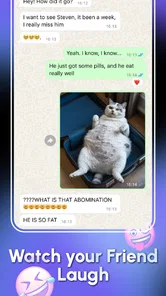
For an everyday example, imagine wanting to send a friend a funny clip for their birthday. Mitu AI makes sense if the goal is a quick, obviously playful surprise—not a polished montage with exact timing, captions, and carefully arranged footage. I’d keep the premise harmless, review the result before sharing, and add a clear message that it is a joke if there is any chance someone could take it literally.
Know whether you want a gag or an editing workspace
The distinction between a prank generator and a general video editor is useful. Traditional editors are better suited to combining your own clips, trimming exact moments, adjusting sound, and building a deliberate sequence. Mitu AI is more relevant when the idea itself is the main attraction and you want the app to help turn it into a funny video.
More From Our News Desk

 Gmail
GmailGmail in a Busy Inbox: Who Benefits Most?
From first account to crowded workday, Gmail earns its place through dependable search and flexible sorting—but its best fit depends on how much inbox maintenance you can tolerate.

 Prime Video
Switching to Prime Video: What Changes in Your Viewing Routine
Prime Video can make a compelling second home for streaming, but switching means learning a different catalog, rental layer, and route from browsing to playback.

 Universal TV Remote Control
Universal TV Remote Control Works Best as a Reliable Backup
A phone remote earns its place through quick setup and reliable habits. Here is how to get more from Universal TV Remote Control—and where its limits show.

 Weather - By Xiaomi
Weather by Xiaomi Review: Clear at a Glance, Less Clear Up Close
Xiaomi’s weather app makes everyday forecasts quick to scan, but its calm surface can leave useful details and recovery paths harder to find than they should be.

 X
XX Under Pressure: Can It Recover When Posting Goes Wrong?
A resilience-focused review of X, examining setup, mistaken posts, interruptions, weak connections, and the gaps that matter when recovery needs to be dependable.

 Clash of Clans
Clash of Clans Is Won Between the Battles
Its raids are quick; its community is a long-term project of coordination, teaching, rivalry, and shared responsibility—with all the friction that entails.
Latest News



That trade-off is the first thing I’d keep in mind. A fast, guided creation flow can save effort, but it may not give the same control as an editor designed for hands-on assembly. If you already know exactly how every shot should look, the usual editing tools are likely to feel more dependable. If you only have a joke and want to see it become a clip, this app is closer to the task.
Where Mitu AI earns its place
The strongest case for Mitu AI is a spontaneous idea that benefits from being a video and doesn’t need a long editing session. I’d use that convenience for low-stakes sharing, while treating the generated result as a draft to judge rather than an automatic punchline. The next question is whether that quick, playful workflow is a better fit than a more hands-on option.
A low-friction option for spontaneous ideas
The appeal here is not that it replaces every creative tool on your phone. It is that a small idea can be enough to get started. I can picture using it during a quiet moment with friends: someone suggests a harmless visual gag, and instead of opening a full editor and sorting through footage, the group can try shaping that idea into a short prank video.
That makes it most suitable for casual creators, people who enjoy sharing jokes, and anyone curious about AI-generated video without committing to a demanding production workflow. The app’s store description emphasizes quick, easy creation, but I’d still treat that as an invitation to experiment rather than a promise that every attempt will land perfectly. Humor is subjective, and generated results may need a second look before they’re ready to send.
Use the premise as your main creative control
A practical way to get more from a focused generator is to make the joke specific before you start. Instead of beginning with a vague request to make something funny, decide what the setup is, who the intended audience is, and what makes the situation amusing. A clear premise gives you a better basis for judging whether the result matches your intention—even if the app handles much of the video creation.
I’d also keep the first attempt deliberately simple. One recognizable joke is easier to evaluate than a clip trying to combine several unrelated ideas. If the result feels off, change the premise rather than spending a long time trying to rescue it with edits the app may not be designed to provide. This is a useful distinction from a conventional editor: the creative work is largely in choosing the idea, not in tuning every cut.
Review the clip as if you were seeing it cold
Before sharing, watch the video once without explaining the joke to yourself. Is the humorous intent clear? Could someone read it as a real claim or an embarrassing moment? Would the person shown be comfortable with it? That quick check is especially valuable when an AI-generated prank relies on a realistic-looking situation. The best outcome is a laugh, not confusion or a message from someone who thinks something genuinely happened.
This also helps decide whether a generated clip is worth keeping. If it only works after a long explanation, it may be better to try a simpler premise or use a different format, such as a captioned image or a short clip you assemble yourself. Mitu AI’s focus is video, but video is not automatically the right medium for every joke.
Check the value before buying anything
The app is free to download, while optional in-app purchases range from $2.99 to $149.99 per item. That is a wide span, so I would not assume that every useful creation requires payment—or that any particular purchase is necessary. I’d try the free experience first, see how often I genuinely use it, and only then consider whether a paid option solves a limitation I have actually encountered.
For someone who makes one birthday gag and then forgets about the app, paying for extras may not make sense. A frequent creator who returns to it for different social occasions may judge that differently. The key is to connect spending to a real habit, not to buy in the hope that a purchase will automatically make the jokes funnier or the results more suited to a specific audience.
A small workflow change that can save a wasted attempt
I’d settle the sharing context before making the clip: private message, close-friends post, or a broader audience. That choice affects how obvious the joke needs to be. A gag sent directly to someone who knows your humor may need less explanation than one that could be encountered by strangers. If the concept depends on someone believing a false claim, I’d rewrite it so the humor is apparent without requiring that belief.
I’d also keep a short note of the premise that worked, rather than just saving the finished video. If I want to make another clip for a similar occasion, remembering the setup helps me adapt the idea without repeating the same joke. This is a simple way to make a casual tool more useful while keeping the focus on the comic concept rather than on endless trial and error.
When another kind of app is the better fit
When the joke depends on exact timing, real footage, or a single still image, I’d consider a different kind of creative app before committing to video. Matching the tool to the punchline can spare you from rebuilding a clip later, and it also helps keep a prank understandable to its intended audience. That trade-off matters more than choosing the most elaborate format.
Choose a conventional editor for precise results
If your priority is exact timing, a particular soundtrack, carefully placed text, or a sequence made from your own footage, I’d reach for a general video editor. Those tools are usually a better match for projects where each detail matters and the creator wants to control the assembly. Mitu AI’s more focused prank-video purpose is a strength when speed and a comic premise matter, but it is also a reason not to expect it to serve as an all-purpose editing suite.
There is a switching cost to consider. If you start in a generator and later decide the clip needs extensive reshaping, moving to another tool can mean rebuilding the idea rather than simply making one small adjustment. I’d avoid that detour by deciding early whether the joke is more important than precise execution. For a loose, playful concept, stay with the generator; for a tightly planned video, start in an editor.
Choose a still-image tool when the joke is visual and brief
Some pranks are better as a single image or a short message. If the punchline depends on one visual detail and does not need movement, an image-focused app can be faster and easier to share. Likewise, if the joke depends on a real conversation, a video may add production work without improving it.
I’d use Mitu AI when motion is part of the gag—when the premise benefits from being presented as a video rather than a static picture. If it does not, I wouldn’t force the idea into this format just because the app is available. Choosing the right medium often matters more than generating more variations.
Skip it if your priority is realism or serious communication
This is a playful app, not the tool I’d choose for a factual announcement, a professional presentation, or a video that must be trusted as a record of real events. Even a joke intended for friends can travel beyond its original context. If a clip could affect someone’s reputation or cause real worry, I’d choose a clearly fictional format or leave the prank idea alone.
I’d also skip it if you dislike experimenting with AI-generated results or need dependable control over every element. A generator can be fun precisely because it takes some of the work off your hands, but that can be a poor fit for someone who wants predictable, repeatable production. In that case, a manual editor—or no video tool at all—may be the more satisfying choice.
What to expect when moving between tools
If you do switch to a manual editor, I’d carry over the idea rather than assume the generated clip will be an ideal starting point. Write down the setup, the intended punchline, and what the audience needs to understand; then build the video around those essentials. That keeps the move from feeling like a failed attempt and makes it easier to decide whether a more controlled version is worth the extra work.
The reverse is true too: someone comfortable with editing may find that a generator is useful for a quick throwaway joke, but not for a project they care about polishing. I see these tools as serving different moods, not as competing on one simple scale. The best choice depends on whether I want the app to help invent a comic clip or want to direct every creative decision myself.
Practical details and the decision to keep it
I’d treat the first session as a small trial: make one considerate joke, watch it as if you were the recipient, and decide whether the process is worth repeating before spending anything. Compatibility and optional purchases are practical parts of that decision, but the real test is whether the result suits your sense of humor and sharing habits. From there, keeping the app—or moving to another tool—is a straightforward choice.
What the audience and platform details tell me
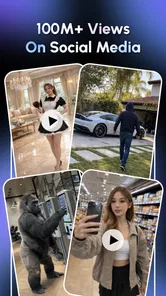
Mitu AI is free to install and is rated for Everyone, so it is positioned as an accessible app rather than one intended only for adult creators. Its popularity is reflected in a 4.7 average from around 14,000 ratings, with more than a million installs. Those figures suggest that plenty of people have tried it, but they cannot tell me whether its particular style of humor will suit my friends or whether I’ll enjoy making more than one clip.
It was released on December 3, 2025, and the current version is 2.7.1. It supports Android 7.0 and later. I’d use those details as a basic compatibility check, then judge the app by my own workflow: can I make something I’m happy to share, and does the process feel worth repeating?
Keep the first session small
My suggested first test is one low-stakes idea, not a complicated project. Think of a friend who enjoys silly surprises, settle on a joke that does not embarrass or mislead them, and see whether the finished clip communicates that tone. Then decide whether the app saved enough effort to become useful for future occasions.
If the result is funny but needs a small finishing touch, consider whether that touch is essential or whether the clip already works as a casual message. If it needs extensive repairs, that is a strong sign that a manual editor would suit the project better. This simple test prevents a common mismatch: expecting a specialized generator to behave like a full production app.
My recommendation
I’d recommend Mitu AI: Prank Video Generator to people who want an easy way to experiment with humorous AI video and understand that the best results depend on a clear, considerate idea. Its strongest case is a spontaneous, low-pressure gag for friends or social sharing—not a polished video that needs exact creative control.
With its 4.7 average rating and more than a million installs, it has clearly found an audience, but I’d still let the first few creations decide whether it belongs on your phone. Try it if playful video is what you’re after; choose an editor for precision, an image app for a still punchline, and another format entirely when the joke could be misunderstood. For quick, harmless comic experiments, I think it is worth a try, as long as you review each clip before sharing and treat optional purchases as something to consider only after the free experience proves useful.
Mitu AI: Prank Video Generator Frequently Asked Questions
What is Mitu AI: Prank Video Generator?
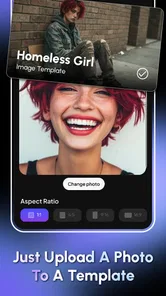
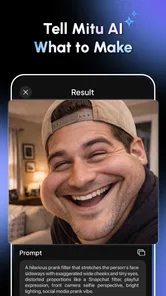
Mitu AI: Prank Video Generator is an entertainment app designed to create playful, AI-assisted prank videos. Depending on the options available in your version, you may be able to select or upload an image, choose a video effect or template, and generate a clip intended for sharing. Results can vary with the input and processing, so treat the output as a novelty rather than a realistic recording.
How do you make a prank video with Mitu AI?
The general workflow is to open the app, choose a creation tool or template, provide the requested photo or other input, and follow the on-screen steps to generate a video. Available features and controls may differ by app version, device, or region. Review your selections before processing, and check the finished clip before sharing, since automated effects may not look exactly as expected.
Is Mitu AI: Prank Video Generator free to use?
The app may be available to download without an upfront charge, but that does not necessarily mean every feature is free. Some versions of apps in this category use subscriptions, in-app purchases, usage limits, or paid access to particular effects. Check the current listing and the payment details shown inside the app before starting a trial or confirming a purchase; prices and terms can change.
Does Mitu AI require access to photos or personal information?
Creating a video may require permission to select or upload images, and certain features may need an internet connection to process content. Grant only the permissions needed for the task, and review the app’s privacy policy and store listing for details about how uploads, generated videos, and account information are handled. Avoid submitting sensitive images, especially images of other people without their permission.
Can I share Mitu AI prank videos, and should I tell viewers they are AI-generated?
You can generally save or share generated clips using the options offered by the app, though exact export features can vary. Because an AI-made prank may be mistaken for genuine footage, make the joke clear and label the video as AI-generated when sharing it. Get consent before using someone else’s image, and avoid misleading, humiliating, or harmful content that could cause distress.
Pros
- Quickly turns a photo into a short prank-style video.
- A simple workflow makes it approachable for first-time users.
- AI-generated clips can add novelty to chats and social posts.
- Useful for creating lighthearted content without video-editing skills.
- Short-form results are easy to share on mobile platforms.
Cons
- Results may look unrealistic
- depending on the source photo and prompt.
- Some features or generations may require payment or credits.
- Processing speed can vary with network conditions and server demand.
- Uploading personal photos raises privacy considerations.
- Generated videos may need trimming or review before sharing.













