

Designest: AI Home Design
- 40.00
- 3.7
- Installs
- 100.00K
- Price
- Free

Screenshots
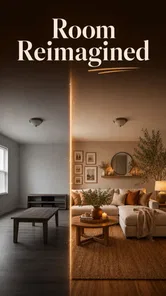



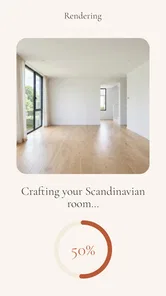
Analysis by Reviewed
I judge a home-design app not just by how appealing its ideas look, but by whether I can make sense of them, use them comfortably, and turn them into decisions that work in my actual home. Designest: AI Home Design is aimed at people exploring layouts and renovation possibilities, and its strongest promise is a lower-friction way to imagine a room before committing time or money. My view is that it can be a useful starting point for visual brainstorming, especially when a blank page makes planning feel difficult. It is not a substitute for measured drawings, a contractor’s advice, or a design tool that gives precise control over every detail.
Making sense of a home-design workflow
Before I judge any AI-generated room idea, I first decide what problem I want it to help me think through: circulation, storage, or the feel of the space. That gives me a steadier way to compare concepts instead of being swayed by attractive details alone. I’ll look next at how readable and navigable the workflow feels, especially when planning on a small screen.
Readable ideas, with a practical next step
Designest is a free house-and-home app from Astronex. Its focus is using AI to help users explore home design, layouts, and renovation ideas. That emphasis makes it different from a conventional decorating gallery: rather than only browsing finished rooms, I would approach it as a way to turn a rough idea into something visual enough to discuss and refine.
That distinction matters for readability in the broader sense. A visual concept can be easier to understand than a page of interior-design terminology, particularly if you are new to planning a room. But an attractive image is not automatically an intelligible plan. I recommend treating each result as a prompt for questions: Where would the furniture go? Can a person pass through comfortably? Does the idea account for doors, windows, storage, and the things already in the room?
The app’s current version is 1.2.0, and it has an average rating of 3.7 from around 1,600 ratings. I would read that as a reason to set measured expectations rather than a verdict that settles whether it will suit you. AI design tools can be appealing when they produce a direction quickly, yet users may differ considerably in how much editing control, consistency, and practical accuracy they expect.
For a first session, I would choose one specific question instead of asking the app to solve an entire home. For example, decide whether a small living room should feel calmer, provide more storage, or make room for a desk. Keeping the goal narrow makes it easier to judge whether a generated concept actually helps. It also reduces the risk of being distracted by decorative changes that look dramatic but do not solve the problem you started with.
Small-screen interaction and sensory comfort
Design work is visually demanding, so the way a person uses the app matters as much as the concept itself. On a phone, comparing a room image with real furniture or checking subtle differences in color can take more effort than doing the same work on a larger display. I would use Designest for quick exploration on mobile, then review promising ideas on a larger screen or alongside photos and measurements if that option is available to me outside the app.
More From Our News Desk

 Gmail
GmailGmail in a Busy Inbox: Who Benefits Most?
From first account to crowded workday, Gmail earns its place through dependable search and flexible sorting—but its best fit depends on how much inbox maintenance you can tolerate.

 Prime Video
Switching to Prime Video: What Changes in Your Viewing Routine
Prime Video can make a compelling second home for streaming, but switching means learning a different catalog, rental layer, and route from browsing to playback.

 Universal TV Remote Control
Universal TV Remote Control Works Best as a Reliable Backup
A phone remote earns its place through quick setup and reliable habits. Here is how to get more from Universal TV Remote Control—and where its limits show.

 Weather - By Xiaomi
Weather by Xiaomi Review: Clear at a Glance, Less Clear Up Close
Xiaomi’s weather app makes everyday forecasts quick to scan, but its calm surface can leave useful details and recovery paths harder to find than they should be.

 X
XX Under Pressure: Can It Recover When Posting Goes Wrong?
A resilience-focused review of X, examining setup, mistaken posts, interruptions, weak connections, and the gaps that matter when recovery needs to be dependable.

 Clash of Clans
Clash of Clans Is Won Between the Battles
Its raids are quick; its community is a long-term project of coordination, teaching, rivalry, and shared responsibility—with all the friction that entails.
Latest News



For people who find dense interfaces tiring, a useful strategy is to work in short, deliberate passes. First decide on the room’s purpose; next consider its layout; only then focus on style. This is not a special feature claim about Designest, but a practical way to keep AI-generated suggestions from becoming an overwhelming stream of choices. If visual comparison is difficult, describing the decision aloud or asking another person to help evaluate two options can make the process more manageable.
Motor comfort can also shape whether an app is a good fit. Home planning often involves repeated adjustments, and small touch targets or precise gestures can be frustrating for someone with limited dexterity. I would test the basic workflow before investing a lot of time: can you enter an idea, review the result, and make whatever changes are available without struggling? If controlling a design on a phone feels uncomfortable, a tablet, a different input method supported by your device, or a desktop planning program may be a better choice.
Sensory preferences deserve attention too. A realistic-looking room may be inspiring to one person and visually busy to another. I find it helpful to assess the underlying arrangement separately from the styling: ignore the accessories for a moment and ask whether the layout, circulation, and storage concept are useful. That simple mental filter can make a highly decorative result easier to evaluate without mistaking visual richness for practical quality.
Using it when the room is not ideal
A realistic everyday use is planning a rented apartment before buying furniture. You might be moving into a room with awkward proportions and want to think through whether a compact desk can fit without blocking the route to a window or doorway. I would use Designest to explore possible directions, then verify every important dimension with a tape measure. The useful outcome is not “the AI says this will fit”; it is a clearer shortlist of arrangements to test in the real room.
The same approach can help a household preparing for a conversation with a partner, family member, or tradesperson. Instead of trying to explain an abstract preference such as “warmer but less cluttered,” you can use a visual concept as a discussion aid. Make a note of what you like and what you would change: perhaps the calmer palette works, while the proposed storage would be inconvenient. That turns a generated image into a communication tool rather than a final instruction.
Designest may also be useful when physical access needs are part of a renovation conversation. A person who uses a mobility aid, has limited reach, or needs clearer walking routes can use design concepts to identify questions early: Is there enough turning space? Are frequently used items within reach? Would a furniture arrangement narrow the path? I would not rely on an AI image to establish that a room meets someone’s needs. Use it to prompt the conversation, then check the space with the person who will use it and, where appropriate, a qualified professional.
Situational access is broader than disability. If you are planning between work shifts, looking after children, or dealing with limited time, the appeal is being able to explore an idea without beginning with a full design brief. A short session focused on one room can be more realistic than trying to map out a whole renovation at once. On the other hand, if you need exact plans for a builder on a tight deadline, a brainstorming tool is unlikely to be enough on its own.
Where AI suggestions need human checks
The main trade-off is the gap between inspiration and implementation. A convincing room concept can still overlook the practical constraints that determine whether a renovation is possible: actual measurements, structural features, plumbing, electrical work, local requirements, and the cost of materials. I would not use a generated image as a construction plan or assume that a visually plausible arrangement accounts for safety and building rules.
There is also a question of control. People who want to adjust every object, compare exact product dimensions, or keep a highly consistent plan may find a specialist interior-design or floor-planning tool more suitable. Those programs can demand more setup, but their measured approach is often a better match when precision matters. A mood-board app may be preferable if your main need is collecting references rather than generating a room concept.
Cost is worth keeping in view before building a routine around the app. Designest is free to download, with in-app purchases priced from $4.99 to $14.99 per item. I would begin by seeing whether the free experience answers your actual question, then consider a purchase only if you understand what it adds and expect to use it. That is especially sensible for casual decorators who may only need inspiration for one room.
The app is rated for Everyone, and its minimum operating-system requirement is version 8.0. Those details help with basic compatibility and age suitability, but they do not by themselves tell me how comfortable the interface will be for a particular person. Someone choosing an app for a child or a family member who needs a specific kind of access should try the interaction directly rather than infer usability from the age rating.
Who should try it, and who should look elsewhere
I would recommend Designest to renters, first-time decorators, and homeowners who have a fuzzy idea but need a visual starting point. It is particularly appealing if you want to compare broad directions before shopping or talking through a room change with someone else. The app has reached over 100,000 installs, so it has found an audience, though popularity is not a guarantee that its workflow will match your personal needs.
I would be more cautious if you need a highly controlled design process, have to meet precise accessibility dimensions, or are already coordinating a complex renovation. In those cases, use a measured floor-plan tool, professional advice, or both. If your priority is a low-stimulation interface or reliable operation without repeated touch adjustments, test Designest before making it your main planning method. The best alternative depends on the task: a visual inspiration board for style, a floor planner for measurements, and a professional for technical decisions.
One helpful workflow is to keep a small decision log outside the app. Write down the room’s dimensions, fixed obstacles, and the two or three things the redesign must improve. After exploring ideas, record which parts are worth keeping and what needs checking in person. This prevents a polished-looking concept from quietly replacing the original requirements, and it gives you something concrete to bring to a household discussion or design appointment.
A thoughtful starting point, not the final authority
My overall impression is that Designest works best as a bridge between “I know this room could be better” and “Here are a few directions I can evaluate.” I like that its home-design focus gives people a way to think visually, particularly when they are not confident drawing a layout from scratch. I also think the app is easiest to use well when the user brings clear constraints and remains willing to question the output.
For inclusive planning, that distinction is important. A generated concept can help people articulate preferences and notice possible layout issues, but it cannot stand in for asking the room’s occupants what works for them or checking dimensions against their needs. If accessibility, safety, or construction accuracy is central, involve the relevant person or professional and treat the app as one conversation aid among several.
Designest is worth trying if you want approachable visual ideas and can separate inspiration from a finished plan. I would skip it as a sole solution for exact renovation drawings or dependable access specifications. Used with measured checks, a focused brief, and a willingness to revise, it can make the early stage of home planning feel less abstract without pretending that an AI image has the last word.
Designest: AI Home Design Frequently Asked Questions
What is Designest: AI Home Design, and what can I use it for?
Designest: AI Home Design is intended to help you explore interior design ideas using AI-generated concepts. Depending on the features available in your version, you may be able to provide a room photo or design preferences and receive visual suggestions in different styles. It can be useful for inspiration and early planning, but generated images are best treated as concepts rather than construction-ready plans or guaranteed representations of real products.
How do I create a design, and do I need a room photo?
The usual workflow in an AI home-design app is to select a room or design style, then either upload a photo or enter relevant preferences before requesting a result. The exact options in Designest may vary by app version, device, or subscription. If you choose to upload a photo, use a clear, well-lit image that shows the room layout; avoid including people, documents, or other personal details you do not want processed.
Is Designest: AI Home Design free to download and use?
The app may be available to download without an upfront purchase, while some features, generations, styles, or other usage may require payment or a subscription. Check the current store listing and the in-app purchase screen before starting a trial or confirming a purchase, since prices, limits, and terms can change. Also review trial renewal and cancellation details through your Apple App Store or Google Play account to avoid unexpected charges.
Can I rely on Designest’s AI designs when renovating or buying furniture?
Use the results as visual inspiration, not as professional architectural, engineering, or interior-design advice. AI images may alter room dimensions, windows, fixtures, colors, or furniture proportions, and they may depict items that are unavailable or do not fit your space. Before spending money or beginning renovation work, measure the room, verify product dimensions and materials, and consult qualified professionals when safety, building rules, or structural changes are involved.
What should I know about privacy before uploading room photos?
A room image can reveal personal information, such as belongings, layout, or identifying details, so review Designest’s current privacy policy and permissions before uploading. Check how images and account information are collected, processed, stored, and potentially shared, and whether you can delete submitted content. Avoid photographing people, valuable documents, addresses, or anything sensitive. Privacy practices can change, so consult the app’s listing and policy for the latest information.
Pros
- Quickly visualizes room makeovers without hiring a designer.
- Useful for exploring different styles and color schemes.
- AI-generated concepts can spark ideas for a renovation.
- Simple workflow makes it approachable for first-time users.
- Can help communicate a design vision before buying furniture.
Cons
- Generated layouts may not reflect exact room dimensions.
- Results can vary in quality depending on the uploaded photo.
- Some features or designs may require a paid plan.
- AI suggestions may include impractical furniture or decor.
- An internet connection is needed for AI processing.









