

Artvilize: AI Video Generator
- 32.00
- 4.8
- Installs
- 1.00M
- Price
- Free

Screenshots
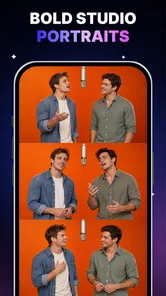
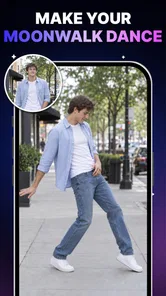

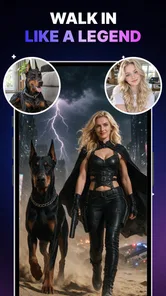

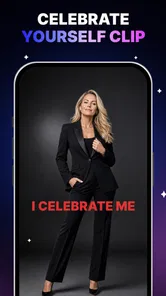


Analysis by Reviewed
The most interesting thing about Artvilize: AI Video Generator is the way it treats a still image as a starting point rather than a finished post. I find that idea useful for the photos that feel too static to share but are not quite strong enough to justify a full video edit. The app is a photography tool from Astronex, and its focus is quick transformations: a photo can become a video, an AI dance, or a collage. That makes it less of an all-purpose editor and more of a shortcut for giving one image a new role.
Why a single image can be enough
That single-image approach also makes the app easy to fit around a busy day. I do not need to plan a shoot or remember to record several clips; I can look through photos I already have and decide whether one would work better with a different presentation. For people who often take pictures but rarely make videos, this is a practical bridge between the two habits.
I would still be selective about what I share. A photo with a clear subject and a recognizable expression gives the transformation something to preserve. When the image is mainly about a specific detail, like a small object in the corner or a carefully composed background, adding movement may pull attention in the wrong direction. The useful question is not simply whether the app can animate a photo, but whether animation helps someone notice what mattered in it.
Turning one photo into something more shareable
In practice, the single-photo approach is the app’s clearest strength. Instead of building a timeline, gathering clips, or arranging a sequence of pictures, I can begin with an image I already have and explore a more animated presentation. This lowers the effort needed to make a post feel different, especially when I have only a few minutes and no appetite for editing.
The difference is not just convenience. A still photo asks the viewer to pause and look; an animated treatment gives the image a sense of movement and makes it feel more suited to a video-oriented feed. That can be a good fit for a portrait, a playful snapshot, or a picture that has a clear subject. It is less compelling when the story depends on several moments unfolding in order: one image cannot provide the context or progression that a carefully edited clip can.
The app’s name signals its AI video focus, but the useful question is what I want the finished piece to do. If I want to give a single picture a more lively, social-media-friendly presentation, this concept makes sense. If I want precise control over cuts, pacing, sound, or a sequence of scenes, I would reach for a conventional video editor instead. Artvilize is appealing precisely when I do not need that much control.
A quick creative workflow, with the photo doing the heavy lifting
The practical workflow starts with choosing a suitable source image. I would look for a clear subject, a face or figure that is easy to distinguish from the background, and a composition that still reads when viewed on a phone. A busy photo with several people, clutter, or an unclear subject may be a weaker starting point for an effect centered on one person. This is a useful selection rule before experimenting: the better the image communicates at a glance, the more likely an animated treatment is to feel intentional.
More From Our News Desk

 Gmail
GmailGmail in a Busy Inbox: Who Benefits Most?
From first account to crowded workday, Gmail earns its place through dependable search and flexible sorting—but its best fit depends on how much inbox maintenance you can tolerate.

 Prime Video
Switching to Prime Video: What Changes in Your Viewing Routine
Prime Video can make a compelling second home for streaming, but switching means learning a different catalog, rental layer, and route from browsing to playback.

 Universal TV Remote Control
Universal TV Remote Control Works Best as a Reliable Backup
A phone remote earns its place through quick setup and reliable habits. Here is how to get more from Universal TV Remote Control—and where its limits show.

 Weather - By Xiaomi
Weather by Xiaomi Review: Clear at a Glance, Less Clear Up Close
Xiaomi’s weather app makes everyday forecasts quick to scan, but its calm surface can leave useful details and recovery paths harder to find than they should be.

 X
XX Under Pressure: Can It Recover When Posting Goes Wrong?
A resilience-focused review of X, examining setup, mistaken posts, interruptions, weak connections, and the gaps that matter when recovery needs to be dependable.

 Clash of Clans
Clash of Clans Is Won Between the Battles
Its raids are quick; its community is a long-term project of coordination, teaching, rivalry, and shared responsibility—with all the friction that entails.
Latest News



From there, the point is to choose the kind of transformation that matches the mood. A video treatment can make a portrait feel more dynamic, while an AI dance treatment suits a deliberately lighthearted post. A collage is a different choice: it presents photos together rather than relying on one image to carry the whole idea. I would not treat those options as interchangeable. Picking the effect first and then finding a photo to fit it can produce a more coherent result than applying the most conspicuous treatment to whatever image happens to be at hand.
For a realistic everyday example, imagine I take a quick picture at a friend’s birthday and want to share something later that evening. A full edit would be overkill, but a single photo could feel a little plain. I could choose a clean shot with one recognizable subject, try a livelier presentation, and keep the result only if it still feels like the moment rather than a distraction from it. That last check matters: an effect should add personality, not obscure the people or expression that made the photo worth sharing.
One practical tip is to keep an unedited copy of the original. It gives me a fallback if the transformation feels too artificial, and it lets me compare whether the extra motion actually improves the image. I would also decide where the result is going before choosing an effect. A playful treatment may be welcome in a casual story but feel out of place in a work profile or a family keepsake. Thinking about the audience first helps prevent a technically interesting result from becoming the wrong kind of post.
Where it fits among photo and video apps
Compared with a standard photo editor, Artvilize is aimed at changing the presentation rather than asking me to fine-tune every detail of an image. A traditional editor is the better choice when I care about careful retouching, color consistency, or making a photo look natural. Compared with a typical video editor, Artvilize starts from a single still instead of asking me to assemble footage and manage a timeline. That distinction is helpful for fast experiments, but it also sets a ceiling on how much control I should expect from this style of tool.
The app sits in an interesting middle ground: it takes a photography input and pushes it toward short-form video culture. For someone who already has photos but rarely records clips, that can be more useful than another editor that assumes a folder full of video. On the other hand, if I already enjoy shaping a story from several clips, an AI transformation of one image may feel like a novelty rather than a replacement for my usual process.
I would use it as a companion to, not a substitute for, a dependable photo library or editing setup. It is well suited to a quick creative variation, while a more conventional tool remains better for work that needs exact timing, a consistent visual style, or a polished narrative. That division of labor keeps expectations realistic and makes the app easier to judge on what it is designed to do.
Limits worth considering before you make it part of your routine
The main tradeoff is that speed and simplicity come at the cost of fine-grained creative direction. Starting with one photo is wonderfully low-friction, but it means the source image carries much of the responsibility. A weak crop, an unclear face, or an awkward pose may not become more engaging just because it moves. I would be selective rather than assuming every picture deserves an animated version.
There is also a taste question. AI effects can draw attention to the technique instead of the person or moment in the photo. That is exactly what some users may want for a humorous post, but it can make a sincere image feel less personal. Before sharing, I would ask whether the transformation strengthens the feeling I want to convey. If the original is touching because of a subtle expression, a conspicuous effect may take away more than it adds.
Artvilize is free to download, with in-app purchases ranging from $9.99 to $38.99 per item. I would start with the free experience and judge whether the available workflow fits my habits before paying for anything. The purchase range is broad enough that I would check the price shown for a specific item and consider how often I would use it; an occasional experiment is a different value proposition from a tool I expect to reach for every week.
As a practical decision, I would not buy into the idea of a one-tap transformation until I had tried it on a few kinds of photos. Portraits, group shots, and images with busy backgrounds can behave very differently in an AI-driven effect. Testing varied examples helps reveal whether the app’s approach suits my camera roll, rather than just one unusually good picture. If I mainly want reliable, natural-looking edits, I would stay with a standard photo editor. If I want hands-on video storytelling, I would choose a timeline-based editor.
Who is most likely to enjoy it?
Artvilize is a strong candidate for casual creators who like sharing photos but want an easy way to make selected images feel more lively. It may also suit someone who wants to try an AI dance treatment for a joke or turn a small set of pictures into a collage without making a larger editing project out of it. The app is aimed at a broad audience: its content rating is Everyone, and its current version is 1.7.3, with Android support beginning at version 7.0.
Its audience figures suggest that it has found a substantial user base: it has over 1 million installs, an average rating of 4.8 from around 5,600 ratings, and 32 written reviews. I would treat that as useful context, not a guarantee that every effect will suit my own images. The number of written reviews is much smaller than the number of ratings, so I would still make my decision by trying the app with the kinds of photos I actually take.
The person who gains most is not necessarily an experienced editor. It is someone who values speed, already has a photo worth sharing, and is open to a more playful or stylized result. A small-business owner might use the idea to make a casual social post feel less static, while a family member could create a lighthearted share from a clear portrait. In both cases, I would keep the transformation aligned with the audience and avoid treating an effect as a substitute for a meaningful image.
By contrast, I would skip it if my priority were exact control, restrained retouching, or a polished sequence built from multiple scenes. It is also not the right answer when I do not have a strong source photo: the app can change how an image is presented, but the user still has to choose a picture with a clear subject and a reason to share it. Those are not flaws so much as boundaries of the one-photo concept.
My recommendation: use it for the right photo, not every photo
My overall view is that Artvilize: AI Video Generator makes the most sense as a fast creative outlet for turning a promising still image into something with a different feel. Its single-photo starting point is the part I would emphasize to a friend: it reduces the work between taking a picture and making a more animated post, without requiring a full video-editing session.
I would keep my expectations focused. It is not a replacement for a careful photo editor or a full video suite, and an effect cannot rescue an image whose subject is hard to read. But if I have a clean portrait, a playful moment, or a few photos that would work well together, it gives me a low-effort way to try another presentation. That makes it worth exploring for casual, image-first sharing, especially when I want a quick result and am comfortable judging whether the AI treatment helps or gets in the way.
A few practical checks before sharing
One question I would keep in mind is whether the result needs to be polished for a particular purpose. For a spontaneous social post, an unexpected or slightly stylized look can be part of the fun. For a product image, a professional profile, or anything where accurate appearance matters, I would choose a more controlled editing route instead. The distinction is not about the app being unsuitable in general; it is about matching an expressive treatment to a context where expression is welcome.
I would also treat the collage option as a way to bring related pictures together, not as a substitute for a story that needs a beginning and an end. A few images from the same outing may make a more coherent set than unrelated favorites pulled from different days. If I am unsure which photo to use, I would first narrow the selection by subject and mood, then decide whether the single-image animation or a collage better serves the post.
For someone deciding whether to keep using it, the most useful test is a small, varied set of personal photos rather than one perfect portrait. Try a straightforward image, a more complicated composition, and a picture intended for a different audience, then judge whether the transformations feel consistent with your taste. That gives a clearer sense of its place in your routine than judging it by the novelty of a single result.
Ultimately, I would recommend Artvilize: AI Video Generator to someone who wants an easy creative detour from ordinary photo sharing, not to someone expecting a complete production studio. Its strongest use is helping a good still image feel fresh without demanding a full editing session. If speed and experimentation matter more than precise control, it is worth trying; if natural edits, detailed adjustments, or a multi-shot narrative are the priority, a conventional tool is the better fit.
Artvilize: AI Video Generator Frequently Asked Questions
What is Artvilize: AI Video Generator?
Artvilize is an AI-powered video creation app designed to turn prompts, images, or other user-provided inputs into short videos. It may be useful for making creative clips, social media content, or visual experiments without editing every frame manually. The exact tools and results can vary by app version, so check the current store listing to confirm which generation options are available on your device.
How do you create a video with Artvilize?
The usual workflow for an AI video generator is to choose a creation tool, enter a text prompt or select an image, adjust any available style or settings, and start generating. Artvilize’s precise screens and options may change between releases, and some features may require an account or credits. Review the app’s on-screen instructions before submitting a prompt, especially if you want to understand generation limits or processing time.
Is Artvilize free to use?
Whether Artvilize can be used for free, and how much content you can create without paying, depends on the current version and its subscription or credit model. Some AI creation apps offer limited free generations while reserving higher usage, premium styles, or faster processing for paid plans. Before subscribing or purchasing credits, check the in-app pricing, renewal terms, and store listing for your region.
Does Artvilize require an internet connection, and can videos take time to generate?
AI video generation commonly relies on online processing, so an internet connection may be needed to submit requests and receive finished clips. Generation time can depend on the complexity of the request, service demand, and the app’s available settings. If a video appears to be taking a while, keep the app updated and follow its status messages; avoid submitting the same request repeatedly unless the app indicates it failed.
What should I know about privacy and sharing videos made with Artvilize?
Before using Artvilize, review its privacy policy and the permissions requested by the app, particularly if you plan to upload personal photos, faces, or other sensitive material. Also check whether generated videos are stored online, how long uploads may be retained, and what sharing or export options are offered. Make sure you have permission to use any images or materials you submit, and check the app’s terms before publishing results.
Pros
- Turns text prompts and photos into short AI-generated videos.
- Offers a quick way to create visual content without editing skills.
- Useful for social posts
- creative experiments
- and concept previews.
- AI effects can give still images more movement and visual interest.
- A mobile-first workflow makes creating and viewing clips convenient.
Cons
- Generated motion may look unnatural or inconsistent.
- Results can differ from the prompt and may need several attempts.
- Video length and creative controls may be limited.
- Processing times can vary depending on the effect and demand.
- Check subscription terms and usage limits before relying on paid features.











