

Lurnia: AI Language Tutor
- 7.00
- 4.7
- Installs
- 1.00M
- Price
- Free

Screenshots





Analysis by Reviewed
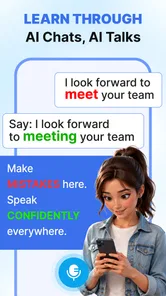
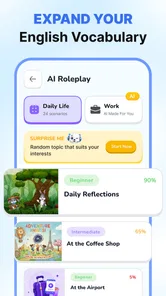
I look for language tools that make it easier to practise saying something out loud, not just recognise a word on a screen. Lurnia: AI Language Tutor is an education app from Astronex built around AI speaking practice for conversational use. That focus gives it a clear appeal: it is aimed at learners who want to get more comfortable producing spoken language, especially when they do not have a conversation partner ready. My main reservation is that a promise of speaking practice does not, by itself, tell you how well an app handles the details that make practice genuinely useful—such as feedback, level fit, and the range of situations it can support.
Cost, practice, and the real trade-offs
I find the most useful way to judge Lurnia is to treat speaking practice as a bridge between studying alone and talking with another person. In this section, I weigh what its free access and paid options mean in practice, then consider how to test whether the experience is worth keeping in your routine. The key is to make any spending decision depend on a benefit you can actually notice, not simply on the promise of AI.
What the free and paid pricing tells you
Lurnia is free to download and use, with in-app purchases listed from $2.49 to $84.99 per item. That range matters more than a simple “free” label: there is a no-cost way to get started, but some purchases can represent a substantial step up in spending. I would treat the free access as a chance to judge whether speaking with an AI tutor suits your habits before paying for anything.
The listed prices establish the possible cost of purchases, but they do not explain what each item includes or whether a particular purchase is recurring or one-time. So I would check the exact purchase description in the app before confirming anything. If you are comparing language apps on price, avoid assuming that the lowest listed item unlocks the same experience as the highest one, or that a larger purchase necessarily offers better value. The useful question is whether the specific option you are considering gives you enough practice to justify its cost.
That distinction is especially important for a speaking-focused product. A learner who only wants occasional rehearsal may get what they need from the free starting point, while someone planning regular practice should first see whether the available purchase fits their budget and intended use. I would not commit to a higher-priced option simply because the app’s AI angle sounds appealing; try the experience and decide whether it actually helps you speak more confidently.
Where the app’s value may show up
The strongest potential value here is the low-pressure setting. Speaking a new language can feel exposing, even when the other person is patient. An AI tutor offers a way to begin forming answers without the social pressure of a live exchange. That can be useful for a beginner who knows basic words but freezes when asked to respond, or for an intermediate learner who reads comfortably but rarely speaks.
I would use a tool like this with a specific goal rather than opening it and hoping to “get better” in the abstract. Before a short practice session, choose one everyday task—introducing yourself, asking for directions, or explaining what you need at a shop—and focus on completing that exchange. Afterward, note the phrase or moment that slowed you down. That small routine turns conversational practice into something you can carry into a real conversation, instead of treating each session as disconnected repetition.
More From Our News Desk

 Gmail
GmailGmail in a Busy Inbox: Who Benefits Most?
From first account to crowded workday, Gmail earns its place through dependable search and flexible sorting—but its best fit depends on how much inbox maintenance you can tolerate.

 Prime Video
Switching to Prime Video: What Changes in Your Viewing Routine
Prime Video can make a compelling second home for streaming, but switching means learning a different catalog, rental layer, and route from browsing to playback.

 Universal TV Remote Control
Universal TV Remote Control Works Best as a Reliable Backup
A phone remote earns its place through quick setup and reliable habits. Here is how to get more from Universal TV Remote Control—and where its limits show.

 Weather - By Xiaomi
Weather by Xiaomi Review: Clear at a Glance, Less Clear Up Close
Xiaomi’s weather app makes everyday forecasts quick to scan, but its calm surface can leave useful details and recovery paths harder to find than they should be.

 X
XX Under Pressure: Can It Recover When Posting Goes Wrong?
A resilience-focused review of X, examining setup, mistaken posts, interruptions, weak connections, and the gaps that matter when recovery needs to be dependable.

 Clash of Clans
Clash of Clans Is Won Between the Battles
Its raids are quick; its community is a long-term project of coordination, teaching, rivalry, and shared responsibility—with all the friction that entails.
Latest News



Another useful approach is to rehearse before a predictable event. If you have a call, trip, appointment, or meeting coming up, practise the kinds of questions you expect to hear and the answers you may need to give. The benefit is not memorising a perfect script; it is getting used to retrieving words aloud under a little pressure. This is a more practical use of AI speaking practice than spending a session reciting phrases you already know.
It can also help to separate fluency practice from accuracy work. In one session, try to keep a conversation moving even if your sentence is imperfect. In another, slow down and pay attention to the words you repeatedly struggle to retrieve. If the app’s interaction encourages you to answer aloud, that distinction can help you notice whether your main problem is hesitation, vocabulary, or sentence construction. I would still use a grammar reference or structured course when I need a clear explanation of a rule; conversation practice and instruction solve different problems.
Limits to consider before spending
AI conversation practice is not the same as speaking with a person. A human partner can bring personal reactions, cultural context, and the unpredictability of a genuine exchange. Lurnia’s stated focus makes it relevant as a rehearsal tool, but I would not treat it as a replacement for conversation groups, tutors, or everyday contact with speakers. If your goal is to understand varied accents or manage interruptions and misunderstandings, real human practice remains important.
There is also a difference between talking and learning from what you said. The app’s broad purpose is clear, but the short description does not establish the exact depth or style of correction available. That makes it sensible to judge the feedback during your own use: does it help you understand what to improve, or does it leave you guessing? If you need detailed explanations of grammar, pronunciation, or why a phrase sounds unnatural, compare that experience with a course or tutor designed to teach those points explicitly.
For learners who prefer a fixed curriculum, a speaking-first format may feel less reassuring than lessons with a visible sequence and defined milestones. Likewise, if you are looking for vocabulary drills, grammar exercises, or a reference dictionary as your primary tool, a dedicated resource may be a better match. Lurnia is most compelling when the missing piece in your routine is the chance to produce spoken language, not when you need every part of language study in one place.
There is a practical trade-off in using an AI tutor as well: it can make practice convenient, but convenience does not automatically create a habit. I would keep sessions short enough to repeat and attach them to an existing routine, such as a break or the time before an appointment. If you find yourself opening the app without a purpose and leaving without remembering what you practised, set a simple target beforehand. A clear task is more useful than a long, unfocused session.
Who is most likely to get value
I would consider Lurnia if you already have some interest in a language and want a less intimidating way to practise speaking. It may suit someone studying independently who can recognise phrases but needs a prompt to answer aloud, or a traveller who wants to rehearse likely situations before leaving. It could also work as a supplement for a learner taking classes: use it to practise speaking between lessons, then bring recurring questions back to a teacher.
A realistic routine might be a few minutes before a work call in another language. You could practise a greeting, explain the reason for the call, and prepare a polite way to ask someone to repeat a point. The goal is not to predict every line of the conversation. It is to reduce the shock of having to speak by saying a few relevant phrases aloud in advance. This kind of focused rehearsal is where an AI conversation tool can be more immediately useful than another round of silent reading.
I would be more cautious if you are a complete beginner who needs careful, step-by-step explanations before attempting conversation, or if you are preparing for a formal exam with a specific syllabus. In those situations, a structured course, textbook, or teacher may provide a clearer route. Lurnia might still be an additional practice option, but I would not make it the sole resource unless its actual lessons meet your needs.
It is also not the obvious choice for a learner who already has frequent access to supportive speakers and mainly wants detailed correction. A human tutor can adapt to your personal goals and explain a mistake in context. Conversely, if embarrassment or lack of opportunity is what keeps you from practising, an AI-led setting may be a useful first step before you move into live conversation. The right choice depends less on whether AI sounds modern and more on what is currently missing from your learning routine.
Availability and day-to-day fit
The app has an average rating of 4.7 from around 1.4 thousand ratings, and it has passed 1 million installs. Those figures suggest that many people have chosen to try it, but they cannot tell me whether its teaching style will suit an individual learner. I would use them as background context, not as a substitute for checking whether the speaking experience, feedback, and purchase options make sense for my own goals.
Lurnia is rated for Everyone, runs on Android 7.0 or later, and its current version is 1.4.0. That makes the minimum Android requirement a straightforward compatibility check before downloading. The app was released on June 17, 2026, so I would also make my decision based on the version currently available and how it behaves on my device, rather than assuming that a feature or interface I have heard about elsewhere is present here.
One helpful way to evaluate it is to give the free experience a fair but bounded trial. Pick two or three real situations you expect to face, practise each one, and then ask yourself whether you can produce an answer more readily than before. If you cannot identify a useful improvement—or if the interaction does not give you feedback you can act on—there is little reason to pay just because the app is designed around AI. That test is more informative than judging it by a brief first impression.
For learners comparing it with familiar alternatives, the distinction is straightforward: many language apps centre their appeal on lessons, vocabulary, or grammar, while Lurnia’s stated emphasis is practising spoken exchanges with AI. Those tools can complement one another, but they are not interchangeable. I would pair Lurnia with a structured resource if I needed a learning path, and with human conversation if I needed spontaneous, socially grounded practice. It is the speaking gap between those two activities that gives this app its clearest role.
My buy-or-skip verdict
I would try Lurnia: AI Language Tutor if I wanted to speak more often but lacked an easy, low-pressure way to rehearse. Its free access makes it possible to test whether AI conversation practice fits before considering purchases, while the listed in-app prices mean I would inspect the exact offer carefully before spending. For a learner who needs confidence and a practical prompt to answer aloud, that combination could be worthwhile.
I would skip it as a primary learning tool if I needed a guaranteed curriculum, detailed instruction, or the full unpredictability of human conversation. I would also hold off on a paid purchase until I had tested whether the experience addresses my particular weakness. My recommendation is deliberately conditional: use it as a focused speaking companion, not as a promise that one app can handle every part of learning a language. If it helps you move from knowing what you want to say to actually saying it, it has a useful place in your routine; if not, a course, tutor, or live exchange is likely a better investment.
A practical way to test whether it fits
Before deciding that the app is either a keeper or a poor fit, I would run a small personal test rather than judge it by how engaging the first interaction feels. Choose a situation that matters to you, such as making a simple request or explaining a problem, and try to answer without writing a script first. Then repeat the same kind of exchange later and notice whether you can begin more quickly or recover when a word escapes you. That is a more useful measure of progress than simply counting how long you spent practising.
I would also keep a short note outside the session with two things: the phrase I could not produce and the question I still have about it. The first gives the next practice session a concrete target; the second tells me whether I need a dictionary, grammar explanation, teacher, or human conversation partner. This division prevents an AI speaking tool from being asked to solve every learning problem, while still making the practice more connected from one day to the next.
How it sits beside other learning options
Compared with a conventional lesson-based language app, the appeal here is not necessarily a more complete course but an opportunity to practise forming spoken responses. A lesson sequence can be the better choice when you need foundations introduced in order, while flashcards are useful when a specific vocabulary gap keeps blocking you. Neither substitutes neatly for saying an answer aloud, so I would choose based on the bottleneck rather than trying to crown one format as universally best.
Compared with a tutor or language exchange, AI practice is most useful as a bridge: it can help you prepare what you want to try before another person is involved. But a prepared exchange should eventually lead to less predictable practice if your goal is real-world confidence. I would use Lurnia to warm up, then take one of the phrases that worked into a conversation with a person. If you already have plenty of accessible speaking partners, spend more of your effort with them; if you do not, this kind of rehearsal may make that first live exchange feel more manageable.
When I would move on
I would stop relying on the app if sessions repeatedly left me unsure what to improve, or if I kept rehearsing the same comfortable exchanges without becoming more capable in the situations I actually face. That would not make the practice useless; it would simply mean the next step should address a different need. A teacher can explain persistent errors, a course can supply a clearer sequence, and a conversation partner can expose me to natural variation and follow-up questions.
For someone deciding whether to spend, the important question is therefore not whether AI practice sounds convenient, but whether the free use demonstrates a change that matters to them. If it helps you start speaking sooner, gives you a worthwhile rehearsal space, and fits your budget, a purchase may be reasonable after checking its exact terms. If the main benefit remains vague, I would keep my money and choose a resource with a clearer match for my goal.
Lurnia: AI Language Tutor Frequently Asked Questions
What is Lurnia: AI Language Tutor?
Lurnia: AI Language Tutor is a language-learning app designed to help users study with AI-powered guidance. Depending on the features available in your version, it may offer practice activities, conversational exercises, explanations, or personalized learning support. It is intended as a convenient study companion rather than a guaranteed substitute for a teacher or complete language course. Check the app listing for the languages and learning tools currently supported.
Which languages can I learn with Lurnia?
The languages available in Lurnia can depend on the app version, your device, or changes made by the developer. Before downloading, review the current store listing or the language selector in the app to confirm that your target language is supported. Also check whether the app explains instruction in a language you understand, since this can affect how useful its lessons and AI-generated feedback are for beginners.
Is Lurnia: AI Language Tutor free to use?
The download may be free, but some learning tools or continued access could require a subscription, in-app purchase, or other payment. Pricing and trial conditions can vary by region and may change over time. Before starting a trial, check its duration, renewal price, cancellation deadline, and which features are included. Review the purchase details in the app store so you know what you will be charged.
Does Lurnia help with speaking and conversation practice?
As an AI language tutor, Lurnia is intended to support interactive language study, and conversational practice may be one of the tools offered. The exact experience can depend on the current app version, supported language, and device permissions. If speaking practice matters to you, confirm whether voice input is available, whether pronunciation feedback is provided, and whether you need a microphone or an internet connection to use those features.
Does Lurnia: AI Language Tutor work offline, and what data does it use?
Some parts of a language-learning app may be available offline, while AI-powered conversations, speech features, or lesson syncing may need an internet connection. Availability can vary, so check the app’s description and try its settings before relying on it during travel. Because AI tools may process text or voice input, read Lurnia’s privacy policy and permissions to understand what information is collected and how it is handled.
Pros
- AI conversations offer a low-pressure way to practise speaking.
- Personalized feedback can help identify areas to improve.
- Flexible practice fits short sessions throughout the day.
- Useful for learners who want more speaking practice between lessons.
- A tutor is available whenever you want to study.
Cons
- AI feedback may miss context or nuances in your speech.
- It cannot fully replace conversation with a human teacher.
- Speech practice may be less useful in noisy environments.
- Progress depends on consistent use and self-motivation.
- Some features or usage may require a paid subscription.













