Mint Mobile
- 17.16K
- 4.6
- Installs
- 1.00M
- Price
- Free

Screenshots



Analysis by Reviewed
Mint Mobile is the kind of app I open when I want to manage my wireless service without turning a simple task into a phone call. It is a free tools app from UVNV, Inc., designed around the Mint Mobile experience rather than general phone maintenance. I found it most useful for checking the practical details that matter during everyday mobile use: understanding my account, keeping an eye on service, and handling routine tasks from one place.
That focus is important. This is not a replacement for Android or iOS settings, a speed-test utility, or a general carrier-management tool that works with every provider. It makes sense when Mint Mobile is your carrier and you want a direct route to your wireless account. If you are considering switching, the app also gives you a feel for how much of the service can be handled digitally, although the quality of your experience will still depend on coverage, your plan, and the phone you use.
After spending time with it, my overall impression is positive but practical: Mint Mobile is strongest as a self-service companion, not as a complete solution to every wireless problem. It reduces small bits of account friction, but it cannot fix weak reception or make carrier decisions disappear. That distinction helps set the right expectations before installing it.
How the app feels in its current state
The current release is version 2.3.36, and the app has been available since November 13, 2017. That history matters because this is not a brand-new experiment trying to prove that carrier management belongs on a phone. It has had time to settle into a familiar role: give Mint customers a mobile doorway into their service instead of making them rely entirely on a browser or support channel.
On Android, it requires Android 6.0 or later, which makes it accessible on a broad range of devices. The content rating is Everyone, so there is no age-related barrier for ordinary account use. It is also free to install, which is exactly what I would expect from an app tied to a mobile service rather than a separate paid utility.
The app’s public reception is encouraging. It holds a 4.6 average from around 70 thousand ratings, with roughly 17 thousand written reviews, and it has passed one million installs. Those figures do not guarantee that every customer will have a smooth experience, but they do suggest that the app has become a familiar part of the Mint Mobile setup for a substantial user base.
In day-to-day use, I prefer this sort of focused carrier app to a cluttered dashboard filled with unrelated promotions and technical controls. The value comes from reducing the number of places I need to check. When I am trying to confirm something about my service, the app feels more direct than searching through system menus that were never designed to explain a carrier account.
The first setup is where patience helps
The first useful step is making sure I have the correct account details ready before I begin. Carrier apps often feel effortless after the initial sign-in, but the first session can be slowed by forgotten credentials, an unfamiliar phone number, or confusion between account access and device settings. I recommend completing setup when I am on a stable connection rather than while rushing between networks.
I also keep my phone’s operating system and the app itself reasonably current. That is not because every update transforms the experience, but because account apps depend on secure sign-in flows and changing carrier systems. If the app behaves strangely, I first close it, reopen it, and check whether an update is waiting before assuming the account is broken.
One useful habit is to treat the app as a planning tool, not only an emergency tool. Checking account details before travel, a renewal decision, or a phone change is less stressful than discovering a problem when I am already away from home. This small change in timing is one of the app’s real advantages: it makes routine wireless administration easier to do before it becomes urgent.
What it does better than ordinary phone settings
Android and iOS settings are excellent for controlling the device itself. They show Wi-Fi connections, mobile-data permissions, battery behavior, and SIM-related controls. They do not, however, provide the carrier-specific context that I need when the question is about my Mint service rather than the phone’s hardware.
That is where the app earns its place. Instead of switching between system settings, a browser, and support pages, I can begin with the carrier’s own account environment. The difference is subtle when everything is working, but it becomes valuable when I need to verify service information or make a decision connected to my plan.
Compared with using a mobile browser, the app also feels more intentional. A browser is flexible and useful when I need broader documentation, but it leaves me navigating a website that may not be optimized for the exact task I have in mind. The app keeps the experience closer to the account itself. I would still use a browser for long explanations or troubleshooting articles, but I prefer the app for quick account checks.
What has changed and how that affects users
The clearest confirmed marker of the app’s current evolution is its version 2.3.36 release state. That tells me the product is maintained beyond its original launch, but I would not treat a version number alone as proof that a particular feature has changed. A responsible review should separate what is visible now from what I might hope to see next.
From a user’s perspective, ongoing version updates are most valuable when they make routine actions more reliable. A carrier app does not need dramatic redesigns every few weeks. It needs sign-in to remain dependable, account information to load clearly, and ordinary tasks to avoid unnecessary dead ends. I judge this app more by that quiet consistency than by whether every release introduces something flashy.
For an existing customer, the practical effect of a maintained app is that it remains worth keeping installed. I do not need to rediscover the service through a browser every time I want to check something. The app becomes part of a repeatable workflow: open it, review the relevant account information, take the needed action, and leave.
For a new customer, the current version also matters because it reduces the fear that the mobile-management side of the service has been forgotten. The app’s long availability and continued versioning make it feel like an established companion rather than a temporary download. Still, I would not choose a carrier solely because its app exists. Network performance and plan suitability remain more important than interface convenience.
A realistic everyday scenario
Imagine I am preparing for a weekend trip. Before leaving, I open Mint Mobile to review my account and make sure I understand my current service situation. I then use the phone’s own settings to check which apps are allowed to use mobile data and whether background activity might consume more than I want. This division of labor is important: the Mint app handles the carrier side, while system settings handle the device side.
If something looks wrong, I do not immediately blame the app. I check whether the phone has a signal, whether airplane mode is off, whether another device is having the same issue, and whether my account information is current. The app helps me inspect the service relationship, but it cannot replace basic device troubleshooting or solve a local coverage problem.
That workflow is more useful than simply saying the app is convenient. It shows how I actually get value from it: I use the app to understand the account, then use the operating system to control behavior, and only after those checks decide whether I need support. The result is fewer random changes and a clearer idea of where a problem is occurring.
Who will get the most from it
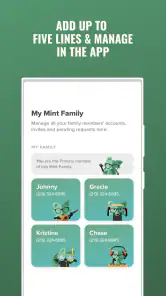
I think the app is a good fit for people who prefer self-service, especially customers who dislike opening a browser for every small account question. It is also helpful for households where one person manages wireless details and wants a straightforward mobile access point rather than a collection of saved pages.
It suits people who regularly review their service before travel, device changes, or renewal decisions. Those users benefit from having a familiar starting point. It can also be useful for someone who is comfortable handling routine account matters independently and only wants support when the issue is genuinely complicated.
On the other hand, I would not recommend making it central to your decision if you are not a Mint Mobile customer. The app’s purpose is narrow, and its usefulness is tied to the carrier relationship. Someone looking for a general cellular diagnostic tool would be better served by the phone’s built-in settings or a dedicated network utility.
I would also be cautious if you expect the app to explain every technical issue in depth. Carrier account tools are designed to help manage service, not to teach radio technology or diagnose every hardware fault. If your main concern is signal mapping, detailed latency testing, or advanced network analysis, another category of app is more appropriate.
Small habits that make the experience smoother
- Use it before a problem becomes urgent. A quick account review before travel or a phone change gives me more time to react if something needs attention.
- Separate account checks from phone checks. I use Mint Mobile for carrier information and Android or iOS settings for permissions, mobile-data limits, and device behavior.
- Keep a browser as a backup. The app is convenient for focused tasks, while a browser may be better when I need longer support explanations or broader account documentation.
- Do not confuse a loaded account with good coverage. If the app opens normally but calls or data are poor, the issue may be location, congestion, the handset, or the network environment.
These habits also reveal a trade-off. The app can simplify the first layer of wireless management, but it does not remove the need to understand the boundaries between a carrier account and a phone. Users who expect one screen to control everything may find that separation frustrating.
The gaps I still notice
The biggest limitation is scope. Mint Mobile is focused on the carrier relationship, so it is not a universal toolkit for mobile connectivity. I cannot rely on it to answer questions that belong to the phone manufacturer, the operating system, local network conditions, or another service provider.
There is also a difference between information access and problem resolution. Seeing account details can clarify what is happening, but clarity does not always produce an immediate fix. If the underlying issue involves reception, device compatibility, a damaged SIM, or a broader service interruption, I may still need a separate troubleshooting path.
Another point is that convenience depends on access. If I have no usable connection, an online account app may be less helpful at exactly the moment I want it. I plan around that by checking important information in advance and keeping essential account details available through ordinary secure methods. I would not treat the app as my only source of information during travel.
The app is also not the best choice for people who rarely manage their own service. If a family member, store representative, or support agent normally handles every wireless task, installing another account tool may not add much. Its value is highest when I actually want control and am willing to spend a minute understanding what I am looking at.
What I would watch in future updates
For future releases, I would pay attention to whether the app continues to make common account tasks clearer rather than simply adding more screens. Better explanations around service status, easier recovery from sign-in problems, and a clean distinction between account information and device troubleshooting would have more value to me than decorative changes.
I would also watch how well the app serves both new and long-time customers. New users need a clear path through setup, while existing users need predictable access to familiar information. Changes that improve one group but make the other hunt through redesigned menus would be a step backward, even if the interface looked newer.
Privacy and account security are another area I consider important for any carrier app. I want sign-in and account actions to feel deliberate, especially when they concern a phone number or service plan. I do not need unnecessary complexity, but I do appreciate clear confirmation before an important change is completed.
Most importantly, I would judge updates by real-world reliability. A carrier app earns trust when it works during ordinary moments and remains understandable during stressful ones. That is a more meaningful measure than a long feature list.
My recommendation after using it
Mint Mobile is a sensible free download for Mint customers who want a direct, mobile-first way to stay connected with their account. The app’s Everyone rating, broad Android compatibility from Android 6.0 onward, and established release history make it approachable for many users. Its strong 4.6 average and more than one million installs also show that it has become a widely used part of the service experience.
I recommend it to people who want to handle routine wireless administration themselves and who understand that an account app is not the same thing as a network diagnostic tool. I would skip it if I need advanced signal analysis, if I am not using Mint Mobile, or if I expect the app to solve every connectivity problem automatically.
My final view is that the app succeeds by staying close to a practical need. It gives Mint customers a convenient place to begin, helps separate account questions from phone settings, and supports a calmer approach to everyday service management. It is not perfect and it does not replace support or system tools, but as a focused companion for Mint Mobile customers, it is useful enough to keep installed.
Pros
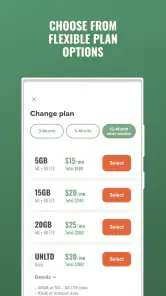
- Affordable plans with generous high-speed data allowances.
- Uses T-Mobile’s nationwide 5G and 4G LTE network.
- Multi-month plans can reduce the effective monthly cost.
- Mobile hotspot data is included on eligible plans.
- eSIM activation makes switching to a compatible phone quick.
Cons
- Best savings usually require paying for several months upfront.
- Network performance depends heavily on local T-Mobile coverage.
- High-speed data may be reduced after the plan’s monthly limit.
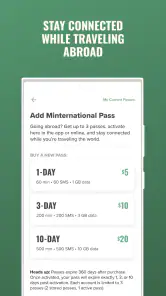
- International calling and roaming options may cost extra.
- Phone financing and device selection are more limited than major carriers.

- Category
- Tools
- Version
- 2.3.36











