MigraConnect Case Tracker
- 1.99K
- 4.9
- Installs
- 500.00K
- Price
- Free

Screenshots


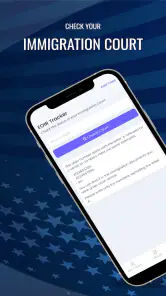

Analysis by Reviewed
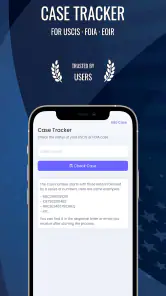
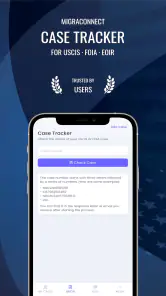
Immigration paperwork has a way of turning a normal day into a chain of browser tabs, saved screenshots, and anxious attempts to remember which case number belongs to which filing. I approached MigraConnect Case Tracker as a practical tool rather than something I would open for entertainment, and that distinction matters. Its purpose is to bring USCIS case tracking, Immigration Court information, and FOIA request monitoring into one mobile experience, giving me a single place to check the parts of an immigration process that are otherwise easy to lose among emails and notes.
My first impression was that the app’s value is tied less to constant interaction and more to reducing uncertainty. I do not need to open it every hour, but I do want a dependable routine for checking important cases. That makes it especially relevant for applicants, relatives helping with paperwork, and anyone managing several immigration matters at once. The real question is whether that usefulness survives after the initial setup and curiosity fade.
What the first week feels like
The first week is when MigraConnect makes its strongest case for staying installed. The idea is simple: instead of treating USCIS cases, court information, and FOIA requests as unrelated tasks, I can organize them around the same phone-based workflow. That is helpful when one person is following a personal case while also keeping an eye on a spouse’s filing, a family member’s matter, or a request for records.
I found the app most useful when I treated it as a tracking desk, not as a replacement for official immigration communication. A tracker can make checking a case easier, but it should not become the only place I look for instructions, deadlines, notices, or documents. My practical habit would be to use the app for regular status awareness and keep official notices, account messages, and legal guidance in their proper places.
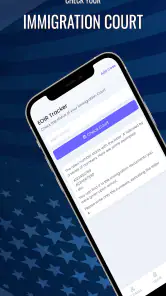
The three areas covered by the app also give it a broader role than a basic USCIS status shortcut. Immigration Court information belongs to a different part of the process, and FOIA requests have their own reason for being monitored. Having these topics together is convenient for people whose immigration situation does not fit neatly into one filing. It also means the app is more relevant to households with complicated paperwork than to someone who only wants to check one straightforward case.
During the first few days, I would begin with a small, controlled setup rather than entering every detail at once. Adding the most important case first makes it easier to understand how the app fits my routine. Once that feels comfortable, I can decide whether additional cases genuinely improve organization or simply create another crowded list that I have to interpret.
That approach reveals an important trade-off. A single dashboard can reduce scattered checking, but it can also concentrate several stressful matters in one place. If I add too many cases without naming or organizing them clearly, the convenience can turn into confusion. The app works best when I use it deliberately, with a short personal system for identifying whose case is whose and why each entry matters.
One non-obvious benefit is the way a centralized tracker can improve conversations with a lawyer or family member. Instead of saying that “something changed online,” I can first review the relevant entry and then discuss the specific case. It does not interpret legal meaning for me, but it can help me arrive at a conversation with better context and fewer loose notes.
A useful routine for applicants and families
A realistic everyday scenario would be a family member who checks a USCIS case before work, then reviews a separate court-related matter later in the week. Without a dedicated routine, that person might rely on memory, screenshots, and several different websites. With MigraConnect, the phone becomes the starting point for those checks. I would open it on a chosen schedule, review anything that appears different, and then verify important developments through the appropriate official channel.
That last step is essential. I would not treat a convenient mobile display as legal advice, a formal notice, or proof that an action has been completed. The app is most valuable as an awareness and organization layer. People who expect it to explain every immigration decision, predict an outcome, or replace professional guidance are likely to be disappointed.
The app is free to install, which lowers the barrier for someone who wants to test this routine without committing to a purchase. It is intended for everyone from an age-rating perspective, but the subject matter is still serious. A teenager may be able to use the interface, while the immigration decisions connected to the information may require an adult, attorney, accredited representative, or trusted family member.
MigraConnect comes from Tecso Solutions LLC and has reached an average rating of 4.9 from around 55 thousand ratings, with more than 500 thousand installs. Those figures suggest that the basic idea resonates with a substantial audience, although popularity does not remove the need for careful verification when the information affects a legal process.
Why it can still matter after the novelty fades
After the first week, the app’s value changes. The excitement of trying a new tracker disappears, and what remains is a question of habit: does checking it save enough effort to justify keeping it on my phone? For me, the answer depends on how many immigration matters I am following and how often I need to monitor them.
Someone with one case and little activity may not need a dedicated tracker every day. That person might be satisfied with the official USCIS tools and occasional manual checks. MigraConnect becomes more compelling when the process stretches across multiple case types or involves more than one person. In those situations, the recurring benefit is not constant information; it is having a repeatable place to begin.
FOIA request tracking is a good example of this longer-term value. A request for records can feel separate from a standard case, so it is easy to forget among more urgent tasks. Keeping it within the same general workflow gives it a better chance of remaining visible. I would still record the date and purpose of a request elsewhere if those details are important to me, because a tracker should support my record-keeping rather than become my only archive.
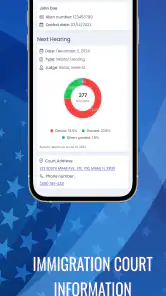
The same principle applies to Immigration Court information. Court-related matters can carry higher stakes and may involve deadlines or notices that deserve immediate attention. I see the app as a way to remember to check, not as permission to relax. A monthly habit may be enough for a low-activity record, while an active court matter calls for a much more careful schedule and direct attention to official communications.
My preferred long-term workflow would be simple. I would choose a regular checking day, keep a separate folder for official documents, and note meaningful changes in plain language. If the app shows something worth investigating, I would follow up rather than assuming the displayed status tells the whole story. That combination makes the app useful without asking it to do a job it was never meant to do.
Another practical insight is that a tracker can reduce emotional checking. Immigration uncertainty often encourages repeated refreshing, even when nothing is likely to change. A planned routine gives me a boundary: I check at a sensible time, record what matters, and return to the rest of my day. The app cannot remove the uncertainty, but it can help prevent that uncertainty from controlling my attention.
Where the app fits beside usual alternatives
The usual alternative is to check official government pages directly, use an online account where applicable, save confirmation emails, and maintain a spreadsheet or notes file. That approach has a major advantage: it keeps me close to the original source and gives me more control over my own records. For a single uncomplicated case, it may be the better choice because there is less to organize.
MigraConnect’s advantage is convenience across different immigration-related tracking needs. I would choose it when I want a mobile starting point that brings USCIS cases, court information, and FOIA requests into one routine. I would choose direct official tools first when I need authoritative instructions, full notices, document history, or an action that must be completed through the government’s own system.
A spreadsheet is also stronger for custom notes, dates, contacts, and household planning. It can show which family member is responsible for a task and store reminders that a case tracker may not be designed to handle. MigraConnect is better at reducing the friction of checking; a spreadsheet is better at building a complete personal case-management record. Using both may sound redundant, but for complicated situations their roles are different.
I would also avoid comparing this app with broad productivity tools as though they solve the same problem. A calendar can remind me to check a case, but it does not provide the same immigration-focused context. A notes app can store case numbers, but it does not offer the same dedicated tracking purpose. The benefit here comes from focus, while the limitation is that focus may not cover all the documentation and planning surrounding a case.
Maintenance, attention, and the points that create fatigue
Any tracker creates a small maintenance burden. I have to keep entries understandable, remember which case belongs to which person, and decide how often to check. That is not a flaw unique to MigraConnect, but it is easy to underestimate. If I add cases and then never establish a routine, the app becomes another drawer where information is stored but not used.
The cleanest method is to start with active matters and remove mental clutter from the process. I would avoid adding an old case merely because I can, especially if I no longer need to monitor it. I would also keep official receipt information and notices safely stored outside the app. This creates a useful division: MigraConnect helps me notice and organize, while my own records preserve the details I may need later.
Source verification is another recurring responsibility. A status update can be important, but its practical meaning may depend on the type of filing, the surrounding notice, or a deadline. I would never make a legal decision solely because a tracker looks reassuring or alarming. The app can prompt a question; it should not provide the final answer to a legal question.
There is also a psychological source of fatigue. When several cases appear together, every check can feel like a test. A person already under stress may open the app too frequently, interpret ordinary inactivity as bad news, or spend too much time looking for changes that are not there. The healthiest use is structured and limited: check when it makes sense, investigate genuine changes, and avoid turning the app into a constant anxiety meter.
In-app purchases range from $1.99 to $549.99 per item. That range is worth noticing before I assume that every useful function is included in the free experience. I would review any purchase screen carefully, understand what a particular item provides, and avoid paying simply because an immigration situation feels urgent. A high-stakes process can make people vulnerable to impulse spending, so restraint is part of using the app responsibly.
The current version is 2.8.2, and the minimum requirement is Android 6.0. For someone using an older device, compatibility is a practical point to check before building a routine around the app. For everyone else, keeping the application updated is sensible, particularly for a tool connected to information I may check repeatedly over time.
One useful habit is to review the app after a meaningful change rather than only after a notification or moment of worry. I can ask myself whether the entry is still active, whether I understand which person it belongs to, and whether I have saved any important official communication. This turns maintenance into a short monthly audit instead of a vague responsibility that grows until it becomes overwhelming.
My long-term verdict
After the novelty fades, MigraConnect earns its space most convincingly for people managing more than one immigration-related thread. Its combination of USCIS case tracking, Immigration Court information, and FOIA request monitoring gives it a clear identity in the tools category. I would recommend it to a friend who wants a more organized mobile checking routine and understands that the app complements, rather than replaces, official sources and legal advice.
I would be more cautious about recommending it to someone with one simple case who already feels comfortable using official government tools. That person may gain convenience, but perhaps not enough to justify another account, another checking habit, or possible purchase decisions. The app is also not the right choice for anyone expecting detailed legal interpretation, guaranteed explanations, or a complete personal document-management system.
For my own long-term use, the deciding factor would be discipline. If I add only relevant cases, check on a sensible schedule, preserve official records, and verify meaningful developments, the app can reduce scattered effort month after month. If I use it as a substitute for reading notices or as a reason to refresh constantly, it becomes less helpful and more stressful.
That balance is why I see the product as a practical companion rather than a complete immigration solution. Its recurring value comes from bringing several kinds of tracking into one focused place, especially for families and applicants with overlapping responsibilities. The convenience is real, but so are the boundaries. The best reason to keep it installed is not novelty; it is a repeatable, careful checking habit.
Developed by Tecso Solutions LLC, the free app is accessible to a broad audience and has built a strong user response. I would install MigraConnect Case Tracker when my immigration situation involves multiple cases, court information, or FOIA activity and I want one mobile starting point. I would skip it when a direct official workflow already covers everything I need. Used with that judgment, it has a lasting role: not the authority on my case, but a convenient reminder and organizer that helps me stay engaged with it.
Pros
- Tracks immigration case updates in one convenient dashboard.
- Provides status notifications for important case changes.
- Supports multiple case types and application tracking.
- Simple interface makes case details easy to review.
- Reduces the need to repeatedly check government websites.
Cons
- Information may be delayed compared with official USCIS updates.
- Some features may require a paid subscription or in-app purchase.
- Not an official government app and cannot influence case decisions.
- Users may need to enter sensitive personal case information.
- Availability and features can vary by country or immigration case type.

- Category
- Tools
- Version
- 2.8.2











