Microsoft Designer
- 372.00
- 3.4
- Installs
- 1.00M
- Price
- Free

Screenshots

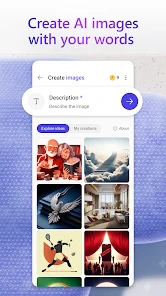
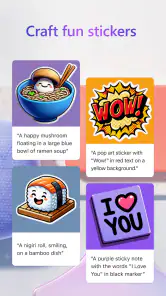
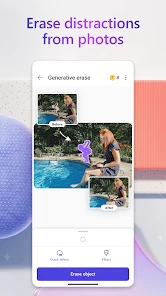
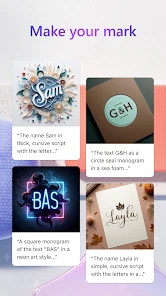
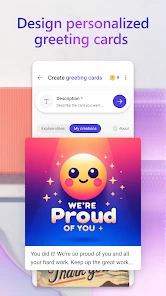
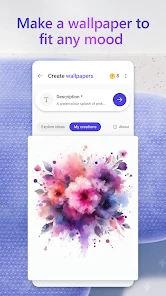
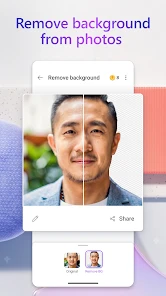
Analysis by Reviewed
When I need a quick visual for a message, a small event, or a social post, I want to spend my time shaping the idea—not wrestling with a complicated editor. That’s the kind of job I’d consider Microsoft Designer for: a mobile art and design app from Microsoft Corporation that uses AI to help create images and edit photos. It is free to install, though in-app purchases range from $1.99 to $199.99 per item, so I’d check the purchase options before making it part of a regular workflow.
Choose it for speed, not a full design studio
The key question is how much control you need. If you want a polished starting point without building every element from scratch, Designer is worth trying. If your work depends on precise layers, detailed illustration, or carefully repeatable brand rules, a dedicated design or drawing tool may suit you better. I see Designer as a convenient route from rough idea to shareable visual, rather than a replacement for every desktop creative app.
A practical example: I’m helping organize a neighborhood bake sale and need a simple announcement for a group chat. I can begin with the event’s purpose, choose a direction that feels appropriate, then refine the wording and image instead of opening a complex program just to arrange a few elements. The time-saving value is in getting past the blank page. I’d still check every date, location, and line of text before sharing; AI assistance can speed up a draft, but it doesn’t remove the need to proofread.
Getting Started with Microsoft Designer
First things first, let's talk about the user interface. If you've ever used any Microsoft product, you'll feel right at home. The app sports a clean, minimalist design that's easy on the eyes and even easier to navigate. You don't need to be a design expert to get started. The app guides you through the process with helpful tips and a layout that just makes sense. From the moment you open Microsoft Designer, it feels like the app is saying, "Don't worry, I've got you."
Features that Make You Go "Wow!"
What sets Microsoft Designer apart are its features that cater to both newbies and seasoned designers. One of my favorites is the extensive library of templates. Whether you're crafting a social media post, a presentation slide, or a flyer, there's a template for that. And these aren't your run-of-the-mill, boring templates. They're sleek, modern, and ready for customization.
Then there's the AI-powered design assistant. Imagine having a little genie that suggests design tweaks to make your project pop. It’s like having a second pair of eyes to ensure everything looks just right. Plus, the integration with other Microsoft apps is seamless. You can pull in content from Word, Excel, or PowerPoint without breaking a sweat.
Designing Made Easy
Now, let’s talk about the actual design process. The drag-and-drop functionality is a dream. Want to add an image? Just drag it in. Need to adjust the text? Click and type. It’s as straightforward as it gets. And if you ever find yourself stuck, the app’s help section is just a tap away, filled with tutorials and FAQs to get you back on track.
More From Our News Desk

Clash of Clans Is Won Between the Battles

Android Auto Makes the Case for Quieter Car Software

MobiOffice: Transforming Mobile Productivity with Seamless Integration

EA SPORTS FC™ Mobile Soccer: Redefining Mobile Sports Gaming

How Microsoft OneDrive Became a Mobile Productivity Giant

How Google Translate Breaks Language Barriers Effortlessly
The app also supports collaborative projects, which is a massive plus. You can easily share your designs with teammates or clients and get feedback in real-time. It’s like having a virtual meeting room where everyone’s on the same page.
Small checks that make a big difference
I find it useful to treat an AI-generated visual as a first draft rather than a finished asset. Before sharing, I’d inspect small text at phone size, look for awkward spacing, and make sure the main message stays readable against the background. For a poster or social graphic, one short headline usually works better than trying to squeeze in every detail. I’d keep the full logistics in the accompanying message if the design starts to feel crowded.
Templates are most helpful when I use them as a structure, not as a substitute for a point of view. I’d change the wording first, then adjust the image or color choices so the result feels connected to the event or audience. That order also makes it easier to compare a few directions without endlessly tweaking decorative details. If a design needs to match an established identity exactly, I’d verify colors, fonts, and spacing against the original guidelines rather than assume a suggested layout will do it automatically.
A workflow for everyday projects
For a recurring task such as a weekly club reminder, I’d make one simple design that carries the essential information, then keep a note of the wording and visual choices I want to preserve. That gives me a consistent starting point next time without assuming every new AI suggestion will match the previous one. I would check the finished piece side by side with the earlier version, especially if people need to recognize the event at a glance. The useful habit is to standardize the message myself and let the app help with the visual draft.
For a small business post, I’d separate the job into two passes: first decide what the customer needs to know, then decide what the image should communicate. This prevents a decorative idea from taking over the message. I’d also view the design on the same kind of screen where people are likely to see it; a layout that looks balanced while editing can feel crowded when reduced to a phone-sized preview. That quick check is particularly valuable when a graphic includes a date, offer, or other detail people must read correctly.
Where another tool may be the better call
Compared with a general photo editor, Designer’s appeal is the combination of image creation and layout-oriented work; a photo editor is often the more direct choice when the main task is retouching a specific picture. Compared with illustration apps, Designer is better suited to assembling a quick communication piece than drawing every element by hand. And for a long presentation or a document with detailed formatting, I’d start in the software built for that output, then use Designer only if a separate visual would help.
There is a trade-off in that convenience: an AI suggestion can look attractive without being the most accurate or distinctive choice. I’d review generated imagery for details that don’t fit the brief, and I wouldn’t rely on it for exact wording embedded in an image. The app is also less compelling if you already have a comfortable workflow in another editor and rarely need quick visual drafts. Switching is easiest when you begin with one small project, learn how its templates and editing controls fit your habits, and only then decide whether it belongs in your regular toolkit.
When precision matters more than convenience
If the output must follow strict print specifications or a detailed brand guide, I’d use a tool that gives me dependable control over the elements that matter. Designer can help me explore a direction, but a fast visual draft is not the same thing as a production-ready file. I’d be cautious about using an AI-created image as the final source for work where tiny visual details, exact placement, or repeatable formatting are central to the brief. A specialist editor is a better fit when revision history, fine adjustments, and predictable output matter more than speed.
For photo work, I’d also decide whether I’m trying to improve a particular picture or build a new communication around it. If the picture itself needs careful retouching, a dedicated photo editor is the more natural starting point. If the goal is a quick announcement that combines a visual idea with a short message, Designer’s broader creative approach makes more sense. Keeping that distinction clear saves time: choosing the wrong kind of app can make a simple task feel harder than it needs to.
Who is likely to enjoy it?
I’d recommend giving it a try if you’re a student making a simple club announcement, a small-business owner preparing an occasional social graphic, or someone who wants to experiment with AI-assisted images without first learning a professional design suite. It is less suited to illustrators who need fine-grained drawing control, production designers who depend on exact specifications, or anyone who wants a dedicated photo-retouching workflow. Those users may be happier staying with specialist tools and using Designer only for quick concept work.
It can also suit someone who is not a designer but often needs a visual for an ordinary task: a community notice, a personal invitation, or a quick image to accompany a message. The main benefit for that person is having a way to explore a few visual directions before settling on one. I’d still make the final call myself rather than accepting the first result automatically. If you enjoy adjusting details and want to learn a deeper craft, a more hands-on app may be more satisfying; if you mainly want a useful starting point, this is an easier place to begin.
What to consider before making it a habit
The app is free to install, but the in-app purchase range makes it sensible to check what an option costs before confirming it, particularly if you are testing the app casually. I’d first try it on a project small enough that I can judge the editing experience without depending on it for a deadline. That helps answer a practical question: does the generated starting point reduce my work, or do I spend more time correcting it than I would have spent making a simple layout another way?
I’d also think about where the finished design needs to go. A graphic for a group chat has different demands from a carefully formatted presentation or a print project. Before committing to a routine, I’d test one example in the format and context I actually use, then check that the text remains clear and the result is easy to share. This kind of trial is more useful than judging the app by a striking first image alone, because day-to-day value depends on how well the entire task fits together.
Microsoft Designer is free to install and has an Everyone age rating. It has a 3.4 average from around 7,700 ratings, with more than 1 million installs, so I’d treat popularity as context rather than proof that it will fit every workflow. The app was released on June 18, 2024, and version 1.2528804.7001 requires Android 9 or later. Those details make it straightforward to judge basic compatibility, while the in-app purchase range is a reminder to review any paid options before committing.
Final Thoughts
So, is Microsoft Designer worth your time? Absolutely. It's a versatile tool that makes designing not just accessible but genuinely enjoyable. Whether you're a student, a marketer, or just someone who loves playing around with visuals, this app has something to offer. It’s not just about creating designs; it’s about making the whole experience effortless and fun.
In a world where first impressions matter, having a tool like Microsoft Designer at your fingertips is a game-changer. It empowers you to create professional-quality designs without the steep learning curve. So go ahead, give it a whirl and let your creativity take the lead!
My recommendation is to start with a low-stakes design and judge the result by how much editing it still needs, not just by how quickly it appears. If the first draft gets you most of the way to a useful image, Designer earns a place as a handy companion. If you find yourself fighting the layout or needing exact control, that is a good sign to use a more specialized alternative instead.
Microsoft Designer Frequently Asked Questions
Does Microsoft Designer use AI to create or edit images?
Yes. Microsoft Designer is built around AI-assisted image creation and photo editing, with the aim of helping you produce or adjust visuals quickly. It is an Art & Design app from Microsoft Corporation, and its core appeal is making creative tasks more accessible without requiring a traditional design workflow. As with any AI tool, review the result before using it, especially when accuracy or a particular visual style matters.
What do I need to install Microsoft Designer on my phone?
Microsoft Designer is a mobile app for Android and iOS, and the Android version requires Android 9 or later. It is free to download, though in-app purchases are available for users who want paid options. Before installing, check that your device meets the operating-system requirement and that you have enough space for an image-focused app. The app is rated Everyone, so it is suitable for a general audience.
Is Microsoft Designer free, and are there optional purchases?
Microsoft Designer is free to download and use, with in-app purchases ranging from $1.99 to $199.99 per item. The app therefore gives you a way to try its AI image and photo-editing features without an upfront download charge, while optional purchases may involve additional costs. Review the purchase details shown in the app before confirming anything, particularly if you are installing it for a child or sharing a device.
What is Microsoft Designer and what can I use it for?
Microsoft Designer is a versatile graphic design application that empowers users with a variety of tools and templates to create professional-quality designs. Whether you're looking to create social media graphics, presentations, or marketing materials, Microsoft Designer offers intuitive features that cater to both beginners and experienced designers. Its integration with Microsoft's ecosystem ensures seamless collaboration and sharing.
Is Microsoft Designer suitable for beginners or is it more for professional designers?
Microsoft Designer is designed to cater to both beginners and professional designers. It offers an intuitive interface with easy-to-use templates and tools for those new to graphic design. For seasoned professionals, it provides advanced features that allow for complex design projects. This dual approach makes it an excellent choice for users at any level of expertise.
Pros
- User-friendly interface enhances creativity.
- Integration with Microsoft 365 boosts productivity.
- Wide variety of templates available.
- Real-time collaboration feature.
- Supports multiple design formats.
Cons
- Limited free version features.
- Requires a Microsoft account to use.
- Occasional performance lags.
- No offline mode available.
- Learning curve for new users.

- Category
- Art & Design
- Version
- 1.2528804.7001













