Messenger - Texting App
- 8.08K
- 4.5
- Installs
- 10.00M
- Price
- Free

Screenshots



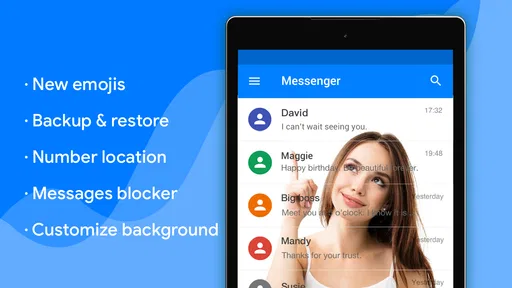
Analysis by Reviewed
I use a texting app differently when it handles everyday SMS and MMS than when it is built around online chats. The useful question is not whether it replaces every messenger, but whether it makes ordinary phone-number conversations easier to manage. Messenger - Texting App is a free communication app from Emoji SMS Messenger, and its practical appeal is its focus on texting, with extras such as blocking, a driving mode and a private box.
A sensible routine for everyday messages
My baseline workflow with an SMS app is simple: open a conversation, check the recipient, write a clear message and choose whether a photo or other MMS attachment belongs in the same thread. This app’s focus suits people who still coordinate plans, errands and quick updates by text rather than asking everyone to join a separate chat service. SMS is especially handy when a contact is reachable by phone number and a new account or group platform would only add friction.
A realistic use is arranging a pickup while travelling across town. I can keep the conversation in my regular message list, use driving mode when I need fewer distractions, and deal with the reply when it is safe to do so. That is a more useful habit than glancing at every notification at a red light: set up the mode before starting the trip, then leave the phone alone. Blocking is another practical control for unwanted conversations, while the private box gives the app a way to separate selected messages from the ordinary flow.
Settings and habits worth checking
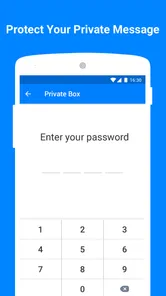
I would spend a few minutes exploring the app’s available controls before making it my default. In particular, learn how its driving mode behaves and where the private box is accessed; a privacy feature is only useful if you understand how to put a conversation there and retrieve it later. For sensitive messages, remember that placing a conversation in a private area is not the same thing as proving that the message is encrypted or invisible to every other person with access to your device.
Blocking works best as a deliberate boundary rather than a substitute for organizing conversations. If an unknown or persistent sender is bothering you, review the conversation before blocking so you do not accidentally cut off a useful contact. I also recommend making a habit of checking the recipient and attachment before sending: MMS can involve a different message format from plain text, and a quick final glance can prevent a photo going to the wrong thread.
Where it fits among messaging choices
Compared with the standard messaging app that comes with a phone, this one is worth considering if its driving, blocking and private-box controls match the way you handle texts. The built-in app may still be the better choice if you want the fewest changes, already rely on its interface, or prefer not to move your default messaging workflow. Internet-based messengers are usually a better fit for people whose main conversations depend on account-based groups, richer online features or continuity across several devices. I would not assume that an SMS-focused app automatically offers those services.
This is also a poor fit if your priority is a single secure communication system for every contact. SMS and MMS are useful because they work through phone-number messaging, but they are not interchangeable with every internet messaging service. The private box can help with separation, yet it should not be treated as a guarantee of end-to-end encryption. I would keep particularly sensitive conversations in a service whose security properties are clearly suited to that need.
More From Our News Desk

Weather by Xiaomi Review: Clear at a Glance, Less Clear Up Close

X Under Pressure: Can It Recover When Posting Goes Wrong?

Clash of Clans Is Won Between the Battles

Android Auto Makes the Case for Quieter Car Software

MobiOffice: Transforming Mobile Productivity with Seamless Integration

EA SPORTS FC™ Mobile Soccer: Redefining Mobile Sports Gaming
First Impressions and Ease of Use
Firing up the Messenger - Texting App for the first time feels like a breath of fresh air. The interface is clean, intuitive, and easy on the eyes. You won't find yourself fumbling around trying to locate features; everything is right where you'd expect it to be. The app supports a wide variety of messaging formats including text, voice, and video, making it incredibly versatile.
Features That Stand Out
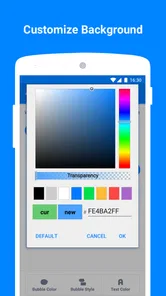
One of the standout features is the seamless integration with other platforms. Whether you’re on Android or iOS, you can sync your messages across devices effortlessly. Plus, the app offers end-to-end encryption, ensuring that your conversations remain private and secure. For those who love to personalize, there's a plethora of customization options from themes to chat bubbles. It’s like having a messaging app tailored just for you.
And let’s not forget the nifty extras like group chats with up to 250 people and the ability to share large files without a hitch. It's pretty clear that this app is designed with the modern user in mind.
Performance and Reliability
Nobody likes a messaging app that lags or crashes, and thankfully, the Messenger - Texting App performs remarkably well. During my time using it, I didn't experience any crashes or slowdowns, even when handling large group chats or media files. It's fast, responsive, and most importantly, reliable.
The app also boasts impressive battery efficiency, so you won't have to worry about it draining your phone as you chat away. Whether you're sending a quick text or engaging in a lengthy video call, this app keeps up without missing a beat.
Final Thoughts
So, is the Messenger - Texting App worth downloading? If you’re looking for a comprehensive messaging solution that combines ease of use with a rich feature set, then absolutely. It’s a well-rounded app that ticks all the right boxes for both casual users and power users alike. While it might not have some of the more niche features found in other specialized apps, it more than makes up for it with its versatility and reliability.
In a world where communication is key, having a reliable and robust messaging app can make all the difference. With the Messenger - Texting App, you’re not just getting an app; you’re getting a complete communication hub. So go ahead, give it a try and see how it can simplify your digital life.
Practical trade-offs before switching
One point I would check before changing apps is whether this particular version suits the phone I plan to use. Version 1.8.5 requires Android 6.0 or later, so it is not an option for an older Android device below that threshold. The age rating is Everyone, and the app is free to install, with optional in-app purchases ranging from $0.99 to $59.99 per item. I would treat those purchases as a reason to inspect the available choices in the app rather than assume every extra is needed for basic texting.
It has an average rating of 4.6 from around 79,000 ratings, with roughly 7,800 written reviews and over 10 million installs. That level of use suggests many people have tried it, but popularity cannot tell me whether its controls match my routine. I would test the core tasks first: receiving a normal text, sending an MMS, finding the private box again, and confirming that driving mode behaves as expected before relying on it during a commute.
Who will get the most from it
I see the strongest case for someone who wants SMS and MMS in one place and values a few focused controls without building their social life around a separate online service. It can also suit a person who regularly receives unwanted texts and wants blocking close at hand, or someone who shares a phone and wants a separate place for selected conversations. In either case, I would first understand what the private box does and who can access the device; a phone-level lock remains important.
Someone who mostly chats with friends in internet-based groups, expects seamless message history on several devices, or needs clearly established encryption should compare alternatives before switching. The right choice depends on what the people around you already use, too. An SMS app cannot make a contact adopt a different channel, and a private message area cannot turn a phone-number text into an online encrypted conversation.
My verdict after weighing the workflow
Messenger - Texting App has a straightforward role: make everyday texting more manageable with controls aimed at distraction and unwanted or private conversations. I would judge it by whether those features solve a real annoyance, not by the promise of replacing every communication tool. Its free entry point makes it approachable, while the optional purchases are worth reviewing before spending anything.
For a person who mostly needs dependable phone-number messaging and will actually use driving mode, blocking or the private box, it is a reasonable app to try. If your current default already handles those needs, or your priorities are cross-device continuity and security assurances, staying with it or choosing a more suitable internet messenger may be wiser. The best habit is simple: use the app for the kind of messages it is built around, check its controls before depending on them, and keep a separate channel for conversations that need different capabilities.
Making the controls part of a repeatable routine
The most useful way to judge these tools is to connect each one to a specific moment in the day. I would not turn on a driving mode only after a message arrives or wait until a sender has become a recurring nuisance before learning where blocking lives. Instead, I would check the driving control before the first trip and locate blocking and the private box when I have time to explore calmly. That small bit of preparation makes the features easier to use correctly when attention is limited.
A household example is coordinating a delivery or pickup with someone who may not use the same chat service as everyone else. A short SMS can reach that person without asking them to install anything or create an account. If the conversation contains a photo, I would pause before sending and confirm both the contact and the attachment. That simple check matters more than trying to make every exchange happen in one all-purpose platform.
What to test before making it your default
Changing a default messaging app is more consequential than trying a standalone chat service, because ordinary phone-number conversations may begin opening in the new app. Before committing, I would test a few normal exchanges with people I trust: receive a text, reply, send a picture if MMS is part of my routine, then return to the conversation later and make sure it is easy to find. I would also check how the app handles the private box in practice, rather than treating the label alone as a full privacy explanation.
That test run answers an important practical question: does the app fit the way I already communicate, or does it add steps? If most of my messages are brief logistics, a focused SMS inbox may feel natural. If I depend on group conversations, calls, shared media and message history across devices, I would compare those exact workflows with my existing internet messenger before moving anything. The names of features matter less than whether my usual contacts and tasks work smoothly.
Choosing the right channel for each conversation
I would use this app as a practical phone-number messaging option, not as a universal replacement for every form of communication. SMS is convenient for a quick confirmation, a one-off update or reaching someone whose preferred chat app I do not know. An internet-based service is often the better choice when a group needs ongoing coordination, richer shared content or the same conversation available on several devices. Keeping both channels for different jobs is not a failure to simplify; it can prevent awkward workarounds.
There is also a useful distinction between keeping a message out of the ordinary view and protecting its contents. A private box may make selected conversations easier to separate, but I would not use it as a substitute for a device lock or a service with security properties appropriate to the conversation. If someone else can use the phone, I would consider that access before storing sensitive exchanges there. This is a real trade-off: convenient organization is helpful, but it should not be mistaken for a security guarantee.
Who should keep looking
I would skip this option if I rarely use SMS, already have a default that handles unwanted messages and distractions well, or need dependable synchronization as a central part of my routine. It is also not the right answer for someone choosing an app chiefly for verified encryption or for extensive online group tools. In those cases, a service designed around those needs is a more sensible starting point than trying to stretch an SMS app beyond its purpose.
For someone who wants familiar phone-number texting with a few extra ways to manage interruptions and selected conversations, the app is easier to recommend. Its strongest case is not that it makes texting radically different, but that blocking, driving mode and a private box can make common tasks feel more deliberate. I would install it only after checking that the supported Android version fits my phone and reviewing any optional purchases I might encounter.
A measured recommendation
The app’s scale can be a useful signal that it has attracted a substantial audience, but it is not a substitute for trying the workflow that matters to me. I would focus on three questions during a trial: can I handle ordinary SMS and MMS comfortably, do the additional controls work in ways I understand, and does switching improve my day enough to justify changing the default? If the answers are yes, it has a clear practical role. If not, returning to the phone’s existing messaging app is a perfectly reasonable decision.
My recommendation is therefore specific: choose it when phone-number texting is still a regular part of your day and you have a real use for its distraction or conversation-management controls. Keep another channel for group features or privacy needs that SMS does not satisfy, and avoid relying on a feature until you have learned its behavior. Used with those boundaries, Messenger - Texting App can be a useful everyday tool rather than a promise to replace every way you communicate.
Messenger - Texting App Frequently Asked Questions
Is Messenger - Texting App available for free, and are there optional purchases?
Messenger - Texting App is free to download and use, making it possible to try its SMS and MMS tools without an upfront purchase. It also offers optional in-app purchases, with prices ranging from $0.99 to $59.99 per item. Consider those purchases separately from any charges your mobile provider may apply for sending messages, particularly when using MMS.
Is Messenger - Texting App suitable for children?
The app has an Everyone content rating, so it is presented as suitable for a broad audience. That rating can help families decide whether it is appropriate, but it does not replace checking how a child will use a messaging app or discussing safe texting habits. Its private box and blocker features may also be relevant to people who want additional ways to manage messages.
Does Messenger - Texting App support SMS and MMS?
Yes. Messenger - Texting App is an SMS and MMS messaging app, so it is designed for texting and sharing multimedia through those message types. Its listed features include blockers, a driving mode, and a private box. This makes it worth considering if you want a messaging app centered on SMS and MMS rather than assuming it is a general internet-calling service.
What features does the Messenger - Texting App offer?
The Messenger - Texting App provides a variety of features including instant messaging, voice and video calls, group chats, and the ability to send multimedia files like photos and videos. It also offers end-to-end encryption for privacy, customizable themes for personalization, and integration with other apps for a seamless communication experience.
Is the Messenger - Texting App secure and private?
Yes, the Messenger - Texting App prioritizes user privacy and security by offering end-to-end encryption for all messages and calls. This means that only you and the person you’re communicating with can read or listen to them. The app also includes features like two-factor authentication and privacy settings to control who can contact you.
Pros
- User-friendly interface for easy navigation.
- Supports multimedia sharing
- including photos.
- Offers end-to-end encryption for privacy.
- Allows group chats with numerous participants.
- Customizable notifications for each chat.
Cons
- Requires internet connection to function.
- May drain battery quickly on some devices.
- Ads can be intrusive and annoying.
- Limited features without premium subscription.
- Occasional connectivity issues reported.











