Messenger: Text Messages, SMS
- 5.90K
- 4.4
- Installs
- 10.00M
- Price
- Free

Screenshots


Analysis by Reviewed
When I need to send a quick text without switching between several services, I want a messaging app that makes the basic job feel straightforward. Messenger: Text Messages, SMS is aimed at that everyday need: it is a communication app from aMessage studio, and its focus is SMS messaging rather than replacing every kind of online chat. I see it as an option for people who mainly want their text conversations in one familiar place, not as a universal answer for every way of staying in touch.
Where a simple texting routine helps
I find this kind of app most useful when texting is a practical tool rather than a social destination. Think of a morning when I am arranging a lift, confirming a time with a relative, and replying to a short work message. Those conversations do not need a shared online group or a new account for each person; they need a clear thread and a quick way to reply. Keeping those everyday exchanges in one SMS-focused app can make the phone feel less fragmented.
That convenience has a boundary. SMS is a good common denominator for reaching people who use different services, but it is not automatically the best choice for every conversation. If the exchange depends on a persistent group, lots of shared media, or features tied to an online account, a dedicated internet messenger may be more suitable. I would choose based on where the people I talk to already communicate, not on the assumption that one app should replace everything.
What “fast” means for everyday texting
The word “fast” is most useful here as an expectation of a simple route to a text, not a promise that every message will arrive instantly. SMS depends on your mobile service and the recipient’s availability, so a delay is not automatically an app problem. In ordinary use, the practical advantage of a dedicated SMS app is that you can open a thread, write a short message, and get on with your day without needing the other person to use the same chat platform.
A realistic example is coordinating a pickup while you are out: you can send a brief message to someone who may not use a particular internet messenger. For that sort of exchange, SMS is often more useful than a service that requires both people to install an app and be online. If you need group conversations, rich online features, or a shared space for media, though, a dedicated internet-based messenger may suit you better.
The Ultimate Messaging Experience
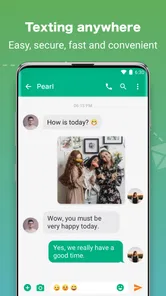
Let’s dive straight into what makes Messenger: Text Messages, SMS such a standout in the crowded world of messaging apps. First off, it supports both traditional SMS and MMS. This means you can send pictures, videos, and even voice messages without a hitch. The app ensures that your messages are sent and received promptly, which is a huge relief for someone like me who absolutely loathes the dreaded lag in communication.
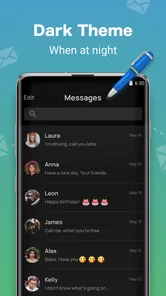
One of the coolest features is its intuitive interface. You know that feeling when you open an app and everything just feels right? That’s exactly what you get here. The layout is clean, the colors are easy on the eyes, and navigating through the app is a breeze. No complicated menus or hidden settings – everything is where you’d expect it to be.
More From Our News Desk

 Lark Player:Music Player & MP3
Switching to Lark Player: A Better Fit for Music Stored on Your Phone?
Lark Player makes sense if your music already lives on your phone. Here is what changes, what does not transfer by assumption, and how to test the switch without regret.

 Tile Master® - Matching Game
Tile Master Finds Its Place in the Gaps of a Noisy Phone
OS changes rarely transform a tile puzzle, but they reshape the small rituals around it. Tile Master’s appeal lies in how well its brief, tactile rounds fit the modern phone.

 Google Docs
 Shows What Mobile Writing Still Gets Wrong
Google Docs still makes a strong case for the shared document, but its real significance is how it exposes the gap between cloud convenience and genuinely capable mobile work.

 YouTube Studio
 Is Becoming a Creator’s Daily Control Room
As publishing turns into a daily, data-led habit, YouTube Studio is becoming the control room creators reach for between uploads—not another tool for making videos.

 Tiles Hop Music & Ball Game
Tiles Hop Review: When the Beat Is Clear, Every Miss Counts
Tiles Hop turns a simple bouncing-ball premise into a sharp test of timing. Its best design is immediate and readable; its weakest moments come when recovery feels less clear than the beat.

 Piano - Music Keyboard & Tiles
: Inviting Rhythm, Unproven Recovery
A tile-tapping piano game lives or dies by timing. This resilience-focused review separates what its format promises from what players still need to verify.
Latest News



Choosing it over other messaging options
The main trade-off is the kind of communication you want. Compared with internet chat services, SMS can reach people without asking them to join the same platform, while an online messenger is usually a better fit when you want its particular account-based features or ongoing group spaces. Compared with a phone’s default texting app, this app’s appeal is its extra personal touches; whether those are worth changing your routine depends on how much you value customization over sticking with what is already set up.
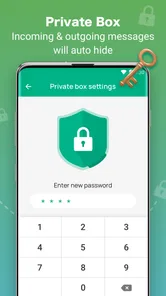
Before making it your default, I would try it with a few everyday conversations and check that the contacts and threads you rely on are easy to find. That small trial is more useful than judging a messaging app by its first screen alone. If you share a phone or need a specific privacy guarantee, check the app’s current settings and policies directly rather than assuming that every SMS tool handles privacy in the same way.
A sensible trial before switching
I would make the switch gradually rather than moving every texting habit over at once. Start with a few low-stakes exchanges, such as confirming plans or sending a quick check-in, and notice whether the conversation list is comfortable to scan and whether replies feel natural. If you use another service for group plans, keep it for that job; there is no advantage in forcing every conversation into an SMS app just to have one icon for messaging.
One practical detail worth checking early is how the app fits your existing phone routine. If you set it as the default texting app, make sure you are comfortable finding old threads and starting a message from the places you normally use. A little familiarization now is better than discovering during a rushed errand that you are unsure which app contains a conversation. I would also keep an eye on any optional purchase prompts and decide whether the basic experience already meets my needs before paying for extras.
Customization and Personal Touch
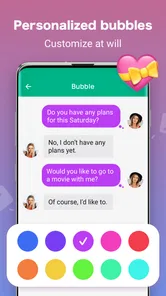
Customizing your messaging experience is another area where this app shines. You can change the look and feel of your chat threads with different themes and colors. It’s like giving your messages a personal touch, which, let’s be honest, makes texting a lot more fun. Plus, you can set custom notifications for different contacts. So, when your best friend texts, you know it’s them without even looking at your phone.
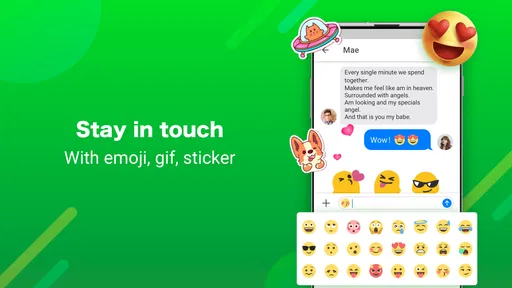
And let’s talk about emojis. Who doesn’t love a good emoji to express exactly what words can’t? This app has a rich library of emojis and stickers that are not only fun but also add a sprinkle of personality to your conversations.
Making customization useful, not noisy
Custom alerts are most valuable when they help you distinguish messages that need attention from routine ones. I’d reserve a distinctive notification for one or two important contacts, then keep the rest more ordinary; otherwise, lots of special sounds can become noise rather than a shortcut. Themes and colors are similarly best treated as a readability choice, not just decoration: a comfortable thread is easier to scan when you are replying between errands.
There is a trade-off with expressive extras, too. Emojis and stickers can make a casual exchange feel warmer, but they are not a substitute for clear wording when you are arranging a time, address, or other detail that should not be misunderstood. If you mostly send short practical texts, the core value is still the conversation itself; the decorative options are a bonus rather than a reason to switch.
Performance and Reliability
Now, onto the performance aspect. I’ve used many messaging apps in the past, and let’s just say not all are created equal. This app, however, is as reliable as they come. It works seamlessly without any hiccups, even when my phone’s storage is full of photos and videos. The app is lightweight, so it doesn’t hog up your phone’s resources, which is a blessing for those of us who are constantly battling with low storage space.
Security is another big plus. The app boasts end-to-end encryption, ensuring that your messages remain private and secure. In today’s world, where privacy is such a precious commodity, this feature is an absolute must-have.
Heavy-use moments and recovery
For a busy texter, the useful test is not a single quick exchange but a day with several ongoing threads: a family plan, a delivery update, and a message that needs a later reply. I would keep conversations organized by using the contact-specific alerts selectively and by opening the relevant thread before responding, especially when several chats are active. That modest habit helps prevent a rushed reply from going to the wrong person, without requiring a complicated system.
When a message seems late, first consider whether the issue is the mobile connection or the recipient’s availability; SMS is not the same as an internet chat that visibly reports an online state. If the app or phone becomes unresponsive, reopening the conversation is a sensible first step, but I would avoid treating a single delayed message as proof that the whole app is unreliable. People who need extensive cross-device continuity or elaborate collaboration may find a larger online messaging service a better fit.
Keeping a busy inbox manageable
When several conversations are active, I would use the contact list and thread names as a deliberate pause before sending anything sensitive or time-specific. For example, while arranging a pickup, I would reopen the person’s thread and confirm the recipient before typing the address or timing details. It is a small habit, but it is more dependable than relying on a distinctive notification sound to tell me who has written.
Multimedia messages also call for a little judgment. A photo or voice message may be convenient for a quick exchange, but it can be less practical than a short written note when the other person needs to search the conversation later or may be in a place where listening is awkward. I would use the format that makes the information easiest for the recipient to act on, rather than treating every available message type as an improvement.
Device fit, cost, and who should choose it
The app is free to install, with optional in-app purchases ranging from about a dollar to roughly twenty-seven dollars per item. Its age rating is Everyone, and it runs on Android 6.0 or later. Those details make it accessible to many Android users, but an older phone can still feel different depending on its available storage, background activity, and general condition. I would keep enough room for normal phone use and avoid expecting any messaging app to compensate for a device that is already struggling.
At version 2.1.0, it has an average rating of 4.4 from around 75,000 ratings, with roughly 5,900 written reviews and more than 10 million installs. I take that reach as a sign that many people have tried it, not as a guarantee that it will match every phone or texting habit. It is a sensible candidate if you want SMS and MMS with a more personal interface; if you rely mainly on internet-based groups, need features beyond ordinary texting, or prefer not to change your default workflow, staying with your current messenger may be the better choice.
Who will get the most from it
I would recommend it first to someone who uses regular texting throughout the day and wants a more personal-feeling place for those conversations. It may suit a household where people use different phones or messaging services, since SMS does not require everyone to join a single platform. It can also make sense for someone who likes assigning a distinct look or alert to a small number of important contacts, provided those touches genuinely help rather than add distraction.
I would be less inclined to suggest it to someone whose communication is mostly built around online groups, shared files, or keeping the same conversations active across several devices. A phone’s built-in texting app may also be the better choice if it already feels familiar and handles the basics reliably for you. Switching brings value only if this app’s presentation and customization improve something you notice every day; otherwise, changing defaults can be needless friction.
Final Thoughts
In conclusion, if you’re looking for a messaging app that’s simple, efficient, and packed with features, Messenger: Text Messages, SMS is definitely worth checking out. It takes the mundane task of texting and turns it into an enjoyable experience. Whether you’re a casual texter or someone who practically lives in their messaging app, this app has something for everyone. Give it a try, and who knows – you might just find your new favorite way to stay connected with the world!
My practical verdict is more specific: it is best for someone who wants a customizable home for everyday SMS and MMS, and less compelling for a person whose conversations already revolve around online groups and shared media. I would try it with routine chats first, see whether its layout and alerts genuinely make texting easier, and only then decide whether it deserves a permanent place in my daily setup.
Messenger: Text Messages, SMS Frequently Asked Questions
What should I know about the age rating before downloading Messenger: Text Messages, SMS?
Messenger: Text Messages, SMS has an Everyone age rating, so it is classified as suitable for a general audience. It is a communication app focused on SMS messaging, and its simple purpose may appeal to people looking for a dedicated way to handle texts. As with any messaging app, consider who will use it and what kinds of conversations they intend to have.
Can I use Messenger: Text Messages, SMS on my device?
Messenger: Text Messages, SMS requires Android 6.0 or later, so check your device’s Android version before downloading. If your phone meets that requirement, you can consider trying it as an SMS-focused communication app. It is available for Android, and its minimum operating system requirement is an important compatibility point to review before installing, especially if you use an older device.
Is Messenger: Text Messages, SMS free to download and use?
Messenger: Text Messages, SMS is a free communication app, so you can get started without paying for the download. It also offers in-app purchases, with optional items priced from $0.99 to $26.99 each. The app is intended for everyone, and its core purpose is straightforward SMS messaging, making it worth considering if you want a dedicated messaging app.
What kind of app is Messenger: Text Messages, SMS, and who makes it?
Messenger: Text Messages, SMS is a communication app developed by aMessage studio. Its focus is SMS messaging, with the aim of making everyday texting faster, simpler, and easier. The app has been available since October 30, 2020, and its current version is 2.1.0. It requires Android 6.0 or later, so check your device’s system version before downloading.
What features does Messenger: Text Messages, SMS offer beyond basic texting?
Messenger: Text Messages, SMS offers a range of features beyond basic texting, including group messaging, multimedia sharing (such as photos and videos), voice messages, and an array of emojis and stickers to enhance your communication. Additionally, it supports SMS and MMS, making it versatile for different types of messages and compatible with a wide range of devices.
Pros
- User-friendly interface
- Fast message delivery
- Supports multimedia sharing
- End-to-end encryption
- Seamless app integration
Cons
- Requires internet connection
- Limited customization options
- Can drain battery quickly
- Frequent updates needed
- May experience occasional lags