Messenger SMS - Text Messages
- 29.21K
- 4.7
- Installs
- 50.00M
- Price
- Free

Screenshots
Analysis by Reviewed
I find Messenger SMS - Text Messages most useful when I want a dedicated place for ordinary phone texting, rather than another account-based chat service. It’s a communication app from SMS Messenger, Text App, and its appeal is the familiar SMS routine: open a conversation, write a message, and get on with the day. That straightforward purpose also sets expectations. It is not a substitute for internet-based group chats or a feature-rich social messenger.
What connectivity changes in everyday use
SMS has a different relationship with connectivity from apps that send messages through an internet connection. In practice, sending a text still depends on your phone’s mobile service and the conditions of your carrier connection. If a message matters, I wouldn’t treat a quiet screen as proof that it has reached someone; I’d check the conversation again when service is steadier or follow up through another channel.
A useful habit is to keep urgent messages short and specific. If I’m coordinating a pickup, I’ll send the place and time in one clear text instead of relying on a long exchange while either person is travelling. That makes the conversation easier to scan later, too. For photos, long discussions, or a group that needs frequent replies, I’d usually choose an internet messenger instead.
How it fits into mobile routines
The app makes the most sense for people who already use SMS with their phone contacts and want a focused interface for those conversations. For example, I might message a family member who prefers regular texting, then switch back to a different app for a group planning a weekend. Keeping those jobs separate can be convenient, although it also means remembering which conversation lives where.
Its contact-oriented approach is handy when I need to start a one-to-one exchange without setting up a new profile or asking someone to join a service. Before making it your default, I’d check that the right contact details are saved and that the app is selected for texting on your device. That small setup check can prevent the awkward mistake of starting a message to an old or duplicate number.
Useful trade-offs before you switch
The customization can make frequent use feel more personal, but a theme or notification choice won’t change the limits of SMS itself. I’d keep notification sounds distinctive enough to notice, while avoiding a sound that makes every routine text feel urgent. If you rely on visual changes, choose a layout you can read quickly rather than one that simply looks different.
There’s also a practical comparison to make with the messaging app that came with your phone. A built-in option may be the easiest choice if it already handles your contacts and notifications the way you like. Messenger SMS - Text Messages is more appealing if you want a dedicated alternative and value the ability to adjust the conversation’s appearance. I wouldn’t switch just for the sake of switching; the benefit should be a layout or routine you genuinely prefer.
More From Our News Desk

Weather by Xiaomi Review: Clear at a Glance, Less Clear Up Close

X Under Pressure: Can It Recover When Posting Goes Wrong?

Clash of Clans Is Won Between the Battles

Android Auto Makes the Case for Quieter Car Software

MobiOffice: Transforming Mobile Productivity with Seamless Integration

EA SPORTS FC™ Mobile Soccer: Redefining Mobile Sports Gaming
When a message doesn’t go as planned
If a text seems delayed, I’d first check mobile reception and the selected conversation before sending it again. Repeatedly tapping send can create duplicates if the first attempt eventually goes through. For a time-sensitive detail, a brief call or another messaging service can be a sensible backup; for an ordinary update, waiting until the connection improves is usually less confusing.
That is the main limitation to keep in mind: the app can organize and present SMS, but it cannot make a weak mobile connection reliable. Nor would I choose it as my primary tool for conversations that need internet-based features, rich group coordination, or a clear read-and-reply workflow across several devices. Its best role is more modest: a comfortable way to handle everyday texts.
A typical day with SMS
Imagine I’m leaving work and need to tell someone I’m on my way, then send a quick change of plan when traffic slows me down. A short text is well suited to both moments: the recipient can read it when convenient, and the details remain in the thread for reference. I’d include the revised arrival plan plainly rather than sending a vague “running late” that invites another round of questions.
The trade-off appears if the other person is relying on an internet chat app and rarely checks SMS. In that situation, the familiar texting workflow doesn’t guarantee a timely response. I’d choose the channel the recipient actually watches, especially for a handoff, appointment, or anything where silence could be mistaken for agreement. The app is most useful when it matches both people’s habits, not simply because it is installed on my phone.
Keeping threads useful rather than noisy
Text threads can become cluttered when every small thought gets its own message. For practical exchanges, I try to group related details into one readable note: the address, the time, and what I need the other person to bring. That is especially helpful when someone is glancing at a phone between errands. It also reduces the chance that an important detail gets separated from the context around it.
For recurring conversations, contact accuracy matters more than cosmetic setup. If a name appears more than once, I’d pause to confirm the number before sending anything personal or time-sensitive. That quick check is a useful safeguard in any SMS app, and it is better than relying on a familiar display name alone. If I change my default messaging app, I’d also send a low-stakes test text first so I know the conversation opens and replies in the place I expect.
A closer look at the texting experience
Hey there, fellow texters! Let's dive into the world of Messenger SMS - Text Messages and see what makes it a nifty addition to our app collection. If you're like me, you probably love staying connected without the hassle of complicated apps. Well, this one might just be what you're looking for.
Simple Yet Effective Communication
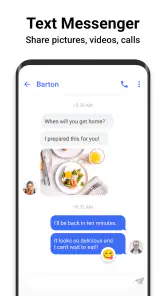
First off, let's talk about the core of this app—sending and receiving messages. The Messenger SMS - Text Messages app offers a straightforward interface that’s incredibly easy to navigate. It's like having an old-school texting experience but with a modern twist. No frills, just good old texting.
One of the things I really appreciate is how it smoothly integrates with your existing contacts. You don’t need to jump through hoops to start texting. Just install the app, and you’re ready to send messages in a jiffy. It's perfect for those who want a simple messaging app without all the unnecessary clutter.
Customization Options Galore
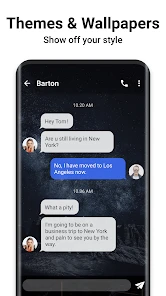
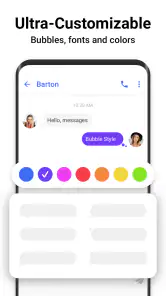
Although simplicity is its strong suit, it doesn’t mean the app skimps on customization. You can tweak the look and feel of your chat interface with different themes and colors, which is a nice touch if you ask me. It adds a bit of personality to your conversations, and who doesn’t like that?
Plus, there are options to customize notification sounds and even the way your messages are displayed. So, if you’re all about tailoring your texting experience, this app has got you covered. It’s not just about sending texts; it’s about doing it your way.
Performance and Reliability
Now, onto something that’s super important for any messaging app—performance. The Messenger SMS - Text Messages app performs reliably without any noticeable lag, ensuring that your messages are sent and received promptly. This is crucial, especially when you’re in the middle of an important conversation and need your messages delivered instantly.
Battery consumption is another strong point. The app is light on resources, meaning it won't drain your phone’s battery life like some other apps do. This is a big win for those of us who hate carrying around portable chargers.
Security Features
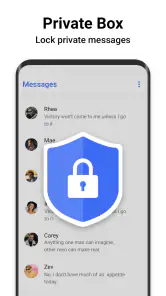
In today’s world, privacy is key, and this app doesn’t disappoint. It offers end-to-end encryption, ensuring your messages are kept safe from prying eyes. Knowing that my conversations are secure gives me peace of mind, and I'm sure it will for you too.
All in all, the Messenger SMS - Text Messages app is a solid choice for anyone looking for a reliable and customizable texting experience. It’s got the basics down pat with a few extra features to keep things interesting. So, if you're in the market for a new messaging app, give this one a shot. It might just become your new favorite way to stay in touch!
Who should consider it, and who should pass
The clearest reason to try it is a preference for ordinary texting with a more adjustable presentation. The app is free to install, rated for Everyone, and has a 4.7 average from around 357,000 ratings. It has passed 50 million installs, which suggests plenty of people have tried it, though popularity alone can’t tell you whether its style suits your phone. The developer is SMS Messenger, Text App, and the current version is 2.9.3.
I’d recommend it to someone who mostly sends short personal texts, wants to customize chat colors or notification sounds, and doesn’t need every conversation to live inside one internet-based service. I’d steer a heavy group-chat user toward a service built around online messaging instead. Those apps are generally better for sharing media, coordinating active groups, and switching among connected devices; a dedicated SMS app is more useful when the other person is simply reachable by text.
Small choices that make texting easier
One non-obvious benefit of changing notification sounds is that it can help me distinguish routine texts from alerts from other apps without checking the screen every time. I’d use that selectively: give important contacts a sound I recognize, but avoid assigning a special alert to so many conversations that the distinction stops helping. A calmer theme can also make a long thread easier to skim, while a high-contrast choice may be more practical than a decorative one.
If you’re weighing the cost, the app is free, with optional in-app purchases priced from $0.99 to $59.99 per item. I’d start by using the basic texting experience and only consider a purchase if its purpose is clear to me. It runs on Android 6.0 or later, so checking your device’s system version before installing can save time. The release date was January 15, 2016, but what matters more for a new user is whether the current version works comfortably with their device and routine.
Privacy, expectations, and the final call
The original description of the experience presents the app as offering end-to-end encryption. I’d be careful not to treat that claim as a reason to assume every SMS conversation has the same privacy properties as a dedicated encrypted internet-messaging service. If confidential communication is a priority, I’d choose a tool whose protections and message delivery model I understand, and make sure the person I’m contacting uses it too.
My overall view is that Messenger SMS - Text Messages is worth considering when a familiar SMS workflow matters more than a long list of connected features. Its themes, colors, and notification choices give everyday texting some personal control, while mobile service remains the deciding factor when a message must get through. If your needs are simple, it can be a comfortable alternative to a phone’s default texting app; if you need rich online conversations or stronger assurances around private messaging, another option is the better fit.
Messenger SMS - Text Messages Frequently Asked Questions
Can Messenger SMS - Text Messages replace my phone’s default texting app?
Messenger SMS - Text Messages is a communication app focused on SMS texting, so it may suit you if you want a dedicated place to send and receive messages. Whether it can become your default messaging app depends on your Android device and settings. Before switching, consider how you currently handle conversations and whether the app’s messaging options fit your everyday needs.
Is Messenger SMS - Text Messages suitable for children?
The app has an Everyone content rating, which indicates that it is considered suitable for a broad audience. That rating can help families decide whether it is appropriate, but parents may still want to review how their child uses messaging and discuss safe communication habits. It is also worth considering that SMS use may involve charges determined by the mobile plan.
What should I know about Messenger SMS - Text Messages before downloading it?
Messenger SMS - Text Messages is a communication app for texting, with a short description that presents it simply as “Messenger SMS.” It is rated for Everyone and is available at no cost to download, with optional in-app purchases. Its broad install base and user feedback make it a familiar option for people looking for an SMS messaging app.
What features does Messenger SMS - Text Messages offer?
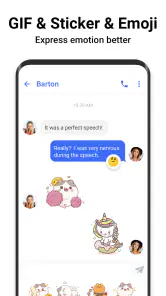
Messenger SMS - Text Messages offers a variety of features including sending and receiving text messages, group messaging, multimedia sharing, emojis, and stickers. It also supports customization options like changing themes and backgrounds. Additionally, it provides security features like message encryption to ensure privacy and protection against unauthorized access.
Is Messenger SMS - Text Messages free to use?
Yes, Messenger SMS - Text Messages is free to download and use. However, it may offer in-app purchases for additional features or premium content, with individual purchases ranging from $0.99 to $59.99. While the basic functionalities are available at no cost, users should be aware of any potential charges for premium services or features they may opt to purchase.
Pros
- User-friendly interface for easy navigation.
- Supports multimedia messaging
- including images.
- Group chat feature for multiple users.
- Works offline for SMS functionality.
- Customizable themes for personalization.
Cons
- Contains ads that can be intrusive.
- Limited customization for notifications.
- No end-to-end encryption for messages.
- Occasional syncing issues with contacts.
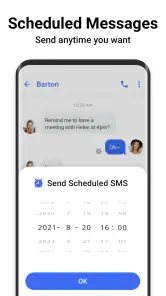
- Lacks advanced features like scheduling.
- Category
- Communication
- Version
- 2.9.3











