Messages: Text SMS
- 488.00
- 4.2
- Installs
- 1.00M
- Price
- Free

Screenshots
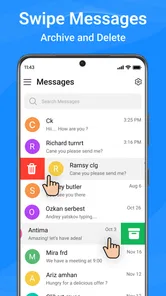
Analysis by Reviewed
I find Messages: Text SMS easiest to judge by one everyday question: does a messaging app let me make ordinary texting feel comfortable without turning it into a project? Its emphasis on customization is the capability that matters most in daily use. A chosen look, readable text, and contact-specific notifications can make a familiar inbox feel better suited to the way I actually communicate.
Personalizing the everyday inbox
The Messages: Text SMS app is packed with features that make texting so much more than just tapping out letters. One of my favorite things about it is the customization options - you can change up the theme, adjust the font size, and even set different notifications for different contacts. This level of personalization really makes messaging feel unique to you.
Those settings have practical value beyond appearance. If I’m often checking messages in different lighting, choosing a theme that feels comfortable can make the inbox easier to look at. Increasing the font size can also help when I want to read a quick message without leaning toward the screen. Contact-specific notifications are useful when I need to distinguish an important person’s message from the rest without opening every conversation. I’d treat these as small quality-of-life choices, not as a replacement for keeping notification habits under control.
How customization fits into a real routine
Imagine I’m expecting a time-sensitive text from a family member while work and group conversations keep generating alerts. A distinct notification for that contact gives me a simple cue to check the message, while other conversations can wait until I have a spare moment. Later, a larger text setting can make a long exchange easier to follow. The benefit is modest but tangible: I spend less effort sorting the inbox by urgency and more time responding when it suits me.
A useful way to set this up is to start with only one or two contacts whose messages genuinely need a different cue. I would use a distinctive alert for a caregiver, a school contact, or someone helping coordinate a time-sensitive plan, then leave ordinary conversations at the default. That keeps the special signal meaningful instead of making every buzz feel equally urgent. If I later find that I’m checking the phone too often, I can simplify the pattern rather than adding more custom alerts.
This kind of tailoring is most helpful when the phone already carries a steady stream of notifications. It cannot decide which messages deserve attention, but it can make a decision I have already made easier to notice. I also find that a readable text size has a different benefit from a theme: it helps me scan the actual content, especially when I’m standing in a queue or checking a message briefly between tasks. A theme is more about comfort and preference, while text size can affect how quickly I understand a message.
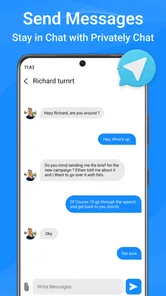
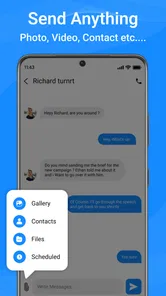
Another cool feature is the ability to send multimedia messages. Whether it’s pictures, videos, or voice notes, the app handles it smoothly, making it super easy to share those memorable moments with your contacts. And for those who love group chats, this app supports them seamlessly, allowing you to keep up with all your groups without a hitch.
More From Our News Desk

 Lark Player:Music Player & MP3
Switching to Lark Player: A Better Fit for Music Stored on Your Phone?
Lark Player makes sense if your music already lives on your phone. Here is what changes, what does not transfer by assumption, and how to test the switch without regret.

 Tile Master® - Matching Game
Tile Master Finds Its Place in the Gaps of a Noisy Phone
OS changes rarely transform a tile puzzle, but they reshape the small rituals around it. Tile Master’s appeal lies in how well its brief, tactile rounds fit the modern phone.

 Google Docs
 Shows What Mobile Writing Still Gets Wrong
Google Docs still makes a strong case for the shared document, but its real significance is how it exposes the gap between cloud convenience and genuinely capable mobile work.

 YouTube Studio
 Is Becoming a Creator’s Daily Control Room
As publishing turns into a daily, data-led habit, YouTube Studio is becoming the control room creators reach for between uploads—not another tool for making videos.

 Tiles Hop Music & Ball Game
Tiles Hop Review: When the Beat Is Clear, Every Miss Counts
Tiles Hop turns a simple bouncing-ball premise into a sharp test of timing. Its best design is immediate and readable; its weakest moments come when recovery feels less clear than the beat.

 Piano - Music Keyboard & Tiles
: Inviting Rhythm, Unproven Recovery
A tile-tapping piano game lives or dies by timing. This resilience-focused review separates what its format promises from what players still need to verify.
Latest News



That makes it useful for practical exchanges as well as casual ones: I can send a photo of an item someone needs to identify, or use a voice note when typing would be inconvenient. Group messaging is handy for coordinating a shared plan, but it can also become noisy when several people reply at once. For a quick, small group update, SMS is straightforward; for large, ongoing conversations with lots of replies, a dedicated chat service may be easier to manage.
Where ordinary SMS is the right tool
A realistic example is arranging a pickup with relatives who use different phones or prefer different chat services. I can send the address, a short timing update, and a photo of the right entrance in one familiar conversation, without asking everyone to install or join a new community. That convenience is the main reason I’d keep an SMS-focused app available even if I also use internet messaging for friends. It works best for direct coordination, not as a substitute for every online conversation.
There is a trade-off with multimedia and group messages: the experience depends partly on the people receiving them and the messaging setup they use. Before relying on a group thread for a complicated plan, I’d make the key details explicit and check that everyone has seen them. For a decision with several moving parts, a shared calendar or a chat platform with richer conversation tools may keep the discussion clearer. Messages: Text SMS is more appealing when the exchange is simple and the goal is to reach people in a familiar way.
Another practical tip is to keep important information easy to find. If a group thread is producing a flood of replies, I would send a concise follow-up that repeats the final time or location rather than assuming everyone will scroll back. That is not a special feature; it is a sensible way to work with a busy text conversation. The app’s uncomplicated approach suits short exchanges, but it does not remove the usual limits of a crowded SMS thread.
Performance and Usability
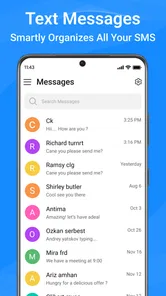
Performance-wise, the app runs like a dream. I've never experienced any lag or crashes, which is a big plus. The interface is intuitive, with everything laid out in a way that’s easy to navigate. Even for someone who’s not tech-savvy, getting the hang of this app is a breeze. Plus, it integrates smoothly with your phone’s existing contacts and call logs, so there’s no need to juggle between different apps.
In practice, the simple interface is most valuable when I’m doing something quickly: opening a contact, checking the latest reply, and returning to what I was doing. One sensible habit is to decide which conversations deserve distinctive alerts rather than assigning special sounds to everyone; too many exceptions can make notifications less useful. I’d also review message threads before relying on them for an important detail, since a busy group conversation can bury the information I need.
For someone moving from a phone’s built-in texting app, the most important question is not whether the inbox looks different; it is whether the everyday routine remains easy. I’d check that the conversations I care about are visible, that the contact names make sense, and that replies arrive in the place I expect. It is also worth checking which app is set to handle SMS after making a change. That small check can prevent the confusion of looking in one inbox while new messages are being handled elsewhere.
Messages is a communication app from Phone call, and its focus is familiar SMS-style messaging rather than replacing every way people talk online. It is free, rated for Everyone, and has an average rating of 4.1 from around 24,000 ratings, with more than 1 million installs. Version 1.45 is listed for devices running Android 7.0 or later. These details make it accessible to a broad range of Android users, but they don’t mean it will suit someone whose friends mainly communicate through a different platform.
Its release on December 1, 2024, places it among newer choices in a category where many people already have a default app and established habits. I would not switch just to have another icon on the home screen. I’d switch if the combination of a more personal inbox, clearer contact alerts, and familiar texting addresses a specific annoyance. Its average rating and broad adoption can help someone feel that it is an established option, but the best test is still whether it works comfortably with the contacts and routines that matter to them.
Privacy expectations and practical limits
In today's world, security is a big concern, and the Messages: Text SMS app doesn’t disappoint. It offers end-to-end encryption, ensuring that your messages are only seen by you and the intended recipient. This feature gives me peace of mind, knowing that my conversations are private and secure.
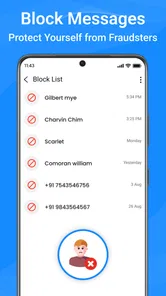
Additionally, the app has a handy feature that allows you to block unwanted numbers. So, if you’re tired of getting spam messages, this feature will be a lifesaver.
Blocking is especially useful when an unwanted sender keeps interrupting an otherwise tidy inbox. I’d use it for persistent nuisance messages, while still treating unexpected links or requests for personal information cautiously. Encryption is reassuring for private conversations, but it doesn’t remove the need to check who I’m messaging or to keep sensitive details out of a text when that is not appropriate. For conversations that depend on rich platform-specific tools or a particular service’s ecosystem, the usual alternative may be a better fit.
I would also separate privacy from convenience when deciding what to send. A private conversation still calls for ordinary care: verify the recipient before sharing something personal, and be wary of messages that pressure you to act quickly or reveal details. Blocking can stop a number from continuing to intrude, but it is not a substitute for being cautious about new senders. These habits matter with any texting app, and they help keep the app’s privacy tools in perspective rather than treating them as a guarantee against every risk.
For many people, the practical question is whether this app can replace the texting app they already use. I’d approach that as a routine decision, not a security shortcut: check how the phone handles SMS, make sure familiar conversations are easy to access, and consider whether the people you contact most often still reach you through the same number. If a workplace, family group, or service depends on another messaging platform, keeping that platform may be more important than making SMS the center of everything.
Who is likely to get the most from it?
I’d recommend this app to someone who wants a familiar texting routine with room to adjust the look and notifications, especially if they value quick exchanges, contact-based alerts, and the option to block unwanted numbers. It is less compelling for someone who expects every friend to be available in the same messaging service, or who wants a highly specialized workspace for large communities. Before switching, I’d check which app is currently handling SMS on the phone and make sure the people I contact most often can still reach me in the way they normally do.
It should suit people who rely on direct texts for family logistics, practical updates, or conversations with contacts who are not all on the same chat service. It may also appeal to someone who finds a crowded inbox harder to scan and wants to make a few conversations stand out without rebuilding their whole communication routine. The customization is most useful when it solves a particular problem—readability, visual comfort, or recognizing a priority sender—rather than when it is treated as decoration for its own sake.
I’d skip it if most of my daily communication happens in a service with large communities, channels, or platform-specific features that SMS does not provide. Someone who needs rich collaboration tools, dependable message organization across many active groups, or a single shared space for a whole team will probably be happier with a dedicated chat platform. Likewise, if the phone’s existing messaging app already feels clear and comfortable, the benefits here may not justify changing a familiar setup.
For a new user, the sensible first step is modest: try the app for ordinary one-to-one texts, adjust the text size or theme only if there is a clear reason, and give a distinctive alert to a contact whose messages should be easier to notice. Then see whether that change actually improves the routine. If it does, keep it; if it creates more interruptions or feels like extra maintenance, return to a simpler setup. That approach makes the customization serve the user instead of turning settings into another task.
My Final Thoughts
Overall, I’d say the Messages: Text SMS app is a solid choice for anyone looking for a reliable and feature-rich messaging app. Its user-friendly design, combined with its robust security features, makes it stand out in a crowded app marketplace. Whether you’re just sending a quick text or managing multiple group chats, this app has got you covered. So why not give it a try and see how it fits into your daily communication routine? You might just find it’s exactly what you’ve been looking for!
My recommendation is to judge it by the small routines it can improve: whether its text and theme options feel comfortable, whether contact alerts help you notice the right messages, and whether its group and multimedia messaging match the people you actually talk to. If those needs line up, it is an approachable option for everyday texting. If your conversations mostly happen elsewhere, choosing the service your contacts already use will matter more than customization.
Messages: Text SMS Frequently Asked Questions
Does Messages: Text SMS need an internet connection to send ordinary texts?
Messages: Text SMS is an SMS app, so ordinary text messages are handled through your mobile service rather than a messaging account that requires internet access. Your phone still needs cellular coverage and an active service plan that supports texting. Features such as sharing media may be handled differently by your carrier, so check your plan if those costs or limits matter to you.
Can I bring my existing text conversations into Messages: Text SMS?
The app is intended for SMS conversations, but switching to it does not necessarily mean your existing message history will be moved or displayed in exactly the same way. That depends on how your Android device manages stored messages and the app’s access to them. Before changing your default messaging setup, consider whether you need to preserve old conversations and check what appears after installation.
Can Messages: Text SMS be used for group conversations and sharing photos or videos?
Messages: Text SMS supports group messaging and multimedia sharing, including photos and videos, so it can cover more than one-to-one text conversations. What you can send and how it is delivered may depend on your phone, carrier, and recipient’s device or messaging setup. If you regularly share media, check your mobile plan for any applicable messaging or data charges.
Is Messages: Text SMS suitable for children?
Messages: Text SMS has an Everyone content rating, which may help families assess whether its general audience classification is appropriate. The app is designed for communication, and children’s texting still depends on the contacts they communicate with and the device’s settings. Parents may want to review permissions, discuss safe messaging habits, and use any relevant supervision features available on the child’s Android device.
Does Messages: Text SMS let me customize its appearance and notifications?
Customization is one of the app’s stated draws, and it offers themes and notification options alongside its SMS features. This can make conversations feel more personal and help you adjust alerts to suit your routine. The exact options you see may depend on your device and app setup, so explore the settings after installing rather than assuming every Android phone presents them identically.
Pros
- User-friendly interface for easy navigation.
- Supports group messaging efficiently.
- Allows multimedia sharing including images.
- Customizable notification settings.
- Compatible with various devices.
Cons
- Lacks end-to-end encryption.
- Limited customization options for themes.
- May encounter spam messages occasionally.
- Requires internet for multimedia sharing.
- No native backup feature available.