

MD335 Hybrid watch face
- 162.00
- 4.6
- Installs
- 50.00K
- Price
- $2.29
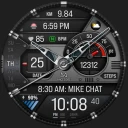
Screenshots
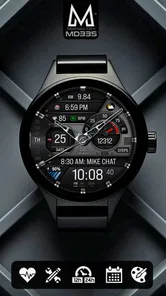
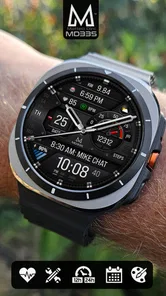
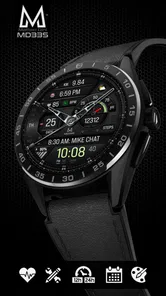
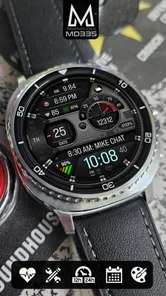
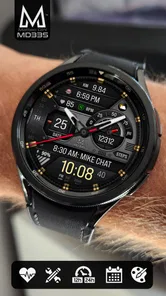
Analysis by Reviewed
I’d judge a watch face less by how many options it lists and more by whether I can set it up once, read it quickly, and stop fussing with it. That is the useful way to approach MD335 Hybrid: begin with the information you actually check, then decide whether its mix of traditional hands and digital details suits your daily routine. It is a paid personalization app for Wear OS, made by Matteo Dini MD ® Watch Faces, and the one-time price is $1.99.
Start with a face you can read at a glance
My first setup would be deliberately simple. I’d choose a color treatment that stays legible in the light and settings that keep the time easy to pick out, then add only the secondary information I use. A hybrid face can look appealing when crowded with details, but a glance at a watch is brief; if I have to pause and decode it, the extra customization has defeated its purpose.
The key question is what you want your wrist to answer without opening another app. If step tracking is part of your routine, that may earn a place on the face; if you rarely check it, leaving that space for something more useful can make the layout calmer. The same applies to heart-rate information and other available details: treat each one as a choice, not a requirement. I’d check the face in ordinary situations—walking outside, sitting at a desk, and moving between tasks—before deciding that a layout works.
First Impressions Matter
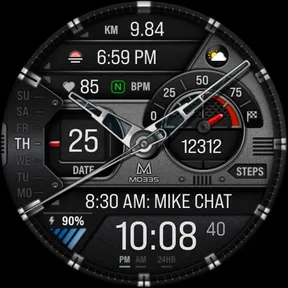
The first thing that caught my eye about the MD335 Hybrid watch face was its sleek and modern design. It’s like wearing a piece of contemporary art on your wrist. The creators have done a fantastic job at merging digital and analog aesthetics, giving you the best of both worlds. I mean, who doesn’t want their wrist to look like it belongs in a tech expo?
Design and User Interface
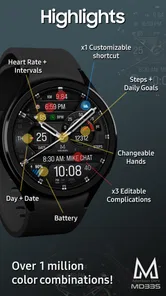
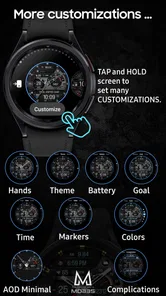
As soon as I installed the app, I was greeted with a clean, intuitive interface that made navigation a breeze. The watch face itself is customizable, allowing you to tweak everything from colors to the types of information displayed. It’s like having a mini control center on your wrist. You can choose what matters most to you, whether it’s keeping track of your steps, monitoring your heart rate, or simply displaying the time in style.
Settings that deserve a second look
Color and information choices are worth testing together rather than one after another in isolation. A bright accent may look crisp in the setup view but compete with small text once the face is on your wrist. I’d make one adjustment at a time, wear it through a normal day, and keep the change only if it improves quick reading. That small, repeatable check is more useful than endlessly redesigning the face.
Also consider whether you want your watch to be a glanceable dashboard or mainly a clock. Calendar notifications and weather can be handy when you’re deciding what to do next, while a cleaner layout can be better if you already use your phone for those checks. The practical trade-off is straightforward: more visible information can reduce the need to reach for your phone, but it can also make the face feel busy. I’d favor the details that change a decision, not merely the ones that are available.
More From Our News Desk

 Gmail
GmailGmail in a Busy Inbox: Who Benefits Most?
From first account to crowded workday, Gmail earns its place through dependable search and flexible sorting—but its best fit depends on how much inbox maintenance you can tolerate.

 Prime Video
Switching to Prime Video: What Changes in Your Viewing Routine
Prime Video can make a compelling second home for streaming, but switching means learning a different catalog, rental layer, and route from browsing to playback.

 Universal TV Remote Control
Universal TV Remote Control Works Best as a Reliable Backup
A phone remote earns its place through quick setup and reliable habits. Here is how to get more from Universal TV Remote Control—and where its limits show.

 Weather - By Xiaomi
Weather by Xiaomi Review: Clear at a Glance, Less Clear Up Close
Xiaomi’s weather app makes everyday forecasts quick to scan, but its calm surface can leave useful details and recovery paths harder to find than they should be.

 X
XX Under Pressure: Can It Recover When Posting Goes Wrong?
A resilience-focused review of X, examining setup, mistaken posts, interruptions, weak connections, and the gaps that matter when recovery needs to be dependable.

 Clash of Clans
Clash of Clans Is Won Between the Battles
Its raids are quick; its community is a long-term project of coordination, teaching, rivalry, and shared responsibility—with all the friction that entails.
Latest News



Functionality Meets Fashion
Functionality is where the MD335 Hybrid truly shines. This watch face isn’t just about looking good; it’s packed with features that make it incredibly practical. From weather updates to calendar notifications, everything is just a glance away. Plus, the hybrid nature of this watch face means you get the classic look of analog with the smart features of digital.
One of my favorite things about this app is how it seamlessly integrates with your smartphone. You get notifications, alerts, and can even control music playback without having to dig into your pocket. It’s all about making life easier, and who doesn’t love that?
Build a repeatable daily pattern
A useful everyday setup is to check the face while getting ready, use its glanceable details to plan the morning, then rely on notifications and music controls during errands or a commute. For example, if a calendar reminder is the detail that keeps you on schedule, make that easy to spot and leave less-used information out of your visual focus. The benefit is not just having more on the watch; it is reducing the number of small phone checks that interrupt a task.
For faster use, I’d settle on a layout and leave it alone for several days before making another round of changes. That gives you a fair sense of whether the placement and contrast work in real conditions, rather than judging them during setup. If you often switch between a workday and exercise, a different arrangement may make sense for each routine, but there is little value in changing settings so frequently that the watch face stops feeling familiar.
Where a hybrid face fits—and where it doesn’t
Compared with a plain digital face, MD335 Hybrid puts more emphasis on the familiar analog look while keeping selected smart information visible. A basic clock face is the better choice if all you need is time and you want the least visual activity. A highly information-dense dashboard may suit someone who wants many readings at once, but it can be harder to scan quickly. This face makes most sense in the middle: for someone who likes hands on the dial and still wants useful watch details nearby.
It is also a Wear OS choice, so I’d first make sure that fits the watch I plan to use. The app is rated for Everyone and has a 4.4 average from around 1.6 thousand ratings; it has passed 50 thousand installs. Those figures suggest that it has found an audience, but they do not decide whether its particular analog-digital balance will suit your eyesight, taste, or habits. I’d choose it for the design and the ability to tailor what is displayed, not simply because it is popular.
Performance and Battery Life
Now, let’s talk about performance. You might think all these features would drain your battery like there’s no tomorrow, but surprisingly, the MD335 Hybrid is quite energy-efficient. It’s designed to be light on resources, which means you can enjoy all its features without constantly worrying about charging your watch. I found myself using it extensively throughout the day without any noticeable battery issues.
Battery life is still a personal, watch-dependent experience, so I would avoid assuming that one setup will behave identically on every device. If you notice a change after installing any new face, compare your ordinary routine with the new setup over a normal stretch of use before blaming one specific setting. A restrained layout is a sensible starting point, especially if you prioritize endurance over having every possible detail visible.
Know the limits before you buy
The main compromise is that customization asks you to make choices. Someone who wants a face that looks exactly the same for everyone, needs no setup, and shows only a large digital time may be happier with a simpler alternative. Likewise, if you dislike analog hands or prefer to keep notifications off your wrist, much of the hybrid appeal may be beside the point. The $1.99 price is modest, but it is still worth paying only if you expect to use the style and configurable information rather than treating customization itself as a benefit.
One practical question is whether the face can replace checking your phone altogether. I wouldn’t expect that: glanceable information and notifications can reduce some pickups, while detailed tasks still belong on the phone. Another is whether you need to configure every element immediately. I’d start with the time and one or two genuinely useful details, then add more only if a real routine calls for them. That keeps the first setup manageable and makes it easier to tell what is helping.
Who will get the most from it
I see the best fit as someone who already wears a Wear OS watch throughout the day and wants more than a decorative dial, but less visual density than a full dashboard. A person who checks the time, a calendar prompt, or a small selection of personal readings between meetings can benefit from having those cues together. The analog styling also gives the watch a more traditional feel than a screen dominated by digital numerals, which may be appealing if you want smartwatch utility without making the device look like a tiny phone.
It is less compelling for someone who rarely glances at a watch, already relies on a minimal digital face, or wants every possible data point visible at once. I’d also think twice if you prefer not to receive wrist notifications: the face’s practical appeal is strongest when you want selected information close by. In those cases, a simpler built-in face can be easier to live with, and paying for personalization may not change your routine enough to justify it.
A practical way to judge the setup
For a realistic test, I’d wear the face through a day with different kinds of attention: a busy morning, time at a desk, and a trip outside. Notice whether you can read the time without turning your wrist repeatedly, and whether the secondary details are visible when you need them rather than merely attractive in the editor. If one item keeps drawing your eye without helping you decide anything, remove it or give it less prominence. That is a more useful test than trying to make the display look complete.
There is also a small habit worth keeping: make a note mentally of what you actually checked over a few days before customizing. If you repeatedly look for calendar information, that is evidence to give it a place; if you never use a particular reading, it is a good candidate to leave out. This avoids the common trap of configuring a watch face around imagined needs instead of the ones that show up in an ordinary week.
Final Thoughts
In the end, the MD335 Hybrid watch face is more than just a pretty face. It’s a powerful tool that combines style with functionality in a way that few other apps do. Whether you’re a tech enthusiast or someone who just wants a stylish and practical watch face, this app has something to offer.
So, if you’re ready to elevate your smartwatch game, give the MD335 Hybrid a try. It might just be the upgrade you didn’t know you needed.
My take after weighing the trade-offs
I’d recommend it to a Wear OS owner who wants an analog-inspired look but still values quick access to selected smartwatch information. Its strongest use is a familiar, personalized daily face—not a substitute for a full phone screen or a promise that every detail will matter to every wearer. If you prefer an uncluttered digital display, or never look at anything beyond the time, a simpler option is likely the more sensible pick.
For everyone else, the best way to get value from it is to build one comfortable layout around a real habit, test it through an ordinary day, and resist changing it just for novelty. That balance of style and practical information is what makes MD335 Hybrid worth considering.
MD335 Hybrid watch face Frequently Asked Questions
What devices and app category is MD335 Hybrid watch face designed for?
MD335 Hybrid is a personalization app made for Wear OS devices, so it is intended for a compatible smartwatch rather than as a standalone phone watch face. Before downloading, check that your watch runs Wear OS and that the app is available for your particular device. This helps ensure you can install the face and access its customization options from the watch.
Who develops MD335 Hybrid, and what is its age rating?
MD335 Hybrid is developed by Matteo Dini MD ® Watch Faces. Its content rating is Everyone, making it suitable for a broad audience. The app is a premium hybrid watch face for Wear OS, so its main purpose is to personalize the look and information shown on a compatible smartwatch rather than provide a separate phone-based service.
What features does the MD335 Hybrid watch face offer?
The MD335 Hybrid watch face combines both digital and analog elements, offering a unique and customizable experience for users. It features multiple display options including time, date, battery life, and step count. Users can also customize the colors and widgets to suit their preferences. This watch face is designed to provide a balance of style and functionality for smartwatch users.
Is the MD335 Hybrid watch face compatible with all smartwatches?
The MD335 Hybrid watch face is compatible with most Wear OS smartwatches. However, it’s important to check the specific compatibility with your smartwatch model before downloading. Some features might not be fully supported on older devices or those running non-standard versions of Wear OS. Always ensure your device is up-to-date for the best experience.
How can I customize the MD335 Hybrid watch face?
Customization is a key feature of the MD335 Hybrid watch face. Users can change the color scheme, select different widgets to display, and adjust the layout to better fit their needs. This can usually be done through the smartwatch settings or a companion app on your phone, allowing for a personalized experience that reflects your style.
Pros
- Highly customizable watch faces.
- Compatible with various Android devices.
- Real-time health tracking features.
- Sleek and modern design.
- User-friendly interface.
Cons
- Limited compatibility with iOS.
- Battery usage can be high.
- Requires frequent updates.
- Limited free features.
- Initial setup can be complex.













