MD242 Hybrid watch face
- 346.00
- 4.4
- Installs
- 100.00K
- Price
- $1.99
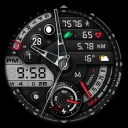
Screenshots
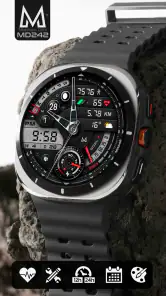
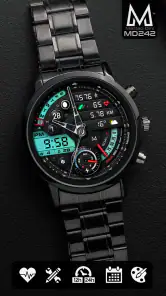
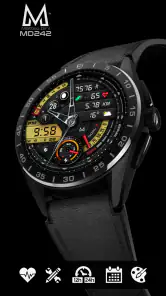
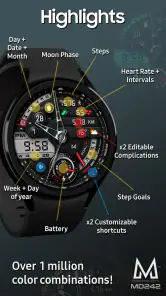
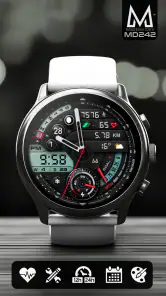
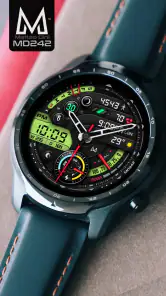
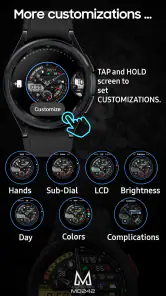
Analysis by Reviewed
My first week with MD242 Hybrid watch face would be about finding a layout that works in real life, not just one that looks good in a screenshot. The appeal of a hybrid face is that it gives the watch a more traditional, watch-like character while keeping digital information close by. I’d start with a restrained color choice and only the complications I check regularly; a crowded face can make useful details harder to spot.
That small setup choice matters on a busy day. If I’m heading out, I might want the time and a calendar glance to be immediately readable; on a walk, I’d rather give a fitness-related complication the space. The practical question is not how many options are available, but whether the details I choose remain legible at a quick glance. I’d try the face for several ordinary days before settling on a layout, since a watch face that looks balanced while browsing settings can feel different when checked in motion.
Making the first week count
I’d use the early days to test the face in different light and situations, rather than repeatedly judging it from the watch’s settings screen. A quick glance outdoors, a look while carrying groceries, and a check during a meeting reveal different things: whether the time stands out, whether the complications are easy to distinguish, and whether the overall design feels too busy. That kind of real-world trial is more useful than changing several settings at once, because I can tell which adjustment actually helped.
A practical starting point is to assign each visible complication a job. One might answer a question I ask every day, while another could be useful only on particular days. If I can’t explain why I want a detail on the dial, I’d leave that space unused or simplify the arrangement. The benefit is not just a cleaner appearance; it also makes the information I care about easier to find without having to remember where everything sits.
When the novelty wears off
For a watch face, lasting value comes from becoming a quiet part of a routine. I’d judge this one by whether its information saves me from opening another screen and whether I still enjoy its design after the first burst of customization. If I keep checking the same two or three details, the face earns its space; if I keep changing everything just to make it feel new, that may be a sign I prefer simpler designs.
The hybrid approach also makes it easier to choose between style and utility without treating them as opposites. Compared with a plain digital face, this design aims for a more classic visual feel; compared with a purely analog option, its complications can make relevant information easier to bring forward. That trade-off suits someone who wants a watch to look considered but still serve as a glanceable daily tool. Someone who only wants the largest possible time display may be happier with a much simpler face.
A sensible setup for everyday wear
I’d treat customization as a little editing exercise rather than a checklist. Pick the information you genuinely use, keep the most important items easy to recognize, and avoid filling every available area simply because it can be filled. A useful test is to check the face during a normal commute or between tasks: if I have to pause and study it, I’d remove a complication or choose a clearer arrangement. This is a practical way to make the face feel personal without letting personalization get in the way.
More From Our News Desk

Clash of Clans Is Won Between the Battles

Android Auto Makes the Case for Quieter Car Software

MobiOffice: Transforming Mobile Productivity with Seamless Integration

EA SPORTS FC™ Mobile Soccer: Redefining Mobile Sports Gaming

How Microsoft OneDrive Became a Mobile Productivity Giant

How Google Translate Breaks Language Barriers Effortlessly
There are limits to what I’d expect from any watch face. Complications depend on the options available through the watch and the information those sources provide, so I wouldn’t assume every preferred detail will behave identically across devices. Nor would I buy a face solely for one particular complication before checking that it appears in the watch’s selection tools. The face changes how information is presented; it doesn’t replace the apps or services that supply it.
A routine, not a settings project
Picture a weekday when I’m leaving home, moving between errands, and checking the time without stopping. A well-chosen complication can make a quick glance more useful, but only if it answers a recurring question clearly. I’d keep the display focused on the details that help with that routine and leave less-used information to the apps already on the watch. This makes the hybrid design feel like a practical surface rather than a miniature dashboard I have to study.
That distinction also helps answer whether the face works for different kinds of users. It is a stronger fit for someone who enjoys tailoring a watch and has a few repeat-use details in mind. It is less compelling for someone who wants to install a face and never make a choice, or who finds any extra information distracting. If I’m unsure which camp I’m in, I’d begin with a sparse arrangement and add only one item after noticing a genuine need.
First Impressions
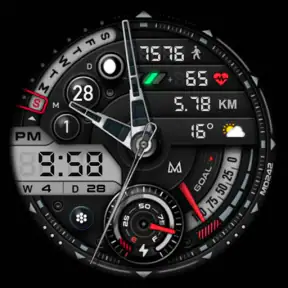
The moment I installed the MD242 Hybrid watch face, I was struck by its sleek and modern design. It strikes a brilliant balance between digital and analog elements, making it a fantastic hybrid model. The bold, clear numbers and intuitive layout make it easy on the eyes and super user-friendly. What's even better? It’s customizable! You can tweak the colors and widgets to match your personal style or mood.
Features Galore
Now, let’s dive into the cool features this app has to offer. First off, it's packed with all the essential information you need at a glance. I’m talking about steps, heart rate, battery percentage, and even the weather. It’s like having a personal assistant on your wrist!
One feature that stands out is the complication support. You can choose from a variety of widgets to display, like your calendar events or fitness goals. Plus, the watch face supports both 12-hour and 24-hour formats, which is a big win if you’re particular about your time settings.
Choosing details that earn their space
The listed examples cover different kinds of glance: a body-related measure, a daily target, a forecast, and something tied to plans. I’d avoid treating them as a bundle that all need to be visible at once. For instance, a person who already checks the weather on a phone may get more value from calendar information, while someone tracking a walk may care more about a fitness detail. The useful setup depends on what I otherwise reach for my phone to check.
There is also a small but important trade-off between variety and consistency. A complication that changes its meaning or source when I switch watch apps can make a layout feel less predictable. I’d settle on the information I want first, then check how the watch presents the available choices before building the rest of the face around them. That order reduces the chance of designing a layout around an item that doesn’t suit my device or routine.
Performance and Usability
In terms of performance, the MD242 Hybrid watch face runs smoothly without any noticeable lag. It’s optimized for battery efficiency, so you won't find yourself needing to recharge your smartwatch more frequently. The interface is intuitive, making it easy even for those who might not be tech-savvy.
Switching between different styles and colors is a breeze, thanks to the straightforward settings menu. It’s these little details that make the user experience so pleasant and hassle-free.
Living with the face day after day
Customization is most satisfying when it solves a small recurring annoyance. If I repeatedly open the calendar just to see what is next, placing that information where I can glance at it may reduce a step. If I rarely look at a particular metric, giving it a permanent spot adds visual competition without changing my habits. I’d pay attention to what I actually check over the first few days, then make one deliberate adjustment instead of trying every possible combination.
That approach is also useful when sharing the watch with different parts of my day. A workday may call for schedule information, while a walk may make a fitness-related detail more relevant. I would not assume I need a separate layout for every activity; too much switching can become its own chore. The better test is whether one arrangement serves most of my ordinary use, with only occasional changes when my routine genuinely shifts.
Maintenance, price, and fit
Once the face is set up, the ongoing effort should be modest: I’d revisit the arrangement when my routine changes, rather than constantly rebuilding it. For example, if a calendar view stops helping after a schedule change, I’d swap that space for a detail I check more often. The useful habit is to keep the display intentional, not to chase a perfect arrangement every morning.
This is a personalization app for Wear OS by Matteo Dini MD ® Watch Faces. It costs $1.99, is rated for Everyone, and has been available since Jun 30, 2022. Its 4.4 average from around 4.1K ratings, with over 100K installs, suggests that plenty of people have given it a try, though popularity alone won’t tell you whether its particular visual style suits your wrist. I’d consider the one-time purchase worthwhile if I expect to use the face regularly and value its hybrid look; if I change faces often or prefer a free, minimal option, I’d save the money.
What to expect from setup and compatibility
Because this is a Wear OS watch face, the practical question is whether the watch’s own complication choices include the information I want to surface. I would check that before paying for it, especially if one specific widget is the main reason I’m interested. The face can arrange and present compatible information, but the available sources and choices are part of the watch environment, not a promise that every desired data point will appear in exactly the same way everywhere.
That is why I’d treat the purchase as a choice of design and a useful framework for complications, rather than as a replacement for a fitness, calendar, or weather app. Someone who wants a particular service to do something new should look to that service; someone who wants a more personal watch display may find the face’s role much more relevant. This distinction keeps expectations sensible and makes the value easier to judge.
Who should keep it on their wrist?
I’d recommend it most to someone who wants a distinctive analog-and-digital presentation and uses complications to check a few everyday details without opening separate screens. It may be less appealing if you want an uncluttered dial, are especially sensitive to small text, or mainly care about a single oversized time readout. Before committing to a layout, check which complication choices your watch offers and try the display at a glance rather than judging it only in the settings screen.
Where alternatives make more sense
If I wanted the quickest possible read of the time and little else, I’d choose a minimal face instead. If I valued a traditional dial above glanceable digital information, a purely analog design would be a more natural match. A plain digital face can also be preferable when the priority is a straightforward time display with less visual character. MD242 Hybrid occupies the middle ground: it makes sense when I want a classic impression but still want selected details within reach.
It is also not the best pick for someone who enjoys changing the watch face every few days and does not care about settling into one layout. In that case, the paid customization may not get much use, and a simpler or free option could be a better fit. I see the strongest case for it when the owner has a clear style preference and a short list of information they repeatedly check.
Final Thoughts
So, is this watch face worth your time and money? Absolutely! The MD242 Hybrid watch face combines style, functionality, and customization in a way that many other watch faces don’t. Whether you’re a tech geek or someone who just appreciates good design, this app has something for you.
All in all, the MD242 Hybrid watch face is a solid choice for anyone looking to upgrade their smartwatch game. Its blend of elegance, practicality, and performance makes it stand out in the crowded watch face market. So go ahead, give it a spin, and let me know what you think!
My long-term take
For me, the deciding point is whether the chosen setup remains useful once the novelty of trying colors and complications fades. A face I can read quickly and enjoy seeing each day has more value than one that offers endless tinkering but never settles into my routine. MD242 Hybrid is at its best when its customization serves a specific habit—checking the time, a schedule, or a personal metric—rather than becoming a project in itself.
I’d give it a place on my watch if I wanted this particular balance of classic styling and glanceable details. I’d skip it if I wanted the simplest possible dial or expected every complication to be available on every Wear OS watch. That makes it a considered choice rather than an automatic recommendation: set it up around the information you actually use, then let daily wear decide whether it has earned a lasting spot.
MD242 Hybrid watch face Frequently Asked Questions
How much does MD242 Hybrid cost, and is it a one-time purchase?
MD242 Hybrid is a paid personalization app for Wear OS, priced at $1.99. Before downloading, check that the purchase is being made through the store account you use with your watch. The price is useful to consider alongside the app’s focus: it is a hybrid watch face with customizable complications and options for tailoring the display to your preferences.
What is MD242 Hybrid, and who makes it?
MD242 Hybrid is a personalization app by Matteo Dini MD ® Watch Faces. It is a hybrid watch face for Wear OS, combining an analog-and-digital style with customizable complications and a range of display options. It may appeal to people who want useful information on their watch face while still being able to adjust its appearance to suit their tastes.
What features does the MD242 Hybrid watch face offer?
The MD242 Hybrid watch face provides a seamless blend of digital and analog display features, offering users a comprehensive timekeeping experience. It includes customizable display options, multiple time zones, weather updates, step counter, heart rate monitor, and battery status. Users can also personalize the watch face with various color themes and complications to suit their style and preferences.
Is the MD242 Hybrid watch face compatible with all smartwatch brands?
The MD242 Hybrid watch face is designed primarily for Wear OS and Tizen operating systems, making it compatible with a wide range of smartwatches including Samsung Galaxy Watch, Fossil, and other Android-based watches. However, it is not compatible with Apple Watch, as it operates on a different OS. Users should check their smartwatch compatibility before downloading.
How can I customize the MD242 Hybrid watch face to suit my preferences?
Customization is a key feature of the MD242 Hybrid watch face. Users can easily change the color themes, select different complications, and adjust the layout to match their style. The app provides an intuitive interface where users can drag and drop elements, choose from a variety of widgets, and set the information they want to display, such as weather or fitness data, directly from their smartwatch or linked smartphone app.
Pros
- Highly customizable interface
- Compatible with multiple devices
- Long battery life
- Real-time health tracking
- Easy to use and navigate
Cons
- Limited third-party app integration
- Occasional sync issues
- Requires frequent software updates
- Limited watch face options
- No offline mode for some features
- Category
- Personalization
- Version
- Varies with device













