

MD326 3D Modern Watch Face
- 239.00
- 4.6
- Installs
- 50.00K
- Price
- $2.49
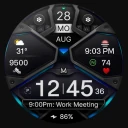
Screenshots
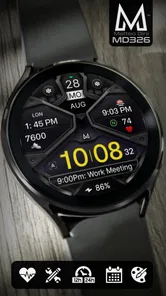
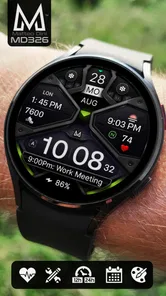
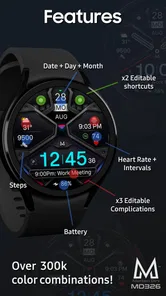
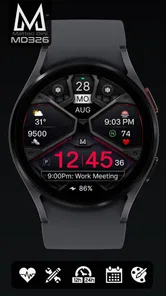
Analysis by Reviewed
I spent time with MD326 3D Modern Watch Face as a personalization app for Wear OS, and my first impression was that it is aimed at people who want their watch to feel deliberately configured rather than simply decorated. The design is digital, information-focused, and built around changing the face to suit different routines. That sounds straightforward, but watch-face apps live or die by the small decisions: whether the screen remains readable while moving, whether the available choices are understandable, and whether changing the layout feels worth the effort.
My experience was generally positive, especially when I treated the face as a practical dashboard instead of a purely visual accessory. It has enough customization to make the display feel personal, while the three-dimensional styling gives it more character than a flat, minimal digital face. At the same time, that visual treatment is not automatically ideal for everyone. If you prefer an extremely calm screen with only the time, this may feel busier than necessary. If you enjoy adjusting a watch face until it matches your habits, it is much easier to appreciate.
How the design works in everyday use
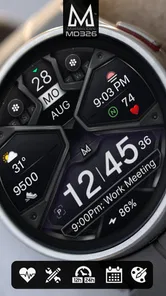
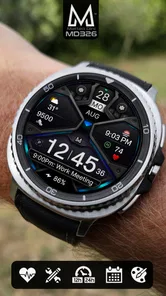
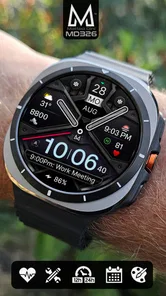
The central appeal is the combination of a digital layout and a 3D-inspired appearance. Digital time is usually easier to read at a glance than ornate analog hands, particularly when I am checking the watch during a commute, while carrying shopping, or in the middle of a short task. The dimensional styling adds depth without changing the basic purpose of the display: I still get a quick time check rather than an illustration that needs studying.
I found the face most convincing when the watch was being used as a quick information surface. A good watch face should answer a question in a second or two: what time is it, and what other selected details matter right now? MD326 is better suited to that habit than a decorative face that makes me pause to interpret its layout. The trade-off is that more visual structure can compete for attention, so I would spend a few minutes simplifying the arrangement before wearing it all day.
The customization is the reason to choose this particular app over a standard face already included with a Wear OS watch. Rather than accepting the manufacturer’s default appearance, I can shape the presentation around my own routine. Someone who checks the watch frequently during work may want a dense, information-rich setup, while someone who mainly wants a distinctive look may care more about the visual balance of the face.
That flexibility also means the first setup deserves more thought than simply installing and leaving the default untouched. I recommend trying the face in the lighting conditions where you normally use the watch. A design that looks impressive indoors can become less comfortable outdoors if contrast or visual density makes the details harder to scan. This is one of the practical differences between choosing a face from a screenshot and living with it on the wrist.
For a realistic everyday example, I can imagine using MD326 during a workday with a restrained arrangement in the morning, then switching to a more expressive configuration for the evening. The value is not that the watch becomes a new device; it is that the same hardware can present itself differently depending on what I need. That is a useful advantage for people who dislike changing straps or watch hardware just to alter the mood of their wrist.
More From Our News Desk

 Gmail
GmailGmail in a Busy Inbox: Who Benefits Most?
From first account to crowded workday, Gmail earns its place through dependable search and flexible sorting—but its best fit depends on how much inbox maintenance you can tolerate.

 Prime Video
Switching to Prime Video: What Changes in Your Viewing Routine
Prime Video can make a compelling second home for streaming, but switching means learning a different catalog, rental layer, and route from browsing to playback.

 Universal TV Remote Control
Universal TV Remote Control Works Best as a Reliable Backup
A phone remote earns its place through quick setup and reliable habits. Here is how to get more from Universal TV Remote Control—and where its limits show.

 Weather - By Xiaomi
Weather by Xiaomi Review: Clear at a Glance, Less Clear Up Close
Xiaomi’s weather app makes everyday forecasts quick to scan, but its calm surface can leave useful details and recovery paths harder to find than they should be.

 X
XX Under Pressure: Can It Recover When Posting Goes Wrong?
A resilience-focused review of X, examining setup, mistaken posts, interruptions, weak connections, and the gaps that matter when recovery needs to be dependable.

 Clash of Clans
Clash of Clans Is Won Between the Battles
Its raids are quick; its community is a long-term project of coordination, teaching, rivalry, and shared responsibility—with all the friction that entails.
Latest News



Customization is useful only when it stays readable
The strongest way to use the face is to treat every visible element as something that should earn its space. A common mistake with customizable watch faces is adding every available option because it is available. I would begin with the time and the information I actually check, then add one item at a time. This makes it easier to notice which choices improve the watch and which merely make the screen look crowded.
There is also a subtle benefit to configuring the face around moments rather than around features. Instead of asking what the app can display, I would ask what I need at the gym, at work, while traveling, or during a normal evening. That approach produces a more useful result and avoids the feeling that customization is just a long list of switches. It is a small workflow, but it makes the app feel more purposeful.
The three-dimensional styling creates a clear personality. I would not describe it as a blank canvas, and that is important when comparing it with simpler alternatives. A plain digital face may be better for someone who wants the least visual interference possible. MD326 makes more sense for someone who wants the watch to look designed, with a stronger identity than a basic system option.
What I would check before committing to it
The first question is compatibility with your particular Wear OS watch. The app is made for Wear OS devices, but the practical experience can still vary with screen shape, size, resolution, and the way a watch handles face customization. I would confirm that your device is supported through the relevant app store before paying, especially if your watch is older or uses an unusual display format.
The second question is whether you enjoy a configuration process. This is not the ideal choice for someone who wants to install a face and never make a decision afterward. The customization is part of the appeal, but it also creates a little friction. If you are happiest with a single uncluttered face and do not care about changing colors, information placement, or visual emphasis, a built-in option may be more convenient.
The third question is battery awareness. I would not assume that every visual choice has the same effect on endurance, because the result depends on the watch and its display behavior. What I can say from a sensible usage perspective is that a more elaborate face deserves a quick battery check during the first day or two. If your watch already struggles to last through your routine, simplicity may be more important than appearance.
These are not reasons to reject MD326. They are reasons to choose it deliberately. The face is most rewarding when its design and customization fit the way you actually use your watch. It is less compelling when the only goal is to avoid spending a few minutes setting up a display.
Trust, controls, and the choices I would make
Because a watch face sits on a personal device and may be visible throughout the day, I think trust should be part of the decision, not an afterthought. I look for clear user choices, understandable setup, and a willingness to avoid assumptions about what the app should access. With MD326, I would review the permissions and privacy information shown through the official installation flow before completing setup. Those screens are the right place to judge what the app requests and whether that matches my expectations.
I would also pay attention to whether any optional access is presented as optional. A watch face should not make me feel that I must approve unrelated access just to change its appearance. If the system presents a permission request, I would read it instead of tapping through automatically. That habit is especially worthwhile on a wearable, where the device may contain health, location, notification, and communication information belonging to the wider watch environment.
There is a useful distinction here: the face’s visible customization and the app’s data practices are separate questions. A polished design does not prove anything about privacy, and a simple interface does not prove the opposite. I would base that part of my decision only on the permission prompts, privacy disclosures, and account controls I can actually inspect. That is a more reliable approach than guessing from the appearance or from the developer name.
The developer is Matteo Dini MD ® Watch Faces, and the app has built a noticeable user response around its presentation. It carries a 4.6 average from around 1.5 thousand ratings, with over 200 written reviews. Those figures suggest that many people have found the face worthwhile, but I would still read recent comments for practical details such as readability, setup behavior, and device-specific issues rather than treating the average as a guarantee.
The app has passed 50 thousand installs, which gives it a meaningful presence among Wear OS personalization choices. I see that as helpful context rather than proof that it will suit every watch. Popularity can indicate that the visual idea connects with users, while compatibility and personal taste still determine whether it belongs on my wrist.
At $2.49, the purchase is small compared with replacing a watch or buying a new strap, but it is still worth judging against how often I will use the face. I would be comfortable paying that amount if I planned to keep the watch for a while and wanted a distinctive, configurable display. I would skip the purchase if I routinely rotate through faces and rarely leave one installed long enough to appreciate its details.
Handling sensitive moments without overpromising
Wearables create sensitive moments even when the app’s main job is visual. Notifications can appear in public, the watch can be checked during meetings, and the screen may be photographed or seen by someone nearby. My practical advice is to configure the face so the most prominent areas contain information I am comfortable seeing at a glance. I would avoid assuming that a small display is private simply because it is on my wrist.
I would also review the watch’s broader notification and privacy settings separately from the face. A watch face can influence what is easy to notice, but it does not replace the operating system’s controls. If you are concerned about messages or personal information appearing in public, manage those settings at the Wear OS level and use the face as part of that wider setup, not as the privacy solution by itself.
The same cautious approach applies to health-related information. If the watch makes certain measurements or activity details available through its system, I would decide whether those details genuinely help me before placing them prominently on the face. A display that shows too much can turn useful context into visual noise, and sensitive information is not automatically more useful just because it is visible.
Who gains the most from this face
I think MD326 is a strong match for three kinds of users. The first is someone who wants a digital face with more personality than a standard system design. The second is someone who enjoys tuning a layout for work, exercise, travel, or daily routines. The third is someone who wants to make an existing Wear OS watch feel less generic without changing the hardware.
It is also a good option for a person who reads the time quickly and prefers digital information to analog decoration. The face’s visual depth gives it a distinct look, while the digital foundation keeps the main function direct. If you often glance at your watch rather than study it, that balance is likely to feel more useful than a purely artistic face.
I would be more cautious about recommending it to someone who wants a completely minimal display, a traditional analog appearance, or a face that requires no adjustment. In those cases, a built-in face or a simpler personalization option may be better. The same is true for anyone who is highly sensitive to visual clutter: customization can reduce clutter, but the underlying design still has a stronger presence than a bare time-only screen.
How it compares with ordinary alternatives
The usual alternative is the collection of faces that comes with the watch. Those options are convenient, familiar, and generally quick to change. Their advantage is low friction: I already know where to find them, and I do not need to make another purchase. MD326 answers a different need by offering a more intentional visual style and a deeper reason to personalize the display.
Another alternative is a very minimal third-party face. That route is better if the priority is maximum calm and immediate legibility. MD326 is the better choice when I want the watch to have a recognizable design language and still retain the flexibility of a digital layout. The decision is not simply about which face looks better; it is about whether I value expression or reduction more during the day.
There is also a trade-off against frequently changing faces. A collection of free options may provide more variety at no cost, while MD326 offers a focused design rather than an endless catalog. I would choose this app when I prefer refining one face and living with it. I would choose a broader collection when experimentation itself is the main hobby.
My setup advice after using it
I would install it when the watch is charged and give myself enough time to test the face without rushing. First, I would choose the basic arrangement that makes the time easiest to read. Next, I would add only the information I check repeatedly. Finally, I would wear it through one ordinary day before making further changes. That last step matters because a face can look balanced in a setup screen but feel too dense during movement.
I would take screenshots of any configuration I particularly like before experimenting further. This is a simple precaution, but it makes customization less frustrating if I later prefer an earlier arrangement. I would also keep a simpler alternative available for days when I want fewer distractions, especially during travel or long periods outdoors.
For privacy, I would inspect the installation permissions, review any available privacy explanation, and decline optional access that does not make sense for a watch-face app. I would then check the watch’s notification visibility separately. These steps do not require technical knowledge, and they give me more control than assuming that an attractive face is automatically harmless or automatically intrusive.
The app is rated for Everyone, so its presentation is broadly accessible from an age-rating perspective. That does not remove the need for personal judgment about visibility, notifications, or the information I choose to place on the screen. Age classification and privacy comfort answer different questions, and I would keep them separate when deciding whether it belongs on a family member’s watch or my own.
My cautious verdict
MD326 3D Modern Watch Face is a worthwhile paid personalization choice for Wear OS users who want a digital face with a stronger visual identity and enough flexibility to tune it around real routines. I like that it can make an existing watch feel more personal without asking me to change the device itself. The best results come from editing with restraint rather than activating every available option.
My reservations are equally practical. The dimensional design will not appeal to people who want an almost invisible interface, and the customization process is part of the commitment. I would also inspect the official permission and privacy screens before installing, because those are the only dependable places to evaluate the app’s data-related choices for my own device and comfort level.
Released on August 9, 2023, it remains an appealing option for someone who wants to spend a little money on the face they see many times a day. The key question is not whether it has many choices, but whether its choices help you read and use your watch more naturally. For me, the answer is yes when I want a distinctive digital dashboard; for a minimalist or hands-off user, the standard Wear OS alternatives may be the smarter pick.
MD326 3D Modern Watch Face Frequently Asked Questions
Is MD326 3D Modern Watch Face free to download?
MD326 3D Modern Watch Face is a paid app priced at $2.49. Before purchasing, make sure your smartwatch is compatible with Wear OS and that you want a customizable digital design rather than a basic built-in face. The app is in the Personalization category, and its content rating is Everyone.
Who develops MD326 3D Modern Watch Face, and is it well regarded?
The watch face is developed by Matteo Dini MD ® Watch Faces. It has an average rating of 4.6 from around 1.5 thousand ratings, alongside 238 written reviews, and has been installed over 50 thousand times. These figures offer a useful snapshot of user reception, but individual experiences can still vary with device compatibility and personal preferences.
What is MD326 3D Modern Watch Face?
MD326 3D Modern Watch Face is a digital watch-face design created for compatible Wear OS smartwatches. It focuses on a modern, three-dimensional visual style with time, date, and additional glanceable information arranged on the main display. The exact appearance and available data can vary depending on the watch model, Wear OS version, and the customization options supported by the installation package.
Which smartwatches are compatible with MD326 3D Modern Watch Face?
Compatibility depends mainly on whether your smartwatch runs Wear OS and supports third-party watch faces. Before downloading, check the Google Play listing for the supported devices and required Wear OS version. Some older watches, proprietary smartwatch systems, and certain phone-only devices may not be supported. Installation availability can also differ by region, account, and the companion device used for setup.
What information and customization options does the watch face provide?
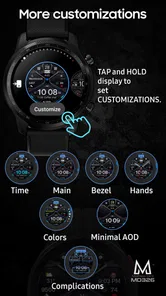
MD326 3D Modern Watch Face is designed to make essential information easy to see without opening another app. Depending on the version and watch model, it may display the current time, date, battery status, steps, heart rate, weather, or other complications. Customization can include colors, complications, and display settings, although the available choices should be confirmed on the product page before installation.
Pros
- Clean 3D modern design suits casual and professional styles.
- Clear time display remains easy to read at a glance.
- Multiple color and layout options support personal customization.
- Designed specifically for Wear OS smartwatches.
- Adds a polished
- premium look to compatible watch screens.
Cons
- Compatibility may vary between Wear OS watch models.
- Some customization options may require an additional purchase.
- Detailed 3D elements can use more battery than simple watch faces.
- The modern layout may feel too minimal for some users.
- Limited usefulness if you prefer health or productivity complications.













