

MD307 Digital watch face
- 1.94K
- 4.4
- Installs
- 100.00K
- Price
- $2.49
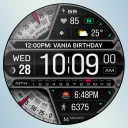
Screenshots
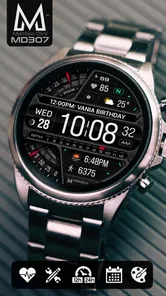
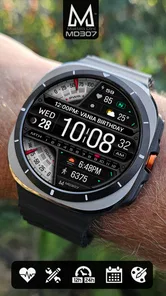
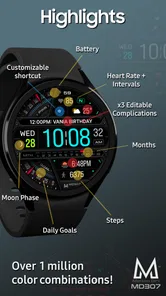
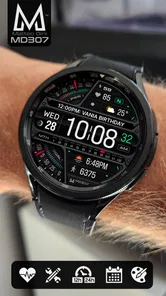
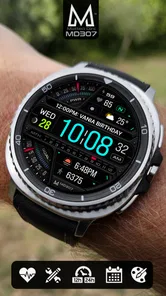
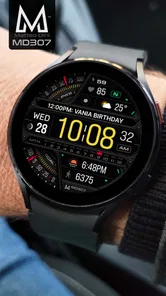
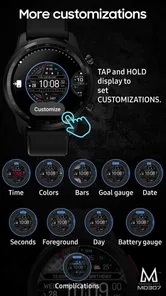
Analysis by Reviewed
When I try a new watch face, the first few days are usually the easy part: a different look makes every glance feel fresh. The harder test is whether I still like seeing it after that novelty wears off. MD307 Digital is a paid Wear OS personalization app from Matteo Dini MD ® Watch Faces, and its appeal rests on combining a crisp digital presentation with information I can use at a glance. I’d consider it for someone who wants a more tailored wrist display, rather than a watch face that is only decorative.
What the first week gets right
The first thing I’d do is set aside a few minutes to choose a color treatment and arrange the complications. That initial setup matters more than it might seem: a face that looks attractive in a preview can feel crowded once I’m checking it while walking or carrying a bag. I’d keep the most useful details easy to scan and avoid filling every available spot just because I can. The goal is a layout I can read in a quick glance, not a miniature dashboard I have to study.
In an ordinary day, that could mean checking the time and a chosen data point before leaving home, then glancing again between errands without pulling out my phone. The practical value depends on which complications I choose and how well they suit my routine. If I regularly use a particular piece of information, giving it a visible place can make the watch face feel personal; if I rarely need it, removing it can make the whole design calmer. That small editing step is one of the better ways to make customization useful rather than merely entertaining.
Design and Usability
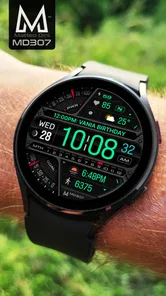
Let’s start with the design. The MD307 Digital watch face boasts a minimalist yet stylish look that makes it stand out. It's like having a tiny piece of art that tells time. The interface is super intuitive; even if you’re not the most tech-savvy person around, you’ll find it a breeze to navigate. You can customize it with colors and widgets to suit your personal style. I went for a sleek black and white combo, and it looks uber chic!
Features Galore
Now, let’s dive into the features. This app isn’t just a pretty face (pun intended again); it’s packed with functionality. You can track your steps, monitor heart rate, and even keep tabs on the weather. It’s like having a personal assistant right there on your wrist. The heart rate monitor is surprisingly accurate, and the step counter is just the nudge I needed to take those extra steps during the day.
Plus, the battery optimization is on point. I’ve had watch faces before that drained my smartwatch’s battery faster than you can say "charging cable," but not with this one. It’s efficient and keeps your watch running smoothly throughout the day.
Compatibility and Performance
Let’s talk compatibility. The app works seamlessly with both Android and iOS, making it a versatile choice for any smartwatch user. Performance-wise, it’s as smooth as butter. No lags, no freezes, just a seamless experience that makes checking the time a pleasure rather than a chore.
More From Our News Desk

 Gmail
GmailGmail in a Busy Inbox: Who Benefits Most?
From first account to crowded workday, Gmail earns its place through dependable search and flexible sorting—but its best fit depends on how much inbox maintenance you can tolerate.

 Prime Video
Switching to Prime Video: What Changes in Your Viewing Routine
Prime Video can make a compelling second home for streaming, but switching means learning a different catalog, rental layer, and route from browsing to playback.

 Universal TV Remote Control
Universal TV Remote Control Works Best as a Reliable Backup
A phone remote earns its place through quick setup and reliable habits. Here is how to get more from Universal TV Remote Control—and where its limits show.

 Weather - By Xiaomi
Weather by Xiaomi Review: Clear at a Glance, Less Clear Up Close
Xiaomi’s weather app makes everyday forecasts quick to scan, but its calm surface can leave useful details and recovery paths harder to find than they should be.

 X
XX Under Pressure: Can It Recover When Posting Goes Wrong?
A resilience-focused review of X, examining setup, mistaken posts, interruptions, weak connections, and the gaps that matter when recovery needs to be dependable.

 Clash of Clans
Clash of Clans Is Won Between the Battles
Its raids are quick; its community is a long-term project of coordination, teaching, rivalry, and shared responsibility—with all the friction that entails.
Latest News



One thing to note is that the app is regularly updated, which means any bugs are squashed pretty quickly. The developers seem to be on top of things, ensuring that users have the best experience possible.
Making it a lasting habit
A useful way to judge a digital face is to ask whether its information still earns space once the visual novelty fades. I’d treat the complications as a small, changeable routine: keep the details that help with an actual decision, and remove anything I find myself ignoring. For example, someone who checks weather before a commute may value that glance more than a decorative field, while a person who mainly wants a clear time display may prefer a quieter arrangement. This is a better test than endlessly changing colors.
There is also a trade-off between density and readability. More visible information can reduce the need to open other screens, but a busy layout can make the time less immediate. I’d try the face during the parts of the day when I actually use my watch, then adjust the layout based on what I can read quickly. That practical check is especially worthwhile before settling on a configuration for work, exercise, or travel.
Price, fit, and alternatives
The app costs $1.99, so I’d think of it as a small paid personalization choice rather than a free experiment. Its 4.5 average from around 12 thousand ratings, along with over 100 thousand installs, suggests that many watch owners have tried it, but those figures cannot tell me whether its style suits my wrist or habits. It is rated for Everyone. The app was released on November 3, 2022, and its developer is Matteo Dini MD ® Watch Faces.
Compared with a basic built-in digital face, the reason to choose this one is the chance to shape the display around the details I want close at hand. A plain system option may be the better choice if I want no extra purchase or setup, or if I prefer a very spare screen. Someone who enjoys changing watch styles often may also find more value in browsing alternatives; someone who wants one polished face to keep using may appreciate a focused design instead. Before buying, I’d make sure my watch runs Wear OS, since that is the platform this face is made for.
Putting the layout to work
A useful setup is less about showing everything and more about matching the face to a particular stretch of the day. If I’m heading into meetings, I’d prioritize a clean time readout and only the complication I’m most likely to check. Before a walk or a busy afternoon of errands, a step-related glance might be more useful. I wouldn’t keep rearranging the face every morning; I’d make one considered setup, use it for several days, and change a field only when I notice a repeated need or distraction.
That approach also helps answer a practical question: does a complication actually save time? If I still reach for my phone whenever I want the information, the field may be taking up visual space without earning it. Conversely, a detail I can recognize instantly while waiting at a crossing or carrying shopping can make the watch feel more useful. The benefit is in the short glance, not in trying to turn the wrist into a substitute for a full app.
Small adjustments, fewer distractions
Color choice is not only a matter of taste. A high-contrast treatment can make the face easier to parse in a hurry, while a softer palette may look calmer but make small details less prominent. I’d judge the combination on the actual watch in ordinary lighting rather than relying on how it looks in a setup screen. If one complication keeps competing with the time, changing the arrangement or removing that item is more helpful than adding another decorative adjustment.
There is a real compromise here: customization is valuable only while it remains easy to maintain. A carefully arranged face can become cluttered as soon as I add every available data point, and a layout that looks impressive when I’m stationary may be harder to read on the move. I’d resist treating every open space as an invitation. Leaving room for the time to stand out is part of making the customization work.
Who may prefer another kind of face
This design makes the most sense for someone who likes digital time and wants a few relevant details close by. It is a weaker fit if the main goal is an expressive analog dial, a bare display with almost nothing on it, or a screen whose information is meant to be explored in depth. For those preferences, a built-in face or a different style of watch face may feel more natural than trying to adapt this one.
I’d also separate “more information” from “more useful.” A person who rarely checks a watch beyond telling the time may not get enough from configurable complications to justify paying for another face. Someone who already knows exactly what they want visible, on the other hand, can benefit from setting it up once and leaving it alone. The decision is less about how many options are present and more about whether the finished arrangement supports a real habit.
What to expect from the purchase
Because it is a paid face, I’d decide what I want from it before purchasing: a digital look I enjoy, a more personal layout, or a convenient glance at selected information. That gives me a sensible way to judge whether the cost feels worthwhile after the initial excitement. I would not buy it expecting a watch face to deliver the depth of a dedicated health, weather, or activity app; the appeal is having chosen details visible in the context of the time.
The platform question matters too. This is a Wear OS watch face, so I’d check that my watch uses Wear OS before making a decision rather than assuming that any Android or iOS phone makes the face compatible with any smartwatch. The phone’s operating system and the watch’s platform are not interchangeable considerations. Once that basic fit is right, the remaining question is whether I prefer a configurable digital display to the simpler options already available on my watch.
Final Thoughts
So, is the MD307 Digital watch face worth downloading? Absolutely! It’s stylish, functional, and user-friendly. Whether you’re a smartwatch newbie or a seasoned pro, it’s a fantastic addition to your digital toolkit. Give it a go, and you might just find yourself checking the time a little more often than you need to, just to admire your snazzy new watch face!
There you have it, folks! A little insight into the world of digital watch faces. I hope you find this review helpful and that you enjoy using the app as much as I did. Stay tuned for more app reviews, and happy timekeeping!
Who should keep it on their wrist?
I’d recommend it most to Wear OS owners who enjoy a digital look and will genuinely use the information they put on screen. It is less compelling for someone who wants a purely analog style, dislikes spending time arranging a face, or expects a watch display to replace opening dedicated apps for detailed information. The most reliable long-term approach is to start simple, live with that setup, and make changes only when a real habit gives you a reason.
MD307 Digital watch face Frequently Asked Questions
What should I know about MD307 Digital watch face before downloading it?
MD307 Digital is a personalization app for Wear OS, created by Matteo Dini MD ® Watch Faces. It is a paid download priced at $1.99, and its content rating is Everyone. The digital design is intended for a smartwatch display, so it is worth checking that your watch uses Wear OS before purchasing. Its store summary highlights customizable complications and a range of data.
What features does the MD307 Digital watch face offer?
The MD307 Digital watch face provides a range of features including customizable display options, multiple color themes, and compatibility with various smartwatch models. It offers real-time weather updates, step count, and battery level indicators, ensuring users can personalize their watch face to suit their preferences while staying informed about their daily activities.
Is the MD307 Digital watch face compatible with all smartwatches?
The MD307 Digital watch face is compatible with most Android and iOS smartwatches that support third-party watch face installations. Users should verify their smartwatch model's compatibility before downloading to ensure seamless integration and optimal functionality. Compatibility details are often available in the app's description or developer's website.
How can I customize the MD307 Digital watch face?
Customization of the MD307 Digital watch face is straightforward. Users can adjust various elements such as color themes, widget positions, and information display settings through the watch face's settings menu. This allows for a personalized look and feel, enabling users to tailor the watch face to their unique style and daily needs.
Does the MD307 Digital watch face affect battery life?
While the MD307 Digital watch face is designed to be energy efficient, it may have a slight impact on battery life, especially if features like real-time updates and animations are heavily utilized. Users are encouraged to monitor their smartwatch's battery usage and adjust settings accordingly to optimize longevity without sacrificing functionality.
Pros
- Sleek
- modern design fits any style.
- Highly customizable interface.
- Battery-efficient performance.
- Supports multiple time zones.
- Seamless smartphone integration.
Cons
- Limited free version features.
- Occasional sync issues.
- May drain battery faster on older devices.
- Complex setup for beginners.
- Some features require in-app purchases.













