

MD332 Digital watch face
- 143.00
- 4.4
- Installs
- 10.00K
- Price
- $1.99
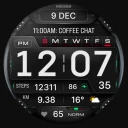
Screenshots
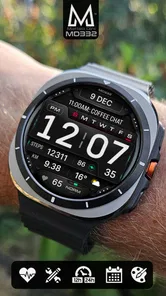
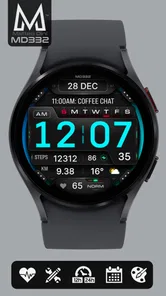
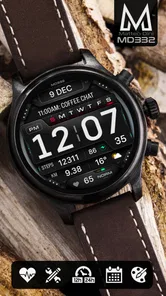
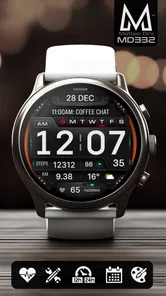
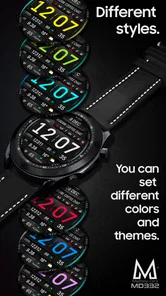
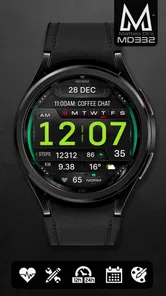
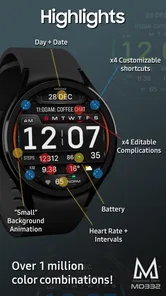
Analysis by Reviewed
When I shop for a watch face, I want to know two things first: can I read it quickly, and will I actually use the extra information? MD332 Digital watch face is a paid personalization app for Wear OS, built around prominent digital time and a customizable look. That combination makes it worth considering if you prefer a clear, information-forward display, though its price means I’d want the design to suit my routine rather than treating it as a casual free trial.
Check the purchase against your watch first
There’s no free tier to weigh against the paid face: MD332 costs $1.99. I’d decide based on whether I want this particular style for regular wear, not on an assumption that I can try it without paying. Before purchasing, I’d confirm that my watch runs Wear OS and that I can access the face on that device. That quick compatibility check matters more than any general recommendation, because a watch face is only useful when it works with the watch I actually wear.
The Everyone age rating makes it broadly suitable, but it says little about whether the layout will suit your eyesight, habits, or taste. I’d treat the purchase as a small commitment to a look rather than a way to collect another option I may never use. If I’m choosing between this and a free face, I’d ask whether the large digital presentation and the ability to personalize it are features I’ll appreciate each day. If I just want to experiment for an afternoon, a free alternative is the lower-risk choice.
Choose a layout for quick glances, not screenshots
A useful way to judge a customizable face is to set it up for the moments when checking time is awkward: carrying groceries, walking outdoors, or sitting in a meeting where I don’t want to linger over the watch. I’d make the time the visual priority, then decide whether the remaining information earns its space. The face should work at a glance on my wrist, not only look appealing when I inspect it closely in a settings screen.
That test also helps avoid a common customization trap: adding every available detail because it is there. A secondary indicator can be useful in one context and distracting in another. I’d begin with a sparse arrangement, wear it through a normal day, and add only what I genuinely miss. If I keep having to focus on tiny items, I’d remove them rather than making the whole display busier just to use more of its options.
When I shop for a watch face, I also think about the watch itself. A digital design with large numerals has a different feel from an analog face, even before color or layout choices come into play. If the watch is part of a polished outfit and I prefer a traditional dial, MD332 may feel too emphatic. If I want the time to stand out while I’m moving, that same boldness can be the point.
What the price buys you
MD332 costs $1.99, so the decision is straightforward: this is a one-time purchase rather than a free watch face. I find that reasonable when a face becomes the one I check throughout the day, but less compelling if I regularly change styles or only want to try a new look for a few hours. It’s intended for Wear OS devices, and the Everyone age rating makes it broadly suitable; compatibility with your particular watch is still the practical first check before buying.
More From Our News Desk

 Gmail
GmailGmail in a Busy Inbox: Who Benefits Most?
From first account to crowded workday, Gmail earns its place through dependable search and flexible sorting—but its best fit depends on how much inbox maintenance you can tolerate.

 Prime Video
Switching to Prime Video: What Changes in Your Viewing Routine
Prime Video can make a compelling second home for streaming, but switching means learning a different catalog, rental layer, and route from browsing to playback.

 Universal TV Remote Control
Universal TV Remote Control Works Best as a Reliable Backup
A phone remote earns its place through quick setup and reliable habits. Here is how to get more from Universal TV Remote Control—and where its limits show.

 Weather - By Xiaomi
Weather by Xiaomi Review: Clear at a Glance, Less Clear Up Close
Xiaomi’s weather app makes everyday forecasts quick to scan, but its calm surface can leave useful details and recovery paths harder to find than they should be.

 X
XX Under Pressure: Can It Recover When Posting Goes Wrong?
A resilience-focused review of X, examining setup, mistaken posts, interruptions, weak connections, and the gaps that matter when recovery needs to be dependable.

 Clash of Clans
Clash of Clans Is Won Between the Battles
Its raids are quick; its community is a long-term project of coordination, teaching, rivalry, and shared responsibility—with all the friction that entails.
Latest News



First Impressions: Design and Usability
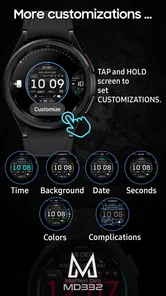
From the moment you install the MD332 Digital watch face, you’re greeted with a sleek and modern interface that screams sophistication. It’s not just about telling time; it’s about doing it with flair. The design is clean, vibrant, and incredibly easy to read, even in low light conditions. What’s more, it’s fully customizable, meaning you can tweak colors, fonts, and even the layout to suit your personal taste. It’s like having a tailor-made suit for your wrist!
That flexibility is most useful when you make a deliberate choice instead of changing everything at once. I’d start with the time display, then adjust the visual details until the face feels easy to scan against your usual watch background. A strong contrast and a restrained color choice can be more practical than a busy combination, especially when you’re checking the time while walking or carrying something. If you mainly want a quiet, analog look, though, a traditional dial may feel more natural than a large digital readout.
Features That Stand Out
Let’s dive into what makes this watch face a must-have. First off, the always-on display is a lifesaver. You no longer need to flick your wrist or tap the screen to check the time; it’s always there, subtly glowing, ready at a glance. The battery consumption is impressively efficient, so no worries about your smartwatch dying halfway through the day.
The MD332 Digital watch face isn't just a pretty face. It packs in a host of features like weather updates, heart rate monitoring, and even a step counter. It seamlessly integrates with your device’s health tracking system, providing you with all the vital stats you need without cluttering the screen. It’s like having a personal assistant strapped to your wrist!
For everyday use, I’d treat those extra indicators as glanceable prompts, not as a replacement for opening a dedicated health or weather app when details matter. A quick look at steps can be handy on a commute, while checking weather before leaving home can help you decide whether to bring a layer. The trade-off is visual space: several useful readouts can make a watch face feel crowded, so the best setup is the one that keeps your most-used information easy to distinguish.
Making it work in a real routine
Imagine heading out for a morning walk with a bag in one hand. A large digital time display is easier to read at a glance than small markers, and a step count can give you a quick sense of how the walk is going without opening another screen. Later, at your desk, you may prefer the same face for time and weather checks, but the heart-rate information is unlikely to replace a focused health app. That distinction matters: MD332 can make key details convenient, but it is still a watch face, not a complete tracking or forecast tool.
If you’re deciding between this and the usual alternatives, think about what you value most. Minimal faces are a better fit for an uncluttered wrist, while analog designs suit people who read time by hand position. A free face may be the sensible choice if you like experimenting; MD332 makes more sense if its digital style and customization are what you want to keep using. Its developer, Matteo Dini MD ® Watch Faces, specializes in watch faces, and the app has an average rating of 4.4 from around 766 ratings, with over 10,000 installs. Those figures suggest it has found an audience, but the visual style is still personal, so I’d judge it by how comfortably it reads on your own watch.
Performance and Reliability
Performance-wise, this watch face runs smoothly without a hitch. There’s no lagging or crashing, which is crucial when you’re relying on it for timely updates. It updates in real-time, ensuring that the information displayed is accurate and up-to-date. Whether you’re in a meeting or out for a run, this watch face keeps up with your pace.
One practical tip is to give the layout a little time in the settings before deciding it is too busy or too sparse. Keep only the elements you expect to check often, then wear it through a normal day: at a glance outdoors, during a meeting, and while moving around. If the big numerals are still legible in those different situations, the face is doing its main job. If you find yourself repeatedly reaching for the phone to interpret small secondary details, a simpler arrangement—or a more minimal face—may suit you better.
Installation is a breeze, even for those who might not consider themselves tech-savvy. Just a few taps, and you’re set to go. Plus, the developer frequently rolls out updates, ironing out any bugs and adding new features, so you know you’re getting a product that evolves and improves over time.
Customization as a practical trade-off
Personalization is valuable when it solves a real problem, not just when it gives me more settings to browse. For example, I might choose a high-contrast combination for daytime errands, then simplify the information so I can read the time without stopping. Someone who mostly checks their watch indoors may make different choices. The useful question is not “How many adjustments can I make?” but “Which version will I still find clear after a week of ordinary use?”
There is also a balance between making the face feel personal and keeping it legible. A color that looks striking in a preview may not be the easiest choice outdoors or at a quick glance. I’d check the finished design on the watch itself, in the places I normally wear it, before settling on it. If the secondary details compete with the time, I’d simplify rather than keep tweaking for decoration. The large digital display should remain the reason to choose this face.
Who should buy it—and who can skip it
I’d put MD332 on the shortlist for someone who wants large digital time, likes adjusting a watch face to personal taste, and expects to glance at a few everyday indicators. It can also be a good choice if you’re tired of tiny time displays and want a layout that makes quick checks less of a squinting exercise. Before purchasing, confirm that your watch runs Wear OS and consider whether you’ll use the digital presentation day after day; those are more important than the feature count.
I’d skip it if you prefer a pared-back face, want a conventional analog dial, or are only browsing for something free. The app was released on December 11, 2023, and has 143 reviews alongside its rating, but neither popularity nor a long feature list can make a style fit everyone. I’d also avoid expecting a watch face to replace the dedicated apps you use for detailed health history or weather planning. Paying makes sense when the design earns a permanent place on your wrist, not simply because customization is available.
It is also a less natural choice for someone who wants a watch face to disappear into the background. Large digital time makes a clear visual statement, so it will not appeal to every outfit or every watch habit. If you enjoy switching between very different designs every few days, you may get more enjoyment from free options than from paying for one face you rarely leave in place. On the other hand, if you repeatedly return to a digital layout because it is easier to read, a customizable version has a stronger case.
For people who rely on detailed fitness records, I’d keep expectations specific. A glance at an indicator can make routine checks convenient, but reviewing trends or making decisions from health information calls for the dedicated tools on the watch or phone. The same applies to weather: a quick cue can help with a simple plan, while a forecast you need to study belongs in a weather app. That division of labor is a sensible way to get value without expecting a face to do more than its job.
Final Thoughts
In conclusion, the MD332 Digital watch face is more than just a tool to check the time. It’s an enhancement to your smartwatch, providing both style and substance. Whether you’re a fitness enthusiast, a busy professional, or someone who just loves cool gadgets, this watch face caters to all. So, if you’re ready to elevate your smartwatch experience, give the MD332 a whirl. It’s like giving your wrist a smart makeover!
My recommendation is to buy it when you already know you prefer bold digital time and will use the customization to make the display work for you. At $1.99, the cost is modest, but the real value is personal: a readable face you enjoy seeing every day is worth more than a crowded set of indicators you rarely check. If you’re undecided between this and a free, simpler alternative, start with the style you’ll genuinely want to wear rather than the longest feature list.
MD332 Digital watch face Frequently Asked Questions
What does MD332 Digital watch face offer Wear OS users?
MD332 is a Personalization app by Matteo Dini MD ® Watch Faces, built around a digital layout with big numbers for Wear OS devices. Its store description highlights customization, making it suited to people who prefer a clear, prominent time display and want to tailor the face to their taste. It costs $1.99, and its content rating is Everyone.
What are the main features of the MD332 Digital watch face?
The MD332 Digital watch face offers a sleek and modern design, customizable color options, and a variety of widgets for health monitoring, weather updates, and calendar notifications. It also includes an always-on display mode, battery status indicator, and compatibility with both Android and iOS devices, ensuring a seamless experience.
Is the MD332 Digital watch face compatible with all smartwatches?
The MD332 Digital watch face is designed to be compatible with a wide range of smartwatches, particularly those running Wear OS and Tizen. However, it is advisable to check your specific smartwatch model's compatibility with the watch face to ensure full functionality and optimal performance.
How can I customize the MD332 Digital watch face?
Customization of the MD332 Digital watch face is straightforward, allowing users to change color themes, select widget placements, and adjust font styles according to their preferences. Users can access the customization settings directly from their smartwatch or through the companion app available on their smartphone, providing a personalized experience.
Does the MD332 Digital watch face affect battery life?
While the MD332 Digital watch face is designed to be energy-efficient, enabling certain features such as the always-on display or numerous active widgets may contribute to faster battery drain. It is recommended to balance the use of features with battery conservation settings to maintain a longer battery life for your smartwatch.
Pros
- Customizable display options
- Battery efficient design
- Clear and easy-to-read interface
- Supports multiple time zones
- Integrates with health apps
Cons
- Limited free features
- Occasional sync issues
- Requires smartwatch compatibility
- Ads in the free version
- Infrequent updates













