McAfee Security: Antivirus VPN
- 54.77K
- 4.7
- Installs
- 50.00M
- Price
- Free

Screenshots


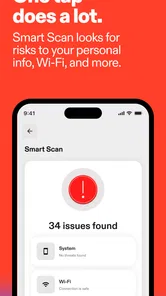

Analysis by Reviewed
I think a mobile security app is most useful when it makes a few good safety habits easier, not when it promises to take every decision out of your hands. McAfee Security: Antivirus VPN brings several familiar protections into one place. I would look at it as a practical security hub for everyday phone use, with some useful safeguards and a few important limits to understand before relying on it.
Who benefits most from a security hub?
I see this app as a practical fit for someone who wants several phone-safety tools gathered in one place, rather than a specialist tool for one narrow job. McAfee LLC makes this free Tools app, and its 4.8 average from around 873,000 ratings, alongside more than 50 million installs, suggests it has found a broad audience. It is rated for Everyone, though some features involve in-app purchases ranging from $0.99 to $200 per item, so I would check the available plan and prompts before assuming every tool is included at no cost.
The useful question is not whether a security app can promise total safety; none can. It is whether a quick routine helps you make better choices. I would consider this one if you often switch between home Wi-Fi, café networks, travel connections, and unfamiliar links, and you want scanning, browsing warnings, and privacy tools close at hand. If you already use a trusted antivirus, a separate VPN you rely on, and a browser with effective phishing protection, the overlap may not justify adding another app.
First Impressions: Setting Up
Getting started with McAfee Security: Antivirus VPN was a breeze. The app was easy to find in the app store, and downloading it was quick and painless. Once installed, I was greeted with a sleek and intuitive interface that made navigation a piece of cake. The setup process was straightforward, guiding me through the essential features without overwhelming me with too much information.
Features That Stand Out
One of the things I love most about this app is its comprehensive suite of security features. It's not just about antivirus protection; there's so much more packed into this powerhouse of an app.
- Antivirus Scanning: The app conducts regular scans of your device, swiftly identifying and eliminating any potential threats. It's reassuring to know that my device is constantly being watched over.
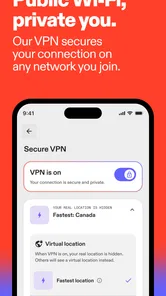
- VPN Protection: The built-in VPN is a game-changer. Whether I'm browsing on public Wi-Fi or just want an extra layer of privacy, this feature ensures my data remains secure and private.
- Safe Browsing: This feature warns you about risky websites and phishing attempts, making online browsing much safer.
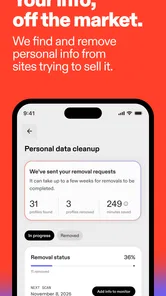
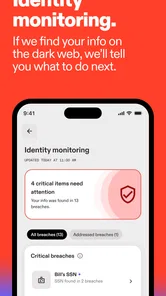
- Identity Protection: This is perfect for keeping tabs on your personal information. You can rest easy knowing that your emails and passwords are being monitored for any suspicious activity.
A repeatable routine for everyday use
For a realistic day-to-day example, imagine I am about to pay a bill while waiting at a café. I would first make sure I am using a connection I trust, then open the app to check its security status and use the VPN if I want that extra layer while browsing. If a message has sent me to a strange payment page, I would treat a warning as a reason to stop and verify the address through the company’s official app or a known contact method, not as a prompt to keep going. The important habit is pausing before entering personal details; a warning tool can help, but it cannot make a deceptive page safe.
I also find it sensible to separate occasional checks from constant tinkering. I would review a scan when something feels off, such as after installing an unfamiliar app, and keep routine browsing protection available without repeatedly opening every tool. For identity monitoring, use an email address you actively check and respond to alerts by changing a password on the affected service, not by following an unexpected link in a message. That small workflow makes the monitoring more actionable instead of merely adding another notification to dismiss.
More From Our News Desk

 Lark Player:Music Player & MP3
Switching to Lark Player: A Better Fit for Music Stored on Your Phone?
Lark Player makes sense if your music already lives on your phone. Here is what changes, what does not transfer by assumption, and how to test the switch without regret.

 Tile Master® - Matching Game
Tile Master Finds Its Place in the Gaps of a Noisy Phone
OS changes rarely transform a tile puzzle, but they reshape the small rituals around it. Tile Master’s appeal lies in how well its brief, tactile rounds fit the modern phone.

 Google Docs
 Shows What Mobile Writing Still Gets Wrong
Google Docs still makes a strong case for the shared document, but its real significance is how it exposes the gap between cloud convenience and genuinely capable mobile work.

 YouTube Studio
 Is Becoming a Creator’s Daily Control Room
As publishing turns into a daily, data-led habit, YouTube Studio is becoming the control room creators reach for between uploads—not another tool for making videos.

 Tiles Hop Music & Ball Game
Tiles Hop Review: When the Beat Is Clear, Every Miss Counts
Tiles Hop turns a simple bouncing-ball premise into a sharp test of timing. Its best design is immediate and readable; its weakest moments come when recovery feels less clear than the beat.

 Piano - Music Keyboard & Tiles
: Inviting Rhythm, Unproven Recovery
A tile-tapping piano game lives or dies by timing. This resilience-focused review separates what its format promises from what players still need to verify.
Latest News



User Experience: Smooth Sailing
Throughout my time using the app, I was pleasantly surprised by how seamlessly it integrated with my daily phone usage. The app runs quietly in the background without draining my battery, which is a huge plus. Notifications are timely but not intrusive, striking a perfect balance between keeping me informed and letting me go about my day.
Settings and faster habits worth adopting
My first settings check would be to understand which protections are active and which require an extra step, account, or purchase. That matters particularly for the VPN and identity tools: availability can depend on the plan and setup, so I would read each screen before relying on a feature for a trip or a sensitive task. I would also keep the app and the phone’s operating system current, and make sure notifications are enabled for alerts I genuinely want to act on. I would not switch on every prompt automatically; useful security is the kind you understand and will keep using.
A faster pattern is to make the app part of an existing routine rather than treating it as a daily project. I might check the main security status when I update apps or before traveling, then use the relevant protection when the situation calls for it. If an alert appears, I would read what it identifies and take the specific next step, rather than assuming that running another scan solves every problem. This distinction is easy to miss: scanning can look for threats on the device, while phishing often depends on recognizing a suspicious message or site before sharing information.
Performance and Reliability
Performance-wise, McAfee Security: Antivirus VPN is top-notch. The scans are quick and don't bog down the device, which is something I really appreciated. The VPN connection is stable and doesn't noticeably slow down my browsing speed, which is often a concern with VPN services.
Where the all-in-one approach has limits
The convenience of having a scanner, VPN, and safer-browsing tools together is the main comparison point with the usual alternatives. A phone’s built-in security and a careful browsing habit may be enough for someone who wants minimal software. A dedicated VPN may suit a person who needs more control over server choices or specific network workflows, while a standalone password manager is a better home for securely storing and generating passwords. I would not treat identity alerts as a substitute for either a password manager or two-step sign-in.
There is also a practical trade-off in using a security suite: more protection can mean more prompts, permissions, and decisions. I would avoid running overlapping security apps that compete to monitor the same activity, since extra tools can make it harder to tell which alert matters. Nor would I assume a VPN makes public Wi-Fi risk-free, hides every kind of tracking, or protects information I voluntarily enter into a scam form. The app can add useful safeguards, but judgment remains part of the routine.
Additional Tools and Benefits
Apart from the core features, the app also offers a few additional tools that I found quite handy. There's a battery optimizer and a storage cleaner, both of which helped in keeping my device running efficiently. These tools might seem minor, but they contribute to a smoother overall experience.
Is It Worth It?
After spending a good amount of time with the app, I can confidently say that it's well worth the investment. The peace of mind that comes with knowing my device is protected by one of the leading names in cybersecurity is invaluable. Plus, the added VPN and identity protection make it a comprehensive security solution.
One detail worth checking before installing is device compatibility: the current version is 10.1.0.771 and requires Android 11 or later. The app has been around since May 30, 2011, but I would still judge it by the tools and settings available on the device I plan to use. If you want a single starting point for mobile protection, that combination can be appealing; if you only need one focused feature, a built-in option or a specialist alternative may feel simpler.
Who should keep looking?
I would skip it if what I really needed was a narrowly defined tool and I already had a setup I understood. For example, someone who only wants to check a suspicious file may prefer a focused scanner, while someone who mainly wants encrypted browsing may be happier choosing a VPN for its specific controls. Adding a bundle just because it contains more features can create duplicated alerts and extra account or plan decisions without improving the parts of security that matter most to that person.
It is also not the right answer for someone expecting a security app to make risky behavior harmless. A scan cannot decide whether a payment request is legitimate, and a VPN does not verify the identity of a person contacting you. I would use McAfee as one layer alongside system updates, unique passwords, and a pause before sharing sensitive details—not as permission to ignore those basics.
What I would check before depending on it
If I were setting it up for a family member, I would walk through the main screen together and ask them to show me where they would look when a warning appears. That is a better test of usefulness than simply turning on every feature: they should know whether an alert is asking them to review a website, inspect a device scan, or take action on an identity notice. Clear habits matter especially for less technical users, because a warning can be useful only if it leads to a sensible next step.
I would also check whether the specific protection I want is available in the plan I intend to use before I build a routine around it. The app is free to install, but the range of in-app purchases means some tools may involve a paid choice. I would compare that cost with what I already pay for and avoid subscribing to overlapping services unless the convenience of having them together is genuinely worth it to me.
On iOS, I would approach any security suite with the same realistic expectations I bring to other mobile platforms: use the protections the app offers, but do not assume it can work like desktop antivirus or inspect every activity on the phone. The day-to-day value is more about bringing security checks and safer browsing into reach than giving an app unrestricted control over the device. That distinction helps set expectations before installation.
In conclusion, if you're on the lookout for a robust security app that covers all the bases, McAfee Security: Antivirus VPN might just be your new best friend. With its user-friendly design, impressive features, and reliable performance, it's a solid choice for anyone looking to keep their device safe and secure.
So, why not give it a shot? You can find the app on both Android and iOS, ready to shield your device from potential threats. Happy browsing!
McAfee Security: Antivirus VPN Frequently Asked Questions
Can I use McAfee Security: Antivirus VPN on more than one device?
McAfee Security: Antivirus VPN is a mobile security app for Android and iOS, so you can consider it for a compatible phone running either platform. Its store summary highlights mobile security, scam protection, malware and virus cleaning, and a safe browser. Check the app’s available setup and account options to see how they fit your devices and intended use.
What should I check before installing McAfee Security: Antivirus VPN?
Start by checking that your phone meets the app’s operating-system requirement and has enough free space for installation. You will also need an internet connection to download the app and use connected security features. McAfee Security: Antivirus VPN is a tools app from McAfee LLC, and its content rating is Everyone. Review the permissions and purchase details before deciding to install.
Is McAfee Security: Antivirus VPN compatible with my phone?
McAfee Security: Antivirus VPN is an Android and iOS security app, and the Android version requires Android 11 or later. Before downloading, check your device’s operating system version and make sure it meets that requirement. Compatibility also depends on having enough available space and a working internet connection for installation and security features.
Who makes McAfee Security: Antivirus VPN, and what is the app’s age rating?
The app is developed by McAfee LLC and is rated Everyone, making it suitable for a general audience. It is a mobile security tool rather than a game, with protection features aimed at everyday browsing and device use. The age rating does not replace reviewing the app’s permissions and privacy information before you install it.
What features does McAfee Security: Antivirus VPN offer?
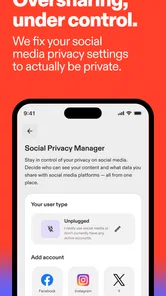
McAfee Security: Antivirus VPN provides a comprehensive suite of security features, including antivirus protection, identity theft protection, Wi-Fi security, and a secure VPN. The app also offers a safe browsing feature that blocks malicious websites, and it monitors your online activity to protect you from potential threats. It's designed to keep your personal data safe across multiple devices.
Pros
- Comprehensive security features.
- User-friendly interface.
- Real-time threat protection.
- Includes identity theft coverage.
- Cross-device compatibility.
Cons
- May slow down older devices.
- Limited features in free version.
- Occasional false positives.
- Subscription can be pricey.
- VPN may reduce internet speed.