Max Cleaner
- 60.00
- 4.4
- Installs
- 1.00M
- Price
- Free

Screenshots


Analysis by Reviewed
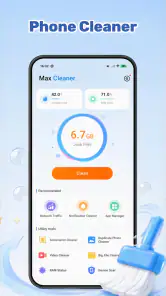
When my phone starts feeling cluttered, I want a cleanup tool that helps me decide what to remove rather than one that simply urges me to tap a big “clean” button. Max Cleaner is aimed at that practical problem: it brings junk cleanup, duplicate-photo removal, and app management together in a free utility from FWP Bigtime. I’d consider it when I want one place to review several kinds of clutter, while keeping in mind that cleanup tools are most useful when they support careful choices—not automatic deletion.
Start with the cleanup job you actually have
Before trying any cleaner, I’d ask whether the problem is a lack of space, a crowded camera roll, or simply difficulty keeping track of installed apps. Those can overlap, but they are not the same task. If I know that one large download is the issue, finding and removing that file directly is probably quicker than starting a broader cleanup. If clutter has accumulated in several places, a combined tool becomes more appealing.
I’d also set a modest goal for the first session: review a particular group of photos or identify apps I no longer need, rather than expecting a single pass to transform the phone. This makes it easier to judge whether the workflow suits me. A cleaner is helpful when it reduces decision-making friction; it is not automatically useful just because it offers several ways to remove things.
The key question is how much control I want. Someone comfortable sorting folders manually may prefer the phone’s existing settings. Someone who wants a guided starting point across several kinds of clutter may find Max Cleaner more convenient. Either way, the right choice is the one that makes it easier to understand what will be removed before anything is deleted.
Choose it for a focused cleanup routine
The first question is what is actually taking up your time. If you mainly need to inspect a single folder or uninstall one app, the tools already built into your phone may be enough. If you want to work through temporary clutter, look for repeated images, and review installed apps in one session, Max Cleaner is a more relevant fit. Its appeal is the combination of those jobs, rather than an elaborate set of controls or a promise that every device problem can be fixed.
I’d approach it as a hands-on storage organizer, not as a substitute for understanding what is on my phone. “Junk” can mean files that are safe to remove in one context and useful in another. Likewise, two photos that look alike may not be interchangeable: one might be sharper, better framed, or the only copy of a moment I care about. The most useful cleanup is therefore the one that leaves me in control of what gets deleted.
That distinction matters especially if a phone is shared, used for work, or holds photos that have not been backed up elsewhere. Before a broad cleanup, I’d make sure important pictures and documents are protected and take a moment to review proposed removals. A cleaner can help surface candidates; it cannot know which image has personal value or whether a file is the only copy someone needs.
More From Our News Desk

Clash of Clans Is Won Between the Battles

Android Auto Makes the Case for Quieter Car Software

MobiOffice: Transforming Mobile Productivity with Seamless Integration

EA SPORTS FC™ Mobile Soccer: Redefining Mobile Sports Gaming

How Microsoft OneDrive Became a Mobile Productivity Giant

How Google Translate Breaks Language Barriers Effortlessly
A sensible way to review clutter
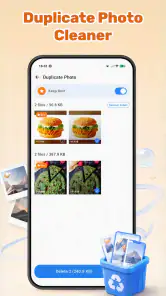
I’d start with one category rather than trying to clear everything in a single burst. Looking at duplicate photos first is a practical choice because visual review can make it easier to recognize what is genuinely redundant. I would compare the images, keep the best-quality or most meaningful version, and remove only the copies I’m comfortable losing. This takes longer than accepting every suggestion, but it reduces the chance of regretting a cleanup.
One useful habit is to separate obvious repeats from near-duplicates. A burst of similar pictures, edited versions, and screenshots of the same page can look redundant at a glance, yet each may serve a different purpose. I’d decide what counts as a duplicate for me before clearing a batch. For example, I might keep the original photo and remove only extra saved copies, while leaving a cropped or annotated version that I use for reference.
Next, I’d review junk candidates with the same care. Temporary files are often less personal than photos, but a cleanup prompt still deserves a glance, particularly if I do not recognize a folder or file description. The useful habit is to treat a recommendation as a starting point, not a command. If the app presents a group of items together, I’d rather inspect the selection than assume every item in that group is disposable.
App management is most helpful when I use it to make a deliberate keep-or-remove list. Instead of uninstalling apps just because they have not been opened recently, I’d consider whether one is needed for travel, account access, a household device, or an occasional task. That is a small but important trade-off: removing an unused app may reduce clutter, but reinstalling it later can involve signing in again or restoring settings.
Where Max Cleaner makes the most sense
The strongest case for Max Cleaner is the overlap between its three jobs. Someone who has accumulated repeated screenshots, forgotten downloads, and apps they no longer use can move through those concerns without treating each as a completely separate project. In that sense, it is better suited to a periodic tidy-up than to a person looking for a specialist photo library or a detailed file explorer.
A realistic example is a phone that has become messy after a busy month: several screenshots were saved while comparing purchases, a few images were shared more than once, and temporary clutter has built up alongside apps used for a one-off event. I’d open the cleaner with a specific goal—perhaps reclaiming space for new photos—then review the photo candidates and app list before dealing with junk. Doing the work in stages makes the outcome easier to understand and gives me a chance to stop if I am unsure.
For that kind of tidy-up, I’d keep a short mental checklist: identify what I want to remove, review each category separately, and avoid making decisions about irreplaceable files when I am rushed. It also helps to leave borderline items alone and come back to them later. The point is not to remove the maximum possible amount; it is to make the phone easier to use without losing something useful.
The app is also a reasonable option for someone who prefers a single utility to a collection of separate cleanup methods. Max Cleaner is listed as a free Android tools app, and its 1.2.0 version supports devices running Android 7.0 or later. Its Everyone age rating makes it broadly suitable from a content-rating standpoint, though anyone helping a younger user should still explain that deleting a file can be permanent in practice.
Its audience is not limited to people whose phones are nearly full. A person who likes to keep a tidy camera roll may value a deliberate duplicate review, while someone who installs apps for short-lived projects may appreciate having app management included in the same routine. The benefit is convenience across related chores, not a guarantee that every user will recover a dramatic amount of space.
What ratings and popularity can—and cannot—tell you
Max Cleaner has an average rating of 4.4 from around 2,400 ratings, alongside about 60 written reviews and more than one million installs. Those figures suggest that many people have tried it and that the overall response is positive, but they do not settle whether its cleanup suggestions will suit a particular phone or personal workflow. I would treat popularity as a reason to look closer, not as permission to skip careful review before deleting files.
The developer is FWP Bigtime. For me, the more useful decision is whether the app’s combined approach matches the way I want to manage clutter. If I want a straightforward place to work through photos, junk, and installed apps, its scope is relevant. If I need a specialized backup plan, deep folder-by-folder control, or a way to compare image quality in detail, I would look for a tool designed around that specific task instead.
When another approach may be better
Built-in storage settings are often the better first stop for a person who only wants to see what is consuming space or remove one known app. They avoid adding another utility to the phone and can be enough for a quick, occasional check. Max Cleaner makes more sense when I want its combination of cleanup and organization to guide a broader review, rather than when I already know exactly what I need to delete.
The distinction is practical: system settings suit a one-off, targeted job, while a combined cleaner is easier to justify when I’m ready to review several categories together. Neither approach is inherently safer in every situation; what matters is understanding the candidates and checking them before removal. If I prefer to see precisely where a file is stored and make each choice myself, a file manager may be a better fit than a guided cleanup routine.
For photos, a dedicated gallery or backup workflow may be preferable if my main concern is protecting originals, sorting albums, or managing a large archive. Duplicate detection can reduce visual clutter, but it is not the same thing as backup. I would not use a cleaner as my only safeguard for valuable pictures; I’d keep an independent copy before making substantial changes. If I care more about organizing than removing, an album-based method may also be less disruptive.
There is a similar trade-off with apps. A system-level app screen may be enough for someone who only uninstalls software occasionally. A separate management approach can be worthwhile for someone who wants to review a larger collection, but convenience should not encourage indiscriminate removal. I’d keep apps tied to banking, authentication, health devices, or infrequent but important tasks unless I had checked how to regain access and restore their settings.
Another reason to skip a cleaner is a strong preference for minimal software or maximum manual control. Every extra utility adds another interface to learn, and a person who is already comfortable checking storage and deleting items directly may not gain much from a combined tool. Max Cleaner is most compelling when reducing the effort of several related chores matters more than keeping the process entirely within the phone’s existing settings.
The real cost is attention, not just installation
Because the app is free, trying it does not require a purchase, but the meaningful cost is the time spent reviewing suggestions and deciding what to keep. I would avoid tapping through cleanup prompts while distracted or in a hurry. If I am sorting family photos, for example, I’d do it when I can compare candidates carefully rather than while rushing to free space before taking another picture.
Switching from a manual routine is also less complicated if I begin with one modest task. I might review duplicate-photo candidates first, then decide whether the app’s approach is useful enough to include junk cleanup or app management in a later session. That staged trial helps me judge whether the combined workflow actually saves effort. It also avoids making a large number of deletion decisions before I understand how the app presents them.
A related question is whether to use it as a routine or only when a particular mess appears. I’d favor occasional, intentional sessions over opening a cleaner simply out of habit. That keeps the task tied to a real need and gives me time to notice when a suggested removal is unfamiliar. If I find that the built-in tools already handle my usual cleanup comfortably, there is little reason to add another step to my routine.
Before removing anything that matters, I’d check that essential files are backed up and that I can restore or reinstall apps I still rely on. This is not a special burden unique to Max Cleaner; it is simply good practice with any tool that helps remove content. The more personal the data, the more worthwhile it is to slow down and verify each choice.
My recommendation: useful for deliberate, mixed cleanup
I’d recommend Max Cleaner to Android users who want one free utility for a periodic review of junk, duplicate photos, and installed apps, and who are willing to make the final decisions themselves. It has a clear practical purpose, and its appeal is strongest for people facing several kinds of clutter at once rather than one isolated problem.
I’d pass on it if I only need a basic storage check, prefer to handle every file manually, or need a dedicated photo-backup and archive solution. In those situations, the phone’s own settings or a specialist tool may fit better. The app has an average rating of 4.4 and over one million installs, but my recommendation comes down to the workflow: use it as a prompt to review, not a reason to delete blindly.
Overall, I see Max Cleaner as a practical organizer for people who want a guided starting point and can spare a little attention to check the results. Keep backups for anything important, work through one category at a time, and stop when a suggestion is unclear. With that careful approach, it can make routine phone tidying feel more manageable; without it, even a convenient cleanup tool can remove things you meant to keep.
Max Cleaner Frequently Asked Questions
What is Max Cleaner, and what does it do?
Max Cleaner is presented as a mobile utility for helping users manage storage and keep track of device performance. Depending on the version and the phone, its tools may include identifying large or temporary files, clearing selected data, or offering battery and security-related features. Check the app’s current listing and in-app descriptions before relying on any particular feature, since availability can vary by version and region.
Is Max Cleaner safe to use, and what permissions might it request?
Safety depends on the specific Max Cleaner app and its developer, so confirm that you are downloading the intended product from an official app store. Review its privacy information and each permission request before granting access. Storage access may be needed to find files, while contacts, location, or other sensitive permissions should be considered carefully and granted only when a clearly explained feature requires them.
Will Max Cleaner make my phone faster or improve battery life?
A cleaner app may help you reclaim storage by making it easier to find files you no longer need, but it cannot guarantee a faster phone or longer battery life. Performance also depends on the device, available storage, background activity, and system health. Be cautious of promises to dramatically boost speed, and avoid repeatedly closing apps or deleting files without checking what they contain.
Can Max Cleaner delete important files or personal data?
Any tool that removes files can cause problems if you confirm a deletion without checking the selection. Before using a cleaning feature, review the file list, pay attention to downloads and media, and keep a backup of anything important. Avoid clearing app data unless you understand the consequences, since it may remove settings, saved sessions, or locally stored content that cannot easily be restored.
Is Max Cleaner free, and does it include ads or subscriptions?
The price and business model may differ between versions, locations, and platforms. The app may be free to install while offering advertisements, optional paid features, or a recurring subscription. Check the store page and the purchase screen for trial terms, renewal dates, and cancellation instructions before agreeing to pay. If you only need basic storage management, compare the app’s tools with those already built into your phone.
Pros
- Simple interface makes common cleanup tasks easy to find.
- Can help free up storage by identifying unnecessary files.
- Includes tools for checking device and battery status.
- Quick scans make it convenient for occasional maintenance.
- Useful for users who prefer several utility tools in one app.
Cons
- Cleanup suggestions may include files you would rather keep.
- Some features may require watching ads or upgrading.
- Background services can consume battery and system resources.
- Results depend on Android version and device permissions.
- Cleaner apps cannot reliably boost performance on every device.

- Category
- Tools
- Version
- 1.2.0