Marco Polo - Video Messenger
- 124.67K
- 4.6
- Installs
- 10.00M
- Price
- Free

Screenshots




Analysis by Reviewed
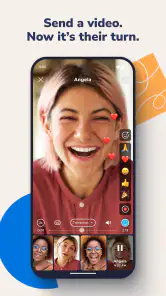
I find the most useful way to think about Marco Polo - Video Messenger is as a conversation that can wait for both people, rather than a video call that needs everyone free at once. That difference makes it especially handy for friends and relatives whose days rarely line up: I can send a quick hello when I have a moment, and someone else can watch and reply later. It is a communication app from Joya Communications, and its appeal is less about replacing every messenger than giving familiar conversations a more personal, face-to-face feel without requiring a live appointment.
How the pace changes a conversation
Video messages trade instant back-and-forth for flexibility. I would choose this format for a small update, a reaction, or a story that benefits from seeing someone’s expression; for an urgent question, a text or live call is still the better tool. The recipient does not have to stop what they are doing to answer immediately, which can make keeping in touch feel less like another calendar task. The trade-off is that a conversation may move slowly if either person checks messages only occasionally.
A practical habit is to make each clip about one thought and say what kind of response you want. A short “just sharing this” message does not create the same pressure as a question that needs an answer. I also find asynchronous video works best when the other person already likes being on camera. If they prefer typing, the personal touch may not outweigh the extra effort of recording and watching.
Everyday use, and when another format wins
Picture a family member on a different schedule: I could send a quick account of a weekend walk, and they could watch it after work and reply when it suits them. A group thread can keep that exchange with the right circle rather than scattering updates across several chats. For a family plan or a recurring check-in, that can feel warmer than a stream of text messages, while avoiding the coordination required for a group call.
Compared with ordinary messaging apps, Marco Polo puts recorded video at the center instead of treating it as an occasional attachment. Compared with live video-call services, it gives up immediate conversation in exchange for less scheduling. Neither approach is universally better: I would keep a familiar text messenger for quick logistics, and choose a live call when tone, discussion, or a time-sensitive decision matters. The strongest fit here is a group that actually wants to see and hear one another in low-pressure updates.
Why Marco Polo is Your Go-To Messenger
First off, let's talk about what makes Marco Polo so special. Unlike traditional video call apps that require both parties to be available at the same time, Marco Polo allows you to send video messages that the recipient can watch at their convenience. It's like walkie-talkies, but with video. I mean, how cool is that? You can catch up on your own time without the pressure of being live. Perfect for those of us with crazy schedules!
Features That Stand Out
The app is super user-friendly, which is a huge plus in my book. Once you download it, you can easily navigate through the features. There’s no need for any prior tech knowledge to get started. Just open the app, and you’re ready to go.
You May Like

Clash of Clans Is Won Between the Battles

Android Auto Makes the Case for Quieter Car Software

MobiOffice: Transforming Mobile Productivity with Seamless Integration

EA SPORTS FC™ Mobile Soccer: Redefining Mobile Sports Gaming

How Microsoft OneDrive Became a Mobile Productivity Giant

How Google Translate Breaks Language Barriers Effortlessly
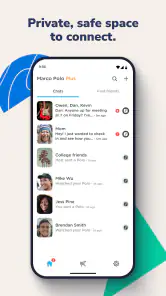
One of my favorite features is the ability to create groups. You can have multiple conversation threads going at once, which is perfect for planning events or just sharing daily updates with different sets of friends. Plus, the video quality is top-notch, so there’s no worry about fuzzy or pixelated videos.
Making busy exchanges easier to follow
Groups are most useful when they have a clear purpose. I would keep a family catch-up separate from a trip-planning conversation, for example, so a personal update does not get buried under practical details. Before recording, it also helps to decide whether a clip is for everyone in the thread or really meant for one person. That small pause can prevent a group from becoming a noisy catch-all and makes it easier for each recipient to understand why the message is there.
For a recurring check-in, I would make the routine lightweight: a brief weekly update, with no expectation that everyone answers immediately. That gives quieter members room to join when it suits them. If the topic turns into a decision with several moving parts, I would switch to a call or a text exchange where people can clarify details quickly. Video is strongest for the human context around a conversation, not necessarily for sorting out every logistical detail.
One useful question before inviting someone is whether they actually want video messages. A friend may enjoy receiving a quick face-to-face update but not want to record one themselves; another may prefer voice or text altogether. I would describe the format plainly and let them choose, rather than assuming that a more personal medium is automatically more welcome. The app works best when the group shares the same expectations about pace and participation.
Pressure points: connection, storage and age
Speed is not only about how quickly an app opens; it is also about whether a video exchange fits the moment. Because messages can be watched later, a slow reply does not automatically mean the conversation has failed. But recording and viewing video asks more of a connection than sending a short text, so I would not rely on it for a fast answer when timing matters. On a limited data plan, using Wi-Fi for longer catch-ups is a sensible way to avoid turning casual updates into an unexpected data drain.
Busy group threads can also become harder to follow than one-to-one chats. I would keep separate groups for genuinely different circles or plans, and avoid sending several clips when one clear update will do. That small bit of discipline makes it easier for people to catch up without feeling they have to watch a backlog. If someone is uncomfortable appearing on camera, a text-based alternative is likely to be a better fit rather than a reason to push them into video.
Marco Polo is free to start, with in-app purchases ranging from $7.99 to $159.99 per item. I would treat those purchases as optional decisions, not a prerequisite for trying the basic video-message approach; check the current in-app choices and costs before buying. The app is rated for Everyone, but parents should still make a practical choice based on who their child communicates with and how they use any messaging service. Its minimum OS requirement is 8.1, so an older device may not be compatible.
Privacy First
In this day and age, privacy is a major concern, and Marco Polo takes this seriously. The app doesn't sell your data to advertisers, which is a big win for anyone who values their privacy. You can rest easy knowing that your personal messages are secure.
Another aspect I love is that there are no ads interrupting your experience. It’s refreshing to use an app that doesn’t bombard you with advertisements every two seconds. This makes the whole experience much more pleasant and seamless.
Reliability and the right expectations
I would judge reliability by whether the app suits the way a person communicates, not by expecting every clip to behave like a live call. If a recording takes time to send or a reply arrives later, that can be a matter of connection or simply the asynchronous rhythm. For an important plan, I would confirm details in a faster channel rather than assume a video message has been seen. That is a useful boundary for any messenger built around replies on someone else’s schedule.
The app has an average rating of 4.6 from around 309,000 ratings, and more than 10 million installs. Those figures suggest it has found a sizeable audience, but they do not tell me whether it will suit a particular family or friend group. The best test is whether the people you want to reach are willing to send and watch short video updates, and whether that feels easier than arranging a call.
Device fit and day-to-day practicality
A phone that is comfortable for recording and watching clips matters more here than it would in a text-first messenger. If you usually keep your phone muted or avoid holding it up to record, the central interaction may feel awkward, even if the app itself is straightforward. I would try a short exchange before moving an entire group over: it quickly shows whether recording, watching, and replying fits naturally into everyone’s routine.
Video also changes the practical feel of using a messenger. Text can be skimmed in a few seconds, while a clip asks for attention and a suitable moment to listen. That is part of the appeal when a story deserves a face and voice, but it can be a drawback on a crowded commute, in a quiet room, or during a packed day. I would keep updates concise and save longer catch-ups for when the recipient can give them proper attention.
If a message seems delayed, I would first separate a technical wait from an ordinary wait for the other person to check in. The format does not promise an immediate reply, so repeatedly sending follow-ups can add pressure without making the exchange clearer. For anything that needs confirmation, I would use a direct text or call and keep Marco Polo for the more conversational part. That simple division makes the app feel more dependable in practice because it is not being asked to do a job it is poorly suited for.
Who will get the most from it
I can see this working particularly well for relatives who live apart, friends in different routines, or people who want to share small moments without arranging a video call. A grandparent could watch a family update when ready, while someone working irregular hours could reply after their shift. The format also suits people who enjoy storytelling: a quick view of a new place or a personal reaction often carries more feeling than a line of text.
On the other hand, I would not make it my first recommendation for a group that mainly exchanges addresses, schedules, and quick yes-or-no answers. Nor is it ideal if several participants dislike being on camera or tend to leave video messages unwatched. In those situations, an established text messenger is easier to scan and less demanding. A live call remains better when everyone needs to discuss something together and reach an answer in the same moment.
The app is free to try, which makes a small test with one willing friend or relative a sensible starting point. I would not move every conversation at once or buy anything just to find out whether the format suits me. Send a few short updates, notice whether replies feel natural, and decide from the group’s actual habits. That is more revealing than judging the idea of asynchronous video in the abstract.
Final Thoughts
In conclusion, if you’re looking for a fun, easy, and secure way to stay in touch with your loved ones, Marco Polo - Video Messenger is definitely worth checking out. It’s a great blend of convenience and entertainment, perfect for our digital age. Whether you're sharing a quick hello or a major life update, this app makes it all possible without the hassle. Give it a try, and you might just find it becomes your go-to app for keeping connected.
I would recommend it to people who enjoy seeing the person they are talking to but cannot reliably be online at the same time. I would skip it if your priority is instant replies, typed messages, or avoiding camera time. The current version is 0.552.0, and the app was released on July 10, 2014; those details give a little context, but day-to-day usefulness still comes down to whether your people adopt the same habit. For me, that is the deciding factor: a thoughtful video exchange can feel close and easy, while a group that rarely records clips will get more from the messaging tools it already uses.
Marco Polo - Video Messenger Frequently Asked Questions
Does Marco Polo work for people who prefer sending messages to making live calls?
Yes. Marco Polo is centered on recorded video messages rather than requiring a live conversation, which can suit people who would rather send a thought when they have time and let others watch later. Its communication style feels more personal than plain text while remaining flexible about when each person joins the conversation.
What devices and operating systems can I use Marco Polo on?
Marco Polo is available for Android and iOS devices. Before downloading, check that your device meets the app’s minimum operating-system requirement; the listed minimum is iOS 8.1. The app is a communication tool from Joya Communications, and its free download makes it easy to consider if you want video messaging on a compatible phone or tablet.
Do I need to be online at the same time as my contacts to use Marco Polo?
No. Marco Polo is designed for video messages that recipients can watch when it suits them, so a conversation does not depend on everyone being available at once. You record and send a message, and your contact can respond later. This makes the app a useful option for keeping in touch across different schedules.
What is Marco Polo - Video Messenger?
Marco Polo - Video Messenger is a video messaging application that combines the convenience of texting with the richness of video. It allows users to send video messages to friends and family, which can be watched at any time, providing a more personal and engaging way to communicate without the need for both parties to be online simultaneously. It is a communication app from Joya Communications, with a free-to-download option.
Is Marco Polo - Video Messenger free to use?
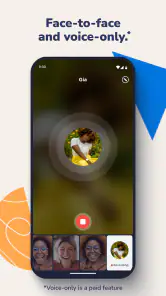
Yes, Marco Polo - Video Messenger offers a free version that includes all the essential features for video messaging. However, there is also a premium subscription called Marco Polo Plus, which provides additional features such as custom emojis, video reactions, and a fast-forwarding option, enhancing the overall user experience. Optional in-app purchases are available, so check the purchase details before choosing any paid extras.
Pros
- Easy to use with intuitive design
- High-quality video messaging
- Supports asynchronous communication
- No need for scheduling calls
- Safe and secure platform
Cons
- Limited free version features
- Requires internet connection
- No live video calling option
- Notifications can be overwhelming
- Consumes significant storage space

- Category
- Communication
- Version
- 0.552.0











