Malwarebytes Mobile Security
- 37.18K
- 4.5
- Installs
- 10.00M
- Price
- Free

Screenshots


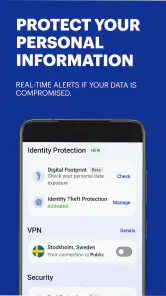
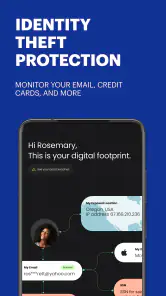
Analysis by Reviewed
When a phone holds private messages, payment apps, photos, and work accounts, it is reasonable to want more than a quick glance at its built-in security settings. Malwarebytes Mobile Security gives me a place to check for potential threats and review how installed apps use permissions. I find it most useful as a practical second opinion: it can guide a closer look, but it cannot make risky habits safe or replace the choices I make about what to install.
What to expect from a mobile security app
I’d think of Malwarebytes as a security checkup and privacy aid, not a reason to ignore cautious habits. It is a free tools app from Malwarebytes, with optional in-app purchases, and it has an Everyone age rating. Its current version is 5.20.0+505, and it has been available since October 15, 2013. The app has an average rating of 4.5 from around 575,000 ratings and more than 10 million installs, which suggests it has reached a broad audience without guaranteeing that every feature will suit every phone.
The key decision is whether you want a separate security app alongside the protections already built into your phone. If you mainly install familiar apps from trusted sources and rarely change settings, the built-in tools may be enough. Malwarebytes is more appealing if you want an extra place to review security concerns and app permissions. I would not treat any scanner as a substitute for careful downloads, updates, or thinking twice before opening an unexpected file.
Why Choose Malwarebytes Mobile Security?
If you’ve ever had a run-in with malware, you know it’s not a pleasant experience. Malwarebytes Mobile Security offers a comprehensive solution to keep your device safe. This app is like having a digital bodyguard, always on guard and ready to pounce on any threat that dares to approach your phone. The installation is a breeze, and once you have it set up, you can practically set it and forget it—though I’d recommend checking it regularly, just in case!
Starting with a useful first check
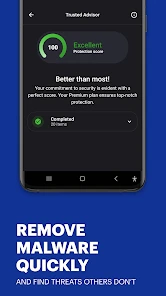
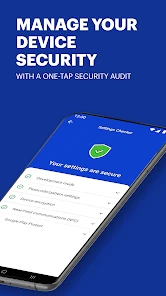
After installing, I’d begin with the main security check rather than diving straight into every setting. That gives a first-time user a clear starting point: look at the result, read any alert in full, and decide whether the suggested action makes sense before tapping through. A scan is most useful when you know what it did and what it found; simply seeing a reassuring screen is not the same as understanding the status of a particular download or app.
For an everyday example, imagine you have just installed an unfamiliar utility after following a recommendation from a friend. I would use a scan as one extra check, then review what the app asks to access and whether those requests fit its purpose. If the permissions feel excessive, the privacy audit can help you examine them, but it is still your judgment that determines whether to keep or remove the app. This practical workflow is more valuable than treating security as a one-time setup task.
Getting from installation to a useful routine
For a first-time user, I would keep the initial setup simple: install the app, open its security check, and read the result before exploring optional settings or purchases. If the app presents a request or recommendation, pause long enough to understand what it is for. That small habit prevents the common mistake of granting access or changing a setting just to clear a prompt. The goal of the first session is not to configure everything; it is to learn where the scan and privacy review are and how to interpret what they show.
More From Our News Desk

Weather by Xiaomi Review: Clear at a Glance, Less Clear Up Close

X Under Pressure: Can It Recover When Posting Goes Wrong?

Clash of Clans Is Won Between the Battles

Android Auto Makes the Case for Quieter Car Software

MobiOffice: Transforming Mobile Productivity with Seamless Integration

EA SPORTS FC™ Mobile Soccer: Redefining Mobile Sports Gaming
Once that first check is complete, choose one follow-up action rather than turning security into a long project. You might inspect permissions for a newly installed app, or revisit a concern that prompted you to download Malwarebytes in the first place. I find this approach more reassuring than repeatedly scanning without a reason: it gives each check a question to answer and makes it easier to decide whether the app is earning a place on your phone.
A useful boundary is to treat an alert as a reason to investigate, not an automatic verdict. Read what the app says, consider what you were doing when the alert appeared, and avoid approving a change you do not understand. If a warning concerns an app you rely on, check that app’s purpose and permissions before deciding what to do. This is especially helpful for new users, who may otherwise mistake a cautious prompt for proof that something is infected.
Features That Stand Out
What really sets Malwarebytes apart from other security apps is its real-time protection. As soon as you install a new app or download a file, Malwarebytes scans it for any known threats. It’s like having a personal security team that works tirelessly to keep your phone safe. Plus, the app's database is constantly updated, ensuring it recognizes and neutralizes the latest threats.
Another feature worth mentioning is the app’s privacy audit tool. It gives you a rundown of all the apps on your phone and what permissions they’ve been granted. This is super helpful for identifying any sneaky apps that might be accessing more data than they should. I was surprised to see just how many apps had permissions I wasn’t aware of!
Making the privacy audit actionable
Rather than trying to review every permission in one sitting, I’d focus on apps that handle sensitive tasks or seem to request access unrelated to what they do. Check the purpose of a permission before changing it: removing access can affect how an app works, while leaving an unnecessary permission in place may not match your comfort level. The audit is a prompt to make informed choices, not proof that an app is malicious just because it has a permission enabled.
This is also where Malwarebytes differs from relying only on a basic antivirus scanner. A scanner centers attention on threats it can detect, while a permission review helps you question how ordinary apps use access to your information. Neither approach replaces the other, and neither can promise perfect protection. If you already use a security suite whose privacy tools you prefer, adding another app may create overlap rather than a meaningful improvement.
One practical way to get more from the audit is to compare permissions with what you expect an app to do, rather than judging a permission by its name alone. A feature may have a legitimate reason to request access, while a familiar app can still deserve a closer look if its access no longer seems necessary. I would make changes one at a time and then check whether the app still works as expected. That makes it easier to reverse a decision if a function you rely on stops working.
The audit is also useful after a period of installing several apps, when it can be hard to remember which ones you meant to keep. I would use it as a prompt to remove apps I no longer use and reconsider access for the ones I keep. That is a modest but worthwhile security routine: fewer forgotten apps mean fewer permissions to revisit, and it does not require assuming that every unfamiliar entry is harmful.
Performance and Usability
One thing that really impressed me about Malwarebytes Mobile Security was its minimal impact on device performance. Some security apps are notorious for hogging resources and slowing down your device, but not Malwarebytes. I ran several tests and barely noticed a difference in performance. The user interface is clean and intuitive, making it easy for anyone to navigate, whether you’re a tech guru or not.
I also appreciate the app’s ability to schedule scans. This means you can set it to run at a time that’s convenient for you, like in the middle of the night, so it doesn’t disrupt your daily activities. It’s little touches like these that make a big difference in the overall user experience.
For someone who shares a phone with a family member or helps a less technical relative, the clearest benefit is having a single place to start when a phone behavior seems odd. I would still talk through the alert rather than simply telling them to tap whatever the app recommends. That turns a scan into a chance to build better habits: identify what was installed, consider why it needs its access, and decide together whether it belongs on the device.
People who want a completely hands-off experience should be realistic about what a security app can do. Scans and permission checks are most valuable when you take a moment to review their results; installing an app and never looking at it again may not address the concern that led you to install it. If you do not want another tool to check or maintain, your phone’s own protections and careful download choices may be a simpler fit.
Understanding the trade-offs
There is a difference between the free app and its optional purchases, which range from $1.49 to $139.99 per item. I’d check what a particular purchase includes and whether it solves a need you actually have before paying; the price range alone does not tell you which option is right for you. If you only want occasional checks and a way to inspect permissions, you may not need to buy anything. If you want a broader set of protections, compare the paid offering with what your phone and any existing security tools already provide.
One common point of confusion is expecting a security app to catch every risky link, file, or behavior. Detection depends on the threat and the protection available, so I would still avoid suspicious downloads and keep the phone’s own software current. Another is assuming an alert automatically means an app is dangerous: read the details and consider the context before acting. Those habits make the app more useful without encouraging false confidence.
People sometimes ask whether they need to pay to get a meaningful first impression. I would start with the free app and the tasks it lets you evaluate, then decide whether a paid option addresses a specific gap. Before buying, compare the proposed benefit with protection already available on your phone or through another service you use. If the overlap is substantial, the extra cost may not be justified for your situation.
Another sensible question is whether this should replace the phone’s built-in security. I would not frame it as an either-or choice: built-in safeguards remain part of the picture, while Malwarebytes can offer another route to inspect a concern and review permissions. If you prefer to keep your phone lean and already feel comfortable with its existing tools, adding a separate app may not improve your day-to-day experience enough to matter.
It is also worth separating a privacy concern from a malware concern. An app asking for access you dislike is not automatically infected, and a clean scan does not mean every permission choice is right for you. I would use the scanner to look for potential threats and the audit to think about access, then make those decisions independently. That distinction keeps the app from becoming a source of either unnecessary alarm or misplaced confidence.
Who will get the most from it?
I’d recommend Malwarebytes to someone who wants an approachable second opinion on phone security and is willing to check permissions instead of tapping through warnings. It can also suit a less technical family member who benefits from a clear place to start when something on the phone feels questionable. On the other hand, a person who wants no extra app, already trusts their built-in protections, or dislikes managing overlapping security tools may be happier sticking with the phone’s existing features.
If you are comparing it with another mobile antivirus app, focus on the tasks you will genuinely use: checking apps and files, reviewing privacy access, and understanding what the free version covers. A familiar brand name or a high rating should not make the decision for you. The better choice is the one whose protections fit your phone and habits without adding needless complexity.
Compared with relying only on a phone’s default protections, Malwarebytes is most compelling when you want an extra scan and a dedicated permissions review in one place. Compared with another antivirus app, the practical differences to investigate are the exact checks available on your device, how clearly results are explained, and whether its paid features duplicate tools you already have. I would compare those everyday tasks rather than chasing a long feature list; the best fit is the one you will understand and actually use.
I would skip it if you are looking for a guaranteed fix for every security worry, or if you do not want to manage another app alongside existing protections. It is also not the right answer to every privacy question: a permissions list can help you inspect access, but it cannot decide what level of access you personally accept. Someone comfortable with their phone’s built-in safeguards and careful about downloads may reasonably prefer not to add a separate security layer.
Final Thoughts
In a world where cyber threats are becoming increasingly sophisticated, having a reliable security app is a must. Malwarebytes Mobile Security provides peace of mind with its powerful protection features and user-friendly interface. Whether you’re a casual user or someone who relies heavily on their smartphone for work, this app is a solid choice for keeping your data safe and sound.
If you haven’t yet tried Malwarebytes Mobile Security, I’d say it’s definitely worth a download. After all, protecting your personal information shouldn’t be optional—it’s essential.
Malwarebytes Mobile Security Frequently Asked Questions
What does Malwarebytes Mobile Security include besides malware scanning?
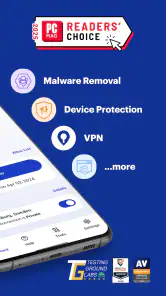
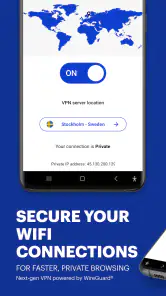
Malwarebytes Mobile Security is presented as an all-in-one mobile security app, with tools associated with antivirus, malware, privacy, and VPN protection. Its goal is to bring several types of digital protection together in one app, rather than focusing only on scanning. The exact features available can depend on the plan you choose, so consider which kinds of protection matter most to you before downloading.
Can I use Malwarebytes Mobile Security on Android and iOS?
Malwarebytes Mobile Security is available for Android and iOS, so it may suit users who want a mobile security app across either platform. For Android, the minimum operating-system requirement is Android 9. The app is rated Everyone, making its content suitable for a general audience. Check your device’s operating system and choose the matching app-store version before installing.
Do I need to create an account to use Malwarebytes Mobile Security?
Whether you need an account can depend on the features and subscription options you choose. The app has a free option, as well as in-app purchases for additional offerings. Before you begin, review the setup and purchase choices presented in the app and decide whether you want to use only the free features or explore a paid option. This helps you understand what you are signing up for.
What is the difference between the free and paid options?
Malwarebytes Mobile Security is free to download, and it also offers in-app purchases. The free option includes basic features such as malware scanning and virus removal, while some advanced features may require a paid subscription. Purchase prices range from $1.49 to $139.99 per item. Review the available plans and their terms before buying so you can choose the option that matches your needs and budget.
Is Malwarebytes Mobile Security available for my phone?
Malwarebytes Mobile Security is a mobile security app from Malwarebytes, with versions for Android and iOS. Before downloading, check that your device meets the minimum operating-system requirement: Android 9 or later. The app is listed for Everyone, so its content rating is suitable for a general audience. It is intended for people who want security tools on their mobile device.
Pros
- Comprehensive anti-malware protection
- Real-time threat detection
- Privacy audit feature
- User-friendly interface
- Low impact on battery life
Cons
- Premium features require a subscription
- Occasional false positives
- Limited free version functionalities
- No VPN included
- Ads in the free version
- Category
- Tools
- Version
- 5.20.0+505








