Local News: Breaking & Latest
- 8.08K
- 4.4
- Installs
- 5.00M
- Price
- Free

Screenshots


Analysis by Reviewed
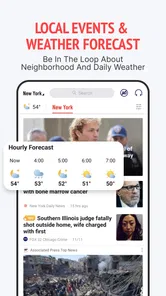
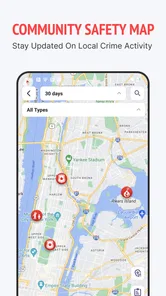
I usually check local news in short bursts: before leaving home, while waiting for an appointment, or when the weather looks uncertain. Local News: Breaking & Latest is aimed at that habit, bringing nearby headlines, weather and events together in a phone app. Its appeal is convenience, but the value depends on whether the coverage feels relevant to your neighborhood and whether notifications fit your routine.
Where the first snags can happen
With any local-news app, the first useful question is whether the feed is showing the place you actually care about. A nearby city may have more coverage than a smaller town, and a general headline can feel “local” while still being too far away to affect your plans. I’d check a few stories against familiar places before relying on the feed for decisions such as changing a commute or attending an event.
Alerts are another point where expectations matter. Breaking-news notifications can be handy when a situation is unfolding, but frequent or broad alerts can turn into noise. I’d start with the topics and location choices that matter most, then adjust them after a few days rather than allowing every notification by default. The app is free to download, though it also offers in-app purchases, so I’d review any purchase prompt before confirming it.
There is also a difference between seeing a headline and knowing enough to act on it. A short alert can help me notice that something is happening, but I would open the story to check its location, timing and context before changing a route or passing information along. That extra pause is especially useful when a headline covers a large area: the event may be real and important without affecting the block or journey I have in mind.
An Instant News Companion
Imagine having a personal assistant who whispers the latest news updates to you. That's essentially what Local News: Breaking & Latest does, and it does it with flair. From politics to local sports, and everything in between, this app is like having a local newspaper rolled up in your pocket. Its user-friendly interface makes it easy to navigate through various categories, ensuring you never miss a beat.
Stay Updated, Stay Ahead
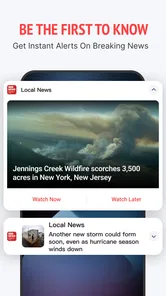
One of the standout features of this app is its ability to deliver breaking news alerts right to your phone. Whether it's a sudden weather change, a traffic update, or a significant local event, you’ll be the first to know. The app is designed to keep you in the loop, acting almost like a radar for all things newsworthy.
I’d treat an alert as a prompt to investigate, not as a complete briefing. If it arrives while I’m busy, I can note the subject and return when I have a moment to read the article. That approach preserves the convenience of quick notifications without letting an alarming phrase dictate a decision before I know whether the story is current, nearby and relevant.
More From Our News Desk

Weather by Xiaomi Review: Clear at a Glance, Less Clear Up Close

X Under Pressure: Can It Recover When Posting Goes Wrong?

Clash of Clans Is Won Between the Battles

Android Auto Makes the Case for Quieter Car Software

MobiOffice: Transforming Mobile Productivity with Seamless Integration

EA SPORTS FC™ Mobile Soccer: Redefining Mobile Sports Gaming
Customized News Experience
Not all of us are interested in the same things, and the creators of this app get that. The customization feature allows you to select the types of news you want to receive. You can tailor your news feed to include sports, politics, entertainment, or just about any area of interest. It’s like having a buffet of news where you can pick and choose what you want to consume.
A practical way to use that flexibility is to make the feed serve different moments of the day. I’d keep the main mix broad enough to catch community changes, then use topic choices to avoid spending a quick break on subjects I rarely follow. For a parent checking school-area events or someone tracking neighborhood sports, focused interests can make a general feed feel more useful. The trade-off is that filtering too tightly may leave out a story that matters locally but doesn’t fit a chosen topic.
For someone new to the app, I wouldn’t try to perfect every preference on the first visit. I’d begin with the location and subjects that are immediately useful, then make small changes after seeing what actually appears. If the feed feels thin, widening the topics is a more informative test than assuming the app has no relevant coverage. If it becomes distracting, trimming one or two less useful interests is easier to judge than switching everything off at once.
Offline Mode for the Win
Have you ever found yourself in a dead zone with no signal and nothing to read? This app has you covered with its offline mode. You can download articles when you have Wi-Fi and read them later, even when you're off the grid. It's a perfect feature for those who travel often or find themselves in areas with spotty service.
The useful habit here is to prepare before the connection disappears. I’d open the articles I expect to read while connected and make sure they are available before setting off, rather than treating offline access as a substitute for a live update. A story saved for a journey can remain enjoyable reading, but anything that depends on changing conditions should be checked again once a connection is available.
A simple routine for getting more from it
For a realistic morning check, I’d glance at local headlines and weather before leaving, then open an event or community story only if it could change the day’s plan. If an article is worth keeping for a train ride or a place with weak reception, save it while connected rather than waiting until the signal drops. That small habit makes offline reading useful instead of something you remember only after losing service.
If the feed looks stale, I’d first check that the app is online and reopen it; if alerts stop, I’d review the phone’s notification settings as well as the app’s own choices. Those are sensible checks for a news app, not a guarantee that every delay comes from a setting. Local reporting can also be quieter on a slow news day, while a network or device issue may affect updates independently of the app itself.
When something seems out of date, I’d compare more than one item before changing settings. A single older article may simply remain available alongside newer reporting, while a feed that stays unchanged after reopening could point to a connection problem or a temporary lull. I’d also check whether the phone itself has internet access in another app; that quick comparison helps separate a general connectivity issue from a problem limited to this feed.
Who will find it useful
This is most appealing if you want a quick local pulse without opening several separate news sites. Compared with a newspaper’s app, a local-news aggregator can be more convenient for scanning different subjects in one place; compared with a social feed, it is less dependent on posts from people you happen to follow. Neither comparison makes it a replacement for a trusted local newsroom or official emergency guidance. For urgent safety decisions, I would verify details with the relevant authorities rather than treating a headline alert as the final word.
Readers who want deep investigative reporting, a single publication’s editorial voice, or precise live traffic directions may be better served by dedicated sources. Coverage can vary by area, and a broad selection of topics does not ensure equal depth in each one. The app is published by NEWSDELIVER LIMITED, is rated for Everyone 10+, and its current version is 2.26.0; it requires Android 8.0 or later. Those basics make it accessible to many Android users, but they don’t remove the need to check local relevance for yourself.
Its best audience is someone who treats local information as a useful layer in the day rather than a complete research tool. If I were visiting an unfamiliar town, I could use a local feed to get a sense of community stories and events, then consult a venue or official source for exact opening details and plans. At home, the same approach helps me spot topics worth following without assuming that a brief article answers every practical question.
It is less suitable for readers who want a carefully edited, single-paper experience. A local newsroom’s own app may be a better choice if you value its reporters, investigations and consistent editorial perspective more than having a mixed feed. Likewise, someone who already gets reliable neighborhood information from a community group may find this app redundant unless its wider news and weather coverage adds something useful.
What to expect before settling in
The app sits in the news-and-magazines category and has a 4.4 average from around 37,000 ratings, with more than 5 million installs. It is free to start, and optional in-app purchases range from $1.99 to $39.99 per item. I’d treat the free experience as the sensible first step: see whether the local stories are timely and useful before spending anything. Its release date is August 24, 2023, but the more practical question is whether its current feed fits your area and your daily reading habits.
One useful way to judge that first week is to keep a mental note of whether the app changes a real decision: did a weather item affect what you packed, did an event listing give you a plan, or did a local report explain something you had noticed nearby? If the answer is consistently yes, the feed is earning its place. If I only skim generic headlines and never find a story that connects to my area, I would not keep checking out of habit alone.
For setup friction, I’d check the basics in a calm order: confirm the intended location, allow the topics I actually want, and decide whether notifications suit my day. If a feature appears unavailable, I’d close and reopen the app and check connectivity before making larger changes. On Android, the minimum requirement is version 8.0, so a device running an older system may not be a fit; keeping the app and operating system current where possible is a sensible general step when troubleshooting.
Questions about cost are easiest to answer by separating download from optional spending: the app is free, while in-app purchases are offered. I would read the wording on any purchase screen carefully and avoid confirming anything I don’t intend to buy. For questions about whether a particular neighborhood is covered well, there is no shortcut around checking the actual stories that appear for the place you care about; another city’s experience may not predict yours.
It is also worth thinking about how much attention you want a news app to claim. A stream of alerts can make a person feel informed while interrupting work or family time, so I’d use notifications selectively and do a deliberate check when convenient. If I need uninterrupted updates during a developing emergency, I’d rely on official channels as well; a general news feed is useful for awareness, not a substitute for instructions from the responsible agency.
All in all, Local News: Breaking & Latest is a nifty little app that packs a punch. It’s like having a trusty sidekick who's always ready with the latest scoop. So, if you're someone who loves staying informed without the hassle of sifting through clutter, this app might just be your new best friend. Give it a whirl, and you might find it becomes an indispensable part of your daily routine.
My practical verdict
I’d try it as a convenient first stop for neighborhood headlines, weather and events, especially if I wanted one place to scan several kinds of local coverage. I would not make it my only source for time-sensitive safety news, nor would I assume every nearby community gets the same depth of reporting. If the feed matches your area and the alerts stay manageable, it can earn a place in a daily routine; if you need one newsroom’s deeper reporting or highly specific live information, a dedicated source is the better fit.
My recommendation is deliberately conditional: give it a short, practical trial around the places and topics you care about, then keep it only if the coverage proves locally useful. That is a better test than judging it by a long list of available subjects or by how many alerts arrive. Used as a quick neighborhood overview—with saved reading for offline moments and another source for consequential details—it has a clear role. Used as a definitive source for every local question, it asks more of a general news app than I would.
Local News: Breaking & Latest Frequently Asked Questions
Is Local News: Breaking & Latest free to download, and what should I know about its age rating?
Local News: Breaking & Latest is free to download, and its content rating is Everyone 10+. That can help families decide whether the app is appropriate for younger readers, while the free price makes it easy to try without an upfront charge. Optional in-app purchases are available, so review any purchase prompt carefully before confirming a transaction.
Who develops Local News: Breaking & Latest, and when was it released?
Local News: Breaking & Latest is developed by NEWSDELIVER LIMITED. It was released on August 24, 2023, and is a News & Magazines app for people looking to follow local updates. Knowing the developer and release date can help you identify the app you intend to install and understand that it is an established news app rather than an unnamed download.
What kinds of local updates can I expect from Local News: Breaking & Latest?
Local News: Breaking & Latest is aimed at readers who want local news alongside weather, events, and breaking stories. It is a News & Magazines app from NEWSDELIVER LIMITED, with a general audience rating of Everyone 10+. If you mainly want a place to keep up with nearby happenings, its focus is broader than breaking headlines alone.
What is Local News: Breaking & Latest and how does it work?
Local News: Breaking & Latest is a mobile application designed to keep users informed about the latest happenings in their local area. It aggregates news from various reliable sources and delivers them straight to your device. Users can customize their feed based on location and topics of interest, ensuring they only receive the news that matters most to them.
Is Local News: Breaking & Latest free to use, or are there subscription fees?
Local News: Breaking & Latest is free to download and use. However, it may offer in-app purchases or a premium subscription to access additional features, such as ad-free browsing, exclusive content, or advanced customization options. Users can opt for these premium services, but the core news features remain accessible at no cost. In-app purchase prices range from $1.99 to $39.99 per item, so check the purchase details before confirming any transaction.
Pros
- Timely updates on local events.
- User-friendly interface design.
- Customizable news alerts.
- Wide coverage of local topics.
- High accuracy in reporting.
Cons
- Limited international news coverage.
- Occasional ad interruptions.
- Require stable internet connection.
- Some sections update slowly.
- Limited multimedia content.












