Live Weather Radar Launcher
- 5.49K
- 4.3
- Installs
- 1.00M
- Price
- Free
Screenshots
Analysis by Reviewed
I judge a weather app less by how dramatic its radar looks than by whether I can understand it quickly when I’m about to leave home. Live Weather Radar Launcher puts radar and local forecasts at the center of the experience, which suits people who want to check changing conditions rather than open a plain temperature readout. My main question is whether that visual approach stays comfortable and useful across different needs, screens, and situations.
Readability and navigation in everyday checks
At a glance, the appeal is straightforward: I can use a map to make sense of where weather is moving, then turn to a local forecast for the practical detail. That combination can help when a single current temperature is not enough—for example, when I’m deciding whether to walk now or wait for a shower to pass. Compared with the usual weather app that foregrounds a list of temperatures and forecast periods, this one makes the map a more natural starting point. If I prefer a compact text-first screen, though, a conventional forecast app may be quicker to scan.
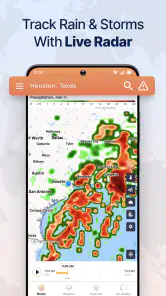
The radar can be more useful when I treat it as a planning aid rather than a promise about the next few minutes. I would check the local forecast alongside the map before making a longer outdoor plan, since a visual pattern is easiest to interpret when I’m not expecting it to answer every question by itself. That habit also makes the app’s mix of radar, temperature maps, and local information easier to put to work without over-reading one screen.
Staying Ahead with Real-Time Weather Updates
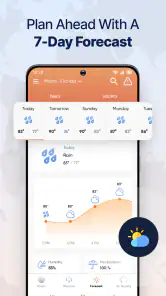
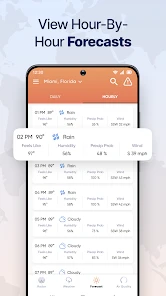
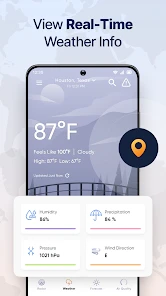
One of the coolest features of the Live Weather Radar Launcher is its real-time weather updates. Imagine having a personal meteorologist in your pocket, ready to give you the latest scoop on what's happening in the skies. I found it super handy to get live updates, especially when the weather's being unpredictable. The app provides detailed forecasts, which makes planning outdoor activities a breeze—or a sunny stroll!
Customization at Your Fingertips
Now, let's talk customization. This app doesn't just give you weather updates; it lets you tailor your experience to suit your style. Whether you're a minimalist or someone who loves a splash of color, the app's customization options mean you can personalize the look and feel of the interface. I spent a good chunk of time tweaking it until it felt just right for me. It’s like having a personalized weather hub!
Customization can be more than decoration: a familiar layout may make routine checks easier if I use the app often. I’d keep the screen arranged in the way I naturally read weather information, then resist changing it just for novelty; consistency matters when I’m checking conditions quickly. That said, visual preferences vary, and personalizing appearance won’t necessarily solve every readability need, so I would try the interface in ordinary daylight and indoors before relying on it for fast decisions.
Interactive Radar Maps
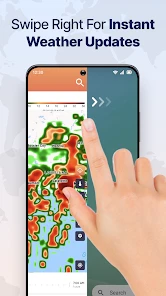
Interactive radar maps are part of what makes this app stand out. With just a pinch and a swipe, you can zoom in and out of areas to see weather patterns. I found myself oddly mesmerized by watching storm systems roll across the map. It's not just informative; it's kind of fun too. Plus, knowing exactly where that storm is headed gives you a little extra peace of mind.
More From Our News Desk

Clash of Clans Is Won Between the Battles

Android Auto Makes the Case for Quieter Car Software

MobiOffice: Transforming Mobile Productivity with Seamless Integration

EA SPORTS FC™ Mobile Soccer: Redefining Mobile Sports Gaming

How Microsoft OneDrive Became a Mobile Productivity Giant

How Google Translate Breaks Language Barriers Effortlessly
Motor and sensory considerations
Map interaction asks for deliberate touch: I’d zoom in before studying a small area, rather than repeatedly pinching while walking or carrying bags. That is a practical trade-off for anyone with limited dexterity, unsteady hands, or a screen that is hard to use outdoors. In those moments, a quick glance at the local forecast may be less demanding than manipulating a map. I also wouldn’t treat a colorful display as automatically easy to interpret; if map layers feel visually busy, switching attention to the forecast is a sensible alternative.
For a realistic use case, imagine I’m getting ready to leave for an appointment and clouds are gathering. I can check the local outlook first, then inspect the radar to see whether the weather approaching my route looks like a reason to take a coat or change my departure time. If I’m already outside, I’d avoid making that decision while crossing a street or navigating a crowded station: a weather check is most useful when I can pause and look safely.
Situational access and choosing the right tool
The app is a strong fit for people who like visual context, check weather before commuting or walking, and want radar alongside local conditions. It is less suitable as a sole tool for someone who needs a very simple text-only forecast, relies on spoken guidance, or finds touch gestures difficult. In those cases, a familiar basic forecast app—or a trusted local weather service with a format that suits the person—may be the better everyday choice. For outdoor plans, I’d check conditions before leaving and use the map to refine, not replace, that first check.
Remaining barriers and practical expectations
Like any radar-led approach, the map can encourage more confidence than a forecast deserves. Weather can change, and a broad visual view may not answer a precise question about a particular street or moment. I would use it to compare the general pattern with the local forecast, not to assume a clear route or exact arrival time. The other friction is that maps demand visual attention and touch interaction; anyone who wants weather delivered with minimal screen work may be happier with a simpler option.
As a weather app from AtomApplications, it is free and rated for Everyone, making it easy to try without committing to a paid plan. It has an average rating of 4.3 from around 13,000 ratings, with over 1 million installs, and version 3.7.2. It was released on November 2, 2023, and requires Android 10 or later. Those details make it a practical option for many Android users, while the radar-first style—not the popularity figures—is what should determine whether it suits your habits.
User-Friendly Interface
Let's not forget about usability. The developers nailed it with a user-friendly interface that's straightforward and intuitive. Even if you're not tech-savvy, navigating through the app is a breeze. I appreciated how easy it was to find information without getting lost in a sea of menus and settings. This is one app where less truly is more.
Who will get the most from it
I’d recommend it to someone who checks conditions before a walk, a school run, or a flexible outdoor errand and enjoys interpreting radar rather than relying on a number alone. A useful habit is to open the local forecast first, then use the map only when changing weather makes location and direction relevant. That keeps a quick check from turning into an extended look at moving colors, and it helps preserve battery and attention without assuming any particular background behavior.
If you mainly want tomorrow’s forecast in a glance, rarely look at maps, or need an interface that works without fine touch control, the usual text-led weather option may be a better match. I’d also avoid using any weather app as the only basis for a high-stakes decision; when conditions matter, compare the forecast with reliable local guidance. The strength here is convenience and visual context, not a guarantee that every small-area change will be captured.
An inclusive verdict
In conclusion, the Live Weather Radar Launcher is more than just a weather app—it's a tool to keep you informed and prepared for whatever Mother Nature throws your way. Whether you're planning a picnic or just need to know if you should wear a jacket, this app has got you covered. Give it a go, and stay ahead of the weather game!
My recommendation is conditional but positive: choose it if a radar view helps you make better everyday decisions, and take a little time to settle on a comfortable layout before depending on quick checks. The app’s visual focus can make changing conditions easier to grasp, but it is not automatically the most accessible choice for every person or setting. If map gestures, visual detail, or screen-based checking get in the way, a simpler forecast tool is a perfectly reasonable alternative.
Live Weather Radar Launcher Frequently Asked Questions
Is Live Weather Radar Launcher available for free, and what should I expect before installing it?
Live Weather Radar Launcher is free to download, and its Everyone content rating makes it suitable for a broad audience. It is a weather app centered on radar maps and a local forecast, presented through a launcher experience. If you are deciding whether to install it, consider whether you want weather information alongside a launcher rather than a standalone forecast app.
Can I use Live Weather Radar Launcher on an iPhone or iPad?
Live Weather Radar Launcher is listed as an Android app, with support for devices running Android 10 or later. That makes checking your device’s operating system an important step before downloading. If you use an iPhone or iPad, this Android version is not the option to install; the app is intended for compatible Android devices.
Who developed Live Weather Radar Launcher, and how established is the app?
AtomApplications is the developer of Live Weather Radar Launcher. The app has been available since November 2, 2023, and its current version is 3.7.2. It has more than 1 million installs, around 13,000 ratings, and about 5,500 written reviews, giving prospective users a sense of its adoption and feedback history.
Do I need to replace my current home screen to use Live Weather Radar Launcher?
Live Weather Radar Launcher is an all-in-one weather radar launcher, so it is intended to bring weather information and launcher features together. Before downloading, consider whether you want weather details presented through a launcher experience rather than using a weather app on its own. Its focus is on rain and temperature maps, along with a local forecast.
What features does the Live Weather Radar Launcher offer?
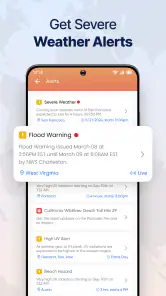
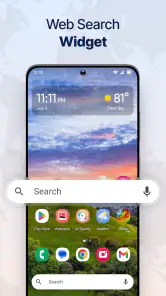
Live Weather Radar Launcher provides real-time weather updates directly on your home screen. It integrates advanced radar technology, displaying weather conditions in your area. You can customize the launcher with various widgets, themes, and wallpapers that reflect current weather. The app also offers forecasts, severe weather alerts, and detailed meteorological data to keep you informed.
Pros
- Real-time weather updates
- Customizable radar maps
- User-friendly interface
- Accurate forecasts
- Detailed weather alerts
Cons
- Ads can be intrusive
- Limited free features
- Requires internet connection
- Occasional loading issues
- Battery drain concern
- Category
- Weather
- Version
- 3.7.2