Daily Horoscope Launcher
- 3.64K
- 4.5
- Installs
- 1.00M
- Price
- Free
Screenshots
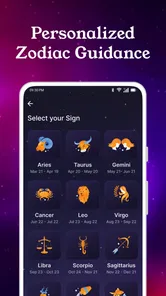
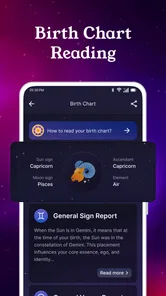
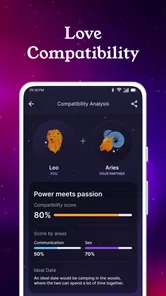
Analysis by Reviewed
I would approach Daily Horoscope Launcher as a small change to the way I check my phone, rather than as an astrology tool that needs to take over my day. Its appeal is the combination of horoscope content and a launcher, so the first question is whether you want those things together on your home screen. If you do, the idea is easy to understand: make a daily reading part of a routine you already have.
What to expect from the combination
Most horoscope apps keep their readings inside a separate app, while a conventional launcher focuses on arranging apps and shortcuts. This one brings the two ideas together. I find that useful if I enjoy astrology and want a quick prompt during the day, but less compelling if I only want an occasional forecast or already have a home-screen setup I like. A launcher affects how you use the phone, so its astrology angle is most valuable when it feels welcome every time you unlock it.
There is also a practical trade-off: putting a reading in a prominent place can make it easy to notice, but it can also turn into background decoration once the novelty wears off. I’d treat the horoscope as something to reflect on, not as a firm instruction for decisions about work, money, health, or relationships. That keeps the daily ritual light and leaves important choices grounded in real circumstances.
Getting started and finding a useful routine
When I first heard about Daily Horoscope Launcher, I was intrigued by its unique proposition. Imagine a launcher that not only customizes your phone but also keeps you updated with daily horoscopes. Setting it up was a breeze. The app guided me through several personalization options, allowing me to align my phone’s theme with the cosmic energies. It felt like a breath of fresh air compared to the mundane launchers I’d used before.
Make the first setup work for you
For a first-time user, I’d keep setup simple: choose a look that is comfortable to see every day, then spend a little time learning where the horoscope appears and how to reach the parts of the launcher you use most. It is tempting to customize everything at once, but changing one or two things first makes it easier to tell whether the new layout genuinely suits you. If you prefer familiar icon placement, preserve that where possible rather than rebuilding your whole routine just to try the astrology features.
The app is free and is made by AtomApplications. It sits in the lifestyle category, has an Everyone age rating, and its current version is 1.30.2. It was released on February 8, 2024, and requires Android 10 or later. Its 4.4 average comes from around 9,200 ratings, with roughly 2,700 written reviews, and it has passed 1 million installs. Those figures suggest that plenty of people have tried it, but they can’t tell you whether its particular home-screen style will feel right on your own phone.
Turn the first glance into a useful action
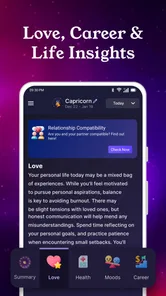
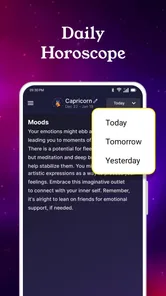
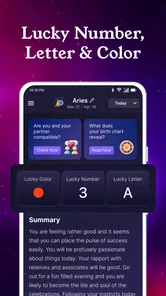
The standout feature, of course, is the daily horoscope update. Each morning, you’re greeted with your horoscope right on the home screen. No need to dive into a separate app; it’s all there as soon as you unlock your phone. Plus, you can choose from a variety of widgets that display everything from moon phases to zodiac compatibility tips.
More From Our News Desk

Weather by Xiaomi Review: Clear at a Glance, Less Clear Up Close

X Under Pressure: Can It Recover When Posting Goes Wrong?

Clash of Clans Is Won Between the Battles

Android Auto Makes the Case for Quieter Car Software

MobiOffice: Transforming Mobile Productivity with Seamless Integration

EA SPORTS FC™ Mobile Soccer: Redefining Mobile Sports Gaming
A realistic way to test that convenience is to check the reading when you first pick up your phone, then decide whether it earns a place in your routine. For example, if I have a busy morning, I might use it as a brief pause before opening messages and calendar items, rather than treating it as another feed to scroll. If the widget catches my eye but rarely helps me, that is a good sign to simplify the home screen or return to a standard launcher.
Suggestions, customization, and everyday trade-offs
Another neat addition is the astrology-based app suggestions. It’s like having a personal assistant who knows your star sign and suggests apps that align with your celestial vibes. Whether you’re a Leo looking for creative outlets or a Virgo seeking productivity tools, this feature has you covered.
I’d use those suggestions as discovery prompts, not as a replacement for choosing apps based on what I actually need. A sign-based recommendation can be a fun nudge toward something new, but it is not evidence that an app will fit your habits. The same goes for compatibility tips: they may give you a conversation starter, while real compatibility still depends on people and how they treat each other.
Customization is another area where this app excels. From changing icon shapes to selecting cosmic-themed wallpapers, the possibilities are plentiful. It adds a personal touch, making your phone truly yours, guided by the stars.
One helpful approach is to make the visual changes in stages. Try a wallpaper first, then adjust icon shapes only if the result remains easy to scan. A striking theme is not much use if it makes familiar apps harder to find. This small check matters especially for anyone who opens the phone quickly throughout the day and relies on muscle memory more than decoration.
When to keep it, and when to choose another option
Performance-wise, the app doesn’t disappoint. It operates smoothly, with no noticeable lag, which is crucial for a launcher. The interface is intuitive, making navigation a walk in the park. The design is sleek, with vibrant colors that don’t overwhelm your senses. It’s a visual treat, especially for those who appreciate a bit of style with their substance.
That smoothness is important because a launcher is encountered far more often than a typical reading app. Still, personal preference matters more than a polished theme: if you find yourself missing the layout or habits of your usual launcher, there is little reason to force the switch. Someone who wants detailed astrological study may be better served by a dedicated astrology app, while someone who only wants a clean, functional home screen may prefer a conventional launcher without daily predictions.
Who is likely to enjoy it?
I think it is best suited to someone who already likes checking a horoscope and is open to making that interest part of their phone’s everyday appearance. The combination is especially convenient if you enjoy a quick reading but often forget to open a separate astrology app. The launcher gives the ritual a natural point of contact: unlocking the phone. If you’re curious but not deeply invested, that low-effort glance is an easy way to see whether daily astrology adds anything enjoyable to your routine.
It is less suitable if your home screen is already carefully organized and you dislike changing familiar layouts. A launcher is not a background feature you can ignore; it becomes the surface you return to throughout the day. If you value a minimal screen above all else, or you find horoscope prompts distracting, a standard launcher and an occasional reading in a separate app may be a better fit. I would also skip relying on it for serious astrological research, since its appeal is daily convenience rather than an in-depth study workflow.
A practical way to judge the first week
Rather than deciding based on the first theme you see, I’d give the arrangement a fair everyday test. Keep the home screen limited to the apps you reach for most, and notice whether the horoscope is easy to find without crowding those essentials. On a workday, the useful question is not whether the prediction feels uncannily accurate; it is whether the glance is pleasant and brief enough to fit between checking the time and opening the app you need.
For instance, I might glance at the reading while waiting for a kettle to boil, take the general mood as a prompt to pause, and then move on with the morning. If I start opening the phone just to reread the same content or lose time rearranging the screen, the setup is no longer serving me. That distinction helps separate a small enjoyable ritual from another source of distraction.
One non-obvious trade-off is that combining the reading and the launcher can make the horoscope feel more available, but it also makes the overall experience depend on whether you like the launcher itself. A standalone horoscope app can be opened only when you want it; this approach places astrology closer to your regular phone habits. If that closeness is the point, it works in its favor. If you want a clear boundary between entertainment and the tools you use all day, keeping the two separate gives you more control over when astrology appears.
Choosing what to customize first
When changing the look, I’d prioritize legibility over matching every element to a theme. A wallpaper can set the mood without requiring you to relearn where your apps are. Icon changes are more personal: they may make the screen feel cohesive, but familiar shapes and positions are often faster to recognize. Making one change at a time also gives you a useful fallback. If the screen feels busy, you can identify what caused it instead of having to undo a full redesign.
The widgets deserve the same practical test. A moon-phase or compatibility display may be interesting at a glance, but it has value only if you actually want to see it repeatedly. I’d choose the item I expect to check, leave the rest out at first, and see whether the space it takes up is worth the convenience. This avoids turning a small launcher experiment into a crowded home screen, and it keeps the central benefit—the quick daily reading—easy to notice.
It is also worth treating app suggestions as optional browsing rather than instructions. If a recommendation catches your interest, I’d still judge it by its purpose, usability, and whether it solves a real need for me. Astrology can make discovery feel playful, but it should not be the only filter for deciding what to install. That approach lets the feature remain entertaining without encouraging unnecessary downloads.
Where it sits among astrology and launcher apps
Compared with a typical horoscope app, this one’s main distinction is that the reading is tied to a launcher instead of being kept entirely inside a dedicated destination. That can save a step for someone who wants a daily prompt in the flow of using the phone. A dedicated astrology app is the more natural choice if you prefer to open readings deliberately, explore astrology in greater depth, or keep that content away from your main screen.
Against a conventional launcher, the choice comes down to whether astrology is a welcome part of your phone’s interface. A standard launcher is generally the simpler match for someone whose priorities are organization and familiar access, while this option adds a themed, horoscope-oriented reason to change the home-screen experience. I wouldn’t switch just because the idea sounds novel; I’d switch if I genuinely want that daily reading close at hand and like the visual customization enough to accept a different routine.
People sometimes wonder whether they need to believe strongly in astrology to get something from the app. In my view, no: it can be treated as light entertainment or a prompt for reflection. The important limit is not to let a prediction stand in for practical judgement, especially for consequential choices. If you find that even casual horoscope content makes you anxious or influences decisions in ways you dislike, a plain launcher is likely the healthier choice.
My Cosmic Verdict
In a sea of apps vying for attention, Daily Horoscope Launcher stands out with its unique blend of functionality and astrological charm. It’s more than just a launcher; it’s a companion for those who love a daily dose of horoscope magic. Whether or not you’re a firm believer in astrology, there’s something undeniably delightful about having your phone reflect a bit of the universe’s mystery.
So, if you’re looking to add a sprinkle of starry wonder to your daily routine, why not give it a spin? It might just align your digital life with the cosmos.
Daily Horoscope Launcher Frequently Asked Questions
Who develops Daily Horoscope Launcher, and what kind of app is it?
Daily Horoscope Launcher is a lifestyle app developed by AtomApplications, built around zodiac content and horoscope readings. Its store description presents it as a zodiac and horoscope launcher for daily sign predictions and astrology. If you are looking for an app that brings astrology-related content into your everyday phone experience, this is the focus to expect.
Is Daily Horoscope Launcher available for my device, and what should I know before installing it?
Daily Horoscope Launcher is available for Android devices running version 10 or later. It is marked for everyone, so its age classification is suitable for a broad audience. Before installing, check that your device meets the operating-system requirement and that you have enough room for another app. The app is free to download, making it straightforward to try its horoscope-focused experience.
What features does the Daily Horoscope Launcher offer?
The Daily Horoscope Launcher is packed with features designed to enhance your daily experience. It provides personalized horoscope readings, daily tarot insights, and astrological compatibility scores. Additionally, the app offers a sleek interface with customizable themes and widgets that allow you to keep your horoscope and other astrological updates easily accessible on your device's home screen.
Is the Daily Horoscope Launcher free to use?
Yes, the Daily Horoscope Launcher is free to download and use. However, it offers in-app purchases for users who want to access premium features such as advanced astrological insights and ad-free browsing. The basic features are sufficient for most users, but the premium options are there for those seeking a deeper experience.
How accurate are the horoscope readings in the Daily Horoscope Launcher?
The horoscope readings in the Daily Horoscope Launcher are crafted by experienced astrologers who use a combination of traditional astrological techniques and modern data analysis. While astrology is not an exact science, many users find the readings to be insightful and aligned with their experiences. It's always best to view these readings as guidance rather than absolute predictions.
Pros
- Customizable horoscope themes
- Daily personalized predictions
- User-friendly interface
- Includes astrology articles
- Supports multiple languages
Cons
- Contains in-app purchases
- Ads can be intrusive
- Limited free features
- Requires Internet connection
- Occasional prediction inaccuracies













