Little Caesars
- 71.44K
- 4.7
- Installs
- 10.00M
- Price
- Free

Screenshots
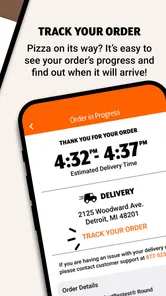
Analysis by Reviewed
When dinner needs to come together quickly, I like having a way to check a pizza menu and place an order without turning the evening into a long planning session. That’s the practical appeal of the Little Caesars app: it brings ordering for the chain onto a phone, so I can make choices before heading out rather than sorting everything out at the counter.
A shared order works best with one clear plan
For a household or a group of roommates, the useful part is not just speed; it is being able to settle the order before anyone leaves. One person can check the menu while others decide on toppings, then the person placing the order can review the choices in one place. That helps avoid the familiar “I thought you were getting mine” confusion, though it still depends on everyone communicating clearly.
A realistic use is a busy evening when one adult is already driving past a store and the rest of the household is still deciding what to eat. I would agree on the pizzas and pickup plan in a group chat first, then place the order from the app. That small step matters: an ordering app can organize the purchase, but it cannot resolve disagreements about toppings or make sure everyone has sent their share of the cost.
Keep account access and ordering responsibilities simple
If several people use the same phone, I’d treat the account as belonging to the person responsible for placing the order, rather than passing around sign-in details. That keeps saved order information and checkout decisions with one person and reduces the chance of someone changing an order by mistake. For a shared device, it is also sensible to check the final selections together before submitting anything.
The app is free, and Little Caesar Enterprises, Inc. develops it. It sits in the food and drink category, with a 4.7 average from around 558,000 ratings and over 10 million installs. It is rated for Everyone, but that age label is not a substitute for household rules: younger users may be able to browse, while an adult should handle payment and confirm pickup details. I would not assume the app provides family controls or separate child accounts.
Where it fits among pizza-ordering options
Compared with calling a store, ordering in person, or using a general delivery service, this app makes most sense when you already want Little Caesars and plan to collect the food. The original article describes Pizza Portal Pickup, customization, and the Hot-N-Ready menu; those options make it useful for both a planned order and a quick stop. A delivery-focused service may be a better fit when nobody can drive, while calling or visiting can be more practical if you need to ask a detailed question before choosing.
One useful habit is to distinguish between a quick menu choice and a customized order before you start. If everyone is happy with a familiar option, browsing can stay brief; if the group wants different toppings, settle those choices first so the person ordering can check each pizza carefully. Reordering can save time for a household with a dependable favorite, but it is worth reviewing the previous selection rather than assuming it still suits tonight’s group.
More From Our News Desk

Weather by Xiaomi Review: Clear at a Glance, Less Clear Up Close

X Under Pressure: Can It Recover When Posting Goes Wrong?

Clash of Clans Is Won Between the Battles

Android Auto Makes the Case for Quieter Car Software

MobiOffice: Transforming Mobile Productivity with Seamless Integration

EA SPORTS FC™ Mobile Soccer: Redefining Mobile Sports Gaming
The app is less compelling if you rarely choose this chain, prefer comparing menus from several restaurants, or need delivery as the main convenience. It also cannot remove the practical limits of pickup: someone still has to travel to the chosen store, and a shared order still needs a person to coordinate it. I’d use it for a straightforward collection plan, not as a universal meal planner.
There is a small but important distinction between convenience and certainty. A phone order can make the selection process easier, but I would still check the order summary before completing it, especially when customizing several pizzas or ordering for people with different preferences. For a group, one person should own the final review and tell everyone what was ordered; that is more reliable than having several people make changes independently.
For a less rushed household routine, I’d use the app to make the decision in two passes. First, choose the type of order and agree on the pickup plan; then enter the pizzas and review them together. This keeps menu browsing from becoming a debate at checkout. It is especially helpful when one person is ordering for adults and children with different preferences: collecting everyone’s choices beforehand reduces last-minute edits and makes it easier to spot a missed topping request.
Another practical trade-off is how much customization to do. A familiar menu choice is quicker to coordinate and easier to review, while individual changes can make the order fit the group better but also create more opportunities for mix-ups. I’d keep a customized order simple enough that the person collecting it can recognize what was requested. If a dietary or ingredient question is important, I would contact the store directly rather than relying on an ordering screen to answer something that needs a precise explanation.
For a shared phone, I’d also separate browsing from checkout. Letting someone help choose items does not mean they need access to the account or payment step. The person responsible can enter the final choices, check the store and pickup details, and confirm the order. That workflow is a modest safeguard, not a built-in family feature, but it is useful in a home where a device passes between people.
Compatibility is worth checking before making the app part of a household routine. It is a free app for Android and iOS, and the current version is 25.23.0; Android users need version 9 or later. Those details matter most if an older family phone is the device everyone expects to use. The app has been available since September 16, 2016, so it is an established ordering option, but I would still keep the installed version current and check that the device can run it before planning around it.
What the ordering flow is best at
I see its strongest use as a bridge between deciding what to eat and collecting the order. You can browse before leaving, make selections away from a busy counter, and use the available pickup approach that suits the visit. That is a narrower promise than making dinner effortless, but it is a useful one. The app does not take care of who is driving, whether everyone agrees, or what to do if plans change; those parts still need ordinary communication.
It also helps to think about who will actually collect the food. If the person placing the order is not the person going to the store, I would send them a clear summary of what was ordered and which pickup plan to follow. That avoids relying on someone else to navigate the app or remember a conversation. For a household with a shared device, this is a simpler arrangement than making several people responsible for one order.
Compared with a general restaurant-ordering app, the main trade-off is focus. This one is centered on Little Caesars, so it is convenient when that is already the choice, but it is not where I would start if the household is still comparing cuisines or restaurants. Calling remains a sensible alternative for a question that needs a direct answer, and ordering in person can work when you are already nearby. The app is most useful when the decision is made and pickup is the plan.
Ratings can offer a quick sense of how widely an app is used, but they do not tell me whether it fits a particular home. Little Caesars has an average rating of 4.7, based on around 558,000 ratings, and has been installed over 10 million times. I take that as a sign that many people use it, not a guarantee that every order or store visit will feel identical. My own deciding factor would still be whether the app’s ordering and pickup options match the way I want to get dinner.
Age, trust, and a sensible household routine
The Everyone age rating makes the app approachable for general audiences, but I would not hand over checkout decisions just because a young person can navigate a menu. A child can help choose a pizza, while an adult checks the total, confirms the order, and handles collection. That division gives younger household members a voice without confusing menu access with permission to make a purchase.
For teens or roommates sharing costs, agree on the order and payment arrangement outside the app before anyone presses the final button. The app can collect choices in one place, but it should not be treated as a group budgeting tool. If people are splitting the bill, decide who pays and how they will settle up in advance. That small boundary makes the ordering process clearer and avoids turning a quick dinner into an awkward conversation afterward.
There is also a good reason not to leave a checkout-ready account open on a shared device. I would keep the device with the person placing the order, avoid sharing account credentials, and review the order before confirming it. These are common-sense habits rather than special app controls, but they help prevent accidental changes and purchases when a phone is passed around.
Who should choose another option
If your priority is comparing several restaurants, the chain-specific focus may feel limiting. If nobody can make a pickup trip, a delivery service is likely a more practical starting point. And if you need to discuss a complex request before ordering, a direct conversation with the store may be more reassuring than trying to fit the question into a menu flow. Those are not flaws so much as situations where a different tool matches the job better.
I would also skip making the app the household’s only dinner plan if people regularly change their minds at the last minute. It can organize a choice once it is made, but it cannot coordinate everyone’s schedule or guarantee that a pickup plan remains convenient. For a dependable favorite and a known store, it is handy; for an uncertain group decision, settle the basics first or choose a more flexible way to explore options.
Alright, pizza lovers, hold onto your pepperonis because I've just delved into the world of Little Caesars' app, and let me tell you, it's as cheesy as it gets in the best way possible! 🍕
Getting Started with the Slice of Life
Jumping into the app is like walking into your favorite pizza joint but without the line and the awkward silence while you wait for your number to be called. The app is available for both Android and iOS, making it super convenient for all us smartphone aficionados. From the get-go, the app is clean and intuitive. Navigating through it is smoother than mozzarella on a hot slice.
Features That Make You Go "Mmm"
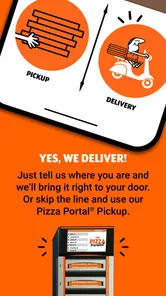
Let's talk features, shall we? First off, the app offers Pizza Portal Pickup, which is a total game-changer. Imagine ordering your pizza, popping into the store, and grabbing it from a heated compartment without talking to anyone. It's like magic, but with more cheese.
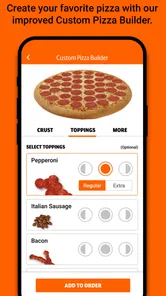
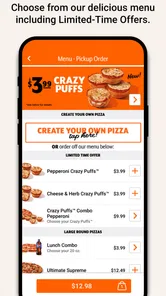
Another cool feature is the ability to customize your pizza down to the last olive. The app lets you tweak your pie just the way you like it, which is perfect for those of us who are a bit picky about our toppings. Plus, the Hot-N-Ready menu is just a tap away, making spontaneous pizza cravings a thing of beauty.
User Experience That's as Tasty as the Pizza
Using the app is a breeze. The interface is user-friendly, and the ordering process is straightforward. It’s designed in such a way that even if you’re not tech-savvy, you’ll still find your way around it without any hiccups. The graphics are vibrant, and everything is laid out clearly. Plus, the app remembers your previous orders, so reordering your favorite pie is just a click away.
Final Thoughts: To Pizza or Not to Pizza?
All in all, the app is a must-have for anyone who loves pizza and convenience. It’s perfect for those nights when cooking feels like a chore, and all you want is something delicious without the fuss. The app is reliable, fast, and packed with features that make pizza ordering a delightful experience. So, whether you're a deep-dish aficionado or a thin-crust enthusiast, this app has got you covered.
With its intuitive design and mouth-watering offerings, it’s safe to say that this app has earned a spot on my home screen. So the next time you’re craving a slice, remember that Little Caesars is just a tap away. Go ahead and give it a try; your taste buds will thank you!
My household verdict
For me, the best reason to keep this app around is simple: it makes a familiar pickup order easier to arrange when everyone already knows what they want. I would use it for a planned stop on the way home, a shared dinner where one person is collecting, or a repeat order that only needs a careful check before submission. Its value is less about replacing every way to order food and more about making this particular choice less cumbersome.
Before depending on it for a meal, I’d make sure the household has settled the menu, chosen who is placing the order, and agreed who is collecting it. Those three decisions do more to prevent confusion than browsing at the same time on several phones. Keep the account and checkout with one responsible person, and use a direct call when an important question needs a clear answer. That routine makes the app a useful tool without expecting it to manage the people around the meal.
My recommendation is therefore conditional but positive: if Little Caesars is already your destination and pickup suits your plans, this is a convenient way to browse and place an order. If you need restaurant comparisons, delivery-first convenience, or a detailed conversation before choosing, I’d use another option for that situation. For households that can agree on a plan and keep checkout responsibility clear, the app earns its place as a practical part of dinner—not a substitute for coordination, but a helpful way to carry it out.
Little Caesars Frequently Asked Questions
Is the Little Caesars app available for Android and iOS?
Yes. The Little Caesars app is available for Android and iOS, so you can use it on either platform to explore the menu and place orders. Android users should check that their phone runs Android 9 or later before downloading. The app is free, making it easy to try if you prefer managing food orders from your phone.
Who develops the Little Caesars app, and is it intended for all ages?
The app is developed by Little Caesar Enterprises, Inc. Its Everyone age rating makes it suitable for a general audience, and its focus is on the restaurant’s menu and ordering experience. Whether you are looking for a quick way to place a pizza order or simply want to browse food options, the app is designed for a broad range of users.
What kind of app is Little Caesars, and who is it for?
Little Caesars is a Food & Drink app from Little Caesar Enterprises, Inc., made for people who want to browse the restaurant’s menu and place pizza orders through their phone. Its store summary describes it as the “EASIEST WAY TO PIZZA®.” The app is free, and its Everyone age rating makes it suitable for a general audience.
What features does the Little Caesars app offer?
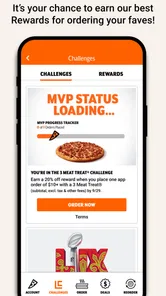
The Little Caesars app provides a variety of features designed to enhance the user experience. Users can easily browse the menu, customize their orders, and quickly reorder favorite items. The app also offers a convenient pick-up option with Pizza Portal® Pickup, allowing customers to skip the line. Additionally, users can find the nearest store location and access exclusive offers and promotions.
Is the Little Caesars app free to download and use?
Yes, the Little Caesars app is completely free to download on both Android and iOS platforms. Users can access all the features without any subscription or hidden fees. However, keep in mind that standard data rates may apply when using the app, depending on your mobile carrier's plan.
Pros
- User-friendly interface makes ordering easy
- Wide range of menu options available
- Fast delivery service
- Affordable prices for most items
- Special promotions and discounts
Cons
- Limited customization options
- Occasional delivery delays
- App crashes reported by some users
- Requires stable internet connection
- Limited payment options











