Listen AI: Text to Speech
- 848.00
- 3.9
- Installs
- 1.00M
- Price
- Free

Screenshots


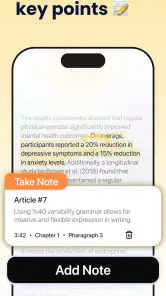
Analysis by Reviewed
I find text-to-speech most useful when it solves a specific bottleneck: a document is worth reading, but I don’t have the attention or free hands to sit down with it. Listen AI: Text to Speech is a productivity app from Codespace Dijital built around that idea. I’d treat it not as a replacement for reading, but as one way to make articles, books, web content, and documents easier to fit into a day.
Decide what deserves a place in your listening day
For me, the best starting point is a single task I already want to complete, not a grand plan to turn my whole reading life into audio. I might pick a saved article for a walk, or a chapter I want to revisit while preparing dinner. This keeps the app connected to an outcome—understanding or reviewing something—rather than making conversion itself feel like progress.
It also helps to match the material to the moment. A calm walk can suit a long explanation, while a noisy commute may be better for familiar material that does not demand close concentration. If I need to retain exact wording, compare figures, or take detailed notes, I’d keep a visual reading session in the plan. Audio is strongest when it gives otherwise unused time a useful purpose, not when it is forced into every kind of reading.
Start with a listening plan, not a pile of files
Before converting anything, I’d choose what I actually want to hear and when. A short article may work well during a walk, while a long report is better split into sections so it’s easier to return to the right place. This small bit of planning matters: turning every saved link and PDF into audio can create another backlog rather than making work feel lighter.
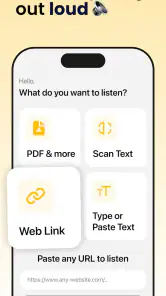
The app’s appeal is the straightforward path from text to listening. You can bring in material such as PDFs, books, web pages, and documents, then use speech instead of keeping your eyes on a screen. If you’re wondering whether that suits focused study, I’d say it depends on the material: audio is convenient for reviewing familiar ideas, but dense tables, diagrams, equations, and passages where layout carries meaning are still better examined visually.
Turning Text into Audio That Fits Your Day
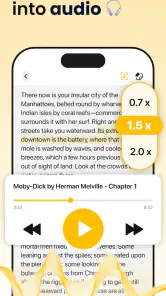
One of the first things I noticed about Listen AI: Text to Speech is its incredibly user-friendly interface. You don't need to be tech-savvy to navigate through it. Just copy and paste the text you want to convert, and voila! The app does its magic in seconds. I was pleasantly surprised by the range of voices available. From soothing tones perfect for bedtime stories to more energetic ones that keep you awake during a long drive, there's something for everyone. And let's not forget the fact that you can adjust the speed and pitch of the voice. Now, that's what I call customization!
Make capture and organization part of the workflow
What truly sets this app apart is its ability to support multiple languages. As someone who dabbles in learning new languages, I found this feature incredibly useful. It’s not just about converting English text; you can explore texts in Spanish, French, German, and more! This makes it a fantastic tool for language learners looking to improve their pronunciation and listening skills. Plus, the app’s capability to handle a wide variety of file formats is a huge plus. Whether you have a PDF, DOCX, or even a simple TXT file, Listen AI has got you covered.
You May Like

Clash of Clans Is Won Between the Battles

Android Auto Makes the Case for Quieter Car Software

MobiOffice: Transforming Mobile Productivity with Seamless Integration

EA SPORTS FC™ Mobile Soccer: Redefining Mobile Sports Gaming

How Microsoft OneDrive Became a Mobile Productivity Giant

How Google Translate Breaks Language Barriers Effortlessly
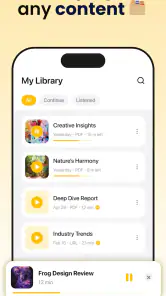
For a more dependable routine, I’d avoid treating the library as a dumping ground. Give each imported item a clear purpose: a chapter to review, a document to understand before a meeting, or a language passage to replay. A practical tip is to test a short excerpt before committing to a long file. That gives you a chance to catch awkward reading of headings, abbreviations, or page furniture early and decide whether the document needs cleaning up first.
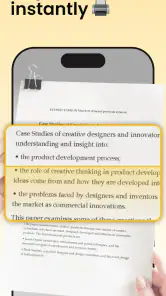
For web material, I’d make capture a deliberate step rather than saving every interesting page. Pick the piece you intend to hear, then check whether the text is coherent when read aloud. Navigation labels, repeated headings, and stray bits of page text can interrupt the flow; if they do, a shorter copied passage may be more useful than importing everything. This extra selection takes a moment, but it can prevent a distracting listening session and make it easier to remember why the item is in your queue.
A useful way to organize a reading queue is by the next action, not simply by file type. I’d keep “listen for the main idea” separate in my mind from “listen to rehearse vocabulary” or “listen before reviewing the original.” That distinction changes how I use playback: broad listening can happen during a walk, while a passage meant for language practice deserves a quieter moment with the text available. Even without a complicated system, naming the purpose before pressing play makes the audio easier to use well.
Another cool feature is the ability to save your converted files for offline listening. Imagine having your entire ebook library in audio form, ready to be played during your morning jog or evening commute. It's like carrying a personal audiobook library in your pocket!
Build a repeatable listening routine
Offline listening is especially useful when you want to prepare material before leaving home rather than depend on a connection during a commute. I’d still keep the original document nearby for anything that needs precise checking: speech can help me absorb the broad argument, but it is not a substitute for scanning a chart, verifying a citation, or finding an exact sentence quickly. That division of labor makes the app more useful than expecting audio to do every job.
A realistic routine might be to choose one reading item at the end of the workday, convert it, and listen during a walk the next morning. If I’m using a language passage, I can first listen without interruption, then replay a short stretch while following the text. Adjusting speed can help with review, but faster playback is not automatically more productive; if I stop understanding the phrasing, I’ve traded comprehension for minutes saved.
I’d also give each session a natural stopping point. A chapter boundary or a clearly defined section is easier to resume than an arbitrary point halfway through a dense document. Before starting, I can decide whether I’m listening to finish the piece, identify its main argument, or revisit a particular passage. That small intention makes it easier to judge afterward whether audio helped, and it discourages the habit of letting a file run in the background without absorbing much.
One everyday example is preparing for a meeting. I might convert a clean, prose-heavy briefing and listen while walking to work, then open the original before the meeting to check names, figures, and any visual details. The audio gives me an early overview without taking over a separate block of desk time; the document remains the source I use for precision. That two-stage approach is more dependable than expecting a spoken version alone to prepare me for every question.
Where the workflow can snag
Now, while Listen AI: Text to Speech is generally a stellar app, it's not without its quirks. In my experience, the app occasionally stumbled with complex formatting or heavily stylized texts. While it’s not a deal-breaker, it’s something to be aware of if you’re dealing with intricate documents. Additionally, while the app offers a free version, some of the cooler features, like premium voices and faster processing times, are locked behind a subscription. But hey, quality often comes at a price, right?
That formatting issue is a reason to be selective about source material. A clean paragraph-based article is a more natural listening candidate than a form, a multi-column page, or a document full of footnotes. If a conversion sounds confusing, I’d try copying only the relevant passage instead of repeatedly processing the entire file. It’s a simple workaround, though it does add a preparation step and may not be worth it for a one-time task.
There’s also a useful distinction between listening convenience and audiobook polish. A text-to-speech reader can make personal documents accessible on the move, while a professionally narrated audiobook is usually the better choice when expressive performance and carefully produced chapter flow are the point. Likewise, if I only need a quick spoken rendering of a short snippet, a built-in phone accessibility reader may be enough; this app makes more sense when I want a dedicated place to turn varied reading material into listening.
Another trade-off is attention. Audio frees my eyes, but it does not make every activity compatible with learning. If a task around the house needs concentration or involves safety, I wouldn’t count on following a complex report at the same time. For simple, familiar chores, listening can be a good fit; for work that competes for my focus, I’d pause the audio and return to it later. That boundary is important if the goal is to understand material rather than merely play it.
Language support can be valuable, but I’d use it with realistic expectations. Hearing a written passage may provide useful exposure to its sound and rhythm, particularly when I can follow along, but it is not the same as receiving feedback on my own speech. A learner who needs correction, conversation practice, or a structured course should pair this kind of listening with tools designed for those goals. It works best as another way to revisit text, not as a complete language-learning plan.
Before paying for an upgrade, I’d test the exact kind of material I expect to use most. Someone who mainly listens to straightforward articles may have different needs from a person who regularly processes long documents or wants a particular voice. Since optional purchases range from $4.99 to $129.99 per item, I’d read the purchase choices carefully and decide based on a repeated need, not on the assumption that a paid tier must be necessary. The free starting point is useful for judging whether the basic workflow fits.
Who will get the most from it
Listen AI is free to start, rated for Everyone, and has a 3.9 average from around 81,000 ratings, with more than a million installs. It was released in September 2024, and version 2.3.5 supports Android 7.0 and later. Optional in-app purchases range from $4.99 to $129.99 per item, so I’d use the free experience to check whether the voices, document handling, and routine suit me before paying for anything. That range also makes it worth checking the purchase details carefully rather than assuming every useful feature is included at no cost.
I’d recommend trying it if you regularly have readable material you want to consume while walking, commuting, doing chores, or taking a screen break. It may also help language learners get more listening exposure, though it works best alongside written study rather than as a full pronunciation course. I’d skip it if most of my reading depends on visual structure, if I need studio-quality narration, or if I only convert text occasionally and already find a built-in reader adequate.
The strongest fit, in my view, is someone with a recurring supply of prose and a predictable window for listening: a commuter with saved articles, a student revisiting readable notes, or a worker who wants an overview of a document before sitting down to examine it. The less often you convert material, the harder it may be to justify learning a separate workflow when your phone already has a basic spoken-reading option. On the other hand, if you regularly move between books, web pages, and documents, having a dedicated listening habit can be more convenient than treating every item as a one-off.
It is also worth considering how much you value voice character. For a short reminder or a quick accessibility readout, natural-sounding performance may not matter much. For a long stretch of listening, a voice and pace that feel comfortable can make the difference between finishing a chapter and abandoning it. I’d sample ordinary, representative text before building a routine around a voice, because a dramatic story excerpt may sound fine while technical prose exposes a different kind of listening fatigue.
A practical verdict
In conclusion, if you're looking for a reliable text-to-speech app that offers a good mix of features, ease of use, and voice variety, Listen AI: Text to Speech is worth checking out. Whether you're a multitasker, a language learner, or just someone who loves listening to content on the go, this app has something for you. Give it a try, and who knows, you might just find it indispensable!
My more measured recommendation is to start with one article and one longer document, then see whether listening genuinely helps you finish useful reading. Keep visual material for the screen, choose clean text when possible, and treat paid options as a decision to make only after the basic workflow feels worthwhile. Used that way, it can become a practical part of a sustainable reading routine rather than another app collecting unfinished content.
My bottom line is that the app is most convincing as a bridge between reading time and listening time, not as a universal reading replacement. Its mix of document sources, voice controls, and offline use gives it a practical role for repeatable routines, while formatting trouble and the limits of audio still matter. If your reading queue contains plenty of clean text and you can name when you’ll listen, it is worth trying; if you need exact visual review or polished narration, another approach will serve you better.
Listen AI: Text to Speech Frequently Asked Questions
Can I use Listen AI: Text to Speech to listen to articles while doing other things?
Yes. Listen AI: Text to Speech is made for turning written material into audio, so it can suit moments when you would rather listen than keep reading on screen. You could use it while commuting, doing chores, or taking a break from your device. The app focuses on PDFs, books, web content, and documents.
Does Listen AI: Text to Speech support natural-sounding voices?
The app is presented as an AI text-to-speech tool with natural voices, and its purpose is to turn written material into spoken audio. This may be helpful if you find listening more comfortable than reading or want audio that feels less mechanical. The result can depend on the content you open and the voice options available in the app.
Who develops Listen AI: Text to Speech, and what kind of app is it?
Listen AI: Text to Speech is a productivity app developed by Codespace Dijital. Its central role is converting written content into audio, making it a practical option for people who want to listen to documents, books, PDFs, or web material. It is designed as a reading companion rather than a general-purpose audio player.
What types of content can Listen AI: Text to Speech turn into audio?
Listen AI: Text to Speech is designed to convert written material into spoken audio, including PDFs, books, web content, and documents. This makes it useful for listening to reading material while commuting, doing chores, or taking a break from a screen. The experience may depend on the format and accessibility of the content you choose to open.
What is Listen AI: Text to Speech used for?
Listen AI: Text to Speech is an innovative app designed to convert written text into natural-sounding speech. It's particularly useful for individuals with visual impairments, those who prefer listening over reading, or users who want to multitask while consuming textual content. The app supports various languages and voices, making it versatile for different needs.
Pros
- High-quality voice output.
- User-friendly interface.
- Supports multiple languages.
- Customizable speech settings.
- Fast text processing.
Cons
- Limited free version features.
- Occasional pronunciation errors.
- Requires internet connection.
- Ads in free version.
- Limited voice options.
- Category
- Productivity
- Version
- 2.3.5













