Link Messenger
- 163.00
- 4.4
- Installs
- 5.00M
- Price
- Free

Screenshots







Analysis by Reviewed
I tend to judge a messaging app by how quickly I can get into a conversation and whether it stays out of my way once I’m there. Link Messenger is a communication app from Link Messenger, and its appeal is straightforward: it brings everyday messaging and social connection together in one place. I find that simplicity useful, especially when I want to check in with family or keep a group conversation moving without learning a complicated interface.
Choosing It for the Right Circle
Before making any messenger a daily habit, I’d think about who I need to reach more than about which app has the longest feature list. Link Messenger makes the most sense when a few people I care about are willing to use it too. It could suit a family that wants one place for quick check-ins, a group of friends arranging plans, or someone who prefers keeping everyday conversations separate from work email.
There is a practical catch: installing a messenger does not automatically move your social circle with you. If relatives, teammates, or customers already respond reliably somewhere else, asking them to switch can create more friction than the app removes. I’d invite a small group first and see whether people actually reply there before treating it as my main channel. For one-to-one conversations with someone who will not install another app, the messenger they already use remains the more useful choice.
A Realistic Day with Messages and Calls
Imagine I’m arranging an evening with friends while commuting. I can send a short group update, let others answer when convenient, and avoid trying to hold a call in a noisy place. Later, if the group needs to settle a detail quickly, a voice or video conversation may be more natural than a long chain of messages. The value is in choosing the format that fits the moment, not in using every option just because it is available.
For a practical workflow, I’d put time-sensitive plans in a clear message rather than rely on a long, fast-moving discussion. If a detail matters—such as the meeting place—I’d repeat it plainly near the end of the conversation so late joiners can find it. Group notification controls can then help me stay aware of the chat without letting every side conversation interrupt the day.
What I Would Check Before Relying on It
A few questions matter before moving important conversations: will the people I contact use it, does it feel comfortable on my phone, and can I fall back to a less demanding format when a call is inconvenient? I’d test those points with ordinary, low-stakes chats first. That is a better way to judge fit than moving every conversation over in one go and discovering later that the people I need are elsewhere.
I’d also keep expectations sensible around privacy choices. Disappearing messages can be useful for casual exchanges that do not need to remain in the chat, but they do not make every kind of information appropriate to send. I’d use ordinary messages for details I need to revisit and avoid treating any single setting as a complete privacy plan.
You May Like

Clash of Clans Is Won Between the Battles

Android Auto Makes the Case for Quieter Car Software

MobiOffice: Transforming Mobile Productivity with Seamless Integration

EA SPORTS FC™ Mobile Soccer: Redefining Mobile Sports Gaming

How Microsoft OneDrive Became a Mobile Productivity Giant

How Google Translate Breaks Language Barriers Effortlessly
Ease of Use and Interface
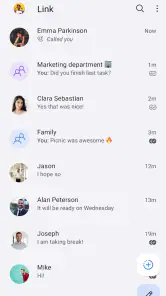
First things first, let’s talk about the design. The interface of Link Messenger is super intuitive. When I first opened it, I was greeted with a clean dashboard that wasn’t cluttered with unnecessary buttons and flashy graphics. Everything is laid out in a way that just makes sense, which means you don’t have to be a tech genius to figure out how to use it. Navigating through the app is smooth, and I appreciate how it doesn’t bombard you with ads or prompts at every turn.
What to Expect from Everyday Use
That uncluttered feel also shapes my speed expectations. The app’s simple layout makes it easy to find the conversation I want without a lot of visual noise, but a tidy screen is not the same as a guarantee that every message or call will feel instant. Connection quality, the other person’s device, and the demands of a call can all affect how responsive messaging feels. I’d treat it as a practical place to keep in touch, rather than assume it will outperform every messenger in every network condition.
For example, if I’m coordinating a family dinner, I can keep the planning in a group conversation and adjust its notifications so it doesn’t get lost among other chats. That small choice is more useful than trying to check every conversation constantly. If a group becomes noisy, prioritizing only the chats I need to follow is a sensible way to make the app feel calmer without abandoning the conversation.
Features That Stand Out
One of the things I love about this app is its versatile messaging options. Whether you’re into texting, voice messages, or video calls, Link Messenger has got you covered. The video call quality is surprisingly good, even if your internet connection isn’t top-notch. Plus, there’s this cool feature where you can send disappearing messages, which is perfect for those of us who value a bit of privacy. It kind of feels like having a mini Snapchat within your messaging app!
Another standout feature is the group chat functionality. Setting up and managing group chats is a piece of cake, and you can even customize notifications for each chat. This is a lifesaver if you’re part of multiple groups and need to prioritize certain conversations over others.
Heavy Conversations and Practical Trade-Offs
The mix of text, voice messages, calls, and group chats makes the app suited to a busy day, but those uses don’t all ask the same thing of a phone or connection. A quick text exchange is a lighter task than a video call, so I’d switch to text or voice messages when a call becomes choppy or inconvenient. That’s a useful fallback in a crowded place or while travelling, when it may be easier to send a short update than try to hold a steady call.
Disappearing messages are handy when I want a conversation to be less lasting, but I wouldn’t treat that option as a substitute for careful judgement about what I share. For important details I may need later, an ordinary message is more practical; for sensitive material, I’d first consider whether any messaging app is the right place for it. The feature is a useful choice for certain exchanges, not a reason to stop thinking about the content.
Security and Privacy
Security is a big deal when it comes to messaging apps, and Link Messenger doesn’t skimp on this front. It uses end-to-end encryption, which means your messages are safe from prying eyes. I feel more at ease knowing that my conversations are kept private and secure. It’s always a plus when an app respects your privacy as much as you do.
Reliability, Devices, and Alternatives
In everyday use, I’d judge reliability by whether I can return to the conversation I need and keep communicating through a format that suits the moment. If video is unreliable on a particular connection, text is the sensible backup; if a group produces too many interruptions, custom notifications help me manage it. I wouldn’t choose any messenger on the assumption that it can repair a weak connection, and Link Messenger is no exception. I also wouldn’t expect performance to be identical across phones: older or less capable devices can make demanding tasks such as video calls feel less comfortable than simple messaging.
Compared with a basic text-only option, this app brings calls and group conversations into the same communication experience. Compared with a messenger that friends or coworkers already use, though, the biggest question is whether your contacts will join you. A familiar app that everyone already checks may be more useful than a fresh alternative with features you like but few people around you use. I’d try Link Messenger with a small, willing group first, then decide whether it deserves to become a regular part of your routine.
How to Judge Performance on Your Phone
I would not use a single quick launch as proof that an app will feel light all day. My more useful test would be to open a conversation, exchange a few messages, move between chats, and then try a call when I have a stable connection. That gives me a feel for the ordinary interface as well as a more demanding task. If the phone becomes warm, the call stutters, or switching apps feels uncomfortable, I’d use text or voice messages for that situation rather than assume every conversation needs video.
On an older Android phone, I’d be especially deliberate about that comparison. A simple chat is usually a fairer test of everyday comfort than a long video call, which places more demands on both the device and connection. Closing other demanding apps before a call may help keep the phone responsive, but I would not expect that to solve a weak network or an underpowered device. The sensible question is whether the app handles the kind of communication I actually use, not whether it feels identical on every handset.
When Another Messenger Is the Better Fit
Link Messenger is not automatically the best choice just because it combines several ways to communicate. If most of my contacts already use a different service, staying there can make coordination easier and avoid missed messages. If I mainly need occasional basic texts, the messaging option built into my phone may be enough. And if my work depends on specialized tools or a tightly managed team setup, I’d choose a service designed around those needs rather than expecting a social messenger to replace it.
Where this app has a clearer case is for someone who wants group conversations, calls, and everyday messages together and can bring a willing circle along. A useful compromise is to keep it for one group that actively prefers it while leaving other conversations where they already work. That way I can assess whether its interface and conversation controls add real value without turning a simple app choice into a disruptive migration.
Device Support and Cost in Context
On Android, it supports version 5.0 and later, and its Everyone content rating makes it broadly accessible. That broad rating can make it easier to consider for family communication, though I’d still help younger or less confident users understand group notifications and disappearing messages before they rely on them. The app is free to install, with optional in-app purchases ranging from about fifty cents to around one hundred and twenty dollars per item, so I’d check any purchase prompt before confirming it.
I would treat the purchase range as a reason to pay attention, not as a reason to assume the basic communication experience is unavailable without spending. If a payment screen appears, I’d read what it offers and whether it is a one-off item before proceeding. That small pause is worthwhile in any free app with optional purchases, particularly if someone else in the household may use the phone.
The app has been available since December 2022, and version 7.3.4 is the current release. Its 4.4 average from around 73,000 ratings and more than five million installs suggest that many people have tried it, though those figures can’t tell me whether my own contacts will use it or how it will behave on my device. I’d begin with ordinary chats and a small group rather than moving every conversation at once; that gives me a low-pressure way to see whether the interface and call experience fit my habits.
Final Thoughts
Overall, I’ve been really impressed with Link Messenger. It’s a solid choice if you’re looking for something reliable and user-friendly. The features are practical and enhance the way we communicate, rather than complicating it. It’s clear that the developers put a lot of thought into creating an app that meets the needs of modern users. Whether you’re catching up with old friends or coordinating a project at work, Link Messenger makes it easy and enjoyable. So, if you’re considering downloading a new messaging app, give this one a shot—I think you'll love it!
My Performance Verdict
My overall performance verdict is deliberately practical: the clean layout and several communication formats make it easy to start with simple conversations, while calls are the part I’d judge most carefully on my own phone and connection. I would not promise that it is faster, lighter, or more stable than every alternative; those impressions depend on the device, network, and the people at the other end. For a small group that wants an approachable shared place to chat, I think it is worth trying. For a contact network already settled elsewhere, or for a phone that struggles with video, I’d keep the familiar option close and use Link Messenger only where it genuinely makes communication easier.
Link Messenger Frequently Asked Questions
What is Link Messenger, and what kind of app should I expect?
Link Messenger is a communication app described as a social network. That makes it worth considering if you are looking for an app centered on connecting with others, rather than a tool for a single task. Before downloading, think about how you prefer to communicate and review the app’s available features and settings once installed.
Who develops Link Messenger, and is it widely used?
Link Messenger is developed by Link Messenger and has more than five million installs. It has an average rating of 4.4 from around 73,000 ratings, alongside 163 written reviews. These figures offer a sense of its reach and user feedback, though individual experiences can differ. Reading recent reviews can help you decide whether the app fits your expectations.
Is Link Messenger free to download, and are there optional purchases?
Link Messenger is free to download, so you can try the app without paying upfront. It also offers in-app purchases, with individual items ranging from $0.49 to $119.99. Those purchases are separate from the free download, so it is sensible to check the purchase details shown on your device before buying anything.
What Android version is required to install Link Messenger?
Link Messenger requires Android 5.0 or later. Before downloading, check your device’s Android version in its settings to make sure it meets that minimum. If your device runs an older version, you may need to update its operating system before installation; compatibility can also depend on the device and the app store’s requirements.
What platforms is Link Messenger available on?
Link Messenger is available for both Android and iOS platforms. Users can download it from the Google Play Store for Android devices and the Apple App Store for iOS devices. The application is designed to provide a seamless messaging experience across both operating systems, ensuring that users can communicate effortlessly regardless of their device.
Pros
- User-friendly interface for easy navigation.
- Offers end-to-end encryption for security.
- Supports video and voice calls.
- Allows multimedia sharing seamlessly.
- Customizable chat themes and stickers.
Cons
- Requires stable internet for optimal performance.
- Limited features in the free version.
- Can be resource-heavy on older devices.
- Occasional bugs in message delivery.
- Privacy settings can be complex to manage.

- Category
- Communication
- Version
- 7.3.4











