Lawfully Case Tracker
- 1.66K
- 4.8
- Installs
- 1.00M
- Price
- Free

Screenshots



Analysis by Reviewed
Immigration case tracking is the kind of task that can quietly take over your attention. You check a receipt number, refresh a government page, search for processing-time estimates, and still wonder whether you have missed something important. I found Lawfully Case Tracker useful because it brings several parts of that routine into one place instead of making me repeat the same search across different official systems.
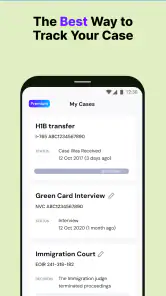
It is a free tools app from Lawfully Inc. focused on USCIS, NVC, DOL, and EOIR cases. The first impression is appealing: add a case, receive alerts, and use processing-time information or predictions to put an otherwise abstract wait into context. That does not make an application move faster, and it should not replace an official notice or professional legal advice, but it can make the waiting period more organized.
After the novelty of adding a case wears off, the more important question is whether the app deserves a permanent place on a phone. In my experience, the answer depends on how many cases you manage, how often you need to compare progress with typical timelines, and whether notifications calm you down or make you check even more often. For a single straightforward case, it can be helpful without becoming essential. For a family, representative, or applicant following several immigration matters, its recurring value is much clearer.
From the first week to a useful routine
Why the opening experience feels practical
The first week is where the app makes its strongest impression. Instead of treating a case as a number that must be entered manually into a browser whenever anxiety rises, I can keep it available for repeated checking. The app’s purpose is easy to understand: it watches the cases I choose and gives me a more convenient way to follow changes.
That convenience matters most when the case involves more than one agency or stage. Someone may be dealing with a USCIS petition while also keeping an eye on an NVC matter, a Department of Labor process, or an EOIR case. The app’s coverage makes it more relevant to immigration users with varied paperwork than a basic single-agency bookmark. It is also more focused than a general notes app, because the information is arranged around case tracking rather than around a personal checklist.
I would still begin carefully. Before relying on any alert, I would compare the case number and current status with the relevant official source. A tracker is a convenience layer, not the authority that decides a case. This is an important habit because a notification can tell me that something changed, but it does not automatically explain what the change means for my eligibility, deadline, response, or next legal step.
Alerts are useful when they replace repeated checking
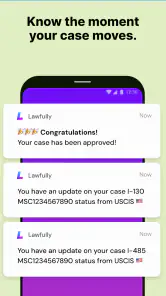
The alert system is the feature most likely to create an immediate sense of relief. Rather than opening a browser several times a day, I can let the app watch for movement and respond when there is something worth reviewing. That is a better use of attention, especially during work, travel, or a period when several family members are waiting on related applications.
There is a subtle trade-off, though. Notifications can reduce compulsive checking for one person and increase it for another. If every alert leads to an anxious search for meaning, the app may become another source of stress. I would keep notifications enabled for genuinely important changes but avoid turning every possible update into a reason to reopen the app. The most useful setup is one that supports a calm review routine, not constant surveillance.
Processing estimates need interpretation
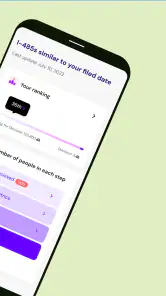
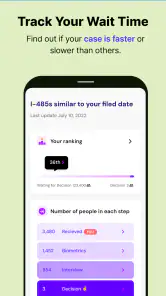
Processing times and predictions are helpful because raw waiting time is difficult to judge. The app gives me a way to compare my case with a broader expectation instead of relying only on anecdotes from forums or social media. That can help with practical planning, such as deciding when to gather documents, ask a representative for an update, or investigate whether a delayed stage deserves attention.
I would treat predictions as planning aids rather than promises. Immigration timelines can vary by case type, office, workload, requests for evidence, interviews, transfers, and other circumstances. A prediction may be useful for setting a reminder to review the situation, but it should not be treated as a guaranteed decision date. This is one of the app’s most valuable lessons: a number can provide context without providing certainty.
A realistic first-week scenario
Imagine that I am waiting on a family-related USCIS case while a relative is following a separate immigration process. During the first week, I add the cases, check that their displayed information makes sense, and use the processing-time view to understand whether the wait looks ordinary or unusually long. If an alert arrives while I am away from a computer, I can review it from the phone and then decide whether the next step is simply to save the update or contact the person handling the case.
The app is especially useful here because it separates awareness from action. I do not need to immediately make a legal decision every time I see a status change. I can record what happened, compare it with the official notice, and then act deliberately. That small pause is a better workflow than reacting to a vague status message in isolation.
What remains valuable after the first month
The habit is more important than the novelty
After a month, the excitement of installing a new tracker disappears. What remains is the habit of having a central place to review cases. For me, the app earns its space when it reduces repeated manual work: remembering which agency to check, locating a receipt number, and trying to recall when I last looked at a status.
Its long-term usefulness grows with complexity. A person with one case and a predictable schedule may only open it occasionally. Someone coordinating several applications can use it as a monitoring dashboard. Families may benefit from keeping related cases visible in one routine, while a representative or organizer may appreciate having a consistent way to notice changes before discussing them with others.
I would not use the app as my only record. A separate folder for notices, receipt details, deadlines, and correspondence is still important. The tracker tells me to pay attention; it does not replace document management. Keeping those roles separate is one of the best ways to avoid a common mistake: assuming that a convenient status screen contains everything needed to manage an immigration case.
When predictions become genuinely useful
Predictions have more value when I use them comparatively rather than emotionally. Instead of asking, “Will my case be decided this week?” I can ask, “Is the current wait broadly consistent with the pattern shown for this type of case, and when should I review the situation again?” That change in wording makes the feature more realistic and actionable.
A practical workflow is to check the prediction at a planned interval, note any meaningful change, and avoid rebuilding my expectations after every small movement. If the estimate shifts, I can use that as a prompt to verify the official case page and review my own documents. This turns an uncertain forecast into a maintenance tool rather than a source of daily disappointment.
Who gets the most recurring value
The strongest audience is people who need ongoing visibility across immigration-related cases. That includes applicants with multiple filings, families tracking connected matters, and users who want alerts instead of repeatedly searching several government portals. The broad agency coverage also makes it more suitable for complicated journeys than a tracker limited to one service.
The app is less compelling for someone who already has a trusted legal case-management system, receives direct updates through a representative, or only needs to check one official page from time to time. In those situations, adding another layer may create duplicate work. I would also hesitate to recommend relying heavily on it to someone who expects a prediction to function like an appointment or deadline.
How it compares with usual alternatives
The usual alternative is to use official agency pages directly. Those sources remain the final reference, and they are the right place to verify a status or read an official notice. Their weakness is convenience: I may need to remember several pages, enter case details repeatedly, and check manually if I want to know whether anything has changed.
Another alternative is a spreadsheet, notes app, or calendar. Those tools are good for recording dates, document requests, and personal reminders, but they do not provide the same focused combination of case monitoring, alerts, processing context, and predictions. A spreadsheet may be better for a detailed private timeline; Lawfully is better for reducing the effort of noticing status movement.
Forums and social networks offer personal experiences, but they are poor substitutes for a case tracker. They can provide emotional support and examples, yet individual stories are easy to misapply. I prefer using the app for structured awareness, official sources for confirmation, and a personal document system for deadlines and evidence. That combination is more reliable than treating any one tool as complete.
Maintenance, friction, and the reasons fatigue appears
The app still needs supervision
A tracker sounds automatic, but it is not a set-and-forget solution. I need to make sure the correct case is being followed, keep notification settings sensible, and verify important changes against official information. If a case progresses to a new stage, the surrounding paperwork may require attention that no prediction can identify for me.
There is also a human maintenance burden. Immigration cases often involve changing addresses, representatives, family circumstances, and document requirements. An app can help me notice status activity, but it cannot maintain the complete context of my situation. I still need to know which receipt belongs to which person, which notice has arrived, and what deadline applies.
Why repeated checking can become tiring
Case tracking has an emotional cost that no interface can completely remove. When nothing changes, opening the app can reinforce the feeling of waiting. When something does change, the wording may be too brief to answer the question I actually care about: what should I do now? The result can be a loop of checking, interpreting, and checking again.
My solution would be to create a fixed review habit. I would open the app at a reasonable interval, use alerts for meaningful changes, and keep a short note about what was verified. This prevents the tracker from becoming a nervous reflex. It also makes the information more useful when I speak with a lawyer, representative, or family member because I can describe the timeline clearly rather than relying on memory.
Cost and upgrade expectations
The app can be downloaded for free, which makes it easy to test without committing money at the beginning. It also carries in-app purchases ranging from $4.99 to $184.99 per item, so I would review any paid option carefully before buying. The right question is not whether an extra feature sounds attractive during a stressful wait, but whether it will reduce a recurring task I actually perform.
I would start with the free experience, confirm that the case information and notification routine fit my needs, and only then consider an upgrade. Someone following one uncomplicated case may not gain enough ongoing value to justify paying. A user managing several cases or depending on deeper monitoring may judge the cost differently, but the purchase should be based on a clear workflow benefit rather than anxiety.
Privacy and trust require common sense
Case numbers and immigration details are sensitive, so I would approach any tracking app with the same care I use for other personal tools. I would avoid entering information that is not necessary for the intended tracking task, keep my phone protected, and use official channels for documents or decisions that require formal handling. The convenience of a mobile dashboard should never encourage careless sharing.
This is also why I would not forward a screenshot of a case screen casually. Even a simple status view may reveal identifying details. The app can make coordination easier, but responsible coordination still means deciding who genuinely needs access to the information.
Technical fit and basic expectations
The current version is 6.8.2, and the app supports Android devices running version 7.0 or later. Its Everyone age rating makes it broadly approachable for households where more than one person helps monitor a case. Those details make installation straightforward for many Android users, although the practical experience will still depend on whether notifications are allowed and whether the phone’s battery or background settings restrict alerts.
If alerts seem delayed, I would first inspect the phone’s notification permissions and battery-saving behavior before assuming the case itself has changed. I would also open the app directly from time to time rather than relying exclusively on a notification. That is a small but important safeguard for any tracker: automation is convenient, while direct verification remains the responsible habit.
Does it earn a lasting place?
My view after the novelty fades
Lawfully Case Tracker earns lasting space when it becomes part of a measured immigration-management routine. Its strongest qualities are the combination of multiple agency coverage, alerts, processing-time context, and predictions. Those features address the repetitive part of waiting, especially for people who would otherwise check several official pages manually.
Its limitations are just as important. It cannot guarantee a decision, interpret every case-specific event, replace official notices, or act as legal advice. Predictions can be misunderstood, alerts can create fatigue, and paid options deserve deliberate consideration. The app works best as a monitoring assistant, not as the final authority or complete case file.
Its reception suggests that many users find the approach useful: it has an average rating of 4.8 from around 61 thousand ratings, with over a million installs. Those figures do not prove that it will suit every immigration journey, but they do fit my experience that the app solves a real organizational problem rather than offering a decorative dashboard.
Who should install it, and who should skip it
I would recommend trying it if you are tracking more than one case, want alerts instead of repeated manual searches, or need a calmer way to compare waiting times with broader processing information. It is also a sensible option for families who share responsibility for monitoring applications and want one focused place to begin their review.
I would skip it if you only check a single official page occasionally, already use a professional case-management platform, or know that predictions will make you more anxious. In those circumstances, an official website plus a calendar may be simpler. Simplicity is a real advantage when another app would only duplicate information and add another notification stream.
The final recommendation
For me, the app’s lasting value comes from maintenance rather than novelty. It gives me a repeatable way to notice changes, set expectations more realistically, and decide when an official follow-up is worthwhile. The best results come from pairing it with saved notices, personal reminders, and direct confirmation through the appropriate government source.
My recommendation is to use it as an organized early-warning system, not as a promise about the future. Start free, verify the first case carefully, keep alerts under control, and judge its value after several normal weeks rather than after the first exciting notification. Used that way, this tools app from Lawfully Inc. can justify its place on an Android phone for the long wait; used as a substitute for official information or professional advice, it is the wrong tool for the job.
Pros
- Tracks USCIS case updates in one convenient dashboard.
- Supports multiple cases
- making family tracking easier.
- Provides timely notifications when case statuses change.
- Offers useful processing-time and case-status insights.
- Simple layout makes essential information easy to find.
Cons
- Some features may require a paid subscription.
- Updates depend on USCIS data availability and can be delayed.
- Not an official USCIS app for submitting applications or inquiries.
- Case predictions and estimates are not guaranteed to be accurate.
- May feel less useful for users with only one straightforward case.

- Category
- Tools
- Version
- 6.8.2











