Kik — Messaging & Chat App
- 432.12K
- 3.0
- Installs
- 100.00M
- Price
- Free

Screenshots


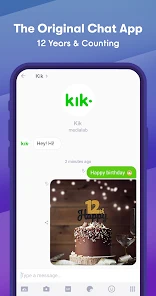
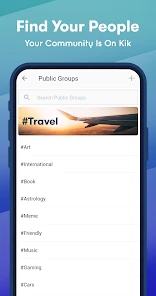




Analysis by Reviewed
The main appeal I see in Kik is the way it lets people start a conversation without making a phone number the center of their account. That can be useful when I want a separate space for casual chats, new acquaintances, or a group that may not need access to my everyday contact details. It is still a messaging app, not a guarantee of anonymity, so I treat that separation as a practical boundary rather than a promise that every interaction is private.
A different route into messaging
That distinction matters when choosing between Kik and familiar alternatives. Apps built around a phone number can make it easier to find people already in my contacts, while Kik’s email-based registration can suit someone who prefers not to share that number just to begin chatting. The trade-off is that friends may need to find and connect with me another way. If everyone I talk to is already settled in a phone-number-based group, switching may create more friction than it solves.
I also wouldn’t use a separate sign-up method as a reason to share freely with strangers. A profile and a conversation can still reveal personal details through what I say, send, or agree to do. I keep identifying information out of chats with people I don’t know, and I use blocking or reporting when an interaction feels unwelcome. Those habits matter more than the sign-up choice alone.
Where the app fits into a real day
Picture a casual event being planned with a few people I’ve recently met. A group chat gives everyone one place to settle the time, share a picture, and react without turning the exchange into a long chain of separate messages. If someone sends an article, the in-app browser can make a quick check convenient; GIFs can keep the conversation light. For a group already using another messenger, though, asking everyone to install a second app may be an unnecessary hurdle.
The same separation can help with communities or short-term plans where I don’t want to hand out my usual number. I’d still decide carefully who belongs in a group and what I share there. Group convenience has a flip side: a message intended for several people is not the place for something I would only tell one trusted person.
Good habits for getting more from Kik
One useful approach is to keep the app’s different functions purposeful. I can use a group for coordination, share media when it adds context, and open a link in the built-in browser when I only need a quick look. For anything that needs closer attention, I can leave the chat and use my usual browser instead. That small choice helps me avoid treating an in-app preview as a substitute for careful browsing.
I’d also review who can see my profile and use the block and report tools promptly rather than waiting for an uncomfortable exchange to get worse. Bots may add a playful diversion, but I wouldn’t assume a bot is a private conversation with a person or share sensitive details with one. These are simple boundaries, yet they make a social app easier to use on my terms.
More From Our News Desk

Weather by Xiaomi Review: Clear at a Glance, Less Clear Up Close

X Under Pressure: Can It Recover When Posting Goes Wrong?

Clash of Clans Is Won Between the Battles

Android Auto Makes the Case for Quieter Car Software

MobiOffice: Transforming Mobile Productivity with Seamless Integration

EA SPORTS FC™ Mobile Soccer: Redefining Mobile Sports Gaming
Who is likely to enjoy it
Kik is a communication app from MediaLab AI - Kik, and its long history gives it a familiar, established feel. It launched in 2010, is free to install, and has reached over 100 million installs. Its average rating is 3.0 from around 2.5 million ratings, which suggests a mixed reception rather than universal satisfaction. I read that as a reason to try it for a specific need, not as proof that it will suit every group.
The app is rated Mature 17+, so it isn’t the right choice for younger users. Adults who want casual group conversations, enjoy GIFs and bots, or prefer not to lead with a phone number may find a clear use for it. Someone seeking a no-friction way to message family already using another service, or someone uncomfortable with social discovery and open-ended contact, may be happier elsewhere.
Why Kik Stands Out
One of the first things you'll notice about Kik is its sleek and simple interface. It's easy on the eyes and straightforward to navigate. You don't need to be a tech wizard to figure it out, which is a huge plus for someone like me who prefers apps that are user-friendly.
What truly sets Kik apart, though, is its unique approach to connecting people. Unlike other messaging apps that require your phone number, Kik allows you to register with just an email address. This is fantastic for those who value their privacy and want to keep their phone numbers under wraps.
Features That Make Life Easy
Let's talk features. Kik has all the basics you’d expect: text messaging, emojis, and media sharing. But it doesn’t stop there. The app supports group chats, which is a lifesaver for planning events with friends or collaborating on projects. And if you're someone who enjoys a bit of flair in your messages, you’ll love the GIF integration. Finding and sending the perfect GIF is as easy as pie!
An unexpected gem within Kik is its built-in browser. You can surf the web without having to leave the app, which is perfect for quick look-ups or sharing articles with friends. Plus, the app includes a handy bot feature. Whether you want to play a game, get the latest news, or receive fashion tips, there's likely a bot for that. This adds a layer of interactivity that keeps the experience fresh and exciting.
Security and Privacy
In today’s digital age, security is a big deal. Kik understands this and keeps your information safe with its robust privacy settings. You can customize who can see your profile, block unwanted contacts, and report users if necessary. It’s reassuring to know that your chats are in safe hands.
Another aspect I appreciate is the anonymity it offers. Since you only need an email to sign up, you can maintain a level of anonymity that isn’t always possible with other messaging apps. For those who value discretion, this is a game-changer.
Final Thoughts
Overall, Kik is more than just a messaging app; it’s a space where you can chat, explore, and have fun without compromising on privacy. While it may not replace your go-to app for every single conversation, it certainly holds its own by offering features that cater to both social butterflies and privacy enthusiasts alike.
If you haven’t given Kik a try yet, I’d say it’s worth the download. Whether you’re looking for a new way to connect or just want an alternative to the usual suspects, Kik offers a refreshing take on messaging. So go ahead, dive into the world of Kik and see what all the buzz is about!
Practical expectations before installing
The current release is version 17.8.0.33323, and the app is free to download, with optional in-app purchases ranging from $0.99 to $99.99 per item. I’d start with the free experience and only consider a purchase if I encounter something I genuinely want; there is no need to spend simply to test whether the basic chat workflow suits me.
One question people often have is whether Kik can replace their main messenger. I’d say that depends less on its feature list than on where their friends already talk. If a group is active on Kik, its chats and media tools can make it a convenient home for that circle. If everyone is already using another service, Kik is more likely to work as a separate social space than as a universal replacement.
My recommendation
My advice is to try Kik with a clear purpose: a particular group, a casual conversation, or a preference for signing up without using a phone number. Keep profile details modest, be selective about contacts, and use the safety controls if needed. That makes the app’s distinctive approach useful without asking it to solve every messaging need.
For me, Kik’s strongest point is that it combines a low-friction sign-up choice with a more playful style of chatting. Its limits are just as important: your friends may not be there, privacy still depends on sensible behavior, and the Mature 17+ rating rules it out for younger users. If those conditions fit, it is worth considering; if your priority is simply reaching an existing contact list with minimal setup, another messenger may be the better everyday choice.
A practical way to test the fit
I’d treat the first few days as a small trial rather than moving every conversation over at once. Choose one low-stakes group or friend who is already willing to use Kik, then see whether the separate account makes the exchange more comfortable or simply adds another inbox to check. This tells me more than exploring every feature in isolation: the app’s real value depends on whether the people I want to reach will actually meet me there.
For a shared plan, I’d keep the chat focused on decisions that benefit from a group view: where to meet, what time works, and which image or link everyone needs. If the conversation starts turning into a long-term project with important details, I’d move those decisions to a tool the group already checks reliably. Kik is more compelling as a relaxed social channel than as a substitute for every organized workflow.
Keeping a social space manageable
A separate messaging account can make boundaries easier to understand, but it can also create a second place where messages arrive. I’d decide in advance what belongs in that space and when I’m likely to check it. That is especially useful if I use Kik for people I have met through a hobby or a short-term activity: I can keep the conversation going without automatically blending it into family or work chats.
When a link arrives in a lively group, I’d pause before opening it, even if the built-in browser makes the transition quick. A familiar-looking message from a group member is not by itself a reason to trust every link. I’d use the in-app browser for a quick read, but switch to my regular browser when I need a more deliberate look or want to handle something sensitive. The convenience is real; it just shouldn’t replace ordinary caution.
How it compares with everyday messengers
Compared with phone-number-centered services, Kik’s clearest distinction is the choice to begin with an email account rather than making a number the starting point. That can be a better fit for a new social circle, but it may be less convenient for family and friends who expect to find one another through their address books. The deciding question is practical: will the people I need to talk with use it, and do I value keeping that contact route separate?
It also feels different from a work-focused chat tool. Group conversations, GIFs, and bots lend themselves to informal exchanges, while a team that needs structured task tracking or a dependable shared work routine may be better served by a service built around that purpose. I wouldn’t choose Kik just because it can host a group; I’d choose it when the group wants a casual place to talk and share media.
What to consider before making it your main chat
People often wonder whether an email-based sign-up makes an account anonymous. I wouldn’t rely on that assumption. It can keep a phone number out of the initial sign-up, but identity can still become obvious through a profile, shared images, personal details, or the people in a conversation. I’d use the account separation thoughtfully and avoid treating it as a privacy shield.
Another reasonable question is whether the app is suitable for a teenager. Its Mature 17+ age rating makes my answer straightforward: it is intended for adults, not younger users. Adults should also think about whether they are comfortable with a social messaging environment where they may encounter people beyond their existing contacts, and make use of the available profile controls and safety tools.
Some users may also ask whether they need to pay to see if Kik is useful. The app is free to install, while optional purchases are available. I’d begin without spending and judge the core conversations, groups, and media sharing first. If a paid item is not connected to something I actively want, there is no reason for me to buy it just because it is offered.
Who benefits most from the separate-account approach
I can see Kik working well for adults who want a lighter social channel for a club, a casual community, or people they have recently met, especially when sharing a phone number feels premature. It can also suit someone who enjoys expressive chats and is happy to keep a second messenger for a particular circle. The value comes from choosing that boundary intentionally, not from assuming the app will make every conversation private.
I’d skip it if my main goal were to reach an established contact list with as little setup as possible, or if I wanted one messenger to cover family, work, and every social group. It is also a poor match for anyone under the stated age rating, or for a user who prefers to avoid open-ended social contact altogether. For those people, the familiar messenger their contacts already use is likely the simpler choice.
My final take
Kik’s most useful idea is not that it replaces every other chat app; it is that it offers a different starting point for conversations. The email-based route can help keep a casual social circle apart from phone-number-based contacts, while group chats, GIFs, media sharing, and bots give that circle ways to interact beyond plain text. In my view, that combination makes sense when a real group is ready to use it.
I’d install it for a defined reason, keep personal details measured, and let the people in my life—not a long feature list—decide whether it earns a place on my phone. If the separate channel feels useful and the group stays active, Kik can be an enjoyable addition. If it becomes one more inbox with nobody to talk to, I’d remove it and stick with the messenger my contacts already check.
Kik — Messaging & Chat App Frequently Asked Questions
What should I know about Kik before creating an account?
Kik is a communication app focused on messaging, chatting, and connecting with friends. Its store summary also describes it as a live app. Before signing up, consider whether its social features suit the way you want to communicate and whether you are comfortable chatting with other users. The app is rated Mature 17+, so age suitability is an important consideration.
Does Kik require an internet connection?
Kik is designed for messaging and chatting, so an internet connection is needed to use its communication features. Keep that in mind if you plan to rely on it while away from Wi-Fi, since mobile data may be involved. It is also sensible to check your device’s connection and data settings before using the app, especially if you want to manage mobile data consumption.
What is the current version of Kik?
The current version of Kik is 17.8.0.33323. If you are deciding whether to install it, checking that your device can run the app is a useful first step. App versions can change as updates are released, so the version shown on your device may differ after an update. Keeping an app current can help you access its latest available release.
Is Kik free to download and use?
Kik is a free communication app for messaging and chatting, so you can download it without paying an upfront price. It also offers in-app purchases, with items ranging from $0.99 to $99.99. Those purchases are separate from the free app, so check the purchase details before confirming anything if you want to avoid unexpected charges.
What age rating does Kik have?
Kik is rated Mature 17+, so it may not be suitable for younger users. The rating is worth considering before downloading, particularly for families deciding whether the app is appropriate for a teenager. Kik also allows users to communicate with others, so it is sensible to discuss privacy, unwanted contact, and responsible online behavior before using it.
Pros
- User-friendly interface
- Supports video and group chats
- Customizable chat themes
- Strong privacy features
- Cross-platform availability
Cons
- Contains ads
- Requires internet connection
- Privacy concerns over data
- Occasional connectivity issues
- Limited parental controls
- Category
- Communication
- Version
- 17.8.0.33323











