JusTalk Kids - Safe Messenger
- 5.47K
- 4.5
- Installs
- 5.00M
- Price
- Free

Screenshots






Analysis by Reviewed
When I consider a first messenger for a child, I look for more than a bright interface: I want a simple path to a real conversation, clear family boundaries, and a setup adults can understand too. JusTalk Kids - Safe Messenger is built around calls and messaging for children, with playful touches that can make a first video chat less awkward. I’d introduce it as a shared family tool, not hand it over as an unsupervised social space.
What to expect from a child-focused messenger
JusTalk Kids is a communication app from developer JusTalk, aimed at helping children keep in touch through calls, messages, and group conversations. The app is free to install, is rated for Everyone, and has optional in-app purchases ranging from $0.99 to $79.99 per item. It has a 4.5 average from around 53,000 ratings, with more than five million installs. Those figures suggest that many families have tried it, though popularity alone doesn’t tell me whether its approach suits a particular household.
The main appeal is having a place for a child to talk with people their family knows, rather than handing them an unrestricted general-purpose social app. That can make a first messaging experience feel more manageable. Still, I’d treat any child-focused messenger as one part of a family’s safety routine, not as a substitute for talking about what to share, who to contact, and when to put the phone away.
Kid-Friendly Features
JusTalk Kids is designed with little ones in mind, providing a plethora of features that are both fun and educational. One of the standout aspects of the app is its interactive design. Kids can send doodles, stickers, and even play games with their friends during video calls. It’s like a digital playground, right at their fingertips!
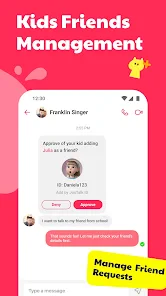
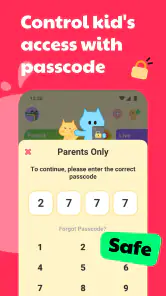
Parents can breathe a sigh of relief knowing that JusTalk Kids doesn't compromise on safety. It’s packed with robust parental controls that allow you to monitor your child’s activity without being overly intrusive. You can approve their contacts, block strangers, and even customize privacy settings, ensuring that the app remains a safe space for your child to explore and connect.
Getting from setup to the first call
Setting up JusTalk Kids is a breeze. The interface is intuitive, making it easy for even the most tech-challenged parents to navigate. You can quickly set up an account, invite family members, and start connecting in no time. The app provides detailed usage reports, so you can keep track of who your child is communicating with and for how long. This transparency is a feature I found particularly reassuring.
For a calmer first run, I’d decide on the initial contact list with my child before sending invitations. Add the relatives or friends they actually talk to, then make the first call together while you’re both nearby. That gives you a chance to see how your child handles answering, switching between talking and playful features, and ending a call, without turning the first attempt into a test. It also helps set a simple boundary: only use the app to contact people the family has agreed on.
You May Like

Clash of Clans Is Won Between the Battles

Android Auto Makes the Case for Quieter Car Software

MobiOffice: Transforming Mobile Productivity with Seamless Integration

EA SPORTS FC™ Mobile Soccer: Redefining Mobile Sports Gaming

How Microsoft OneDrive Became a Mobile Productivity Giant

How Google Translate Breaks Language Barriers Effortlessly
Making it useful in an ordinary week
A practical use is a short video call with a grandparent after school: a child can show a drawing, exchange a few messages, and feel included even when a visit is not possible. Group chat can also help cousins coordinate a family hangout, while the interactive elements give younger users something to do if conversation stalls. I’d keep the first group small, though; a busy chat can be harder for a child to follow than a one-to-one call.
That’s where the app’s kid-oriented extras can be a genuine advantage over a standard messenger. A general chat app may be more familiar to adults or better suited to a household already using it, but it can bring broader social features that parents may not want to introduce yet. JusTalk Kids puts the child’s calls and playful interaction closer to the center. The trade-off is that relatives may need to install and learn another app, so it works best when the people your child needs to reach are willing to join.
Keeping It Secure
In an era where digital safety is paramount, JusTalk Kids takes cybersecurity seriously. The app promises to keep all data encrypted, meaning your child's conversations are private and secure. Plus, it’s ad-free! That’s right, no annoying pop-ups to distract your little ones or, even worse, expose them to inappropriate content.
The app also allows for fun and safe interaction. Kids can video call their friends or family members, send fun emojis, and even share audio messages. It’s a great way for them to stay connected while also learning the basics of digital communication in a controlled environment.
Questions I’d settle before handing it over
One common point of confusion is the word “free.” The app costs nothing to install, but optional purchases are available, so I’d review the purchase settings on the device and explain to a child that paid extras need an adult’s approval. The current version is 2.11.3 and it requires Android 6.0 or later; families should also check that the app fits the devices they plan to use before arranging a call.
Another useful question is whether a child needs a phone of their own. In practice, the right choice depends on the family’s routine: a shared device can be enough for scheduled calls, while a child who needs to reach relatives independently may need access at agreed times. I’d also ask whether the intended contacts are comfortable using the app. If they are not, an ordinary phone or a messaging service everyone already has may be the more dependable option.
Making the first call feel easy
I’d make the first call a small, familiar task rather than an open-ended “go chat” instruction. Pick one person the child already knows well, agree on a convenient time, and give the conversation a natural prompt: show a picture, ask about the day, or say hello before dinner. A clear start and finish help a young user learn the basic rhythm of a call without pressure to keep talking.
If the child is shy on camera, there’s no need to make video the measure of success. A brief voice conversation or a message can be a more comfortable first step, depending on what the child is ready for. The useful test is whether they can reach the intended person and understand the household rules, not whether they use every playful feature on the first try.
Keeping a child’s conversations manageable
As the contact list grows, I’d revisit it with the child rather than treating approval as a one-time setup task. A quick check can clarify who each contact is and why they are there, especially if relatives invite other family members into a group conversation. This is a practical way to keep the app’s social circle understandable and gives the child a chance to ask before accepting something unfamiliar.
Group chats deserve a little extra guidance. Children can find it harder to follow several people talking at once, and playful messages can quickly distract from the original reason for the chat. I’d use a small group for a specific purpose, such as arranging a family catch-up, and move to a direct call if the conversation becomes confusing. That keeps group chat useful instead of letting it become a stream the child feels obliged to monitor.
Setting a healthy rhythm
One nifty feature is the "Do Not Disturb" mode. This ensures that your child isn’t distracted by calls or messages during homework time or bedtime. It’s these thoughtful touches that make JusTalk Kids a standout choice in the realm of children’s communication apps.
I’d agree on a routine before the app becomes part of daily life: for example, a suitable time for family calls and a clear rule for putting the device aside afterward. The usage reports can support a parent’s check-in, but I’d use them as a prompt for conversation rather than as a replacement for it. That keeps supervision practical without making every interaction feel like surveillance.
Who it suits, and when I’d choose something else
I’d consider JusTalk Kids for a family that wants a child to call known people, enjoys the idea of playful video chats, and is willing to help relatives get set up. It is less compelling if everyone already uses a trusted service that meets the family’s needs, or if a child is not ready to follow agreed contact and screen-time rules. In those cases, keeping communication on a parent’s device or choosing a simpler, familiar option may be easier than adding a new account and routine.
Compared with an ordinary phone call, the app gives a child a more visual, interactive way to catch up, but it depends on both sides using the service and having a suitable device available. Compared with a broad family messaging app, its child-focused feel may be more appealing for a beginner, while a service already used by the whole household may involve less setup. I’d choose based on the people the child actually needs to reach, not on the number of features offered.
Before it becomes part of the routine
JusTalk Kids was released on June 15, 2018, and its current version is 2.11.3. It is available for Android and iOS; on Android, it requires version 6.0 or later. Those details make it worth checking the family’s devices before planning a call, particularly if a child will use an older phone or tablet. The app remains free to install, while optional purchases range from $0.99 to $79.99 per item, so I’d make sure purchase approval is handled on the device the child uses.
A sensible next step is to agree on one approved contact, make a short test call together, and then ask the child what felt easy or confusing. If the call works smoothly and the family likes the way the app fits its routine, add contacts gradually. If relatives would rather stick with a service they already use, or the child needs only occasional calls, a familiar alternative may be the simpler choice.
Easy for Parents to Use
Setting up JusTalk Kids is a breeze. The interface is intuitive, making it easy for even the most tech-challenged parents to navigate. You can quickly set up an account, invite family members, and start connecting in no time. The app provides detailed usage reports, so you can keep track of who your child is communicating with and for how long. This transparency is a feature I found particularly reassuring.
One nifty feature is the "Do Not Disturb" mode. This ensures that your child isn’t distracted by calls or messages during homework time or bedtime. It’s these thoughtful touches that make JusTalk Kids a standout choice in the realm of children’s communication apps.
In conclusion, JusTalk Kids - Safe Messenger offers a wonderful blend of fun and security. It keeps kids engaged with its interactive features while providing parents with peace of mind through its comprehensive safety measures. If you’re looking for a way to keep your child connected with friends and family in a safe manner, this app is definitely worth considering. It’s like giving your child the world, but with a safety net firmly in place. I’d still treat parental settings, household expectations, and adult involvement as part of that safety net: the app can make approved conversations easier, but a child learns good communication habits through the guidance around it.
JusTalk Kids - Safe Messenger Frequently Asked Questions
Does JusTalk Kids support both private conversations and group chats?
Yes. JusTalk Kids includes text messaging, voice and video calls, and group chat, so children can use it for one-to-one conversations as well as chats involving family or friends. The store summary also highlights hangouts and together party games, giving families options beyond basic messaging. As with any communication app, parents can help children choose who to talk with.
Can children use JusTalk Kids for video and voice calls as well as texting?
Yes. The app brings together text messages, voice calls, and video calls, allowing children to communicate in different ways with family and friends. A child might send a message when a call is not convenient, or use voice or video to have a more direct conversation. An internet connection is needed for these communication features, so check that the device can get online.
What age is JusTalk Kids intended for, and can adults use it to stay in touch with children?
JusTalk Kids is a communication app designed around children’s conversations with family and friends. Its age rating is Everyone, and parents can help children get started and manage approved contacts. It can also serve as a way for adults in a child’s family or trusted circle to keep in touch through text, voice, and video calls.
Is JusTalk Kids free to download, and are there any potential costs?
JusTalk Kids is free to download, though it includes optional in-app purchases. Families should review purchase settings on the device before a child uses the app, particularly if the device allows purchases without an adult’s approval. The app’s core purpose is communication, including messages, calls, group chat, and activities such as hangouts and party games.
What is JusTalk Kids and how does it work?
JusTalk Kids is a safe and child-friendly messaging app designed specifically for children to communicate via video calls and text messaging. The app provides a secure environment where kids can interact with their family and friends without the risk of exposure to strangers or inappropriate content. It includes fun features like doodling, stickers, and games to make communication more engaging. Its communication tools also include voice calls and group chat, making it useful for both one-to-one conversations and shared family chats.
Pros
- User-friendly interface for children
- Parental controls ensure safety
- Fun interactive features
- No ads
- enhancing user experience
- Supports video and voice calls
Cons
- Limited customization options
- Requires parental setup
- In-app purchases
- Occasional connection issues
- Limited to JusTalk users only

- Category
- Communication
- Version
- 2.11.3












