Junk Cleaner Pro
- 282.00
- 4.3
- Installs
- 1.00M
- Price
- Free

Screenshots
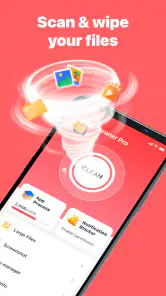
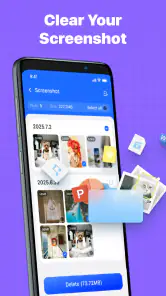
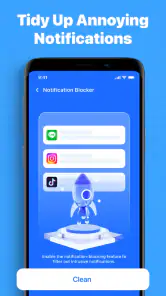
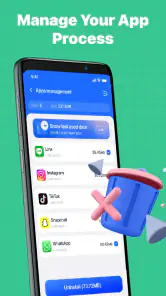
Analysis by Reviewed
I approached Junk Cleaner Pro as a practical Android maintenance tool rather than expecting it to transform an old phone overnight. Developed by ByteWizard, this free app sits in the tools category and focuses on the everyday job of finding removable clutter so you can decide what deserves to stay. That sounds simple, but a cleaner is only useful when it helps me act safely and quickly, without turning routine storage management into another chore.
My first impression is that its appeal comes from being easy to understand. The store summary presents it as an Android phone cleaning master, while the shorter listing description simply calls it Junk Cleaner Pro. In use, that positioning makes sense: this is aimed at people who want a direct route to tidying a device, not a large suite filled with unrelated utilities. It is free, rated for Everyone, and works on Android 7.0 or later, so it can be considered by owners of both relatively recent phones and older compatible devices.
How I would build a reliable cleaning routine
The safest way to use a tool like this is to begin with a baseline check instead of immediately approving every suggested deletion. I open the app when storage is becoming uncomfortable, let it inspect the phone, and treat the result as a list for review rather than an instruction to erase blindly. That small change in attitude matters because “junk” is not always worthless from a user’s point of view. A downloaded document, an old image, or a video received in a conversation may look disposable to a scanner while still being something I need.
I would start with the broad scan, inspect the categories or groups it presents, and then work from the least controversial items toward the more personal ones. Temporary leftovers are easier to evaluate than files sitting in folders I use for work, travel, study, or family photos. This gives me a repeatable baseline: first identify what is taking space, then remove only the groups I recognize, and finally check whether the phone feels less crowded.
That workflow is especially useful on a phone shared with children or used for both personal and professional tasks. I would not hand the device to someone else and tell them to press the biggest cleaning button. Instead, I would make the first pass myself, explain which categories are safe for our particular habits, and leave anything ambiguous alone. The app can help expose clutter, but it cannot know why a file matters to me.
A realistic example is a phone that has been used during a busy week of travel. I may have saved maps, screenshots of boarding information, duplicate pictures, and several large clips from messaging conversations. Junk Cleaner Pro can be part of the cleanup at the end of that week, but my order would be deliberate: keep documents and travel confirmations until the trip is finished, review media manually, and only then clear material I no longer need. The advantage is not merely recovered space; it is avoiding the panic of discovering that an important file disappeared during a rushed cleanup.
I also prefer using the app before a specific task rather than only after the phone becomes unusable. Before recording a long video, installing a large game, or downloading offline content, I can use it to identify obvious clutter and make room. That is more controlled than waiting for a low-storage warning and trying to solve everything in one stressful session.
What I check before approving a cleanup
The most important habit is separating discovery from deletion. A scan result tells me where to look; it does not automatically settle the decision. I read the labels, open previews when they are available, and pay attention to whether a group contains files connected to an app I still use. If a category is unclear, I leave it untouched and investigate through the phone’s file manager or the original app instead.
I also avoid treating a larger number as a better target. A big group of files may offer more potential space, but it can also carry more risk. A smaller, clearly understood group is often the better first action. This is one of the practical strengths of a focused cleaner: it gives me a starting point, while my own knowledge of the phone supplies the final judgment.
For an older Android device, I would be even more cautious. The minimum supported operating system is Android 7.0, which makes compatibility broad, but older phones often contain legacy folders and app behavior that deserve a slower review. A device that has been upgraded repeatedly may have years of accumulated downloads and media. I would clean in stages, use the phone normally between passes, and confirm that essential apps still behave correctly before doing another round.
On a newer phone, the same process can be faster, but speed should not replace attention. Modern devices often have generous storage, which makes it tempting to ignore clutter until it becomes a serious problem. I find a short, occasional review more manageable than a dramatic purge. It also makes it easier to remember what I created recently and what can safely go.
Settings and permissions deserve a careful look
Before making Junk Cleaner Pro part of my routine, I would review its Android access requests and the app’s own options as they appear on my device. A cleaning tool needs enough visibility to identify files, but I still want to understand what I am authorizing. I would not grant an access request simply because the app cannot continue without it; I would read the wording, consider whether the function is relevant, and decline anything that does not fit my intended use.
I would also check whether the app offers choices about scan scope, notifications, or confirmation steps, without assuming that every installation exposes identical controls. The useful principle is to favor reviewable actions over automatic behavior. If a setting can make deletion immediate, I would keep confirmation enabled unless I have already tested the workflow with harmless material. A cleaner should reduce friction, not remove the moment when I can catch a mistake.
Notifications are another setting I would evaluate. If reminders are useful, I might allow them at a sensible interval; if they become noise, I would turn them down through Android or the app’s available controls. A maintenance tool that constantly interrupts me can become less helpful than the clutter it is meant to address. I want the app available when I choose to clean, not demanding attention every day.
The app is free, which lowers the barrier to trying it, but I still judge it by the time and confidence it saves rather than by the absence of a purchase price. I would watch for any screen that encourages a rushed decision, especially during a first scan. Free does not mean I should surrender control over personal files. My preferred setup is the one that leaves me able to inspect, cancel, and return to the phone’s normal storage tools when needed.
Shortcuts that make repeated cleaning less annoying
Experienced use is mostly about creating a pattern. I would choose a regular moment, such as after a project ends or before a major download, and use the same sequence each time: scan, review obvious clutter, inspect personal media, clean selected items, and then verify the result. Repeating that order reduces decision fatigue because I am not reinventing the process whenever storage becomes tight.
I would also keep a mental list of folders and file types that are important to me. For example, if I frequently save receipts, voice notes, or offline reading material, I know those areas deserve extra scrutiny. If I rarely download anything, I can give that category less attention. This personal map is more valuable than any universal definition of junk because it adapts the app to how I actually use my phone.
Another useful shortcut is to clean around a single goal. Instead of trying to make the entire device perfect, I might aim to free enough room for a planned recording session or an operating-system update. That keeps the review focused and makes it easier to stop when the immediate problem is solved. It also prevents the common mistake of deleting increasingly questionable files simply because the first cleanup felt successful.
For families, I would make the routine visible and predictable. I might ask other users to move important pictures or documents into a clearly named location before a shared cleanup. The app can then handle the discovery stage, while the household agrees on what is protected. This is a better arrangement than relying on one person’s memory after files have already been removed.
I would not use a cleaner as a substitute for organizing. If the same downloads keep returning, the underlying habit may be the problem. I would rename or move files I need, remove duplicates at the source, and adjust how I save media in the apps that create it. Junk Cleaner Pro is most useful when paired with those habits; otherwise, it becomes a recurring broom for the same pile.
Where the app helps, and where its reach ends
The central limitation is that no automated scan can understand personal context as well as I can. A file may be technically old but emotionally important, legally useful, or needed for a future task. That is why I would resist any workflow that treats a scan as permission to erase everything in one step. The app’s value is strongest when it narrows the search and presents candidates clearly.
I would also avoid expecting it to repair every performance issue. A phone can feel slow because of an aging battery, an app that misbehaves, limited memory, network problems, or a system process working in the background. Removing clutter may improve available storage, but it is not a universal cure. If the device remains sluggish after a careful cleanup, I would look at Android’s battery and app settings, update or remove problematic software, and consider whether the hardware itself is the bottleneck.
There is a trade-off between convenience and transparency. A dedicated cleaner can be quicker than manually browsing folders, particularly when I do not know where temporary leftovers are stored. The phone’s built-in storage manager, however, may offer more system-level context and can be preferable when I want the most direct control over large files, unused apps, or media categories. I would use Junk Cleaner Pro for guided discovery and Android’s own tools when I need a second opinion or a more granular system view.
Specialized alternatives can also be better in particular situations. A cloud photo service is more appropriate when the real problem is a large camera library and I want backup plus selective local removal. A file manager is better when I need to move, rename, compare, or archive documents. An app-specific cleanup screen may be safer for clearing downloaded media from a messaging service because it understands that service’s own categories. Junk Cleaner Pro is not a replacement for all of these; it is a convenient general pass.
Privacy-conscious users should make the same evaluation they would make with any utility that examines storage. I would read the app’s current permission prompts and privacy information before relying on it for sensitive material. The fact that it is rated for Everyone does not remove the need for adult judgment around personal documents, private photos, and shared devices. I would keep the app’s role narrow and avoid giving it more authority than its cleaning purpose requires.
It is also worth remembering that deleting files can produce secondary effects. Removing a downloaded attachment may mean downloading it again later. Clearing cached material may save space but cause an app to rebuild content, using time or mobile data. Deleting thumbnails or local copies may change how quickly galleries and apps open on the next visit. These are not reasons to avoid cleaning; they are reasons to choose targets with a clear benefit and understand what convenience may be lost.
Who will get the most from it
I think this app suits Android users who want a guided, free tool for occasional storage maintenance and who prefer a simpler interface to manually exploring every folder. It is particularly practical for people who accumulate downloads, screenshots, temporary files, and shared media without realizing how quickly those items grow. The broad Android compatibility also makes it relevant to owners of older supported phones who want a straightforward starting point.
It is less suitable for someone who already has a disciplined file-management system and wants deep control over every operation. Power users who regularly archive folders, compare duplicates, manage backups, or automate device maintenance may find a general cleaner too limited for their workflow. I would also steer away from using it as the sole answer for a phone with a serious hardware or software fault.
The public response gives the app a 4.3 average from around 3.2 thousand ratings, with more than 280 written reviews and over a million installs. Those figures suggest that many people are willing to try it as a practical utility, but they do not remove the need to test its behavior on a particular phone. Different storage histories, Android versions, and personal habits can change how useful a cleaning scan feels.
ByteWizard currently lists version 1.0.16, and the app was released on September 11, 2025. I would keep it updated through the normal store channel, then recheck the interface and permissions after updates rather than assuming that every option works exactly as it did before. That is a sensible habit for any tool involved in file deletion.
My verdict after using it as a habit, not a magic button
Junk Cleaner Pro works best when I treat it as a filter between a messy phone and a considered cleanup. It can make the search less tedious, especially when I need a quick overview before a download or recording session. Its free access, Everyone age rating, and support for Android 7.0 and later make it approachable, while the focused tools category positioning keeps the purpose clear.
The real skill is not pressing clean; it is learning which results deserve a second look. I would scan regularly, protect files with personal value, use Android’s built-in tools when I need more detail, and stop once the immediate storage problem is solved. That combination gives the app a useful place in my routine without asking it to do a job no cleaner can do reliably: understand the meaning of every file on my phone.
My recommendation is therefore positive but measured. Try it if you want a simple way to locate likely clutter and are comfortable reviewing results before deleting anything. Skip it if you expect a performance miracle, need advanced file operations, or prefer complete manual control. Used with sensible settings and a repeatable workflow, Junk Cleaner Pro is a practical Android maintenance companion rather than an all-purpose repair tool.
Pros
- Quickly identifies junk files and unused app data.
- Simple interface makes cleaning easy for beginners.
- Can help free storage space on older devices.
- Useful cache-cleaning tools for routine maintenance.
- Cleanup results are presented in an easy-to-understand way.
Cons
- Some scans may require broad storage permissions.
- Cleaning recommendations can occasionally need manual review.
- Aggressive cleanup may remove files you intended to keep.
- Free features may be limited by ads or upgrade prompts.
- Results can vary depending on Android version and device brand.

- Category
- Tools
- Version
- 1.0.16











