Jow - easy recipes & groceries
- 363.00
- 3.7
- Installs
- 5.00M
- Price
- Free

Screenshots







Analysis by Reviewed
I often judge a meal-planning app by what happens on a tired weeknight, not by how impressive its recipe pictures look. Jow is aimed at that moment when I want an idea for dinner and a clearer sense of what to buy. It is a free Food & Drink app from Jow, with a 4.1 average from around 18,000 ratings and over 5 million installs. That reach makes it a familiar option, but the real test is whether its recommendations fit the way you actually cook.
Where meal planning can get stuck
The appeal is straightforward: choose recipes, then use the resulting shopping list to prepare for them. That can cut down the mental work of deciding what to eat and remembering every ingredient. It does not, though, make every meal effortless. You still need to check that a recipe suits your schedule, kitchen skills, and what is already in your cupboards. I treat the suggestions as a useful starting point rather than a plan I have to follow exactly.
That distinction matters if you cook for people with different tastes or have ingredients you need to use up. A recipe recommendation can inspire dinner, but it may not solve those household-specific constraints on its own. Before shopping, I would scan the selected recipes and list together, check quantities against what I have, and remove anything I do not need. A quick review is more reliable than assuming a generated list will account for every pantry item.
Discovering the Magic of Meal Planning
So, here's the scoop. The Jow app is designed to make meal planning as easy as pie. You just pop in the number of people you're cooking for, your dietary preferences, and voilà! The app churns out a bunch of delicious recipes tailored just for you. It's like magic, but better because it involves food.
Cooking Made Simple
What really tickles my taste buds about this app is how it simplifies the cooking process. Each recipe comes with a step-by-step guide that's easy to follow, even if you're a kitchen newbie. Plus, the app provides you with a handy-dandy shopping list. No more wandering aimlessly in the grocery aisles. You know exactly what you need and can get in and out faster than you can say "grocery shopping."
Personalization at Its Best
One of the coolest features is how Jow learns about your preferences. If you're not a fan of mushrooms or you're all about that vegan life, the app remembers and adjusts the recipes accordingly. It's like having a friend who knows exactly what you like and surprises you with it every time. How cool is that?
Making the plan work in real life
For a practical weeknight routine, I would pick a few recipes before the next grocery trip, then read each method once before committing. That small step helps reveal whether two planned meals compete for the same evening or whether one asks for more attention than I have time to give. The list is most useful after that check: it can guide a focused shop, while my own pantry check prevents buying another bag of rice or a spice I already own.
More From Our News Desk

Weather by Xiaomi Review: Clear at a Glance, Less Clear Up Close

X Under Pressure: Can It Recover When Posting Goes Wrong?

Clash of Clans Is Won Between the Battles

Android Auto Makes the Case for Quieter Car Software

MobiOffice: Transforming Mobile Productivity with Seamless Integration

EA SPORTS FC™ Mobile Soccer: Redefining Mobile Sports Gaming
Compared with searching recipe sites one by one, the useful difference is the connection between meal ideas and shopping preparation. A notes app or handwritten list can be more flexible if I already know exactly what I want to cook, but it will not do the same recipe-discovery work for me. Jow makes more sense when I need help choosing; it is less compelling when I have a fixed menu, strict ingredient rules, or a favorite source of recipes I already trust.
Setup checks and sensible expectations
When recommendations feel off, I would first revisit the preferences and household details entered during setup rather than assume the app has understood every exception. A broad dietary choice may not capture a specific ingredient intolerance or a family member’s dislikes, so I would inspect each recipe before relying on it. If a recipe is appealing but not quite right, use it as inspiration and make a deliberate substitution only when you know it will work.
The app is free to download and rated for Everyone, though it includes optional in-app purchases ranging from $0.99 to $48.99 per item. It has been available since April 30, 2018; the current version is 17.20.0 (3), and it supports Android 5.0 and later. I would check the purchase details in the app before buying anything, especially if I only want the basic planning routine. The average rating is a useful sign of broad interest, not a guarantee that the recipes will suit every household.
Recovering when a plan goes off course
Plans change: a shop runs short of an ingredient, dinner gets postponed, or you discover that a listed item is already at home. In those cases, I would return to the chosen recipes and review the list rather than shop from memory or discard the whole plan. If something in the app seems out of date or does not behave as expected, closing and reopening it, checking for an available update, and reviewing the recipe selection are sensible first steps. Those checks address common app friction without assuming a particular fault.
Sometimes the obstacle is not the app at all. A crowded shop, a tight budget, limited cooking equipment, or a sudden change in schedule can make even a well-organized list less useful. I would keep one easy backup meal in mind and treat the plan as adaptable. If you need precise nutrition tracking, detailed control over every ingredient, or a rigid schedule, a specialist tool or your own carefully checked menu may be a better fit than a recipe-and-shopping workflow.
Saving Time and Money
Now, let's talk about the practical side. We all know how time-consuming meal planning can be, not to mention the cost of groceries if you're not strategic about it. With Jow, you save both time and money. The app optimizes your shopping list to ensure you're buying only what you need. No more extra expenses on things that end up forgotten at the back of your pantry.
If you're always on the go or just want to reclaim your evenings from the clutches of meal planning, I highly recommend giving Jow a whirl. It's a game changer in the kitchen, and it might just become your new best friend. Happy cooking!
Who will get the most from it
I see the strongest fit for someone who wants ideas and a shopping plan but does not want to spend Sunday evening building a menu from scratch. It can also help a newer cook feel more comfortable following a recipe in manageable steps. If you enjoy improvising, shop based on seasonal bargains, or already keep a dependable rotation of meals, you may prefer your own list and use Jow only when you need fresh inspiration.
One useful habit is to plan around your busiest night rather than choosing recipes just because they look appealing. Put the simplest meal there, and save anything that needs more preparation for a day with room to cook. That is a small decision, but it is where a recipe planner becomes a routine you can actually sustain instead of another list you feel obliged to complete.
My practical verdict
For me, Jow is most convincing as a bridge between deciding what sounds good and knowing what to pick up at the shop. It can reduce the blank-page problem and make cooking feel more organized, while still leaving the final judgment with you. Its recommendations and list are aids, not a substitute for checking ingredients, timing, or household needs. If that balance suits your kitchen, it is worth trying; if you want precise dietary control or already have meal planning covered, another approach may serve you better.
A realistic weeknight routine
Imagine getting home later than planned with little energy for another round of decision-making. I would use Jow earlier in the week, when I have a few calm minutes, to pick meals that seem manageable and check the ingredients against what is already in the kitchen. Then, on the busy evening, I can open the chosen recipe and follow its steps instead of searching several sites while hungry. The benefit is not that dinner becomes automatic; it is that the decisions have been moved to a more convenient time.
This routine also helps me avoid treating every recommendation as a commitment. If the day becomes unexpectedly hectic, I can choose the least demanding planned meal and save a more involved recipe for another evening. If none of the options fits, a simple backup dinner is still sensible. A plan should reduce pressure, not create guilt because the week did not go exactly as expected.
Making the shopping list work harder
One practical way to improve the list is to review it by ingredient rather than only by recipe. If several meals call for the same basic item, I can check whether the combined amount seems reasonable and whether I already have enough. I would also pay attention to ingredients that appear in only one recipe and could be left unused afterward. That quick pass can help me decide whether to keep the recipe, choose a substitute I already know, or plan another meal that uses the same ingredient.
The trade-off is that a recipe-linked list is most valuable when I am open to the meals it supports. If I shop primarily by discounts, buy produce according to what looks good that day, or need to keep a strict spending ceiling, I may want to make my own final choices at the store. I would use the app’s list as a draft to work from, not as a promise that every item is essential or that it will guarantee a cheaper shop.
Choosing recipes with household needs in mind
Personalization can make suggestions feel more relevant, but I would still read the full ingredient list whenever a meal is for someone with a serious allergy, intolerance, or firm dietary restriction. A preference setting is helpful for discovery; it is not a substitute for checking labels and deciding whether a particular recipe is safe. The same goes for strong dislikes: a household member may object to a texture or seasoning that is not captured by a broad preference.
If I am cooking for several people, I would also consider whether the recipe is easy to adjust at the table. A shared base with optional toppings or seasonings can be more practical than choosing a meal that requires separate versions. That is not a special feature of the app; it is a way to judge whether one of its suggestions will suit the people who are actually eating. The final decision still belongs to the cook.
What to expect before installing
Jow is a cooking and meal-planning app rather than a general-purpose grocery list, so its strongest role is helping turn recipe ideas into a shop plan. The Google Play version shows 341 written reviews, alongside the broader rating activity, and the app is free to install. Optional purchases are available, so I would check what an individual purchase includes and whether it is relevant to my needs before confirming it. That is especially useful if I am testing the app casually and want to keep spending separate from the basic download.
For Android users, the stated minimum is Android 5.0, and the current version is 17.20.0 (3). Those details are useful to check if an older phone is involved, but a compatible operating system alone does not guarantee that every individual device will behave identically. If setup or a screen feels confusing, I would take one step at a time: confirm the basic household and food preferences, choose a small number of recipes, and inspect the resulting list before building a full week around it.
When another approach is better
Someone who already has a reliable collection of family recipes may get more value from a simple checklist or notes app. Those tools require more manual work, but they make it easy to preserve exact quantities, personal variations, and a shopping routine that has already been tested. Likewise, a person who wants detailed nutrition information or strict control over every ingredient should look for a tool built around those needs rather than expecting a recipe-discovery app to cover them fully.
Jow is a better match when the hard part is choosing what to cook and remembering what those meals require. A recipe website can offer a broader browsing experience, while a handwritten list can be quicker for a known menu; the app’s useful middle ground is connecting discovery with preparation. I would start with a few recipes and see whether that connection genuinely saves effort in my own kitchen. If it adds more decisions than it removes, there is no reason to force it into the routine.
Jow - easy recipes & groceries Frequently Asked Questions
Can Jow help me decide what to cook when I have no meal ideas?
Yes. Jow is built around recommending recipes, so it can help you move from a vague dinner plan to a selection of meals and the groceries needed for them. You can explore recipes, choose what suits your plans, and let the app create a shopping list from your selections. It is useful when you want a starting point rather than building every meal and ingredient list from scratch.
Does Jow create a shopping list automatically from the recipes I choose?
Yes. One of Jow’s central features is creating a dynamic shopping list based on the recipes you select. Rather than writing down every ingredient yourself, you can use the generated list as a starting point for shopping. You can also customize your grocery list to suit your needs, which is helpful if you already have some ingredients or want to adjust your plans.
Is Jow free to download, and are there any in-app purchases?
Jow is free to download, so you can try its recipe and grocery-planning features without paying an upfront price. The app also offers in-app purchases, which may be relevant if you are considering optional paid features or content. Check the purchase details in your app store before buying, and review any terms shown in the app so you know what a purchase includes.
What is Jow and how does it work?
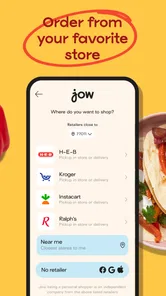
Jow is a user-friendly app designed to simplify meal planning and grocery shopping. It allows users to choose from a wide range of easy-to-follow recipes and automatically generates a shopping list based on the selected meals. Users can also customize their grocery list and have the option to shop online directly through the app or in-store, depending on their preference.
Is Jow suitable for people with dietary restrictions?
Yes, Jow accommodates various dietary preferences and restrictions. The app allows users to filter recipes by specific dietary needs such as vegetarian, vegan, gluten-free, and more. This makes it easier for users with dietary restrictions to find meals that suit their lifestyle and ensures that they can enjoy delicious recipes without any hassle.
Pros
- User-friendly interface for easy navigation.
- Wide variety of recipes to choose from.
- Integrates grocery list for convenience.
- Offers meal planning features.
- Regularly updated with new recipes.
Cons
- Requires internet connection to access features.
- Some features behind paywall.
- Occasional bugs with recipe loading.
- Limited customization options.
- In-app ads can be intrusive.











