Jack in the Box® - Order Food
- 21.90K
- 4.8
- Installs
- 5.00M
- Price
- Free

Screenshots

Analysis by Reviewed
Ordering fast food from a phone sounds simple, but the quality of the experience depends on more than the menu. The app has to load when I am hungry, keep my order understandable while I move through checkout, and give me enough confidence that the restaurant will receive the request correctly. After spending time with Jack in the Box® - Order Food, I see it as a focused Food & Drink app for people who already know Jack in the Box and want a quicker route to pickup or delivery.
It is free to install, made by Jack in the Box Inc., and aimed at Everyone. The app has been available since October 3, 2017, and its current version is 2026.13, with support beginning at Android 7.1. That broad device coverage makes it practical for people who do not replace their phone often. Its store presence is also substantial: it has passed five million installs, with a 4.8 average from roughly 114 thousand ratings.
Those numbers suggest a polished and familiar ordering tool, but they do not tell the whole story. My experience is that the strongest part is convenience when the connection is stable and the restaurant choice is already clear. The weaker moments appear when I am switching between networks, trying to make a last-minute change, or expecting the app to behave like a full restaurant discovery service rather than a direct ordering channel.
What the app feels like when the connection is doing the work
The central task is straightforward: browse Jack in the Box food, build an order, and choose pickup or delivery. That narrow purpose is a strength. I do not have to search through unrelated restaurants or compare menus from different businesses. When I am specifically craving this chain, opening the app is more direct than using a general delivery marketplace.
Connectivity shapes nearly every important step. Menu information, available choices, ordering progress, and the final handoff all rely on the app being able to communicate properly. On a strong home connection, the process feels light and uncomplicated. On a weak mobile signal, even a short delay matters because I am never completely sure whether the screen is still working or whether my tap needs to be repeated.
I recommend waiting for the menu and location information to settle before rapidly tapping through options. A hurried sequence of taps during loading can create uncertainty: I may wonder whether a choice was accepted, whether the basket updated, or whether the next screen is simply taking its time. My practical habit is to pause after each major step, especially after selecting a restaurant, changing an item, or moving toward payment.
This is also why the app is better suited to deliberate ordering than frantic ordering from a moving car. I would choose my meal before leaving home, while connected to reliable Wi-Fi or a strong mobile signal, then review the basket calmly. The app can save time at the restaurant, but it cannot remove the risks of trying to complete a detailed order while distracted or poorly connected.
More From Our News Desk

Weather by Xiaomi Review: Clear at a Glance, Less Clear Up Close

X Under Pressure: Can It Recover When Posting Goes Wrong?

Clash of Clans Is Won Between the Battles

Android Auto Makes the Case for Quieter Car Software

MobiOffice: Transforming Mobile Productivity with Seamless Integration

EA SPORTS FC™ Mobile Soccer: Redefining Mobile Sports Gaming
Pickup is the clearest use case
Pickup is where I find the experience easiest to understand. If I am leaving work and want food ready around the time I arrive, the app gives me a more organized alternative to waiting at the counter. I can make the selection in advance, check the order before submitting it, and travel to the restaurant without needing to repeat every item aloud.
A realistic example is a late afternoon drive home. I would place the order before starting the trip, while still on a dependable connection, then avoid making changes once I am on the road. That workflow reduces the chance of a stalled screen or a mistaken tap. It also keeps the phone from becoming part of the driving task, which is a small but important practical advantage.
Pickup is not automatically ideal for everyone. If the restaurant is not on my route, or if I am unsure when I will arrive, ordering too early can create its own inconvenience. I would rather wait until my schedule is reasonably settled than submit an order simply because the app makes it easy. Convenience is useful only when the timing matches real life.
Delivery adds convenience but also more variables
Delivery is appealing when I do not want to travel, particularly during a busy evening or when several people are ordering together. The app lets the order begin from one place instead of requiring a phone call or a separate marketplace search. That directness is valuable for someone who already knows what they want from Jack in the Box.
However, delivery is the part of the experience where connectivity and timing feel most important. The order has to move through more stages, and I have less control after submission. I would double-check the selected location, the basket, and the delivery details before confirming. A general delivery service may be a better choice when I want to compare restaurants, see broader delivery options, or keep several businesses in one account.
The trade-off is simple: this app is more focused, while a marketplace is more flexible. I would choose Jack in the Box’s own app for a familiar order and a direct relationship with the chain. I would skip it in favor of an aggregator when my main goal is discovering nearby alternatives, combining food from different restaurants, or comparing delivery choices in one screen.
Using it in real mobile situations
The app makes the most sense on a phone because food decisions often happen away from a desk. I can imagine using it at home, in an office before lunch, or parked safely before heading to a restaurant. In each case, the best results come from treating the phone as the place to prepare the order, not as something to operate continuously while walking, driving, or dealing with a crowded environment.
Small screens change how carefully I review the basket. A meal that seems obvious while browsing can look different once several items, custom choices, or quantities are together. I make a point of reading the final summary from top to bottom rather than relying on memory. This is one of the less obvious benefits of ordering digitally: the written basket gives me a chance to catch an accidental extra item before I submit.
For group orders, I would use a simple division of labor. One person can collect everyone’s choices, while another checks the final basket and destination. That sounds basic, but it avoids the common problem of several people making suggestions while one person is trying to complete checkout on a small screen. The app works best when the order is decided before the connection becomes urgent.
People using older Android phones may appreciate the minimum requirement of Android 7.1, since they do not need a recent device just to access the app. Still, an older phone can have its own limitations, such as slower screen transitions or less comfortable typing. I would keep the app updated when possible, particularly because the current version is 2026.13, but I would not assume that an older handset will feel as quick as a newer one.
Where the focused design helps
I like that the experience is centered on Jack in the Box rather than diluted by a large catalog of unrelated restaurants. If I already have a preferred order, the app removes several decisions. I am not comparing menus, wondering which listing is official, or rebuilding the same meal in a third-party service every time.
The focused design also makes repeat behavior easier. I can approach the app with a clear intention: choose food, select the convenient fulfillment method, and review the order. That is a better fit for regular customers than for someone who wants culinary exploration. The app is not the place I would start if I had no idea what I wanted to eat.
There is a subtle trade-off here. A dedicated restaurant app can feel cleaner because it has one purpose, but it also gives me fewer escape routes when a particular location, delivery option, or moment does not suit me. A marketplace may be cluttered, yet that clutter can be useful when I need alternatives. I see the dedicated app as a specialist tool, not a universal food-ordering replacement.
What happens when the connection is unreliable
The most important limitation is that ordering is network-dependent. I would not plan to browse the menu, finalize a purchase, or rely on a last-second update in a place where the signal is unstable. A weak connection can turn a quick order into a guessing game, especially if a screen appears unchanged after I tap a button.
My recovery approach is deliberately cautious. First, I stop tapping repeatedly. Then I check whether the phone has a usable connection and give the current screen a moment to respond. If the app still appears stuck, I reopen it and inspect the basket or order status before attempting anything again. The key is avoiding duplicate submissions caused by assuming the first attempt failed.
I would also keep any confirmation details visible until I am confident the order went through. That is useful when moving from Wi-Fi to mobile data, leaving a building, or entering a restaurant with a crowded network environment. If I cannot tell whether an order was accepted, I would verify its state inside the app or with the restaurant before placing a second order.
This is not a criticism unique to restaurant ordering, but it matters more when food and payment are involved. A slow screen is annoying; uncertainty about whether I have created two orders is much worse. The app rewards a patient workflow, even though its whole purpose is to make ordering feel instant.
Recovering from a change of plan
Plans often change after an order begins. A friend may no longer want an item, I may realize that pickup is inconvenient, or traffic may make the chosen restaurant impractical. I would avoid assuming that an in-progress order can always be edited freely. Instead, I would review the order information and contact the relevant restaurant or support channel when a correction is important.
The safest habit is to make the final review before submitting rather than treating checkout as a draft. I check the restaurant, fulfillment method, items, quantities, and destination in one pass. That takes less time than trying to repair a mistake after the request has already moved beyond the phone.
For a weak connection, I would prepare the order while connected reliably and avoid switching networks during checkout. If I am about to enter a basement, elevator, parking garage, or remote road, I would finish first or wait until I reach a stable signal. This simple timing choice makes a bigger difference than trying to troubleshoot after the app is already struggling.
Data-conscious habits that make ordering smoother
Because the app is designed for online ordering, I would use it with the same practical data awareness I apply to other connected services. A stable Wi-Fi connection is convenient for browsing, particularly when I am taking time to compare items or build a larger basket. Mobile data is perfectly useful for a quick order, but I would avoid repeatedly reopening screens or restarting the process when the signal is poor.
One useful habit is to decide the broad meal before opening the app. If I know I want a particular type of Jack in the Box order, I spend less time loading and revisiting menu pages. This is not about avoiding normal use; it is about reducing unnecessary back-and-forth when I am on a limited or unreliable connection.
I also prefer to keep the phone still while the order is progressing. Moving between indoor and outdoor coverage, or between Wi-Fi and mobile data, can create confusing pauses. I would rather complete the order at a table, in an office, or in a parked car than while walking through changing signal conditions. The app is mobile, but mobility is not always the best environment for a transaction.
For privacy-minded users, the practical question is whether the convenience of direct ordering fits their comfort level with using a restaurant account and entering delivery information. I would read the app’s current permission and account screens before agreeing to anything I do not understand. The important point is to make that decision consciously rather than rushing through setup because I am hungry.
Families and shared-device users should also review the basket before submitting. A child or friend can add an item accidentally if the phone is passed around, and a quick visual check catches that more reliably than trying to remember every tap. Since the app is rated Everyone, it is approachable for a broad audience, but adults should still supervise payment and delivery details on a shared phone.
When another option is better
I would not recommend this app to someone who rarely eats at Jack in the Box and mainly wants to compare restaurants. A delivery marketplace is more useful for that purpose because it keeps multiple menus and fulfillment choices together. I would also choose a browser or direct restaurant contact when my phone is too old to feel comfortable, my connection keeps dropping, or I need help with an unusual request that the normal ordering flow does not handle clearly.
On the other hand, regular Jack in the Box customers are the natural audience. The free price removes a barrier to trying it, and the large install base and strong average rating indicate that many people have made it part of their ordering routine. I would still judge it by my own habits: frequent customers gain more from a dedicated app than occasional visitors who do not want another food service on their phone.
My connectivity verdict
I come away viewing Jack in the Box® - Order Food as a practical, specialized tool rather than an all-purpose food platform. Its value is highest when I know the restaurant I want, have a reliable connection, and prefer to arrange pickup or delivery without using a general marketplace. The app keeps the path focused, and that focus can make a familiar order feel pleasantly simple.
The limitations are equally clear. A weak signal can make the most important moments feel uncertain, and the dedicated approach is less helpful when I want broad restaurant comparison or a flexible change of plan. I would not depend on it for a rushed order from an unstable location. I would prepare the basket in advance, review it carefully, and submit it while the phone has a dependable connection.
For me, the best workflow is uncomplicated: decide what I want, connect reliably, check the restaurant and basket, choose pickup or delivery, and keep the confirmation available until the order is settled. That approach turns the app’s network dependence from a constant annoyance into something manageable.
Overall, I recommend it to Jack in the Box regulars who value direct ordering and want a free mobile option that works across a wide range of Android devices. I would point occasional customers toward a broader service if comparison matters more than loyalty. The app is at its best when convenience comes from preparation, not from trying to force an order through a weak connection.
Jack in the Box® - Order Food Frequently Asked Questions
Can I check whether a nearby Jack in the Box location is available before ordering?
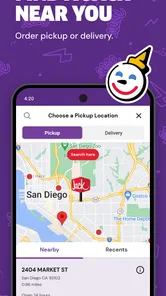
Yes. The app is designed to help you choose a restaurant and place an order, so selecting a nearby location is a practical first step. The ordering options and menu can depend on that restaurant, and availability may also vary by time of day. Check the selected location and the options shown in the app before proceeding.
Can I customize menu items or add special instructions in the app?
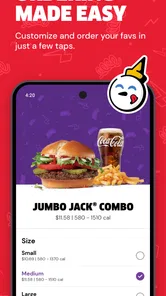
The app lets you browse menu items and build an order before checking out. What choices are available for customizing an item can depend on the menu and the selected restaurant, so review each item’s options as you add it to your cart. Before submitting your order, check the cart carefully to make sure the items and selections match what you want.
Is Jack in the Box® - Order Food available for my phone?
The app is available for Android and iOS devices, and its minimum operating system requirement is Android 7.1. It is a Food & Drink app from Jack in the Box Inc. If you are considering a download, check that your phone’s software meets the relevant store requirements and that you are selecting the official Jack in the Box® app.
What can I order through the Jack in the Box® app?
The Jack in the Box® - Order Food app lets you browse the restaurant’s menu and place orders for many popular items, including burgers, chicken sandwiches, tacos, breakfast foods, sides, desserts, and drinks. Menu availability can vary by location and time of day, so the app is useful for checking what your nearby restaurant currently offers before placing an order.
Can I use the app for delivery and pickup orders?
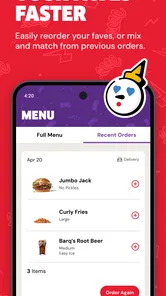
Yes, the app generally supports convenient ordering options such as delivery, pickup, and drive-thru pickup, depending on the services available at your selected Jack in the Box location. After entering your address or choosing a restaurant, the app shows the available options, estimated preparation times, fees, and any applicable minimum order requirements before you confirm.
Pros
- Quick mobile ordering for pickup or drive-thru
- Menu customization helps tailor burgers
- tacos
- and combos
- Order-ahead feature can reduce waiting at busy locations
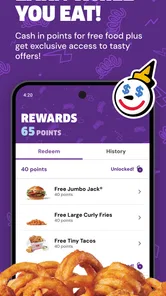
- Rewards and promotions may lower the cost of repeat orders
- Location finder shows nearby restaurants and operating hours
Cons
- Some menu items or deals may vary by restaurant
- Pickup timing can be inaccurate during peak hours
- App may require location access for nearby-store features
- Rewards and offers often include restrictions or expiration dates
- A stable internet connection is needed to place and track orders











