iSharing: GPS Location Tracker
- 2.13K
- 4.6
- Installs
- 10.00M
- Price
- Free

Screenshots
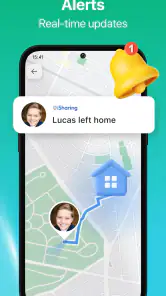
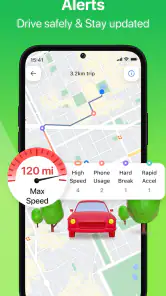
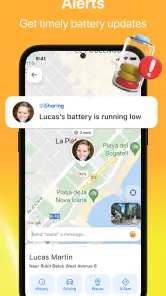

Analysis by Reviewed
For the first few days, a shared map can feel like a small everyday superpower: instead of asking “Where are you?” you can check whether someone is still on the way or has arrived. That immediate convenience is the strongest reason I’d try iSharing: GPS Location Tracker. The bigger question is whether everyone in the family or group will keep using it once the novelty wears off—and whether the reassurance is worth making location sharing a regular habit.
Where it earns a place in the first week
iSharing is a communication app from iSharingSoft, inc. built around seeing participating contacts on a map. I can see it being most useful for a household that already agrees to share locations, especially when plans involve several people arriving at different times. For example, if a parent is waiting for a child to finish an activity, a quick map check may be more convenient than repeatedly calling to ask whether they have left. That works best as a practical shortcut, not as a substitute for talking through plans.
Setup depends on the people you want to see joining in. Before inviting anyone, I’d explain what the group wants the app for and who will be able to view locations. That conversation matters: location sharing can feel reassuring when it is mutual and agreed on, but uncomfortable when someone feels pressured to participate. A useful first-week test is to try it for one specific routine, such as coordinating a shared trip, rather than turning on constant checking without a clear reason.
Connecting the Dots
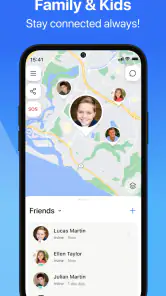
First things first, the iSharing: GPS Location Tracker is all about real-time location tracking. You know that feeling when you're waiting for a friend but have no idea how far they are? With this app, those moments are history. Once your buddies are on board, you can see their live locations on the map, making it super easy to plan meet-ups or ensure everyone gets home safely.
How It Works
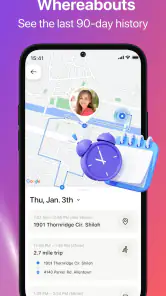
Now, you might be wondering how all this magic happens. It's pretty straightforward. The app uses your phone's GPS to pin down your location and then shares it with your selected contacts. Don't worry, though—privacy is a big deal here. You have control over who can see your whereabouts, and it's all about mutual sharing. Plus, the app has a handy location history feature, so you can keep tabs on where you've been without any fuss.
Safety First
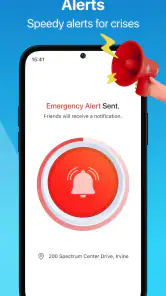
One of the standout features of iSharing is its focus on safety. There's a panic mode that lets you send an SOS alert with your location to your emergency contacts. It’s like having a safety net in your pocket. Whether you're traveling alone or just want a little extra peace of mind, this feature is a real lifesaver.
Easy Peasy Setup
Getting started with iSharing is a breeze. Just download the app, sign up, and invite your friends or family to join. The interface is user-friendly, and even if you're not tech-savvy, you'll find your way around in no time. The app is designed to be intuitive, so you won't have to deal with any unnecessary complications.
More From Our News Desk

Weather by Xiaomi Review: Clear at a Glance, Less Clear Up Close

X Under Pressure: Can It Recover When Posting Goes Wrong?

Clash of Clans Is Won Between the Battles

Android Auto Makes the Case for Quieter Car Software

MobiOffice: Transforming Mobile Productivity with Seamless Integration

EA SPORTS FC™ Mobile Soccer: Redefining Mobile Sports Gaming
A Few Fun Extras
Apart from the core tracking features, iSharing also throws in a few fun extras. You can send free text messages to your contacts through the app, making communication seamless. Whether you're organizing a meetup or just want to say hi, these little touches make the app feel more personal.
Keeping it useful after the novelty
For month-to-month value, I’d judge iSharing by whether it solves a recurring coordination problem, not by how often I open the map. If family members regularly travel separately or need to coordinate pickups, location checks and in-app messages can reduce needless back-and-forth. If everyone usually stays in one place or already communicates easily, the map may become an extra screen to maintain rather than a lasting help.
A small habit can make the arrangement feel less intrusive: agree on a narrow purpose, such as checking arrival during a commute, and avoid treating every map update as something that needs an explanation. Location history may be useful when someone wants to retrace a route, but it can also make sharing feel more sensitive. I’d make sure everyone understands how the group uses that feature instead of assuming that access to a map automatically means everyone is comfortable with every use.
Making a routine work in real life
A useful way to judge the app is to try it against a situation that happens repeatedly. Imagine a caregiver coordinating pickup after an activity while another family member is already on the way. Rather than sending several messages for updates, the people involved can check the shared map and use the in-app messaging when a plan actually changes. That division matters: the map can reduce status-checking, but a message is still better for saying “I’m taking a different route” or “Please wait inside.”
I’d also agree on what counts as a reason to check. One person might look when a late arrival is genuinely affecting a pickup; another might open the map whenever a contact moves. Setting a shared expectation before that habit forms helps keep a practical tool from becoming a running attendance check. For families with teenagers, that distinction can be especially important: being able to see a location is not the same as needing to comment on every stop.
Location sharing needs a clear agreement
The app’s value depends on participation, so invitations should be a conversation rather than a demand. A group can decide who belongs in the circle, what routine the map supports, and whether location history is useful to them. If a person no longer needs to share, the group should be able to revisit the arrangement without turning that choice into a conflict. I see this as practical maintenance, not a one-time setup step.
For anyone asking whether it is suitable for children, I would focus less on the label “family locator” and more on the child’s age, understanding, and the family’s reason for using it. The app is rated Everyone, but that rating does not settle how a household should handle privacy. Explain the purpose in plain language, limit the audience to the people who need the information, and use direct conversation for safety concerns that a moving dot cannot resolve.
Maintenance, trade-offs, and who should skip it
The main ongoing task is keeping the group useful and consensual: contacts need to participate, and people should be able to revisit whether sharing still suits them. GPS-based location sharing also relies on phones being available and able to determine location, so I wouldn’t treat a map as a guarantee of safety or as proof that someone is in immediate danger. The SOS option is a useful extra, but it doesn’t replace calling emergency services when urgent help is needed.
Compared with ordinary messaging, iSharing can answer “where are they?” more directly, while a call or text is better when you need context or a definite response. A phone’s built-in location-sharing option may suit people who want a simple, occasional share without adopting another dedicated app. I’d skip iSharing if the people involved don’t want ongoing location visibility, or if the group only needs to coordinate one-off meetups; a direct message is lighter in those cases.
There is also a middle ground between constant sharing and no shared map at all. If your group only needs to coordinate a single journey, a temporary share through a tool already on everyone’s phone may be less work. iSharing makes more sense when people expect the same coordination need to return and want a dedicated place for location checks and messages. The trade-off is another app for each participant to install, learn, and keep relevant to the group’s routine.
One practical tip is to test the arrangement with a single outing before relying on it for a daily commute. Confirm that everyone can find the right contact and understand what the map is showing, then decide whether it actually reduces calls or merely adds another thing to check. If the group still needs frequent “Are you there?” messages, the app may be helping with location but not with the underlying plan; clearer pickup times or a agreed meeting point could do more.
The app is free to download, is rated for Everyone, and has in-app purchases ranging from $2.99 to $129.99 per item. It has a 4.6 average from around 223,000 ratings, with over 10 million installs. Those figures suggest it’s widely used, but they don’t tell me whether its approach to sharing fits a particular household. I’d check the purchase options in the app before paying for anything and decide as a group whether the free experience meets the actual need.
Because there are in-app purchases, I’d treat the free starting point as a chance to see whether the basic routine is valuable before considering an upgrade. Don’t pay just because the group has installed the app: first identify what feature or limitation is prompting the purchase and whether every person who needs it benefits. This avoids turning a trial of location sharing into a recurring expense before the household has established that it will keep using the service.
How to keep the habit from becoming tiring
Location apps can lose their appeal in two opposite ways. Some people forget to open them because the household has settled into a predictable routine; others check so often that the map becomes a source of anxiety. I’d review the purpose after a few weeks: is it still easing a real coordination problem, or has the group started checking out of habit? If the answer is the latter, a smaller sharing circle or fewer check-ins may restore the balance.
Phone and network conditions can also affect how useful a location view feels. I would read it as a helpful indication, not a precise promise about where a person is at that exact moment. If a location appears unexpected or seems out of date, contact the person directly rather than drawing conclusions from the map. That small rule makes the app more useful and prevents a convenience feature from becoming a source of avoidable misunderstandings.
For someone living alone or traveling independently, the SOS feature may be appealing as an extra way to share location with chosen contacts. I would still decide in advance who those contacts are and make sure they know what to do if an alert arrives. An emergency tool is only as useful as the people and plan around it; the app cannot replace emergency services, a phone call, or a clear safety plan.
It was released on June 16, 2012, and version 12.10.8.1 requires Android 7.0 or later. That makes the Android requirement worth checking before inviting family members, particularly if someone uses an older device. My lasting verdict is that iSharing makes most sense when a small group has a clear, recurring reason to share locations and is comfortable maintaining that agreement. For that kind of routine, it can be genuinely handy; without mutual buy-in, the extra visibility is more burden than benefit.
In a world where staying connected is more important than ever, the iSharing: GPS Location Tracker offers a simple yet effective solution. Whether you're a parent wanting to keep tabs on your kids, or just someone who likes to stay connected with friends, this app has got you covered. It's all about peace of mind and staying in the loop without being intrusive. So go ahead, give it a whirl, and see how it fits into your daily routine. It might just become your new favorite app!
iSharing: GPS Location Tracker Frequently Asked Questions
Can I use iSharing to keep in touch with family members in different places?
Yes. iSharing is a communication app centered on sharing locations with friends and family, so it can help people stay connected while they are apart. Members can use its location-sharing and messaging features as part of a family’s routine. Before setting it up, it is sensible to talk together about when location sharing is useful and who should be able to see each person’s location.
What should I consider before sharing my location with someone?
Location sharing works best when everyone understands how it will be used and agrees to participate. Talk with friends or family about who can view locations and when sharing makes sense, particularly when children are involved. iSharing is designed for connection and family locating, but choosing who to share with is an important personal decision. Review the app’s privacy controls and use them to manage your sharing preferences.
Does iSharing include communication tools in addition to location sharing?
Yes. iSharing includes a messaging feature alongside its location-sharing tools, giving users a way to communicate with friends and family through the app. It also offers alerts for arrivals and departures, location history, and an SOS panic button. These features are intended to support staying connected and feeling more informed, though users should decide together which features suit their needs.
What devices and operating systems can run iSharing: GPS Location Tracker?
iSharing: GPS Location Tracker is available for Android and iOS devices. On Android, the current version is 12.10.8.1 and requires Android 7.0 or later, so it is worth checking your phone’s software version before downloading. Keeping the operating system and app updated can also help you use the location-sharing and communication features smoothly.
Who is iSharing designed for, and is it suitable for children?
iSharing is a communication app built around sharing locations with friends and family, including families who want to stay connected while apart. Its content rating is Everyone, and its store description presents it as a GPS phone tracker for finding kids and as a family locator. As with any location-sharing tool, users should discuss consent and agree on who can view each person’s location.
Pros
- Real-time location sharing.
- User-friendly interface.
- Low battery consumption.
- Customizable alerts.
- Cross-platform compatibility.
Cons
- Privacy concerns.
- Requires constant internet.
- Can drain data quickly.
- Occasional location inaccuracies.
- Limited free features.
- Category
- Communication
- Version
- 12.10.8.1











