IQ Booster: Brain Games & Test
- 282.00
- 4.5
- Installs
- 100.00K
- Price
- Free

Screenshots
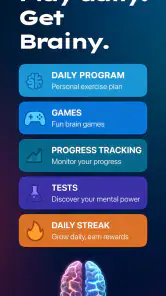
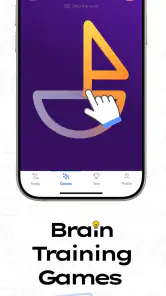
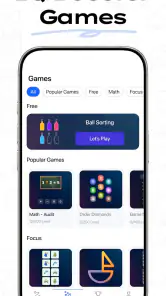
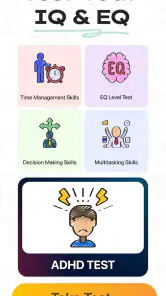
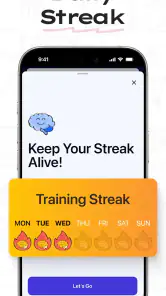
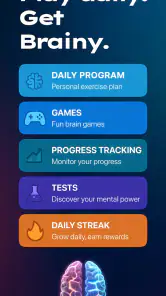
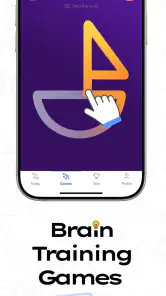
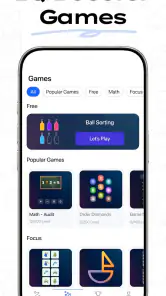
Analysis by Reviewed
I approached IQ Booster: Brain Games & Test as a short daily training app rather than a replacement for a classroom, a therapist, or a formal assessment. That distinction matters. Its appeal is simple: it gives me quick activities built around memory, attention, reasoning, emotional intelligence, and ADHD-related testing, all inside one education app. After spending time with it, I think its best quality is convenience. It is easy to open when I have a few spare minutes, and the variety helps prevent the routine from feeling completely repetitive.
The app is developed by HubX and is available free of charge, with optional in-app purchases ranging from $6.99 to $39.99 per item. It is suitable for Everyone, which makes the presentation approachable for a broad audience. The current version is 1.1.8, and it runs on Android 7.0 or later. Those details make it accessible to many older devices, although the experience still depends on how comfortably a particular phone handles quick visual tasks.
How I built a useful baseline routine
My first recommendation is not to treat every activity as a test of intelligence. I used the opening sessions to learn how the app presents its challenges, how quickly I needed to respond, and which types of exercise made me concentrate most. That baseline is more useful than chasing a flattering result on the first attempt. If I rushed through a memory task while distracted, the outcome said more about my attention at that moment than about my general ability.
A practical routine is to choose a consistent moment, such as after breakfast or before putting the phone away at night, and complete a small session without multitasking. I found that this made the app more valuable than opening it randomly during a busy day. A commute, a waiting room, or a short break can work too, but I would avoid playing while walking, talking to someone, or switching between messages. These exercises depend on attention, so divided focus creates a noisy baseline.
The most useful everyday scenario for me was a ten-minute pause between larger tasks. Instead of scrolling through social media, I could complete a few challenges and notice whether I was alert or mentally tired. I did not use the result to make a serious judgment about myself. I used it as a prompt to slow down, reset, and see which kind of activity felt difficult that day.
That approach also answers an important question: is this a genuine IQ assessment? I would not use it that way. The app can provide brain-training activities and tests that are interesting for self-observation, but a phone session is not the same as a professionally administered cognitive evaluation. Anyone needing a clinical, educational, or employment-related assessment should use an appropriate qualified service instead.
The range of topics is a clear strength. Memory exercises feel different from reasoning tasks, while emotional-intelligence and ADHD-oriented tests invite a different kind of reflection. I enjoyed that change of pace because it stopped the experience from becoming one narrow reaction-speed drill. At the same time, the variety means I had to be clear about my goal. If I wanted focused memory practice, jumping straight into unrelated sections made the routine less consistent.
More From Our News Desk

Clash of Clans Is Won Between the Battles

Android Auto Makes the Case for Quieter Car Software

MobiOffice: Transforming Mobile Productivity with Seamless Integration

EA SPORTS FC™ Mobile Soccer: Redefining Mobile Sports Gaming

How Microsoft OneDrive Became a Mobile Productivity Giant

How Google Translate Breaks Language Barriers Effortlessly
I eventually separated my sessions mentally into two modes. In the first, I explored whatever looked interesting. In the second, I repeated the same type of activity under similar conditions. Exploration is more entertaining, but repetition makes it easier to notice whether I am improving at a particular format or simply becoming familiar with its instructions. That distinction is one of the most useful habits an experienced user can develop with this kind of app.
What the first sessions reveal
The early experience is also a test of fit. Some people will enjoy the compact challenges and the immediate interaction. Others may find the activities too brief or too game-like, especially if they expected detailed lessons. I landed somewhere in the middle: I liked the low commitment, but I wanted to supply my own discipline because the app alone cannot turn occasional play into a meaningful long-term habit.
I also recommend reading each instruction carefully before trying to optimize speed. A common mistake is to assume that faster always means better. In memory and reasoning tasks, accuracy usually gives me more useful feedback than frantic tapping. Once I understand the rule, I can work on pace. This two-step approach reduces the chance that I am measuring confusion rather than cognitive performance.
Settings and choices worth checking before chasing results
Experienced users should spend a little time reviewing the app’s available choices before beginning a serious routine. I do not mean searching for secret tools; I mean checking the ordinary controls and preferences that affect comfort. Look at whether sound, notifications, reminders, or similar options are enabled, and decide what suits your day. A reminder can support consistency, but it can also become irritating if it arrives at a poor time.
Screen comfort is easy to overlook. I prefer a brightness level that makes symbols and text clear without glare, especially in the evening. I also keep the phone steady rather than playing with one hand while moving around. These adjustments sound minor, but visual strain and awkward tapping can influence performance. When a task depends on noticing small differences quickly, a comfortable setup is part of the method.
It is worth checking how the app handles optional purchases before settling into a routine. The download is free, but some items cost between $6.99 and $39.99. I would not buy anything simply because a result feels disappointing or because I want to progress faster. First, I would use the free experience long enough to decide whether the activities genuinely fit my habits. That makes the purchase decision practical rather than emotional.
The Everyone content rating makes the app approachable for families, but that does not mean every result should be interpreted without context. Younger users may see a score as a label, while adults may overread it as a diagnosis. I would frame the activities as practice and self-reflection. If a child or teenager is worried about attention, learning, memory, or emotional wellbeing, a conversation with a parent, teacher, doctor, or qualified professional is more appropriate than relying on an app result.
Another useful setting is the language and text presentation, where available on the device and in the app. Brain tasks depend on understanding instructions, so I would choose the language in which I can read quickly and accurately. If wording feels unclear, I would not treat the resulting performance as meaningful. That is especially important for tests involving emotional or attention-related questions, where subtle wording can affect the answer.
My rule is to keep the environment stable when comparing sessions. I use the same general time of day, similar screen brightness, and a quiet place when I want to compare how I am doing. I do not expect identical results, because mood and fatigue change. Still, controlling a few obvious variables makes the comparison less arbitrary.
Small shortcuts that improve the experience
The fastest improvement does not come from tapping harder. It comes from reducing friction before the activity begins. I close distracting notifications, place the phone where both hands are comfortable, and decide which category I want to work on before opening a session. That saves the first minute of indecision and keeps the exercise connected to a purpose.
I also avoid playing immediately after a frustrating task. If I am annoyed, I tend to answer too quickly and then blame the app for a result that reflects my mood. A short pause, a drink of water, or a few quiet breaths can make the next attempt more representative. This is a simple habit, but it is more reliable than repeatedly restarting until I receive a result I like.
For memory activities, I focus on the structure of what I see rather than trying to hold every detail as an undifferentiated picture. For reasoning activities, I read the rule twice before acting. For emotional-intelligence questions, I answer based on my usual response rather than the answer that sounds most admirable. These are not magic techniques, but they make the sessions more honest and reduce the temptation to game the outcome.
One non-obvious trade-off is that familiarization can look like improvement. Repeating a particular activity may make me quicker because I understand its format, not because my general memory or reasoning has transformed. That does not make repetition useless; it simply changes what the result means. I treat progress within one exercise as practice with that exercise, while broader improvement requires patience and activities that challenge me in different ways.
Faster patterns for people who want more than casual play
Once I understood the basic flow, I became more selective. Instead of opening the app and taking whatever appeared first, I chose one main goal for each session. A memory-focused day might include only memory-related challenges. Another day could be reserved for reasoning. This makes the short sessions feel less scattered and helps me remember what I was actually trying to improve.
I would not recommend creating a rigid schedule that turns a casual app into another obligation. A flexible pattern works better: several short sessions across a week, with enough space to avoid fatigue. The point is to build a repeatable habit, not to spend an exhausting amount of time chasing a score. If I notice that I am guessing, skipping instructions, or playing only to finish, I stop. More repetitions under those conditions add little value.
A useful workflow is to pair each session with a brief note in my own words. I might record the category, whether I felt alert, and what caused mistakes. I do not need a spreadsheet or a complicated tracking system. A simple note can reveal patterns that a single score cannot, such as consistently struggling when tired or performing better after a quiet break. This turns the app into a small self-observation tool rather than a source of isolated numbers.
The app’s mixture of cognitive activities and tests also creates a choice between entertainment and reflection. If I want a light mental break, I move between categories and accept that the session is recreational. If I want to learn something about my habits, I keep conditions steadier and avoid switching constantly. Neither mode is wrong, but mixing them makes the results harder to interpret.
Compared with traditional brain-training alternatives, the main advantage here is breadth and immediacy. A book of puzzles can offer deeper explanations and more deliberate problem-solving, while a classroom course can provide instruction and feedback from a person. A meditation app may help attention through a calmer method, and a formal assessment has a different purpose altogether. I see this app as the convenient middle ground: more interactive than a worksheet, less structured than a course, and far less authoritative than a professional evaluation.
That comparison also shows where it is not the right choice. If I wanted detailed lessons explaining why an answer was wrong, I would prefer an educational platform built around teaching rather than testing. If I wanted a serious evaluation of ADHD, emotional wellbeing, or cognitive ability, I would not rely on a general mobile app. If I disliked short challenges, the format would probably feel shallow no matter how polished the presentation was.
For users who enjoy competition, the temptation is to repeat an activity until the result improves. I think a better pattern is to set a stopping point before starting. For example, I can decide to complete a small number of attempts and then stop, whether the outcome is good or bad. This prevents the familiar loop of chasing a better score and protects the app’s role as a healthy break rather than a source of frustration.
How I handle the IQ, EQ, and ADHD sections
The labels deserve careful handling. I enjoyed the chance to explore different kinds of questions, but I do not treat an IQ-style result as a complete picture of intelligence, an EQ-style result as a final description of emotional ability, or an ADHD-oriented test as a diagnosis. These areas are complex and depend on context, history, and professional interpretation. The app can encourage curiosity, but it should not replace proper support.
My best use of those sections is as a conversation starter with myself. If I notice that I rush through instructions, lose focus in a quiet setting, or react differently depending on stress, I can reflect on those patterns outside the app. I do not turn one session into a conclusion. Repeated experiences may suggest questions worth discussing with a qualified professional, but they do not answer those questions on their own.
This is also where honest answering matters most. Choosing what seems like the “smart” or “healthy” response defeats the purpose of self-reflection. I answer as I usually behave, not as I wish I behaved. That can produce a less flattering result, but it gives me something more useful to think about afterward.
Advanced limits and the points where I would stop relying on it
The biggest limitation is interpretive, not technical. A score from a short phone activity can be influenced by sleep, stress, language, screen comfort, familiarity with the format, and simple luck. Even a consistent routine cannot remove all of those factors. I therefore use results as rough signals about the session, not as permanent measurements of my ability.
Another limitation is the risk of confusing engagement with learning. Quick challenges are satisfying because they provide an immediate task and response. However, enjoyment does not automatically mean that a skill transfers to school, work, relationships, or daily decision-making. I would combine the app with real activities: reading carefully, remembering errands without checking, solving unfamiliar problems, or practicing communication. The phone session can support a habit of attention, but life outside the app is where broader skills are tested.
There is also a practical cost consideration. Since the app is free to download but includes optional purchases, users should decide in advance whether the free experience is enough for them. I prefer to test the routine first and consider spending only if the additional content clearly matches a need I already have. Someone looking for a completely unrestricted free experience may find the purchase structure less appealing, while someone who values convenience may consider it reasonable after trying the basic version.
Older devices that meet the Android 7.0 minimum may be able to run it, but a minimum operating-system requirement does not guarantee identical comfort on every phone. Small screens, slower touch response, or aging batteries can make quick challenges less pleasant. I would judge the app by how reliably I can read and respond, not merely by whether it installs.
The app has reached over 100 thousand installs and holds a 4.5 average from around 5.1 thousand ratings, with roughly 282 written reviews. Those figures suggest that many users find the concept appealing, but they do not tell me whether it suits my particular learning style. I pay more attention to my own response after several calm sessions: do I look forward to opening it, do I understand what I am practicing, and do the activities help me build a useful habit?
One advanced boundary is knowing when to stop testing. If I am using the app to reassure myself repeatedly about a worry, more attempts may increase anxiety rather than provide clarity. In that situation, I would step away and seek a more appropriate source of help. The same applies if a result causes persistent concern about attention, memory, mood, or development. A responsible app routine includes the judgment to stop treating the phone as the answer.
My mastery verdict after using it as a habit
I recommend IQ Booster: Brain Games & Test to people who want a convenient collection of short mental activities and who can keep their expectations realistic. I like its broad mix, the approachable education focus, and the fact that it can fit into a small break without demanding a long study session. HubX has positioned it as an easy starting point for users curious about memory, reasoning, emotional intelligence, and attention-related tests.
My strongest recommendation is to use it with a repeatable workflow: choose a category, remove distractions, complete a short session, and reflect on the result without turning it into a verdict about yourself. Check the available settings for comfort, be cautious with optional purchases, and remember that familiarity with a task can imitate improvement. Those habits make the experience more informative and less frustrating.
I would skip it if I needed formal diagnosis, deep explanations, structured lessons, or guaranteed transfer to academic and professional performance. A specialist, a course, a book of challenging puzzles, or another focused tool may serve those goals better. I would also skip it if I tend to chase scores compulsively or interpret every result as a judgment of my worth.
For everyone else, the free entry point makes it easy to try without committing immediately. The age rating is broad, the operating-system requirement is relatively accommodating, and the optional purchase range is clear enough to consider carefully before spending. My final view is positive but measured: this is a useful pocket routine for curiosity and attention practice, not a scientific label-maker. Use it to train a habit of focused thinking, not to define your intelligence or diagnose your health.
IQ Booster: Brain Games & Test Frequently Asked Questions
What does IQ Booster: Brain Games & Test include?
IQ Booster: Brain Games & Test is an education app from HubX that brings together cognitive training games and tests focused on areas such as memory and reasoning. Its store summary also mentions EQ and ADHD tests. It may appeal to people looking for brief mental challenges, but test results should be treated as app-based feedback rather than a diagnosis or a definitive measure of ability.
What is IQ Booster: Brain Games & Test?
IQ Booster: Brain Games & Test is a mobile app designed to exercise memory, logic, attention, concentration, and problem-solving skills through short interactive challenges. It typically combines brain-training games with IQ-style tests and performance scores, allowing users to monitor their results over time. The app is better viewed as a source of mental exercises and entertainment rather than a scientifically definitive measurement of intelligence.
Is IQ Booster: Brain Games & Test free to download and use?
The app can generally be downloaded without an upfront charge, but some features may be restricted behind advertisements, in-app purchases, or a premium subscription. Before starting a trial or confirming a purchase, check the current pricing, renewal terms, and cancellation instructions shown on the Google Play Store or App Store. Availability of specific games and premium tools may also vary by device, region, and app version.
Can IQ Booster actually increase my IQ?
IQ Booster can provide regular practice in areas such as pattern recognition, arithmetic, memory, and speed, which may help you become more familiar with similar puzzle formats. However, completing brain games does not guarantee a permanent increase in measured IQ or broad improvements in every cognitive ability. Treat the scores as an indication of performance within the app, not as a professional psychological assessment or medical evaluation.
Does the app require an internet connection?
Some parts of IQ Booster: Brain Games & Test may work offline after installation, particularly basic games that are already stored on the device. Internet access may still be needed for advertisements, account synchronization, scoreboards, updates, premium verification, or downloading additional content. If offline access is important to you, test the app in airplane mode after installation and review its permissions and store description before relying on it while traveling.
Pros
- Offers varied puzzles for memory
- logic
- attention
- and problem-solving.
- Short sessions make it convenient for quick daily brain-training breaks.
- Progress tracking helps users monitor scores and personal improvement.
- Simple interface is easy to navigate for most ages and experience levels.
- Difficulty can provide a motivating challenge as skills improve.
Cons
- Some exercises may feel repetitive after extended use.
- Results are not a clinical measure of intelligence or cognitive health.
- Certain features or content may require in-app purchases.
- Ads can interrupt gameplay
- especially in the free version.
- Performance may depend on concentration
- screen size
- and device responsiveness.
- Category
- Education
- Version
- 1.1.8













