Inmigreat: USCIS Case Tracker
- 306.00
- 4.9
- Installs
- 100.00K
- Price
- Free

Screenshots


Analysis by Reviewed
When an immigration case is moving slowly, the hardest part is often not filling out a form. It is knowing what deserves attention today and what can safely wait. I tested Inmigreat: USCIS Case Tracker as a practical companion for that waiting period, focusing on the complete journey from entering a case to interpreting an alert and deciding what to do next. It is a free Tools app from Inmigreat LLC, aimed at people following USCIS and EOIR matters from a phone rather than repeatedly searching through official pages.
My first impression was that it is most useful as an organization layer, not as a replacement for the government systems themselves. That distinction matters. The app can make monitoring less scattered, but immigration decisions still depend on official notices, deadlines, and case instructions. I would recommend it to someone who wants a clearer routine for checking progress, especially when several cases or family members are involved. I would be more cautious about treating any tracker as the final authority.
The app is free to install and rated for Everyone, which makes the basic idea approachable for a broad audience. Its current version is 2.3.53, and it runs on Android 7.0 or later. Inmigreat has passed over 100 thousand installs and holds a 4.9 average from around 4.8 thousand ratings, so it is clearly being used by a substantial group of people rather than sitting unnoticed in the store.
From a case number to a usable daily routine
Starting with the right information
The starting condition is familiar: I have a receipt or case reference, I am waiting for movement, and I do not want to lose time checking several places manually. The first practical step is to enter the relevant case information carefully. This is where patience pays off. A single mistyped character can make an apparently inactive case look like a problem with the government system, when the real issue is simply the input.
I would prepare the receipt numbers and the names I use to distinguish them before opening the tracker. For a single case, a short label such as “work permit” or “family petition” is easier to recognize later than a string of letters and digits. For a household, consistent labels are even more valuable: use the person’s name followed by the case type, rather than relying on memory after several weeks.
This small naming habit is one of the less obvious ways to get more from a tracker. The app’s value grows as the list becomes easier to scan. A case-monitoring tool is not only about retrieving a status; it is about reducing the mental work of remembering which reference belongs to which process.
Reading the status without jumping to conclusions
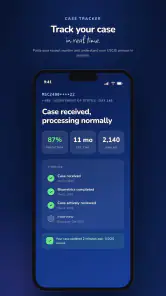
Once a case is added, the next step is to interpret what appears on screen. I found it helpful to treat the displayed status as a prompt for attention rather than a prediction. A status can tell me that something has changed in the case record, but it does not automatically explain the full legal meaning, the likely outcome, or what I should file next.
That is especially important for people who are new to immigration terminology. Familiar-looking phrases can still have narrow meanings, and a tracker cannot replace the wording of a notice sent by USCIS or the instructions connected to an EOIR matter. My workflow would be to use Inmigreat to notice movement, then open the official notice or official case source before making a decision.
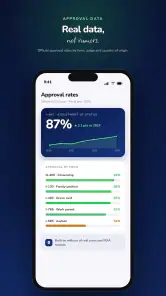
The app’s “your own stats” and “your place in line” angle is useful for context. Personal statistics can help turn an endless wait into something I can observe over time, while a place-in-line view may make a queue feel less abstract. I would use those tools to understand patterns and prepare questions, not to assume that a case will advance on a guaranteed schedule.
Turning alerts into action instead of noise
Alerts are the part that can change the daily routine most. Without a tracker, I might check manually whenever anxiety rises, which is both inefficient and emotionally draining. With a notification-based approach, I can check at a sensible time and reserve deeper attention for an actual change.
There is a useful trade-off here. An alert is valuable only when it leads to a clear next step. I would keep a simple note outside the app with the date of the alert, the status I saw, and any deadline stated in the official communication. That creates a basic audit trail and prevents the common mistake of reading a notification quickly, then forgetting what changed.
For a realistic everyday scenario, imagine a parent monitoring a petition and a work-related case while commuting and working full-time. Instead of searching each case every morning, the parent can use the tracker as the first checkpoint. If nothing changes, the routine ends quickly. If something does change, the parent can set aside time that evening to verify the details through the official channel and gather the documents needed for the next response.
Using the personal view to manage several cases
The strongest use case is not necessarily one person with one case. It is the household or representative who has several related matters to watch. The app’s personal statistics and line-position information become more meaningful when I need to compare progress without confusing one case with another.
I would still avoid comparing cases as though they were identical. Different forms, offices, categories, and procedural stages can produce very different timelines. A slower case is not automatically mishandled, and a faster case does not establish a promise for another one. The app can help me see that two cases are moving differently; it cannot, by itself, explain every reason why.
A practical workflow is to review the list once or twice a week, rather than repeatedly opening every entry. I would first look for alerts, then review the cases with recent movement, and finally check the oldest unchanged item. This order keeps the app focused on decisions and exceptions instead of turning it into another source of compulsive checking.
Where the handoffs matter
The important handoff happens between the app and the official immigration process. Inmigreat can be the place where I notice a change, but the government notice remains the place where I confirm what that change requires. I would never rely on a notification alone for a filing deadline, interview instruction, document request, or hearing-related obligation.
There is another handoff between the person monitoring the case and anyone helping with it. If I share an update with a family member, attorney, accredited representative, or trusted adviser, I would pass along the exact case label, the date I noticed the change, and a screenshot or official notice when appropriate. Saying only “the app says something happened” is too vague for a serious discussion.
This is where the app can quietly improve communication. A shared household often has one person checking messages and another person keeping documents. A clear case label and a dated update reduce the chance that an important change gets buried in a chat conversation. The tracker does not solve the legal work, but it can make the handoff less chaotic.
What the result looks like in practice
The best result is not a dramatic prediction. It is a calmer, repeatable process: I enter the case once, receive a signal when attention may be needed, compare the change with official information, and record the next task. That is a modest outcome, but it is exactly the kind of improvement that helps during a long wait.
The “place in line” view can also help me ask better questions. Instead of asking only when a case will finish, I can ask whether the displayed position is relevant to my particular process, whether a delay is normal for the category, and whether an official inquiry is appropriate. Those are more useful questions than trying to turn an estimate into a promise.
For people managing multiple filings, the result is even more practical. I can separate routine monitoring from urgent review, recognize which case changed, and avoid starting from zero every time I open my phone. That organizational benefit is the main reason I would install it.
Where the flow breaks
No tracker can remove the uncertainty built into immigration processing. The flow breaks when a user expects a status screen to explain a complicated procedural situation. A case may require context that is not visible in a short update, and a notification may be too compressed to guide a legal response.
The flow can also break through stale assumptions. If I see no new alert, I should not conclude that nothing matters. Official mail, account messages, hearing information, or a deadline can still deserve attention. Inmigreat is best used as one monitoring channel in a broader routine, not as permission to stop reading official communications.
Another limitation is that personal statistics can encourage over-comparison. Seeing other cases or a position in line may feel reassuring one day and alarming the next. I would treat those views as orientation tools. If they increase anxiety without changing what I do, they are not helping, and I would reduce how often I consult them.
There is also a financial detail worth noticing. The app is free, but optional in-app purchases range from $3.99 to $349.99 per item. That wide range means I would review any purchase screen carefully before confirming it, especially if I only need basic monitoring. A person who wants a simple single-case reminder should decide whether the free experience already meets that need before paying for anything.
How it compares with the usual alternatives
The usual alternative is manual checking through official USCIS or EOIR resources, plus email, paper mail, and a personal calendar. Those sources remain essential because they carry the authoritative instructions. Their weakness is convenience: I have to remember where to look, repeat the process, and organize several cases myself.
Inmigreat sits between those official sources and a personal spreadsheet. Compared with a spreadsheet, it is more naturally focused on case updates, alerts, personal statistics, and line-position context. Compared with manual checking, it offers a more consistent monitoring habit. Compared with professional legal advice, it is far less suitable for interpreting a complex notice or choosing a filing strategy.
My preferred setup would combine them rather than choose only one. I would use the app for visibility, the official source for confirmation, and a calendar or document folder for deadlines and evidence. That division of labor gives each tool a clear job and reduces the risk of treating a convenience feature as legal guidance.
Who should use it and who should skip it
I think it is a good fit for applicants, relatives, and case organizers who are tired of checking manually and want alerts in one place. It is particularly useful when several USCIS or EOIR cases need occasional monitoring, or when the person responsible for checking updates is not the same person handling documents.
I would also recommend it to someone who tends to forget when they last checked a case. The personal view and notification workflow can provide a simple rhythm, provided the user follows through by verifying meaningful changes. That last step is not optional; it is what turns a convenient alert into responsible case management.
I would skip it if I expect a tracker to provide legal advice, guarantee a processing date, or replace official notices. Someone with a highly complicated matter may get more value from speaking directly with a qualified immigration professional and using official case channels as the main reference. The app can support that process, but it should not be mistaken for it.
My final take after following the workflow
Inmigreat: USCIS Case Tracker succeeds when I use it as a calm front door to case monitoring: enter the reference, wait for a signal, inspect the change, verify it, and hand the result to the right person or task. Its alerts, personal statistics, and place-in-line view make the waiting period easier to organize, especially for households with more than one case.
Its limits are just as important. The app cannot turn an uncertain process into a fixed schedule, and its information should not outrank official notices or professional advice. I would install it for visibility and routine, then keep my documents, deadlines, and official confirmations in their own system.
With that realistic expectation, the app is a useful free tool for everyday monitoring. Its strong user response, broad adoption, and Everyone rating make it approachable, while the optional purchases mean I would inspect upgrade choices before spending. My recommendation is simple: use it to notice change, not to make the final legal judgment.
Pros
- Tracks USCIS case updates in one convenient dashboard.
- Supports multiple cases for monitoring family or group applications.
- Provides timely notifications when case statuses change.
- Simple interface makes checking immigration cases quick and easy.
- Useful case history helps users review previous USCIS status changes.
Cons
- It does not influence USCIS processing times or case decisions.
- Information may be delayed compared with updates on the USCIS website.
- Some features may require payment or an in-app subscription.
- Users must enter sensitive case details into a third-party service.
- It cannot replace official USCIS notices or advice from an immigration lawyer.

- Category
- Tools
- Version
- 2.3.53











