imo video calls and chat HD
- 36.76K
- 3.8
- Installs
- 10.00M
- Price
- Free

Screenshots

Analysis by Reviewed
I’d treat imo as a practical way to keep conversations with family and friends in one place, especially when some people prefer a video call and others would rather send a quick message. The appeal is straightforward: it brings calling and chat together without asking you to learn a complicated set of tools. In my experience, that simplicity matters most when you’re helping someone less confident with phones get connected.
What the free price does—and doesn’t—settle
imo video calls and chat HD is free to download, so trying its core communication setup does not require an upfront purchase. It also offers in-app purchases, with listed prices ranging from $0.99 to $199.99 per item. I would not assume those purchases are necessary for ordinary messaging or calls, or that paying automatically improves call quality; the sensible approach is to check what an item is before buying and decide whether it solves a need you actually have.
That makes the value question less about a subscription decision and more about fit. If the people you want to reach already use imo, having chat and calls together may be useful at no download cost. If they are settled on another messenger, persuading everyone to switch can be more trouble than the app saves. A free install is easy to test, but a communication app only becomes valuable when it connects you to the right people.
Before you invite everyone
I’d start with one person rather than asking a whole family or friend group to install another messenger at once. Pick someone who is comfortable testing a call, exchange a few messages, and see whether the basic routine feels natural to both of you. That small trial reveals the most important practical issue: not whether the app has a long feature list, but whether the person you actually want to contact can use it with you.
It is also worth agreeing on what the app is for. If you use it only for a particular group or for relatives who prefer video, people can keep their other messenger for the rest of their conversations. This avoids creating two competing places for every chat. I find that a limited, clear role is often a better reason to add a communication app than the hope that everyone will abandon their existing habits.
Easy Setup and User-Friendly Interface
Setting up imo video calls and chat HD is a breeze. You download it, register your phone number, and boom, you’re ready to go. The interface is intuitive and straightforward, making it perfect for tech-savvy users and tech newbies alike. I appreciate an app that doesn’t require a degree in computer science to navigate, and imo delivers precisely that.
Crystal Clear Video Calls
Let’s talk about the video call quality because, honestly, it’s what sets imo apart from the crowd. The app offers HD quality video calls, which means you can see every little detail as if the person is right there in front of you. It doesn’t matter if you’re chatting with someone across town or across the globe; the video remains sharp and clear. This is a massive plus for anyone tired of pixelated video calls that make it hard to recognize the person on the other side.
You May Like

Clash of Clans Is Won Between the Battles

Android Auto Makes the Case for Quieter Car Software

MobiOffice: Transforming Mobile Productivity with Seamless Integration

EA SPORTS FC™ Mobile Soccer: Redefining Mobile Sports Gaming

How Microsoft OneDrive Became a Mobile Productivity Giant

How Google Translate Breaks Language Barriers Effortlessly
I’d still treat “HD” as a capability, not a promise that every call will look perfect. A weak connection, a busy network, or a low-quality camera can affect what either person sees. For an important call, I’d first check that the other person can hear me and that the connection is stable, rather than assuming the app can overcome every network problem. If video becomes choppy, switching to audio or sending a message is a practical fallback.
Making calls work for everyday moments
A realistic use for imo is a quick check-in with a relative who is not nearby: send a message to ask whether they are free, then move to a call if a text would be too slow or impersonal. It is a small but useful workflow because it avoids making every conversation a video call. If the other person is busy, they can reply when convenient; if they are available, you can see and hear one another without arranging a formal meeting.
For a family member who needs help with a phone, I’d keep the first call simple. Ask them to open the app before the agreed time, then guide them through the contact or call screen slowly. Once they have completed that routine with one familiar person, the next call is less intimidating. That is where a straightforward interface can be more valuable than a larger collection of tools: fewer choices can make the first successful conversation easier.
Video is not automatically the best choice for every check-in. If you are calling from a noisy place, need to keep your attention on something else, or only have a short detail to share, a message or voice message may be more considerate. I would also avoid starting a video call when the other person has not had a chance to respond to a quick note first, especially if they may be at work or in transit. The option to move between chat and calling is useful, but good timing still matters.
Seamless Chat Experience
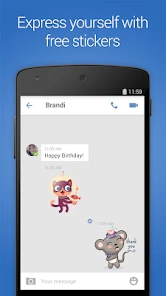
Texting on imo is a delight. The app’s chat feature is quick and responsive, with no noticeable lag. You can send texts, photos, videos, and even voice messages with ease. Plus, imo supports group chats, so you can keep up with all your friends and family in one place. It’s like having your own personal chat hub, and I love how it keeps everything organized and accessible.
Group chat is particularly handy for a family trying to settle everyday plans: one person can send a time change, another can reply with a voice message while walking, and someone else can share a photo instead of explaining what they mean. My useful tip is to agree on one group for a specific purpose, such as coordinating a visit, rather than letting every conversation drift into a single crowded thread. That small habit makes it easier to find the message that matters when plans change.
Using group chats without losing the important detail
In a busy group, I’d put the key information in a plain, direct message rather than relying on a long back-and-forth to make it clear. For example, when arranging a visit, send the place and time together, then use replies to settle smaller questions. A photo can help explain which entrance or item you mean, while a voice message can be quicker when typing is awkward. The trade-off is that a fast-moving thread can bury those details, so a group works best when its purpose is easy to understand.
If one person is not comfortable typing, voice messages give them another way to participate without requiring a live call. That can be more convenient than asking everyone to join at the same moment, particularly when schedules do not line up. On the other hand, voice notes are not ideal when someone needs to scan information quietly or retrieve a precise time later. For practical arrangements, I’d pair a short voice explanation with a written detail that people can find at a glance.
Compared with the usual alternatives, imo’s appeal is its combination of direct messaging and calls in one familiar place. A separate video-calling app may suit people who mainly need scheduled meetings, while a messenger already used by everyone in your circle may be the easier choice for casual updates. I would choose imo when the people I need are reachable there and I want a simple route from a text exchange to a call—not just because another app claims to offer video.
When another communication app may fit better
The right alternative depends on what your conversations look like. If your circle already shares a messenger and mainly sends brief updates, staying there can be simpler than moving everyone. If you regularly need structured work meetings, use an option designed around that routine rather than expecting a personal messaging app to replace it. I’d consider imo for informal contact with people who are willing to use it, not as a universal replacement for every chat and call service.
That distinction matters when you are deciding whether to install it for a group. A new app can be worthwhile if it solves a specific problem—for instance, making it easier to see a relative while keeping everyday messages nearby. It is less worthwhile if the same people already call comfortably elsewhere and there is no clear reason to maintain another inbox. The free download makes trying it less of a financial commitment, but it does not remove the social effort of getting contacts on board.
Data Efficiency
One of the standout features of imo is its data efficiency. The app is optimized to use less data during calls and chats, which is a blessing for anyone who doesn’t have unlimited data. You can chat and call without constantly worrying about eating up your data plan. It’s these little details that make using imo such a joy.
Even with that efficiency, video is still a more demanding choice than a short text, so I would use chat when I only need to share a quick detail and save a call for when seeing or hearing someone adds something. That is useful on a limited mobile plan, during a commute, or when reception is uneven. If you are comparing data use closely, check your own device’s usage after a normal call; your connection and call habits matter more than a general promise of efficiency.
Small habits that make the app easier to live with
If you are watching mobile data, use a short test call under the conditions where you expect to use the app. A call on home Wi-Fi may not tell you how it feels on a mobile connection, and a video call is a different choice from sending a couple of messages. I’d pay attention to whether you can hear the other person comfortably and whether the conversation stays smooth enough to be useful, then decide when video is worth using.
For relatives who are new to messaging apps, a familiar contact name and a simple expectation can help: tell them who will call and roughly when, rather than leaving them to interpret an unexpected ring. For group use, keep the group’s name and purpose clear to its members. These are small organizational choices, not special features, but they reduce confusion and make the app more approachable for people who do not enjoy experimenting with phone settings.
Who I’d recommend it to
I can see imo working well for relatives who live far apart, friends who like spontaneous calls, and people who want voice messages as an alternative to typing. It is also approachable for someone who does not want a feature-heavy interface just to check in. Baby Penguin develops the app, which is categorized as communication; its Teen age rating is worth noting if you are choosing apps for a younger family member.
I’d skip it if your contacts are committed to a different service, if you need a specialized work-meeting setup, or if you want to avoid registering with a phone number. The setup described here uses a number, so that is a real consideration before inviting people in. Also, an app’s listed average rating of 3.8 from around 132,000 ratings and over 10 million installs suggests a sizable audience, but popularity alone cannot tell you whether it will suit your contacts or your network. The current version is 9.8.000000011435, and it runs on Android 5.0 or later.
Cost, age rating, and the practical decision
The free starting point makes imo easy to test, while optional in-app purchases mean it is sensible to pause before spending. I would first use the app for the conversations I actually need and only consider a purchase if its purpose is clear to me. Prices for individual items span from $0.99 to $199.99, so I would inspect the item and its cost carefully rather than treating the presence of purchases as a reason to pay. The free download alone is not a guarantee that every possible option has no cost.
The Teen age rating is another reason to make the choice deliberately when setting up a younger person’s device. I would consider who they plan to contact and whether this is the communication app your family wants them to use, instead of assuming that a familiar interface settles the decision. For adults, the same basic question applies in a different way: does the app make it easier to reach the people who matter, and are you comfortable with its phone-number-based setup?
That is also the best way to judge the ratings and popularity. A broad audience can make it more likely that someone has heard of the app, but it does not guarantee that your own contacts are there or that calls will suit your network. I would use the numbers as context, not as a substitute for trying a short conversation with the person I expect to contact most often.
For everyday use, I would try a short call with one trusted contact first, then see whether the sound, picture, and chat flow feel comfortable on your connection. That answers the practical question better than judging video quality from a label. If the trial works and your circle is willing to use it, the free entry point makes imo easy to consider; if you need a different audience or more specialized tools, another communication app may be a better fit.
In conclusion, imo video calls and chat HD is more than just another communication app. It’s a comprehensive solution for anyone who wants to stay connected without sacrificing quality or simplicity. Whether you’re catching up with family overseas or coordinating with colleagues, imo has got you covered. So why wait? Give it a try and see how it transforms your digital communication experience!
imo video calls and chat HD Frequently Asked Questions
Can I use imo video calls and chat HD to contact people who do not use the app?
imo video calls and chat HD is built for messaging and video calls with family and friends through the app. To use those communication features, the people you want to reach will need a way to connect with you on imo as well. If your contacts already use it, the app can serve as a shared place for conversations and calls.
What should I consider about calls and messages before downloading imo video calls and chat HD?
imo video calls and chat HD is a communication app for messaging and video calls, so its usefulness depends on whether it fits the way you want to stay in touch. The app’s summary highlights HD calls with family and friends. Consider your usual calling habits and whether the people you communicate with are ready to use the same app before installing it.
What is the current version of imo video calls and chat HD?
The current version of imo video calls and chat HD is 9.8.000000011435. If you are deciding whether to install it, check the version shown for your device and make sure your operating system meets the app’s requirements. Keeping an app updated can also help you use its current release, so review available updates through the app store you use.
Does imo video calls and chat HD need an account to get started?
Yes. To use imo video calls and chat HD, you need to set up an account so you can connect with family and friends and keep your conversations associated with your profile. The app is designed around messaging and calls rather than anonymous browsing, so be ready to complete its sign-in or registration steps before you start chatting.
What features does imo video calls and chat HD offer?
imo video calls and chat HD offers a variety of features, including high-definition video calls, group chat options, multimedia sharing capabilities, and end-to-end encryption for secure communications. Users can enjoy a seamless experience with cross-platform support, making it easy to connect with friends and family across different devices.
Pros
- High-quality video calls
- User-friendly interface
- Low data consumption
- End-to-end encryption
- Cross-platform support
Cons
- Limited group call size
- Ads can be intrusive
- Occasional connection issues
- Requires stable internet
- No advanced features

- Category
- Communication
- Version
- 9.8.000000011435













