ID Photo - Easy ID Maker
- 76.00
- 3.7
- Installs
- 5.00M
- Price
- Free

Screenshots
Analysis by Reviewed
When I need an ID-style portrait without arranging a trip to a photo shop, I want a tool that makes the basic steps clear and lets me check the result before I use it. ID Photo - Easy ID Maker is a free photo tool from Share Any, aimed at that practical job as well as creating artistic portraits. Its appeal is convenience, though I would still treat the finished image as something to verify carefully rather than assume it meets every official requirement.
A sensible first pass, from camera to crop
The sensible routine is to choose the kind of document or portrait you need, take a fresh photo or pick an existing one, then review the crop and background before saving. A plain, evenly lit wall and a camera held roughly level with your face make a better starting point than trying to fix a difficult photo later. I’d take a few options before opening the editor; small differences in expression, shadows, or hair placement can matter more than another round of cropping.
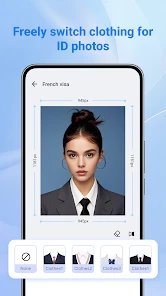
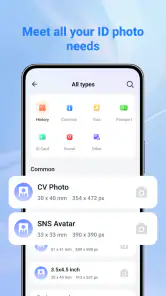
The app supports different ID-photo formats, and its background-removal tool can help when the original setting is distracting. That is useful for a quick application photo, but automated cutouts can struggle around loose hair, glasses, or clothing that blends into the background. Zoom in on the edges before deciding the result is ready. For official documents, check the relevant authority’s current rules as well: a correctly sized crop does not automatically mean every requirement has been met.
Before editing, make the source photo easier to work with
I get better results by treating the camera step as part of the editing workflow, not as something the app can fully repair afterward. Face a window for soft light, keep the background visually simple, and avoid a pose that hides the outline of your head. If you are taking several photos, change one thing at a time—position, lighting, then expression—so it is easy to tell which image gives the editor the cleanest edges.
This matters most when the finished picture will be judged at small size. A crop can look convincing on a phone while a faint shadow or an uneven cutout becomes obvious when printed or viewed closely. I would check the image at normal size and zoom in briefly around the hairline, ears, and shoulders. If the source photo has a strong shadow or motion blur, starting again is usually a better use of time than hoping the background tool will hide it.
First Impressions
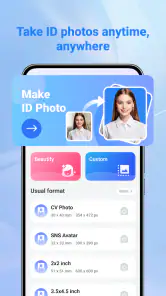
From the get-go, ID Photo - Easy ID Maker impresses with its user-friendly interface. It’s like the app holds your hand and guides you through each step of the photo-making process. Whether you’re tech-savvy or a complete newbie, you’ll find yourself breezing through the menus with ease. The design is sleek, modern, and intuitive, making navigation a piece of cake. And let’s face it, nobody wants to fiddle around with complicated settings when all you want is a quick photo solution.
Formats are helpful, but the choice still matters
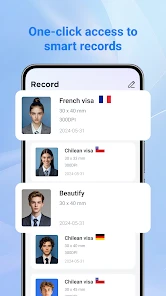
One of the app’s standout features is its ability to support a variety of ID photo formats. Whether you need a passport, visa, driver’s license, or student ID photo, this app has got you covered. You simply select the country and type of ID, and the app automatically adjusts the photo to meet the specific requirements. How cool is that?
More From Our News Desk

Clash of Clans Is Won Between the Battles

Android Auto Makes the Case for Quieter Car Software

MobiOffice: Transforming Mobile Productivity with Seamless Integration

EA SPORTS FC™ Mobile Soccer: Redefining Mobile Sports Gaming

How Microsoft OneDrive Became a Mobile Productivity Giant

How Google Translate Breaks Language Barriers Effortlessly
Another feature worth mentioning is the automatic background removal. This tool works like a charm, saving you the hassle of finding a plain background for your photo. The app’s algorithm is impressively accurate, giving you a professional-looking photo without the professional price tag.
That preset selection is convenient, but I would not choose a format just because its label sounds close enough. Document rules can vary, and they can change, so I use the country and document selection as a starting point, then compare the result with the current instructions for the application I am actually completing. If the app’s available option does not clearly match the destination, I would pause rather than force a near match.
There is also a useful distinction between making a portrait look tidy and making it officially compliant. Automatic background removal can improve a cluttered scene, but it cannot correct every issue in the original pose, expression, lighting, or clothing. I would use the tool to prepare a candidate image, not as a substitute for checking the authority’s requirements or for a professional photo service when the consequences of rejection are significant.
Settings that deserve a second look
Before saving, I’d check the selected country and document type rather than relying on the first option that looks close. If you are preparing pictures for two different purposes, make each as a separate job and inspect both outputs; one crop should not be assumed to suit another document. The useful habit is to compare the on-screen framing with the destination’s stated photo rules, especially head position and background expectations.
For a photo you may need to print, keep the original image as well as the edited version. That gives you a fallback if the crop needs adjusting or an office asks for a different format. Saving a clean source portrait also avoids repeating the photo-taking step if you later need another version. This is a simple workflow choice, not a reason to skip checking the final file.
I would also check what the output is meant to do before deciding it is finished: a digital application and a paper form may call for different handling. Keep the edited result separate from the camera original, and give the files clear names that distinguish the intended document. That small bit of housekeeping prevents an easy mistake later, especially if you create more than one crop from the same portrait.
If the app offers a choice you do not understand, I would not guess based on appearance alone. A familiar-looking size or background does not necessarily mean it is the right specification for a particular authority. The safest routine is to confirm the destination’s instructions first, make the closest appropriate version, and then inspect the saved image itself rather than assuming the preview tells the whole story.
Faster habits for repeat use
A realistic use case is a last-minute school form: take a portrait near a bright window, avoid direct sunlight that creates hard shadows, choose the relevant ID style, and check the face edges after background removal. If the first image looks uneven, retaking it is often quicker than trying to repair glare or a strong shadow in the editor. For a household that occasionally needs different ID pictures, doing the photography in one calm session and editing each person separately can be less stressful than rushing one image at a time.
The app is most useful when you already have a clear idea of the document and need a convenient way to prepare a portrait. Compared with a general photo editor, its ID-focused workflow can reduce fiddling with crops; compared with a photo shop, it avoids a trip and gives you immediate control. The trade-off is that a shop may provide a more dependable result when strict compliance or professional guidance matters. Artistic portraits are a separate use: I’d treat them as a creative extra, not as evidence that an edited image is suitable for an official application.
For repeat use, the time saver is preparation rather than hunting for a hidden shortcut. I would take the portraits in one session, keep the originals together, and process each person’s image as its own task. That makes it easier to notice when a crop or background has been applied to the wrong picture. It is also a practical way to avoid retaking a good source photo just because another family member needs a different document format.
For a solo user who only needs one portrait, the app’s speed is most valuable when the source image is already suitable. For a parent preparing photos for a form, the benefit is being able to handle the task at home and check each result at their own pace. But if the deadline is tight and a rejection would cause a serious problem, convenience may not outweigh the reassurance of asking a photo shop to produce and review the image.
Where the convenience stops
It has an average rating of 3.7 from around 4,000 ratings, and has been installed over 5 million times. It is rated for Everyone, with a minimum Android version of 7.0, and the current version is 1.5.9. The free download is easy to try, while in-app purchases range from $3.99 to $15.99 per item, so I’d check any purchase screen carefully before committing. Share Any released it on April 16, 2024, and the app has 76 written reviews.
I would recommend it to someone who wants a quick, phone-based starting point for routine ID portraits and is willing to inspect the result. I would skip it if you need guaranteed acceptance, cannot retake a photo with better lighting, or would rather have a professional check the framing. The most important limitation is not the convenience of editing but the gap between preparing an image and knowing an authority will accept it.
There is a practical cost question too: the app is free to download, but some items are offered as in-app purchases. I would begin with the basic workflow and only consider paying if a specific option is clearly useful for my task. Since the need is often occasional, it is worth deciding in advance whether a paid addition would solve a real problem or whether a well-lit source photo and careful checking are enough.
This is also not the best choice for every kind of portrait work. If you want detailed retouching, precise manual control over every edge, or a polished creative edit, a dedicated photo editor may suit you better. If you need a photo that must meet strict official rules and do not want to judge the crop yourself, a professional service is the safer alternative. The app’s strongest case is the middle ground: routine preparation at home, with the user staying responsible for the final check.
Using it without mixing up the result
One question people often have is whether an existing picture can be used instead of taking a new one. It can: the workflow allows you to choose an image already on the device. That is handy if you have a recent, clear portrait, but I would still check that the face is evenly lit and framed appropriately. A casual photo that looks fine in a gallery may have a tilted angle, a busy background, or shadows that become distracting once cropped.
Another sensible question is whether a prepared image is guaranteed to pass. I would not treat it that way. The selected format and editing tools can help create a suitable-looking file, but acceptance depends on the rules of the organization receiving it and on details the editor cannot necessarily fix. For high-stakes documents, check the current instructions and use a professional service if you are unsure about the requirements.
People also ask whether the app is only for official documents. It has a creative side through AI artistic portraits, which gives it a use beyond document preparation. I would keep those purposes separate: an artistic result can be fun to make or share, but it is not automatically appropriate for an ID application. If I only wanted elaborate portrait effects, I would compare it with an editor focused on creative styling rather than choosing an ID tool for that alone.
On the practical side, I would save the finished image to the device and then check the saved copy, not just the editing screen. That confirms I am looking at the version I intend to submit or print. Keeping the original nearby gives me a way back if I spot a poor edge, choose the wrong format, or need to produce a separate version. This habit is especially useful when making several portraits in one sitting.
Ease of use in everyday hands
The app is incredibly easy to use. You just take a photo with your phone’s camera, or upload an existing image, and let the app do the rest. It will guide you through cropping and adjusting the image to ensure it meets the necessary standards. Plus, it offers built-in tips to help you achieve the best results. It’s like having a personal ID photo studio right in your pocket!
That guided approach is a good fit for someone who does not want to learn a full editing program just to prepare one headshot. I would still describe it as assistance rather than automation: choosing the right document type, judging whether a cutout looks clean, and checking the final requirements remain part of the job. The less time you spend correcting a poor original, the more useful that simple flow becomes.
And for those who worry about privacy, rest assured that this app doesn’t store your photos. Once you’ve got your ID photo perfect, you can save it directly to your device. Security and convenience? Yes, please!
A measured verdict for a small but useful job
So, is ID Photo - Easy ID Maker worth downloading? Absolutely! It’s perfect for anyone who needs quick and easy ID photos without the fuss. The convenience, combined with the app’s smart features, makes it a must-have tool. Whether you’re traveling, renewing a license, or just need a photo for an application, this app has you covered. It’s like having a magic wand for ID photos right on your phone.
If you’re tired of paying for overpriced, subpar ID photos, give this app a try. It’s a game-changer. With just a few taps, you’ll have a perfect ID photo ready to go. Trust me, you’ll wonder how you ever managed without it!
My more measured recommendation is to see it as a convenient preparation tool, not a guarantee or a replacement for every photo service. It makes the most sense when you have a decent portrait, know what kind of image you need, and are comfortable checking the final result. If those conditions fit, it can save effort; if they do not, a general editor or professional help may be the better call.
ID Photo - Easy ID Maker Frequently Asked Questions
Can I print my finished ID photo at home or at a photo shop?
ID Photo - Easy ID Maker is intended to help prepare ID photos, so it may be useful when you want to save an edited image and print it later. You can make basic edits and save photos to your device, giving you the option to use a home printer or take the image to a photo shop. Check the final layout and print dimensions before using the photo for an official document.
Do I need photo-editing experience to use ID Photo - Easy ID Maker?
No specialist editing experience is needed to get started. The app presents its photo tools through a user-friendly interface, with options for tasks such as cropping, background removal, and image enhancement. These features can make preparing a simple ID-style portrait less intimidating for first-time users, although it is still worth checking the finished image carefully before relying on it for an application.
Does ID Photo - Easy ID Maker include AI portrait tools?
Yes. Alongside its ID-photo tools, ID Photo - Easy ID Maker is described as a tool for creating AI artistic portraits. This gives the app a broader purpose than preparing document photos alone, and may appeal if you also want to experiment with stylized portrait images. The ID-photo workflow and artistic portraits serve different needs, so review the result you create before deciding how to use or share it.
What features does ID Photo - Easy ID Maker offer?
ID Photo - Easy ID Maker provides a range of features aimed at simplifying the process of creating ID photos. Users can choose from various ID photo sizes suitable for passports, visas, and other official documents. The app also includes tools for background removal, image cropping, and enhancement to ensure your photo meets the required standards. With a user-friendly interface, even those unfamiliar with photo editing can easily navigate and use the app.
Is ID Photo - Easy ID Maker free to use?
ID Photo - Easy ID Maker is free to download, with in-app purchases offered for additional options. The free version provides basic functionalities such as standard ID photo sizes and basic editing tools. Some advanced features may require a purchase, so review the available options in the app before choosing what suits your needs and budget.
Pros
- User-friendly interface for easy navigation
- Quick processing of ID photos
- Supports multiple ID formats
- High-quality photo output
- Includes editing tools for customization
Cons
- Limited free features
- In-app purchases required for some formats
- Occasional ads may disrupt usage
- Requires internet for some functions
- Not optimized for all device types

- Category
- Tools
- Version
- 1.5.9