Hume Health
- 4.65K
- 4.3
- Installs
- 1.00M
- Price
- Free

Screenshots
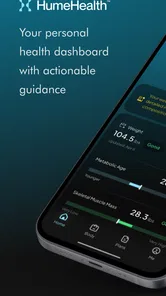
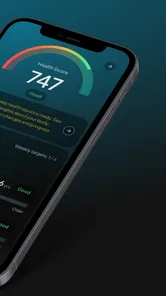
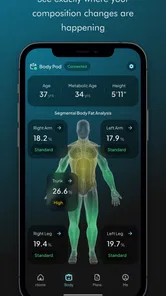
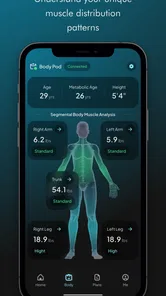
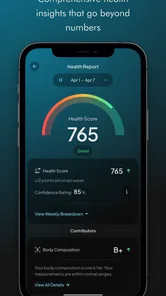
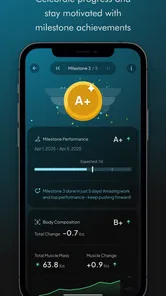
Analysis by Reviewed
I’d treat Hume Health as a shared household tool only when the person using it is clear about whose health information is being recorded. It is a free tools app from Hume Health Corp, designed to work alongside the Hume Band and Hume Body Pod, with a focus on weight and longevity tracking. In a home where one person owns the compatible device, the app may help make their routine easier to follow, but that does not automatically make it a good shared account for everyone.
One household, different health routines
A realistic use might be a person checking their progress after a morning weigh-in, then using the app to keep a longer view of their habits rather than reacting to one day’s result. A partner or housemate might be curious about the device, but I would keep the tracking tied to the individual whose measurements are being collected. Mixing people’s records can make trends harder to interpret and may undermine the point of following personal changes over time.
This is where the app’s specific hardware focus matters. If nobody at home has a Hume Band or Hume Body Pod, it is less compelling than a general wellness app that can be used on its own. I would decide first whether the Hume device is already part of the household routine; the app makes more sense as its companion than as a standalone reason to change how everyone tracks health.
Set expectations before sharing a device
Before another person tries a household device, I’d agree on whose account and routine they are using rather than assuming that one login will neatly separate several people. I would also avoid treating a shared screen as permission to browse someone else’s health history. That is a practical boundary, not a claim about special family controls: each person should know what is being recorded and who can see it.
For anyone comparing this with a basic scale or a notes app, the trade-off is straightforward. A basic scale gives a quick reading without asking you to maintain an app routine, while Hume Health is aimed at people who want a connected record associated with its own devices. The extra tracking is useful only if you actually return to it; if you prefer occasional, private measurements, a simpler option may suit you better.
Coordinate without turning tracking into pressure
In my view, household coordination works best when it means supporting someone’s routine, not checking up on them. You could agree on a convenient time to use a device or give one another space to follow personal goals. If more than one person is interested, make the arrangement explicit instead of assuming the app will manage everyone’s participation for you.
A useful habit is to look at a pattern rather than letting one measurement dictate the day. That is especially sensible for a tool focused on weight and longevity: a single check-in is not a verdict on someone’s health. I’d use the app as a prompt to notice consistency and to support conversations with a qualified professional when needed, not as a diagnosis or a replacement for medical advice.
More From Our News Desk

 Lark Player:Music Player & MP3
Switching to Lark Player: A Better Fit for Music Stored on Your Phone?
Lark Player makes sense if your music already lives on your phone. Here is what changes, what does not transfer by assumption, and how to test the switch without regret.

 Tile Master® - Matching Game
Tile Master Finds Its Place in the Gaps of a Noisy Phone
OS changes rarely transform a tile puzzle, but they reshape the small rituals around it. Tile Master’s appeal lies in how well its brief, tactile rounds fit the modern phone.

 Google Docs
 Shows What Mobile Writing Still Gets Wrong
Google Docs still makes a strong case for the shared document, but its real significance is how it exposes the gap between cloud convenience and genuinely capable mobile work.

 YouTube Studio
 Is Becoming a Creator’s Daily Control Room
As publishing turns into a daily, data-led habit, YouTube Studio is becoming the control room creators reach for between uploads—not another tool for making videos.

 Tiles Hop Music & Ball Game
Tiles Hop Review: When the Beat Is Clear, Every Miss Counts
Tiles Hop turns a simple bouncing-ball premise into a sharp test of timing. Its best design is immediate and readable; its weakest moments come when recovery feels less clear than the beat.

 Piano - Music Keyboard & Tiles
: Inviting Rhythm, Unproven Recovery
A tile-tapping piano game lives or dies by timing. This resilience-focused review separates what its format promises from what players still need to verify.
Latest News



Age, trust, and personal boundaries
The app is rated for Everyone, so its age rating is broad, but I would still make an adult responsible for decisions about a child’s health tracking. Young people may need help understanding why a measurement is being recorded and who can see it. A general content rating does not settle those household questions, and I would not use the app to police a child’s body or eating habits.
For adults sharing a home, trust is just as important. Health records can feel personal even when the household is close, so I’d ask before looking at another person’s information and keep any shared discussion supportive. If the goal is simply to encourage each other to build routines, conversation may be more useful than comparing numbers.
Using Hume Health in a real routine
So, I recently got my hands on the Hume Health app, and let me tell you, it's like having a personal health guru right in your pocket. If you're on a journey to better health—or just trying to keep up with your New Year's resolution—this app might just be your new best friend. Let me dive into the details and share my experience with you.
First Impressions and User Interface
Upon launching the app, I was greeted with a sleek and intuitive interface. The design is minimalistic, which I appreciate because it keeps things simple and straightforward. You won’t find any unnecessary clutter here. Everything is where you expect it to be, making navigation a breeze.
The app opens up with a dashboard that summarizes your health data. This includes your daily steps, heart rate, and sleep patterns. It’s like a snapshot of how your body’s doing without any of the technical jargon. I found myself checking it several times a day just to see how I was doing.
Features That Stand Out
One of the coolest features of this app is the personalized health insights. Hume Health analyzes your data and offers tips that are tailored just for you. It’s like having a health coach who knows exactly what you need. For example, the app noticed when I wasn’t getting enough sleep and suggested some bedtime routines to help me wind down.
Another standout feature is the meal tracker. It’s super easy to log what you eat, and the app provides nutritional info on the fly. It’s a game-changer if you’re trying to maintain a balanced diet. Plus, there’s a built-in barcode scanner, making it even easier to add items to your log.
Community and Social Engagement
What’s health without a little motivation from friends? Hume Health has a community feature where you can connect with like-minded individuals. You can share your achievements, ask for advice, or simply get inspired by others’ stories. It’s all about building a supportive network, and I found it to be a great motivational boost.
There’s also a challenge feature where you can participate in various health challenges. Whether it’s a step challenge or a clean-eating challenge, there’s something for everyone. It’s a fun way to stay engaged and push yourself a little further each day.
Integration and Compatibility
The app seamlessly integrates with other health devices and apps. Whether you’re using a Fitbit, Apple Watch, or another fitness tracker, Hume Health pulls in all the data to give you a comprehensive view of your health. It’s super convenient because you don’t have to manually input your data.
Compatibility isn’t an issue either. Whether you’re on Android or iOS, the app runs smoothly without any hiccups. It’s been perfectly optimized for both platforms, which is a huge plus in my book.
Privacy and Security
Now, I know what you’re thinking—what about my data privacy? Hume Health takes this seriously. They have stringent measures in place to protect your personal information. Everything is encrypted, so you can rest easy knowing your data is safe.
The app also gives you control over what data you want to share. You can customize your settings to ensure you’re only sharing what you’re comfortable with.
Final Thoughts
All in all, I’m really impressed with the app. It’s a comprehensive tool that makes managing your health feel less like a chore and more like an engaging journey. Whether you’re a fitness fanatic or someone just starting out, this app has something to offer.
If you’re looking for a reliable health companion, I’d definitely recommend giving it a try. It’s a solid investment in your well-being, and who doesn’t want to be the best version of themselves?
Feel free to check it out on the App Store or Google Play and let me know what you think. Happy health tracking!
What I’d check before committing
The app has an average rating of 3.9 from around 16,000 ratings, with roughly 3,500 written reviews and over 500,000 installs. I see that as a reason to set sensible expectations, not as proof that the experience will fit every person. Its current version is 9.14.1, and it supports Android 8.0 and later. The age rating is Everyone, and optional in-app purchases range from $9.99 to $109.99 per item, so I’d review any purchase prompt carefully rather than assuming every part of the experience is included at no cost.
One practical tip is to give the app a consistent check-in routine instead of opening it whenever you feel anxious about progress. For example, a person might review their record at a regular point in the week and note any broader changes, while avoiding constant comparisons between household members. That makes the tool more useful as a personal log and less likely to turn into a source of pressure.
Hume Health was released on September 30, 2019, and its strongest fit is still someone who wants to use Hume’s connected health devices as part of an ongoing routine. I’d recommend it to a household member who values tracking and is comfortable keeping their health information personal. I’d skip it if you want a simple standalone tracker, do not plan to use the Hume Band or Body Pod, or would rather not maintain another health account. For shared homes, my verdict is to coordinate the device use, keep records and boundaries individual, and choose a simpler alternative if the app’s connected approach does not match how you want to manage health.
Making the tracking useful rather than noisy
One decision that can make a real difference is choosing what you want the record to help you understand before you start checking it regularly. If the aim is to notice gradual changes, frequent glances at a dashboard can distract from that goal. I’d settle on a modest review rhythm and use the same conditions where practical, such as checking at a similar time and under a similar routine. That way, a change is less likely to reflect a different moment of the day rather than a meaningful trend.
For a busy household, a useful workflow is to keep the device in a predictable place but treat the app as personal. A person could take their turn, then review their own record later without turning the bathroom or bedroom into a public scorecard. This is a small distinction, but it helps separate convenient access to shared hardware from access to private information. If someone is uncomfortable with that arrangement, I’d respect that and avoid making participation a household expectation.
Choosing the right kind of health record
Hume Health sits between a simple measurement tool and a broad fitness tracker: its appeal is the connected relationship with Hume’s own devices and the prospect of keeping a continuing record. A basic scale or a handwritten log is easier when all you need is an occasional check. A general-purpose wellness app may be a better fit if you want to bring together routines that do not depend on Hume hardware. I would not choose this app just because it appears to promise a complete picture of health; the practical value comes from using the compatible device and returning to the information in a measured way.
That also affects who should skip it. If you are trying to reduce the number of accounts you maintain, dislike health metrics, or do not want a connected device in your routine, the friction may outweigh the benefit. On the other hand, it may suit someone who already uses the Hume Band or Body Pod and wants a dedicated place to follow their own measurements over time. The best reason to try it is a clear personal question you want the record to help you explore, not pressure from a partner or a desire to compete with someone at home.
Questions worth settling at home
Before using a shared device, I would talk through a few practical points: who is using it, whose account will hold the record, and whether anyone else is allowed to see that information. I would also agree on how to handle curiosity from children or guests. Those conversations are more useful than assuming a single household login will make individual tracking straightforward. If separate personal records are important, check that the setup you plan to use supports the arrangement you want before building a routine around it.
Another sensible question is whether the app is worth maintaining if your compatible device is only used occasionally. In my view, it is easiest to justify when it supports a habit you already intend to keep. If you find yourself opening it only to compare people or worry over one reading, step back and reconsider the routine. A private note, a simpler tool, or no tracking at all can be a healthier choice for some households.
My household verdict
For a home that already has a Hume device and one adult who wants to keep a personal record, I can see the appeal of a dedicated companion app. The key is to make coordination about access and encouragement, not supervision. I would keep the person’s account and measurements individual, agree on shared-device etiquette, and avoid treating the app as a medical authority. That approach gives the tracking its best chance of being useful without letting it take over family conversations.
My recommendation is conditional: Hume Health makes the most sense for someone who wants to use Hume’s connected hardware consistently and is comfortable with a health-tracking routine. If what you need is a quick standalone weight log, an uncomplicated scale or private note may be the better choice. In a shared home, a little clarity about boundaries matters more than trying to make one app serve everyone.
Hume Health Frequently Asked Questions
What is the current version of Hume Health, and when was it released?
Hume Health is an app from Hume Health Corp, and its current version is 9.14.1. It was released on September 30, 2019. If you are deciding whether to install it, checking that your device can run the current version is a sensible first step. The app is intended as a companion to Hume health equipment rather than a standalone general-purpose tracker.
How popular is Hume Health, and what do users think of it?
Hume Health has an average rating of 3.9 from around 16,000 ratings, with about 3,500 written reviews and over 500,000 installs. Those figures offer a useful snapshot of its reach and user feedback, but ratings can reflect different devices, expectations, and experiences. If you are considering downloading it, focus on whether its role as a companion to Hume equipment matches what you need.
What is Hume Health, and what equipment is it designed to work with?
Hume Health is a tools app and companion to the Hume Band and Hume Body Pod. It is intended to help users track weight and longevity alongside those devices. If you already own compatible Hume equipment, the app gives you a place to view and follow related health information; its purpose is more specific than that of a general fitness tracker.
What features does Hume Health offer?
Hume Health offers a comprehensive suite of features designed to enhance your well-being. It includes personalized health tracking, daily wellness tips, meditation guides, and fitness plans. The app also integrates with wearable devices to provide real-time data analysis and progress tracking, ensuring a holistic approach to your health journey.
Is Hume Health compatible with my device?
Hume Health is available for Android, and the current version requires Android 8.0 or later. Check your device’s operating system before downloading to make sure it meets that requirement. Compatibility with the app itself is only one part of the experience; you will also want to consider whether you have the Hume Band or Hume Body Pod that the app is designed to accompany.
Pros
- User-friendly interface for easy navigation.
- Comprehensive health tracking features.
- Customizable reminders for medication.
- Integration with fitness devices.
- Detailed health reports and insights.
Cons
- Limited free features; premium required.
- Occasional sync issues with devices.
- Requires constant internet connection.
- Some features have a steep learning curve.
- Notifications can be overwhelming.