HeriBase: AI Coin Identifier
- 4.95K
- 4.7
- Installs
- 5.00M
- Price
- Free

Screenshots
Analysis by Reviewed
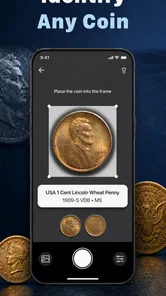
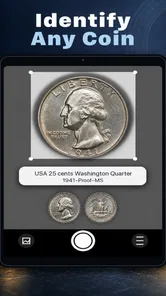
When I sort coins at home or try to make sense of a banknote I’ve never seen before, a phone camera can be a useful first step—but only if the app turns a photo into something practical. HeritCoin: AI Identify Coins is a free tools app from HeritCoin that uses AI to help identify coins and banknotes, look up possible value, and organize a collection. I’d treat it as a convenient research companion, not the final word on what a collectible is worth.
Where a connection can shape the experience
Taking a picture is the easy part; getting useful identification and reference information may depend on the app being able to communicate with its online services. I’d use it when I have a steady connection and time to check a result, rather than relying on it as the only source of information at a flea market with unreliable reception. If a scan stalls, I’d first check the connection and try again before assuming the coin itself is difficult to identify.
That distinction matters because image recognition gives you a starting point, not an expert authentication. A worn coin, glare, an unusual angle, or a detail hidden by dirt can make a photo less informative. For a better attempt, I’d place the coin on a plain surface, use even light, and photograph the front and reverse clearly. I’d also compare any suggested match against visible details such as the date, lettering, and mint mark before adding it to a collection or making a purchase.
Useful in everyday collecting, with sensible limits
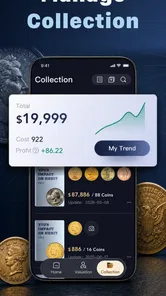
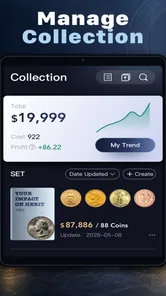
A realistic use is sorting a small box of inherited coins at the kitchen table. I could scan unfamiliar pieces, note which ones deserve closer research, and catalog the collection in one sitting instead of keeping a loose list on paper. The catalog is most useful when I enter coins as I go: recording an item immediately makes it easier to spot possible duplicates later. For a large collection, I’d still keep a separate backup record of especially important pieces rather than making a phone app my only inventory.
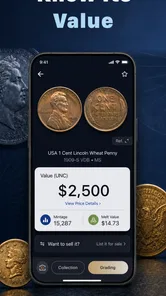
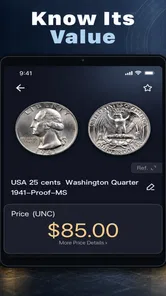
Compared with searching the web manually, an AI scan can save time when I don’t know what terms to search for. A general camera or search app may help identify a picture, but it usually won’t be as focused on coin and banknote collecting or offer the same collection-oriented workflow. On the other hand, specialist reference books, reputable price guides, and an experienced dealer are better choices when precision or a buying decision matters. I wouldn’t treat an estimated value as a guaranteed sale price: condition, authenticity, and what buyers are actually willing to pay all matter.
What to do when a scan is uncertain
If a result looks wrong, I’d avoid repeatedly photographing the same coin under identical conditions. Instead, I’d change the lighting, reduce reflections, frame the coin tightly, and make sure the side with the clearest identifying marks is visible. Then I’d compare the suggested details with another reliable reference. This small workflow helps separate a poor photo from a genuinely ambiguous match, and it reduces the risk of cataloging a guess as a confirmed identification.
People often want to know whether the app can replace research or professional appraisal. In my view, it can help narrow down what you’re looking at, but it shouldn’t settle authenticity or value for a high-stakes transaction. I’d also check the app’s current purchase options before buying any paid extras: it is free to download, with in-app purchases ranging from $0.99 to $99.99 per item. The age rating is Everyone, and the current version is 3.8.6; it requires Android 8.0 or later.
More From Our News Desk

 Lark Player:Music Player & MP3
Switching to Lark Player: A Better Fit for Music Stored on Your Phone?
Lark Player makes sense if your music already lives on your phone. Here is what changes, what does not transfer by assumption, and how to test the switch without regret.

 Tile Master® - Matching Game
Tile Master Finds Its Place in the Gaps of a Noisy Phone
OS changes rarely transform a tile puzzle, but they reshape the small rituals around it. Tile Master’s appeal lies in how well its brief, tactile rounds fit the modern phone.

 Google Docs
 Shows What Mobile Writing Still Gets Wrong
Google Docs still makes a strong case for the shared document, but its real significance is how it exposes the gap between cloud convenience and genuinely capable mobile work.

 YouTube Studio
 Is Becoming a Creator’s Daily Control Room
As publishing turns into a daily, data-led habit, YouTube Studio is becoming the control room creators reach for between uploads—not another tool for making videos.

 Tiles Hop Music & Ball Game
Tiles Hop Review: When the Beat Is Clear, Every Miss Counts
Tiles Hop turns a simple bouncing-ball premise into a sharp test of timing. Its best design is immediate and readable; its weakest moments come when recovery feels less clear than the beat.

 Piano - Music Keyboard & Tiles
: Inviting Rhythm, Unproven Recovery
A tile-tapping piano game lives or dies by timing. This resilience-focused review separates what its format promises from what players still need to verify.
Latest News



For data-conscious use, I’d scan only the coin or note itself and avoid including personal documents or identifying details in the frame. I’d also check the app’s settings and privacy information directly before deciding what collection details to enter. This is a practical habit with any cataloging tool: a detailed inventory is useful, but you should share only what you’re comfortable keeping in an app.
The app has an average rating of 4.7 from around 56,000 ratings, with about 4,000 written reviews and over a million installs. Those figures suggest it has found an audience, but they don’t guarantee that every identification will fit a particular coin. It was released on May 28, 2023, and its current version is 3.8.6. I’d judge it by whether it helps me move from an unknown object to a sensible next research step.
Using AI as a Starting Point for Coin Research
The first thing that caught my attention was how the app uses AI to do the heavy lifting. You simply snap a picture of your coin, and voilà, the app gets to work. The AI analyzes the image and pulls up information about the coin, like its origin, history, and even its potential value. It’s like having a personal coin expert right in your pocket! And let me tell you, the accuracy is pretty impressive. I tested it with a few coins from my collection, and the app nailed it almost every time.
User-Friendly Interface
Now, let's chat about the interface. HeritCoin keeps things simple and intuitive. The layout is clean, allowing you to navigate through features effortlessly. Even if you’re not tech-savvy, you’ll find it a breeze to use. The main screen gives you all the options you need without overwhelming you with too many buttons or menus. Plus, the app’s speed in processing images and delivering results is commendable. No waiting around here!
Community and Learning
One of the charming aspects of this app is its community feature. You can connect with fellow coin lovers, share your finds, and even get tips on coin collecting. It’s like a social network for numismatists! There’s also a learning section packed with articles and trivia about coins from all over the world. Whether you’re a newbie or a seasoned collector, there’s always something new to discover.
Another neat feature is the ability to create a digital catalog of your collection. You can log your coins, categorize them, and keep track of which ones you still need to find. It’s a fantastic way to manage your collection and make sure you don’t accidentally buy duplicates.
Making a scan useful beyond the first result
I’d get the most from the app by treating each scan as the start of a short checking routine rather than a one-tap verdict. First, I’d note the details I can read myself, such as the year and denomination, before looking at the suggested match. Then I’d compare those observations with the result. That order helps me notice when the app’s answer sounds plausible but conflicts with something plainly visible on the coin.
For a mixed batch, I’d work through one object at a time and keep the photographed item beside the phone until I’m satisfied I’ve cataloged the right piece. It’s an easy safeguard against mixing up similar coins, especially when several share a design. I’d also use a consistent naming habit in the catalog—country, denomination, and year where known—so a later search is more useful than a row of vague entries such as “old coin.” This is a small bit of discipline, but it makes the collection tool more valuable as the inventory grows.
There’s a trade-off between speed and confidence. Scanning every object quickly can help me sort a pile, but it also makes it tempting to accept uncertain suggestions just to move on. I’d mark questionable pieces for a second look instead of treating the first identification as settled. That distinction matters if I later use the catalog to decide what to insure, sell, or take to a dealer.
When the phone is doing too much
Coins are small, reflective, and often worn, so mobile conditions can make a scan harder than it seems at home. A dim room, a moving hand, or a shiny surface can obscure fine lettering. I’d avoid holding the coin in the air while taking a picture; setting it down reduces movement and leaves both hands free to steady the phone. If sunlight creates a sharp reflection, shifting the coin or moving to softer light is usually a better first fix than taking many nearly identical photos.
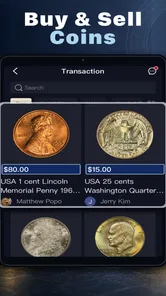
At a market or show, I’d use the app to generate questions, not to negotiate as though an estimate were a firm valuation. A quick scan can help me recognize a possible type and decide whether to investigate further, but I would still inspect the piece and compare independent references before paying a premium. If reception is weak, I’d save the decision for later rather than letting a delayed result rush me into a purchase. For time-sensitive buying, a knowledgeable human seller or specialist reference may be more useful than a phone-based lookup.
The app is a better fit for curious beginners, casual collectors, and anyone sorting inherited pieces than for someone who needs formal authentication. It can make the first step less intimidating when you don’t know a coin’s terminology, and the catalog can help keep discoveries organized. A dealer, specialist grading service, or established reference remains the safer route for a valuable or disputed item. I’d also skip relying on it as my only record if a collection is large or financially important; an independent inventory gives me a way to recover details if I change devices or lose access to an account.
What I’d expect from recovery and careful use
If a scan fails, I’d separate the possible causes instead of immediately deciding the app is broken. I’d check whether the phone has a stable connection, retake the image with clearer lighting, and try a different angle that shows the key markings. If the same coin continues to produce an unclear result, I’d stop repeating the scan and move to a written reference or another research source. Repeating the same poor input rarely gives a more dependable answer.
When cataloging, I’d make a habit of reviewing entries before relying on them. A mistaken identification can become harder to notice once it sits among dozens of correctly labeled pieces. I’d keep notes for uncertain items and, for particularly important coins, retain my own photographs and a separate record of the details I have checked. That approach is not as effortless as putting everything in one app, but it avoids treating a convenient digital catalog as an unquestionable archive.
People who are cautious about data should also think about what a collection record reveals. Even without photographing anything personal, a catalog may describe what someone owns. I’d enter only the details that help me manage the collection, and I’d review the app’s privacy information and settings before sharing anything with other users. If I don’t need a social feature for a particular item, I’d keep my use focused on identification and private organization.
Who will get the most from it
My everyday recommendation is to use HeritCoin during a quiet sorting session, when I can photograph each item carefully and verify the result without pressure. It’s especially handy when a relative hands me a tin of mixed coins or when I want a first clue before searching a reference book. For someone who collects casually, the combination of image-based identification and a digital catalog can turn an unstructured pile into a list of things worth learning about.
It is less suitable for a collector who needs consistently authoritative pricing, formal authentication, or a full professional inventory. A camera-based identification can narrow the possibilities, but it cannot remove the need to judge condition or confirm that a rare-looking object is genuine. If all I wanted were occasional facts about a familiar coin, a reference website or book might be simpler. If I wanted a reliable market valuation, I’d consult specialists and current sales information instead of relying on a suggested figure alone.
For Android users, the requirements are straightforward: the app supports Android 8.0 and later. I’d still make sure the phone’s camera can focus closely enough to capture small lettering, since clear input matters more than taking a large number of scans. A free download makes it easy to try the basic workflow, but paid in-app options mean I’d check what is included before committing to anything. The useful question is not whether every feature is free; it’s whether the identification and cataloging tools fit the way I actually collect.
The Final Verdict
In conclusion, if you’re a coin collector or someone with a budding interest in numismatics, HeritCoin: AI Identify Coins is a must-try. It makes the process of identifying and learning about coins not just easy but genuinely enjoyable. The blend of AI technology with user-friendly design and community features creates a unique experience that both educates and entertains. So, go ahead, download the app, and start your coin-identifying journey today!
My more measured recommendation is to see it as a useful assistant rather than an authority. Its strongest role is helping me turn an unfamiliar coin or banknote into a focused research question, then keep the item organized while I follow that question up. I’d use it with a steady connection, careful photographs, and a habit of checking important details elsewhere. If that sounds like the kind of help you want, it is worth trying; if you need a definitive appraisal or dependable offline field reference, I’d choose a specialist resource instead.
HeriBase: AI Coin Identifier Frequently Asked Questions
What does HeritCoin: AI Identify Coins do, and is it worth trying?
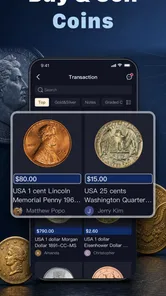
HeritCoin is a Tools app for identifying coins and paper money with an AI scanner, as well as cataloging and trading a collection. It may appeal to people who want to explore items they already own or keep collection-related activity in one app. Whether it suits you depends on what you need from a scanner and catalog, so try its features with a few items before relying on it for important decisions.
Who makes HeritCoin, and what do other users think of it?
HeritCoin is developed by HeritCoin and has an average rating of 4.7 from around 56 thousand ratings, with about 4 thousand written reviews. It has over 1 million installs, suggesting that many people have tried it. Ratings can offer a useful first impression, but individual experiences may differ, so it is worth reading recent user feedback and considering whether the app’s tools match your collecting habits.
What operating system version do I need before downloading HeritCoin?
HeritCoin requires Android 8.0 or later. Before downloading, check your device’s operating system version to make sure it meets that requirement. The app is intended for use with a smartphone camera, which is central to scanning coins and paper money, so a device with a working camera will be important for trying its identification tools.
Is HeritCoin: AI Identify Coins free to download, and are there in-app purchases?
HeritCoin is a free Tools app, so you can download it without an upfront purchase. It also offers in-app purchases, with individual items ranging from $0.99 to $99.99. If you plan to use paid options, check what each purchase includes in the app before completing it, and consider your budget as you explore its coin-identification and collection features.
Which devices can run HeritCoin: AI Identify Coins?
HeritCoin runs on Android devices using Android 8.0 or later. Before downloading, check your device’s operating system version to make sure it meets that requirement. The app is intended for use with a smartphone camera, which is central to scanning coins and paper money, so a device with a working camera will be important for trying its identification tools.
Pros
- Fast and accurate coin identification
- User-friendly interface and easy navigation
- Extensive database of coins worldwide
- Supports offline identification
- Regular updates with new coin data
Cons
- Occasional misidentification of rare coins
- Requires camera access for functionality
- No option for manual identification
- Ads can be intrusive at times
- Limited free features, subscription needed