

Hear Through Walls
- 54.00
- 4.4
- Installs
- 50.00K
- Price
- Free

Screenshots
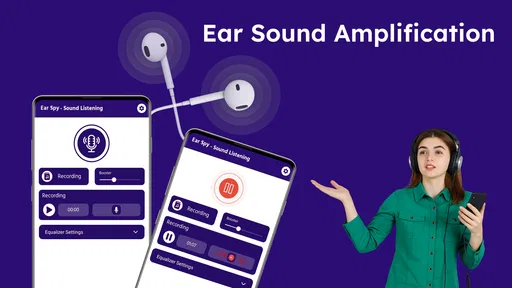
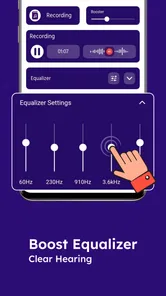
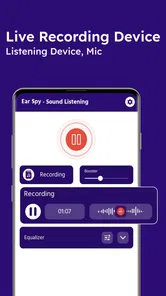
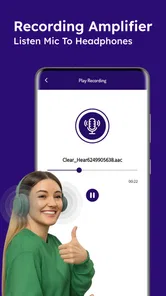
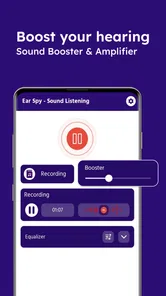
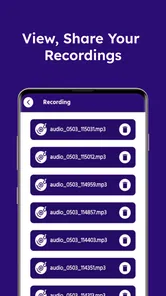

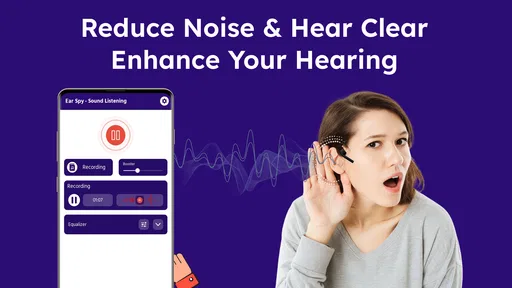
Analysis by Reviewed
Hear Through Walls is a medical-category listening app from Battery Stats Saver that presents itself as a way to hear distant sounds through your phone. I approached it with realistic expectations rather than treating the short store description as a promise of professional equipment. In everyday use, the interesting question is not whether a phone can magically defeat a wall, but whether this app gives you a convenient way to amplify and monitor nearby sound in situations where your phone microphone already has something useful to capture.
The app is free to install, which makes trying it relatively low-risk. It has an average rating of 4.4 from around 500 ratings, and its audience has taken it beyond the curiosity stage: it has reached over 50 thousand installs. The current release is version 17.1.0, and it runs on Android 8.0 or later. Those details make it accessible to people using older Android phones, although the actual experience will still depend heavily on the microphone and speaker hardware in the device.
How Hear Through Walls works in real situations
The most useful way to think about Hear Through Walls is as a phone-based listening aid, not as a replacement for a dedicated microphone, a stethoscope, or a professional acoustic device. A phone can pick up sound in its immediate surroundings, and software may make that sound easier to monitor. A solid wall, distance, background noise, and the quality of the handset’s microphone remain physical limits.
I would use it for simple experiments first. Place the phone near the area where you want to listen, keep the microphone opening unobstructed, and start with the volume low. Then test it with a controlled sound, such as someone speaking at a normal level in an adjacent room. This gives you a much more honest impression than trying it in a noisy building and assuming every unclear sound is an app failure.
One practical detail matters more than many people expect: the phone’s position. Covering the microphone with a case, resting it face-down on fabric, or placing it against a vibrating surface can change the result dramatically. Moving the handset only a small distance may also alter what it captures. For that reason, I would treat placement as part of using the app, not as an afterthought.
A second useful workflow is to use headphones when possible. The phone speaker can create feedback when the microphone hears its own amplified output. Headphones separate the incoming sound from the output and usually make testing less distracting. If you do not have headphones, keep the volume modest and avoid holding the phone directly beside your ear while changing settings or moving it around.
There is also a privacy responsibility here. Listening to people without their knowledge can be intrusive or unlawful, depending on where you live and what you are doing. I would limit use to spaces and situations where you have permission, such as checking how clearly a baby monitor area can be heard in your own home, testing sound transfer between rooms, or exploring how your phone handles distant speech. The app should not be treated as permission to record or monitor others.
More From Our News Desk

 Gmail
GmailGmail in a Busy Inbox: Who Benefits Most?
From first account to crowded workday, Gmail earns its place through dependable search and flexible sorting—but its best fit depends on how much inbox maintenance you can tolerate.

 Prime Video
Switching to Prime Video: What Changes in Your Viewing Routine
Prime Video can make a compelling second home for streaming, but switching means learning a different catalog, rental layer, and route from browsing to playback.

 Universal TV Remote Control
Universal TV Remote Control Works Best as a Reliable Backup
A phone remote earns its place through quick setup and reliable habits. Here is how to get more from Universal TV Remote Control—and where its limits show.

 Weather - By Xiaomi
Weather by Xiaomi Review: Clear at a Glance, Less Clear Up Close
Xiaomi’s weather app makes everyday forecasts quick to scan, but its calm surface can leave useful details and recovery paths harder to find than they should be.

 X
XX Under Pressure: Can It Recover When Posting Goes Wrong?
A resilience-focused review of X, examining setup, mistaken posts, interruptions, weak connections, and the gaps that matter when recovery needs to be dependable.

 Clash of Clans
Clash of Clans Is Won Between the Battles
Its raids are quick; its community is a long-term project of coordination, teaching, rivalry, and shared responsibility—with all the friction that entails.
Latest News



What the free access means
The basic financial appeal is straightforward: you can start without paying an upfront purchase price. That is valuable for an app whose usefulness depends so much on your phone model, room layout, and expectations. You can test the concept before deciding whether it deserves a regular place on your device.
There are in-app purchases ranging from $0.99 to $99.99 per item. Because those purchases cover a very broad range, I would not assume that paying automatically makes the listening experience proportionally better. The sensible approach is to try the free access, identify the exact limitation you are encountering, and only then consider whether an optional purchase addresses it. If the result is already unclear because of distance, walls, or a weak microphone, spending more may not solve the underlying physical problem.
This distinction is important for value. Free access can be worthwhile for occasional experiments, basic sound checks, and curiosity. Paid value is harder to justify when your goal requires dependable clarity, long-distance pickup, or consistent monitoring. In those cases, a better microphone or purpose-built listening equipment may be a more rational purchase than extending a phone app.
Where it can be genuinely useful
One realistic home scenario is checking whether a child’s voice or a household sound can be heard from another room while you remain nearby. I would place the phone in a safe, visible position, use headphones, and treat the result as a quick check rather than a guaranteed monitoring system. This can help you understand the acoustic connection between rooms, especially in a small apartment where sound carries but is difficult to judge from one location.
Another use is testing a room before a conversation, presentation, or recording session. You can place the phone near a doorway or behind a partition and compare how much speech is lost as you move farther away. That makes the app useful as an informal acoustic experiment. It can reveal whether a room has distracting background noise or whether a door blocks more sound than expected.
A less obvious use is troubleshooting your own phone’s microphone behavior. If speech sounds muffled, uneven, or unusually quiet, an app like this can help you compare the microphone response from different positions. Try speaking at the same distance while rotating the phone, then check whether a case or hand placement is interfering. It will not diagnose hardware damage, but it can help separate a blocked microphone from a general expectation that the phone should hear farther than it does.
I also see value for people who enjoy practical sound experiments. You can compare a bare room with a furnished room, test how curtains affect speech, or observe how background appliances compete with a distant voice. These are modest uses, but they fit the app better than the dramatic interpretation suggested by “through walls.” The app becomes more useful when you frame it as a listening test rather than a supernatural detector.
Limitations that affect the experience
The largest limitation is the wall itself. A phone microphone does not turn into a sensor capable of reliably identifying every sound on the other side of a barrier. Thick construction, insulation, plumbing, traffic, fans, and nearby conversations can all overwhelm a weak signal. Even when you hear something, it may be difficult to understand words or identify the source.
Distance creates a similar problem. The farther the phone is from the sound, the more room noise competes with the voice you want. A quiet room can produce a surprisingly different result from the same test in a kitchen with an extractor fan running. I recommend switching off avoidable noise before judging the app, but I would still avoid expecting broadcast-quality speech.
Phone hardware is another major variable. Different Android devices use different microphone placements, speaker designs, and audio processing. A newer handset may capture a cleaner signal than an older model, while a protective case may reduce clarity. Since the minimum operating system is Android 8.0, the app can run on a wide range of devices, but compatibility does not guarantee identical sound quality.
Feedback can become a real nuisance. When the microphone hears the phone’s speaker, the amplified sound may loop back into the input. Headphones are the easiest workaround, but they do not improve the original signal; they only make monitoring cleaner. If you are testing in a quiet room, start with low output and increase it gradually rather than beginning at maximum volume.
I would also avoid using the app as a safety-critical tool. It is not the right choice for checking on someone who may need urgent assistance, replacing a medical hearing assessment, or relying on a distant sound alert while sleeping. A dedicated monitor or an appropriate professional device is better when missing a sound could have serious consequences.
How it compares with ordinary alternatives
The usual alternative is simply using the phone’s built-in voice recorder or a standard audio-monitoring tool. Those options may be better when you want to save a sample, compare recordings later, or inspect whether a sound is actually present instead of listening live. Hear Through Walls is more appealing when immediate monitoring is the main goal and you do not want a separate recording workflow.
Headphones connected to a normal microphone or recording app can also be enough for nearby listening. In that case, this app’s advantage is convenience rather than a guaranteed technical breakthrough. If you already own a small external microphone, that setup may deliver a cleaner result because microphone placement is easier and the sensor is designed specifically for sound capture.
For hearing assistance, the comparison changes again. A purpose-built personal amplifier or medically appropriate hearing device is designed around fit, comfort, predictable controls, and safer everyday use. This app may be interesting for occasional situations, but I would not choose it over professional support for someone with ongoing hearing difficulty. The medical category describes how the app is positioned, not a substitute for clinical care.
Dedicated baby monitors, intercoms, and security devices are stronger choices when you need dependable range, alerts, two-way communication, or continuous operation. They are built around those jobs, whereas a phone app depends on the handset being placed correctly, powered, and available for listening. That trade-off is easy to overlook when the app is presented as a simple listening solution.
Who should try it and who should skip it
I think Hear Through Walls is best for curious Android users who want a free way to test how sound travels around their home or workspace. It can also suit someone who occasionally needs to monitor a nearby sound while remaining in the same general area. The low entry cost makes experimentation reasonable, especially if you already have headphones and a spare phone position available.
It is less suitable for anyone expecting clear speech through substantial walls, reliable long-range monitoring, or a guaranteed result on every handset. People with hearing loss should be particularly careful about treating it as a personal hearing solution. The phone may amplify noise along with speech, and louder output is not the same as clearer or safer sound.
Before installing, I would ask what problem I am actually trying to solve. If the answer is “I want to understand the acoustics of my room,” this app may be a useful experiment. If the answer is “I need dependable monitoring while I am elsewhere,” I would choose dedicated hardware. If the answer is “I need help hearing conversations every day,” I would look toward an audiology professional and purpose-built equipment instead.
My final view on its value
Battery Stats Saver has made a free medical-category app that is easy to test and potentially useful in narrow, everyday situations. Its 4.4 average and more than 50 thousand installs suggest that the concept has attracted a meaningful audience, but those figures should not replace a hands-on test with your own phone. The result depends too much on room acoustics and hardware for a general promise to settle the question.
I would recommend trying the free experience with headphones, careful placement, and a controlled sound source. Do not judge it by the phrase “hear through walls”; judge it by whether it helps you monitor a nearby sound more conveniently than your normal phone tools. That is a fairer and more useful standard.
The optional purchases deserve caution because the available items run from $0.99 to $99.99. I would only spend money after confirming that the app already works for your specific situation and that the purchase solves a clearly identified inconvenience. For casual experiments, free access is the strongest part of the value proposition.
My recommendation is to try it, but keep the expectations physical and practical. It is a reasonable free experiment for nearby listening and room-sound checks, not a dependable wall-penetrating monitor or a replacement for professional hearing and safety equipment. If that distinction matches your needs, Hear Through Walls is worth exploring; if you need certainty, range, or medical reliability, skip it and choose a tool designed for that job.
Hear Through Walls Frequently Asked Questions
Is Hear Through Walls available for my phone, and is it suitable for all ages?
Hear Through Walls is an app in the medical category, and its listed minimum operating-system requirement is version 8.0. It is rated for Everyone, so its content rating is suitable for a general audience. Check that your phone meets the operating-system requirement before downloading, and remember that listening results can vary with the device’s microphone and connected headphones.
Who makes Hear Through Walls, and what do users think of it?
Hear Through Walls is developed by Battery Stats Saver. It has an average rating of 4.4 from 511 ratings, alongside 54 written reviews, and has passed 50K+ installs. Those figures offer a quick sense of its audience and reception, but individual experiences may differ depending on phone hardware, headphones, the listening environment, and what someone expects the app to do.
What is Hear Through Walls and how does it work?
Hear Through Walls is an audio-amplification app designed to help users listen to nearby sounds through their device’s microphone. After opening the app, you generally connect headphones or earbuds, place the phone near a wall or sound source, and adjust the volume or amplification controls. Its performance depends heavily on the phone microphone, headphones, surrounding noise, and wall construction.
Can Hear Through Walls really let me hear conversations through a wall?
The app cannot magically penetrate walls or guarantee clear conversations. It simply processes sound captured by the smartphone microphone, so results may be limited by thick walls, insulation, distance, background noise, and the quality of the connected headphones. It may make certain nearby sounds more noticeable, but users should keep expectations realistic and understand that it is not professional surveillance equipment.
Is Hear Through Walls free to download and use?
Hear Through Walls is free to download, but in-app purchases are listed at prices ranging from $0.99 to $99.99 per item. The free download does not necessarily mean every feature is available without a purchase, so review the purchase options shown in the app before buying anything. Check the current app-store page as well, since the available version and purchase details can vary by platform.
Pros
- Simple interface with quick access to listening controls.
- Useful for checking nearby sounds without extra equipment.
- Small app size should suit devices with limited storage.
- Can be helpful for experimenting with microphone sensitivity.
- Works as a discreet sound-monitoring tool in suitable situations.
Cons
- Results vary greatly with phone microphone quality and placement.
- Background noise can make voices and sounds difficult to distinguish.
- Requires microphone permission
- which may concern privacy-conscious users.
- Performance may be limited by walls
- distance
- and building materials.
- Continuous microphone use can increase battery consumption.













