Guardio - Mobile Security
- 11.45K
- 4.2
- Installs
- 1.00M
- Price
- Free

Screenshots






Analysis by Reviewed
I came away from Guardio with a fairly clear impression: it is most useful as a safety layer for everyday browsing, not as a complete replacement for every security tool on a phone. That distinction matters. The app focuses on browsing and identity protection, and its value appears when you are moving quickly between search results, messages, shopping pages, sign-in screens, and unfamiliar websites. I found the idea practical because many online problems begin with a hurried tap rather than a dramatic attack.
Guardio is a free Android tools app from Guardio, available to users rated Everyone. It has passed the point of being an obscure utility, with over a million installs and an average rating of 4.2 from roughly twenty-four thousand ratings. Those figures do not prove that it will suit every phone, but they do suggest that the app has found a real audience among people who want a simpler approach to online protection.
What Guardio does well in everyday browsing
The strongest part of the experience is its focus. Instead of presenting itself as a giant toolbox for every possible maintenance task, Guardio is built around the moments when browsing and personal identity overlap. A suspicious page, an unexpected sign-in prompt, or a message that pushes me toward an unfamiliar website is exactly the kind of situation where a second layer of caution is useful.
I especially like this approach for people who are confident enough to use the internet regularly but do not want to study security terminology. A protection app has to be understandable at the moment it matters. If an alert is too technical, many users will ignore it; if it is too vague, they will not know what to do next. Guardio’s central promise is easier to grasp: help me browse with fewer surprises and protect the identity-related parts of my online life.
That makes it different from the usual phone-cleaning apps. Those tools often concentrate on storage, memory, duplicate files, or battery behavior. Guardio belongs to a different part of the tools category. It is concerned less with making a phone feel faster and more with making online decisions feel safer. I would not install it expecting a storage manager, and I would not judge it by whether it removes clutter from my device.
It also occupies a different position from a traditional antivirus product. Antivirus software is generally associated with scanning files, checking installed software, and watching for malicious activity on the device. Guardio’s identity and browsing emphasis is more relevant when the danger is a convincing page or a deceptive request for information. In practice, these approaches can complement one another rather than compete directly.
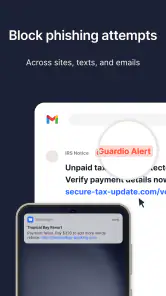
A realistic example is checking a delivery message during a busy afternoon. I might be expecting a package, see a message asking me to confirm details, and tap before thinking carefully about the sender or address. This is where a browsing-focused service can be useful: it encourages me to pause at the point where a harmless-looking interaction could become an identity problem. I still need to make the final decision, but the app can add context when my attention is elsewhere.
Why the identity angle is more useful than it sounds
Many people think of security as something that happens after a bad file reaches the phone. For ordinary users, the more common difficulty is recognizing whether a request is legitimate. A fake login screen can look polished. A shopping page can copy familiar design cues. A message can use urgency to prevent careful checking. Guardio’s emphasis on identity protection addresses that human part of security, where judgment and timing matter as much as technical detection.
My practical advice is to treat the app as a prompt to slow down, not as permission to click without thinking. When an alert appears, I would check the web address, consider whether I expected the message, and open the service through its official app or a saved route if possible. That workflow is more valuable than simply dismissing warnings. The app can help identify a risky moment, but good habits are still the final defense.
Another useful habit is to separate browsing protection from account recovery. If I suspect that I have entered credentials into a questionable page, I would not stop at closing the tab. I would change the affected password through the legitimate service, review active sessions where available, and make sure another account has not reused the same password. Guardio can support awareness, but it cannot undo a disclosure by itself.
Where it fits beside familiar alternatives
Compared with relying only on a browser’s built-in warnings, Guardio may appeal to someone who wants a more visible security companion and a stronger focus on identity-related risks. Built-in browser protection remains useful, especially because it is already present and requires little setup. The reason to choose Guardio is not that ordinary browser safeguards become worthless; it is that a dedicated service can make protection feel more deliberate and easier to monitor.
Compared with a password manager, Guardio serves a different purpose. A password manager is better for creating unique credentials, storing them safely, and reducing the temptation to reuse passwords. Guardio is more relevant to the surrounding browsing experience and the sites a person encounters. If my main problem is remembering dozens of passwords, I would prioritize a password manager. If my main problem is uncertainty about links, pages, and identity-related traps, Guardio makes more sense.
Compared with a full security suite, the trade-off is focus versus breadth. A broader suite may be preferable for someone who wants one product to cover device scanning, network checks, privacy controls, and other areas. Guardio is easier to understand when the goal is specifically safer browsing and identity protection. I see that narrower scope as a strength for beginners, but it may feel incomplete to advanced users who already maintain a layered security setup.
One non-obvious benefit of this narrower focus is that it can make security routines less intimidating. A person who would never open a detailed antivirus dashboard may still pay attention to a warning connected to the page they are viewing. That is not a technical advantage in isolation, but it is a real usability advantage. Protection only helps when people notice it and act on it.
Important limitations before installing
The first limitation is that Guardio cannot replace careful behavior. No browsing protection should be treated as an absolute guarantee, and I would be uncomfortable recommending any app on the assumption that every harmful page will be identified perfectly. New scams appear quickly, legitimate sites can be compromised, and some attacks rely more on manipulation than on obviously dangerous web addresses.
The second limitation is overlap. Android already includes security features, browsers provide warnings, and many users have other privacy or protection tools installed. Adding Guardio may create repeated notifications or make it less obvious which service is responsible for a warning. I would review the phone’s existing security setup before installing it, especially if I dislike duplicate alerts.
There is also a potential cost consideration. The app itself is free, while in-app purchases are listed at $14.99 per item. That means I would install it to evaluate the free experience first rather than assuming every useful protection layer is included without payment. Before buying anything, I would check exactly what the selected purchase adds and whether it solves a problem I actually have. A paid upgrade is easier to justify when it replaces another service, not when it merely duplicates one.
Privacy-sensitive users should also think about the nature of the product. A service designed to help with browsing and identity protection may need to be involved in security-related activity around online use. I would read the current privacy and permission explanations carefully and decide whether the protection model matches my comfort level. This is not a reason to reject the app automatically; it is a reason to make an informed choice instead of installing every security product on instinct.
Compatibility is straightforward but worth checking. The current version is 2026.95.0 and requires Android 10 or later. Owners of older phones should not assume that an installation will be possible, while users on supported devices should still allow room for the app’s normal operation and notifications. I would also avoid stacking several apps that claim to monitor the same browsing activity, because more protection does not always mean a clearer or better experience.
Small workflows that make the app more useful
I would begin by using Guardio during the activities where I am most likely to rush: opening links from messages, comparing unfamiliar online shops, and signing into accounts from a search result. That is more effective than treating it as a decorative icon on the home screen. The app’s value is highest when it sits close to a decision that could affect my personal information.
A second useful workflow is to investigate warnings instead of dismissing them automatically. If a page is flagged, I would stop and ask three simple questions: did I expect this page, did I reach it through a trustworthy route, and is the address exactly what I intended to visit? If the answer to any of those is unclear, I would leave and navigate through the official app or manually typed address. This turns a warning into a repeatable habit.
A third is to use the app as part of a family conversation. Less confident users often need practical examples rather than general advice. Showing someone how to pause at a sign-in page, avoid urgent payment requests, and verify the destination can be more effective than telling them to “be careful online.” Guardio may serve as a visible reminder during that learning process, particularly for users who want reassurance without a complicated technical interface.
I would not, however, use it as the sole plan for protecting important accounts. I would combine it with unique passwords, multi-factor authentication where available, software updates, and direct access through official apps. That combination addresses different failure points: stolen credentials, deceptive pages, outdated software, and rushed decisions. Guardio fits best into that larger routine as the browsing and identity-focused layer.
Who should choose it, and who should skip it
I think Guardio is a good match for someone who frequently follows links from texts or email, shops across unfamiliar websites, or wants a less technical way to think about online identity risks. It is also reasonable for a family member who understands basic smartphone use but is not comfortable judging whether every web page is genuine. The free entry point makes it easy to test without committing immediately to a purchase.
I would be more cautious about recommending it to an advanced user who already has a carefully managed password system, browser protection, device security, and a clear response plan for suspicious activity. That person may gain little from another layer, particularly if overlapping alerts become annoying. I would also point a user with an older Android phone toward checking compatibility first, and I would suggest a password manager instead if forgotten or reused passwords are the central problem.
People looking mainly for phone cleaning, battery optimization, file management, or a broad device-maintenance dashboard should choose another tools app. Guardio’s purpose is not to make a crowded phone tidy. Its strongest case is online caution, especially around browsing and identity. Choosing it for unrelated maintenance tasks would lead to disappointment.
My final assessment
After looking at how it fits into real phone use, I see Guardio as a focused and approachable security companion. Its best contribution is not a promise that every threat disappears; it is the extra moment of awareness before I trust a page or hand over personal information. That is a modest role, but it is an important one because many online mistakes happen quickly and look ordinary.
The free app from Guardio is worth considering if browsing safety and identity protection are your priorities, and its Everyone rating makes it approachable for a broad audience. I would start with the free experience, keep expectations realistic, and avoid treating it as a substitute for strong passwords or multi-factor authentication. The in-app purchase price of $14.99 per item also makes it sensible to evaluate the exact benefit before spending.
My recommendation is simple: choose Guardio if you want a clear browsing-focused layer that helps you pause at suspicious moments, but skip it if you are seeking a complete device-maintenance suite or already have overlapping protection you trust. Used as part of a sensible security routine, it can make everyday browsing feel more deliberate without demanding that I become a security expert.
Pros
- Blocks malicious websites and phishing attempts while browsing.
- Monitors personal information for signs of online exposure.
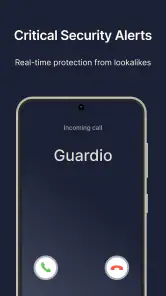
- Simple interface makes security alerts easy to understand.
- Helps identify risky apps
- links
- and potential privacy threats.
- Useful protection for users who frequently browse on public networks.
Cons
- Several advanced protections require a paid subscription.
- Security scans may use extra battery during continuous monitoring.
- Some alerts can feel repetitive when browsing familiar websites.
- Requires broad device permissions to provide full protection.
- Results may depend on Guardio’s online threat database and connection.

- Category
- Tools
- Version
- 2026.95.0











