GroupMe
- 163.34K
- 4.6
- Installs
- 10.00M
- Price
- Free

Screenshots




Analysis by Reviewed
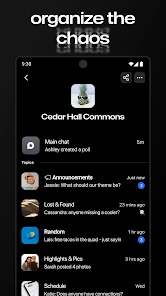
When a household shares plans across different schedules, the hard part is not sending a message; it is making sure the right people can find it later. I find GroupMe most useful when family members, roommates, or friends need a dedicated place for everyday coordination without mixing every topic into one conversation. It is a communication app from GroupMe, and its group-first approach makes it feel less like a stream of private messages and more like a set of rooms for different parts of life.
One chat for each shared routine
Imagine coordinating a weekend visit: one person checks who can come, another shares what to bring, and someone else needs the arrival time. A dedicated group gives those messages a common home, so people can catch up when they have a moment instead of relying on everyone to be online at once. I would use separate groups for a household and a wider family circle; that small bit of structure helps keep practical messages from getting buried in unrelated chatter.
That setup is especially helpful when some people use the app more actively than others. A group can serve as the shared noticeboard, while direct conversations remain available for matters that do not concern everyone. The trade-off is that more groups require more attention: before sending a sensitive or time-critical message, I would check the group name and participants rather than assume the audience. Group messaging makes coordination easier, but it does not remove the need to be deliberate.
Setup is simple, but boundaries matter
GroupMe is free, and its current version is 15.11.3 for devices running iOS 9 or later. I would treat a shared tablet or phone carefully: a group-chat account belongs to the person signed in, so handing a device around can blur who is speaking and who may read notifications. For a household, separate personal accounts and a clear agreement about who uses which device are safer habits than treating one login as a family inbox.
Invitations also deserve a quick pause. Before sharing a group link, think about whether it is intended for a small household circle or a broader event group, and send it through a channel that reaches only the people you mean to invite. That is a practical way to avoid turning a convenient invitation into an unexpectedly open door. I would also agree on what belongs in a group chat; not every family detail needs to be visible to every participant.
Getting Started with GroupMe
First things first, diving into GroupMe is as easy as pie. Once you download it from the app store, setting it up is a breeze. You can register using your email or phone number, and voilà, you're in! The interface is super intuitive; even your tech-averse aunt could figure it out in no time.
Features That Make It Shine
One of the coolest features is the ability to create groups for just about anything. Whether it's your book club, family, or college buddies, you can segregate chats into neat little compartments. Each group gets its own unique link, so inviting people is as simple as sharing a URL. Plus, there's no limit to how many people you can add, which is perfect for large gatherings or events.
You May Like

Clash of Clans Is Won Between the Battles

Android Auto Makes the Case for Quieter Car Software

MobiOffice: Transforming Mobile Productivity with Seamless Integration

EA SPORTS FC™ Mobile Soccer: Redefining Mobile Sports Gaming

How Microsoft OneDrive Became a Mobile Productivity Giant

How Google Translate Breaks Language Barriers Effortlessly
GroupMe also lets you express yourself with emojis, GIFs, and memes. It's like having a conversation, but with a sprinkle of fun. And if you're feeling a bit retro, you can even send SMS messages to those who aren’t on the app. This feature particularly stands out because you won’t miss out on any chats, no matter where your friends are.
Coordination without a phone call
For a shared plan, I would use the group as a running record rather than repeat the same question in several private chats. A useful habit is to put the key detail—such as the agreed meeting time—in a clear message once the conversation settles, then point back to it if plans shift. This keeps decisions easier to find in a busy thread. It is not a substitute for an urgent call, though: when someone needs an answer immediately, messaging can be missed or muted.
SMS support can help include someone who is not using the app, but it also means the group may not feel identical for every participant. I would make sure everyone understands where replies will appear and avoid assuming that a person has seen a message just because it is visible in the chat. For people who already coordinate in a larger messaging service, the main reason to add GroupMe is often separation: a dedicated space for a club, family, or event instead of another conversation mixed into their everyday inbox.
Making group plans easier to act on
A useful way to keep a busy thread from turning into a pile of half-decisions is to separate discussion from the final plan. I would let people suggest options in the chat, then post one concise wrap-up with the chosen time, place, and anything participants should bring. That creates a clear point to check without requiring everyone to reread every message. If the plan changes, I would make the correction explicit rather than assume a casual reply will be noticed.
This approach works particularly well for recurring tasks: roommates sorting out groceries, relatives arranging a meal, or a club coordinating who will arrive early. It is less effective when the group has no shared expectation about who is responsible for answering. GroupMe can gather the conversation, but it cannot decide whether a message is merely informational or a request that needs a response. I would agree on that distinction with the group, especially for chores or handoffs where silence could be mistaken for agreement.
Compared with using a broad social network’s group feature, a dedicated chat can make a practical circle easier to locate and keep separate from personal updates. Compared with a one-to-one text chain, it gives everyone the same conversation rather than relying on one person to relay decisions. The advantage is organizational, not magical: if participants ignore the thread or keep changing plans in private messages, the shared record loses its value.
Why You'll Love It
What I love most about GroupMe is its ability to keep everything organized without feeling like a chore. The app provides a calm and clutter-free space, unlike other messaging apps that can feel overwhelming with constant notifications. You can mute specific chats if things get too noisy, ensuring you stay focused on what matters most.
Muting is more than a comfort setting when a group is active all day. I would mute a low-priority planning chat and check it at convenient moments, while leaving an important household thread easier to notice. The key is to remember that a muted chat can also hide a change of plan from your attention. A quick check before leaving home is a sensible routine if people use the group to coordinate pickups, errands, or shared meals.
Another nifty feature is the calendar integration. Planning events? Simply add them to the group calendar, and everyone will get a reminder. It’s like having a personal assistant that keeps everyone in the loop.
Age, trust, and the right audience
The app is rated Teen, so I would not treat it as a children’s messaging space by default. For a family group that includes younger members, adults should decide together whether the setup is appropriate and talk through who is in the group, what is shared, and how to respond to unfamiliar messages. The app’s convenience does not replace household rules or adult judgment, and I would not assume it provides family controls just because it can host family conversations.
Its reach is substantial: GroupMe has a 4.6 average from around 603,000 ratings, with over 10 million installs. That suggests many people find the group-chat approach useful, but popularity is not a reason to add someone without checking that they want to participate. I would also keep sensitive information out of a broad group; a convenient shared thread is best for ordinary coordination, not for details that should stay private.
Room for Improvement
While GroupMe is pretty fantastic, there are a few areas where it could improve. For instance, video and voice call functionalities are missing, which are pretty standard in other messaging apps. It would be great to have these features integrated for a more comprehensive experience.
That gap matters in a household when a conversation needs tone, quick back-and-forth, or visual context. I would switch to a calling app for that, rather than trying to make a long text exchange do the work of a conversation. People who want one app for group messages, calls, and broader personal chats may be happier with a more all-purpose messenger; GroupMe makes more sense when the group itself is the main thing to organize.
Also, the app could benefit from a more modern design update. While the current design is functional, a little facelift could make it more appealing to the younger crowd. Nonetheless, these are minor gripes in what is otherwise a stellar app.
Who it suits—and when I would skip it
I would recommend it to households, clubs, and event organizers who want separate group conversations and a straightforward way to keep plans together. It is particularly handy when a few participants are less comfortable with apps, or when someone outside the app needs to stay in the loop through SMS. I would skip it if the group depends on frequent voice or video calls, needs a single shared account across devices, or already has a well-organized chat elsewhere and does not want another place to check.
With a Teen age rating and a free price, it is easy to consider, but the best fit still depends on how your household communicates. GroupMe was released on November 3, 2010, and the current version is 15.11.3; on iOS, it requires version 9 or later. Those details make it straightforward to judge basic compatibility, while the more important decision is whether a separate group space will simplify your routines or add another inbox.
Choosing it over the chat you already use
If your household already uses a messaging app that everyone checks, I would not move conversations just for the sake of trying something new. The strongest reason to adopt GroupMe is having a distinct group for a purpose that would otherwise get lost among private chats: a shared home, a trip, a team, or a temporary event. Keeping the group’s purpose narrow also makes it easier to decide what belongs there and when the conversation can wait.
For a group that needs voice or video calls as part of ordinary coordination, an all-in-one messenger is likely the more convenient choice. For a large or changing circle, a dedicated group can be easier to manage than repeatedly forwarding messages. And when some participants rely on SMS, it can bridge different habits, though I would test the communication routine with the group before depending on it for an important day. The best alternative is often the one people already open reliably.
One realistic household routine might be to use a group for weekly meal plans: someone posts a proposed menu, others flag what they can bring, and one person shares the final shopping list. I would keep addresses, private health details, and other sensitive material out of that thread, and use a direct conversation when only one person needs to know something. That small boundary keeps a practical chat useful without turning it into a record of every personal detail.
For a one-off gathering, I would also decide when the group has served its purpose. A temporary event thread can become noisy after the event, while an ongoing household group needs a longer-term reason to remain active. Muting or leaving a low-value conversation may help reduce clutter, but I would make sure that doing so does not cause someone to miss an obligation they agreed to handle.
My household verdict
I would use it as a practical coordination tool, not as the household’s only way to reach one another. Give each group a clear purpose, be thoughtful with invitations, and keep urgent or private matters in the right channel. If that sounds like the way your family or shared home already works, GroupMe is worth trying; if the extra chat would become one more place everyone forgets to check, a simpler existing routine may serve you better.
GroupMe Frequently Asked Questions
Can I create a GroupMe account without sharing my phone number?
Before downloading, consider how you prefer to set up and use a messaging app. GroupMe is built for conversations with other people, including direct messages and group chats, so you will need an account to participate. Review the sign-in options shown in the app and choose settings that you are comfortable using for your communications.
Can I manage notifications for busy GroupMe conversations?
Group conversations can become active, especially when several people are sharing updates. GroupMe lets users manage notifications and mute specific chats, which can help you limit interruptions without leaving every conversation. It is useful to consider these controls if you expect to join busy groups or want to keep quieter chats separate from conversations that need your attention.
Can I use GroupMe without creating a group?
Yes. GroupMe supports direct messages as well as group conversations, so you can communicate with one person without first setting up a group. That makes it useful for both one-to-one chats and conversations with several people. The app is designed around staying in touch, and you can choose the kind of conversation that suits your needs.
What should I know about GroupMe’s age rating before downloading it?
GroupMe has a Teen content rating, which is worth considering when deciding whether it is suitable for you or someone in your care. As with any communication app, conversations and shared media come from other users, so it is sensible to think about who you communicate with and what you share. The rating offers a useful starting point for that decision.
What is GroupMe and how does it work?
GroupMe is a free group messaging app that lets you stay connected with friends, family, and colleagues through text messages. The app allows you to create groups for different occasions and communicate with multiple people at once. It works on any device, whether it's a smartphone, tablet, or computer, and supports features like direct messages, custom emojis, and image or video sharing.
Pros
- User-friendly interface
- Supports group chats
- Free to use
- Works across platforms
- Customizable notifications
Cons
- Limited file sharing options
- No video calling feature
- In-app ads
- Occasional message delays
- Requires internet connection

- Category
- Communication
- Version
- 15.11.3











